5. RTGS Return Payments
5.1 RTGS Inbound Return Payments
This chapter contains the following sections:
l Section 5.1.1, "India RTGS Inbound Payments: Returns Processing"
l Section 5.1.2, "India RTGS - Return of Inbound Payment"
5.1.1 India RTGS Inbound Payments: Returns Processing
l The Beneficiary bank must return the transaction to the originating bank within one hour of the receipt of the payment or before the end of the RTGS Business day, whichever is earlier, if it is not possible to credit the funds to the beneficiary customer’s account for any valid reasons.
l The Return can be initiated for the below reasons:
– Inward Credit to a NRE account from a Non-NRE account
– Invalid Beneficiary account
– Rejection/Cancellation from the Incoming Exception queues (such as Process Exception/Business Override/Repair Queue/Authorization Limit Check/ Sanction Check/Pricing Queue/EAC)
l Returns (Cancel action) can be done from any Queue where You can input the Return reason Code and Return Reason.
The below screen handles the return of RTGS inbound payments. System generates pacs.004.001.03 for the returns processed.
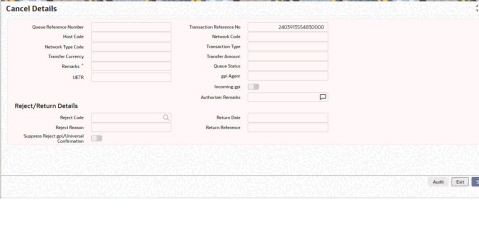
When an inbound transaction is cancelled from the queue, the following accounting entries are posted and the inbound payment transaction gets reversed except for the charges.
|
Dr./ Cr. |
Account |
Value Date |
TXN_CCY |
|
Dr. |
Nostro Account |
Return Processing Date |
Account Currency |
|
Cr. |
Intermediary GL |
Return Processing Date |
Transfer Currency |
|
Dr. |
Intermediary GL |
Return Processing Date |
Transfer Currency |
|
Cr. |
Return GL |
Return Processing Date |
Transfer Currency |
|
Dr./ Cr. |
Account |
Value Date |
TXN_CCY |
|
Dr. |
Return GL |
Return Processing Date |
Account Currency |
|
Cr. |
Intermediary GL |
Return Processing Date |
Transfer Currency |
|
Dr. |
Intermediary GL |
Return Processing Date |
Transfer Currency |
|
Cr. |
Nostro Account |
Return Processing Date |
Transfer Currency |
Note
In case of returns, incoming credit and debit happens to Return GL and reversal is also done to Return GL
l The system generates notification ‘RETURN_SUCCESS’ as part of the Inbound Return transaction processing.
l Below mentioned is the accounting entry posting of the Inbound Return transaction processing:
Debit Liquidation Entries
|
Event Code |
Amount_Tag |
Account |
Transaction Date |
Value Date |
DRCR |
TXN_CCY |
TXN_AMOUNT |
|
DRLQ |
TFR_AMOUNT |
Nostro Account |
Return Processing Date |
Return Processing Date |
DR |
Transfer Currency |
Transfer Amount |
|
DRLQ |
TFR_AMOUNT |
Intermediary GL |
Return Processing Date |
Return Processing Date |
CR |
Transfer Currency |
Transfer Amount |
Credit Liquidation Entries
|
Event Code |
Amount_Tag |
Account |
Transaction Date |
Value Date |
DRCR |
TXN_CCY |
TXN_AMOUNT |
|
CRLQ |
TFR_AMOUNT |
Customer |
Return Processing Date |
Return Processing Date |
CR |
Account Currency |
Debit Amount |
|
CRLQ |
TFR_AMOUNT |
Intermediary GL |
Return Processing Date |
Return Processing Date |
DR |
Transfer Currency |
Transfer Amount |
You can initiate Auto Return for all incoming RTGS payments failed due to validations provided are error codes can be linked to a reject code maintained in ‘Reject Code Detailed' screen. If the error codes matches, then system initiates Auto Return.
5.1.2 India RTGS - Return of Inbound Payment
You can view the return transactions pertaining to the inbound payments through this screen
You can invoke the “RTGS - Return of Inbound Payment” screen by typing ‘PLDINRTN‘ in the field at the top right corner of the application tool bar and clicking on the adjoining arrow button.
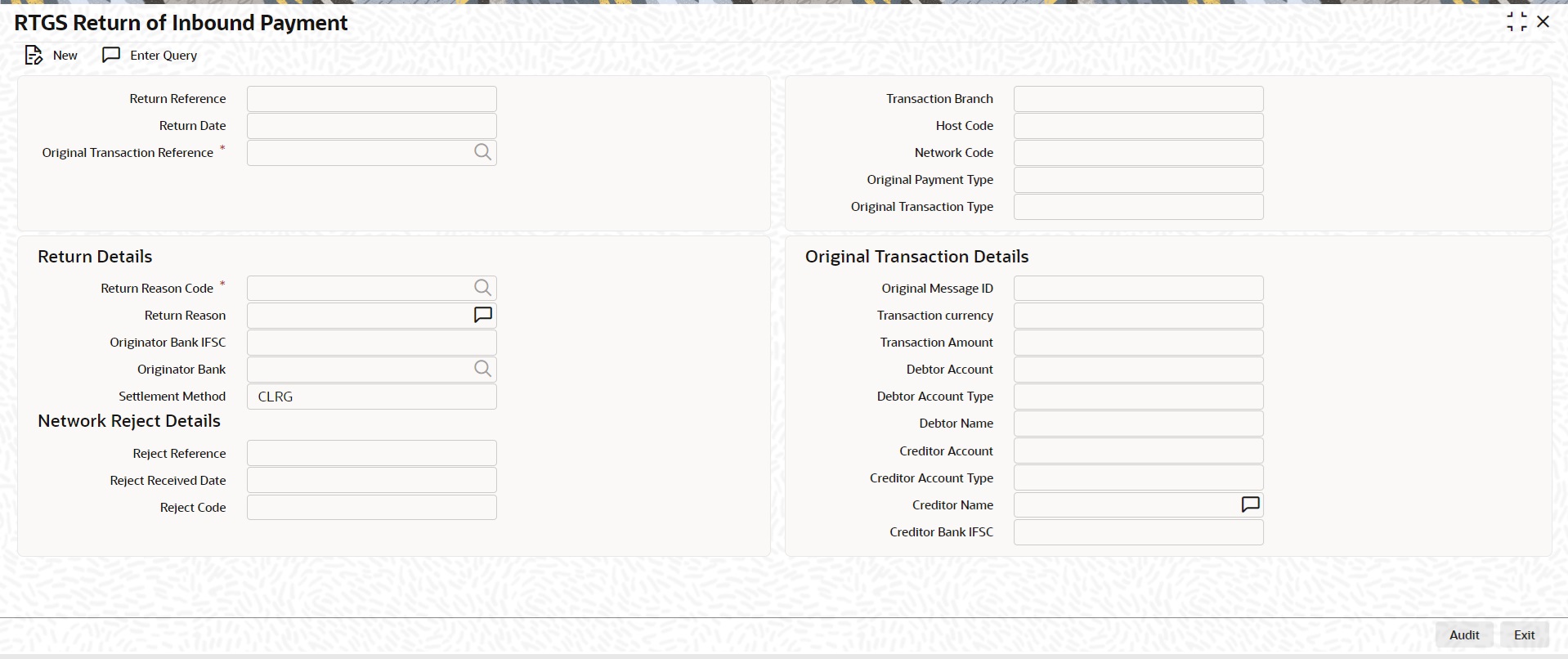
Return Reference
Specify the Return Reference and click on ‘Enter Query’.
You can view the inbound transactions that are returned, with payment type as ‘RTGS’ and Transaction status - ‘Returned’.
Return Date
The system displays the Return Date as the current date by default.
Original Transaction Reference
The system displays the Original Transaction Reference for which the transaction is Returned.
Transaction Branch
System defaults the Transaction branch of the user’s logged in branch.
Host Code
System defaults the Host Code the user’s logged in branch.
On entering the Return Reference, the information related to the transaction is defaulted in the below listed fields:
l Network Code
l Original Payment Type
l Original Transaction Type
Original Transaction Details
l Original Message ID
l Transfer Currency
l Transfer Amount
l Debtor Account
l Debit Account Type
l Debtor Name
l Creditor Account
l Creditor Account Type
l Creditor Name
l Creditor Bank IFSC
Return Details
Return Reason Code
System displays the Return Reason Code as received in pacs.004 message.
Return Reason
System displays the Return Reason based on the selected Reject Code.
Originator Bank IFSC
System displays the IFSC code of the originator of the transaction
Originator Branch
System displays the Name of the Originator Branch
Originator Bank
System displays the Originator Bank as received in the pacs.004 message.
Settlement Method
CLRG method gets defaulted. The options are COVE, INGA, INDA.
Network Reject Details
These fields are applicable while querying for a particular Return record which is rejected by the RBI/ Clearing Centre.
Reject Reference
System displays the Reject Reference details.
Reject Received Date
System displays the date on which the network reject was received.
Reject Code
System displays the network reject code.
5.1.2.1 India RTGS Return Of Inbound Payment Summary
You can invoke the ‘RTGS Return Of Inbound Payment Summary’ screen by typing ‘PLSINRTN’ in the field at the top right corner of the application toolbar and clicking the adjoining arrow button.
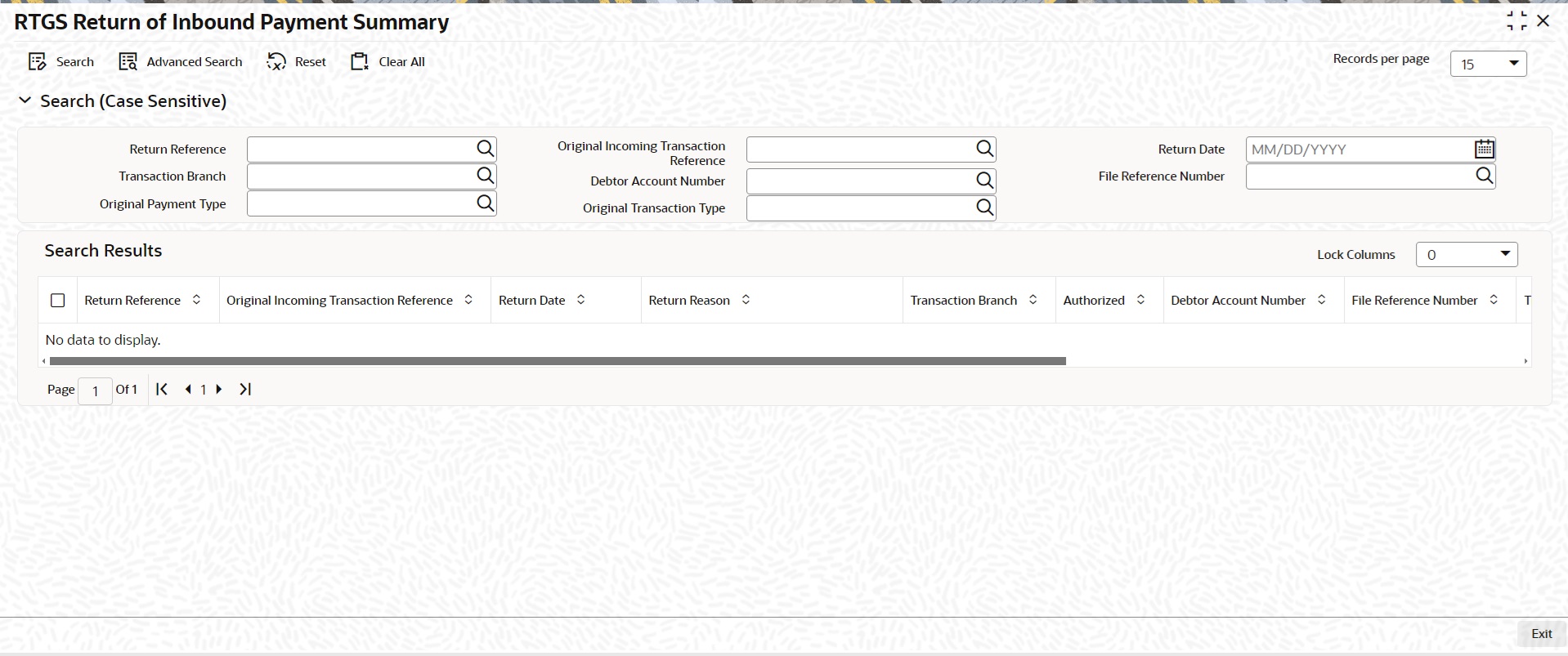
You can search using one or more of the following parameters:
l Return Reference
l Original Inbound Transaction Reference
l Return Date
l Transaction Branch
l Debtor Account Number
l File Reference Number
l Original Transaction Type
l Original Payment Type
Once you have specified the search parameters, click ‘Search’ button. The system displays the records that match the search criteria.
Double click a record or click the ‘Details’ button after selecting a record to view the detailed screen.
5.2 RTGS Outbound Return Payments
This chapter contains the following sections:
l Section 5.2.1, "India RTGS Outbound Payments - Return Processing"
l Section 5.2.2, "India RTGS - Return of Outbound Payment"
5.2.1 India RTGS Outbound Payments - Return Processing
l Incoming pacs.004.001.03 messages can be received as result of any outgoing payment being returned by beneficiary bank.
l The parent transaction is fetched based on following matching fields:
|
R-transactions |
Message type |
First Level Matching |
Second level Matching (provided first level is successful) |
||
|
|
|
Field No/Field Name |
Original transaction field |
Field No/Field Name |
Original transaction field |
|
Return of Outgoing Payments |
pacs.004 |
OrgnlGrpInf +OrgnlMsgId
TxInf +OrgnlEndToEndID |
Message ID
Transaction Reference; Related Reference |
TxInf |
|
l On finding a parent match, a return transaction is internally created. Return reference,return date, reason code and rejection reason is stored for the returned transaction.
l EAC check is performed before accounting handoff for the reversal.There is no sanction check.
l Return accounting entries are processed with value date as return processing date. Charges applied as part of original transaction is not reversed.
l Original transaction status is updated as ‘Returned’.
l Return details are captured for the original transaction and is available for view.
Following are the entries posted for the return of outbound transaction:
|
Dr./ Cr. |
Account |
Value Date |
TXN_CCY |
|
Dr. |
Nostro Account |
Return Processing Date |
Account Currency |
|
Cr. |
Intermediary GL |
Return Processing Date |
Transfer Currency |
|
Dr. |
Intermediary GL |
Return Processing Date |
Transfer Currency |
|
Cr. |
Customer Account |
Return Processing Date |
Transfer Currency |
5.2.2 India RTGS - Return of Outbound Payment
You can view the return transactions pertaining to the outbound payments through this screen
You can invoke the “RTGS Return of Outbound Payment” screen by typing ‘PLDOTRTN‘ in the field at the top right corner of the application tool bar and clicking on the adjoining arrow button.
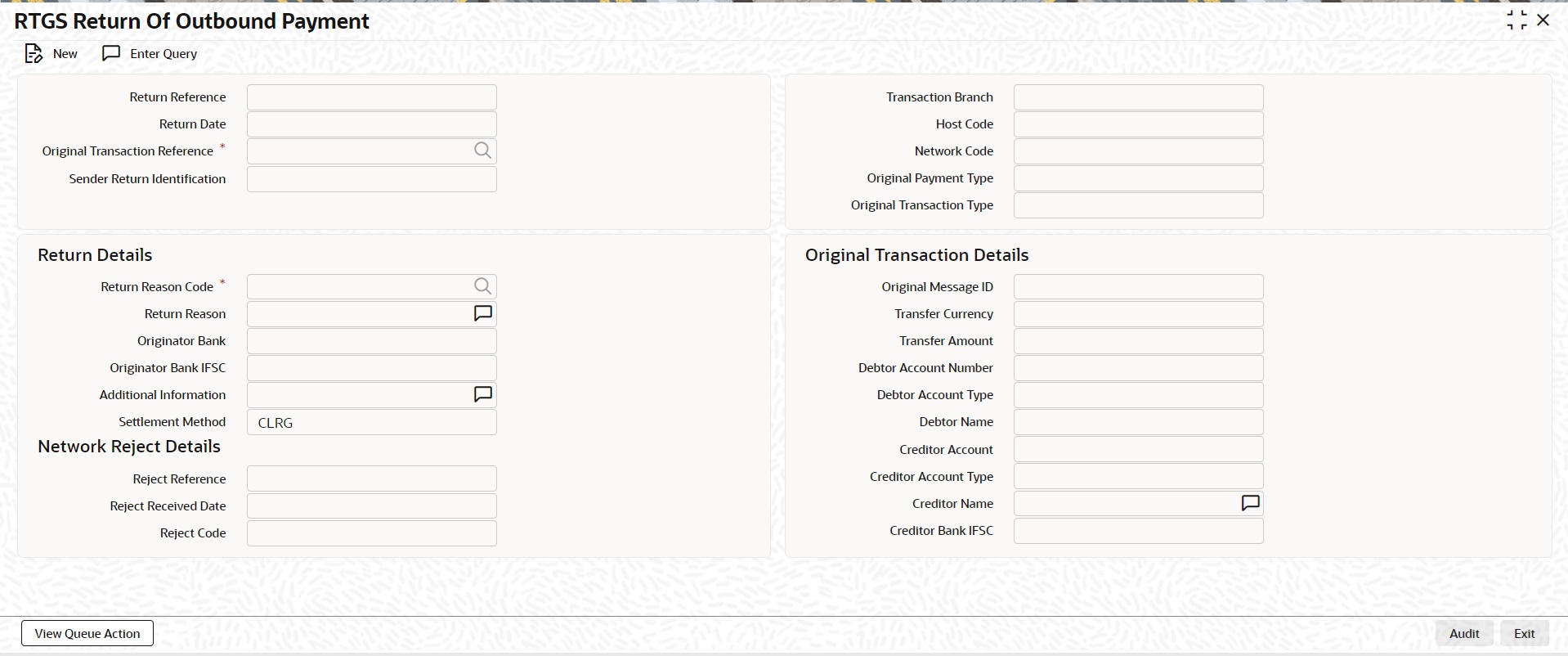
Return Reference Number
Specify the Return Reference and click on ‘Enter Query’.
You can view the inbound transactions that are returned, with payment type as ‘RTGS’ and Transaction status - ‘Returned’.
Return Date
System displays the Return Date as the current date by default.
Original Transaction Reference Number
System displays the Original Transaction Reference for which the transaction is Returned.
Transaction Branch
System defaults the Transaction branch of the user’s logged in branch.
Host Code
System defaults the Host Code the user’s logged in branch.
On entering the Return Reference, the information related to the transaction is defaulted in the below listed fields:
l Network Code
l Original Payment Type
l Original Transaction Type
Original Transaction Details
l Original Message ID
l Transfer Currency
l Transfer Amount
l Debtor Account Number
l Debtor Account Type
l Debtor Name
l Creditor Account
l Creditor Name
l Creditor Bank IFSC
Return Details
Return Reason Code
System displays the Return Reason Code as received in pacs.004 message.
Return Reason
System displays the return Reason based on the selected Return Code.
Originator Bank
System displays the Originator Banks as received in pacs.004 message.
Originator Bank IFSC
System displays the IFSC code of the originator of the transaction
Settlement Method
CLRG method gets defaulted. The options are COVE, INGA, INDA.
Network Reject Details
These fields are applicable while querying for a particular Return record which is rejected by the RBI/ Clearing Centre.
Reject Reference
System displays the Reject Reference details.
Reject Received Date
System displays the date on which the network reject was received.
Reject Code
System displays the network reject code.
5.2.2.1 India RTGS Return Of Outbound Payment Summary
You can invoke the ‘RTGS Return Of Outbound Payment Summary’ screen by typing ‘PLSOTRTN’ in the field at the top right corner of the application toolbar and clicking the adjoining arrow button.
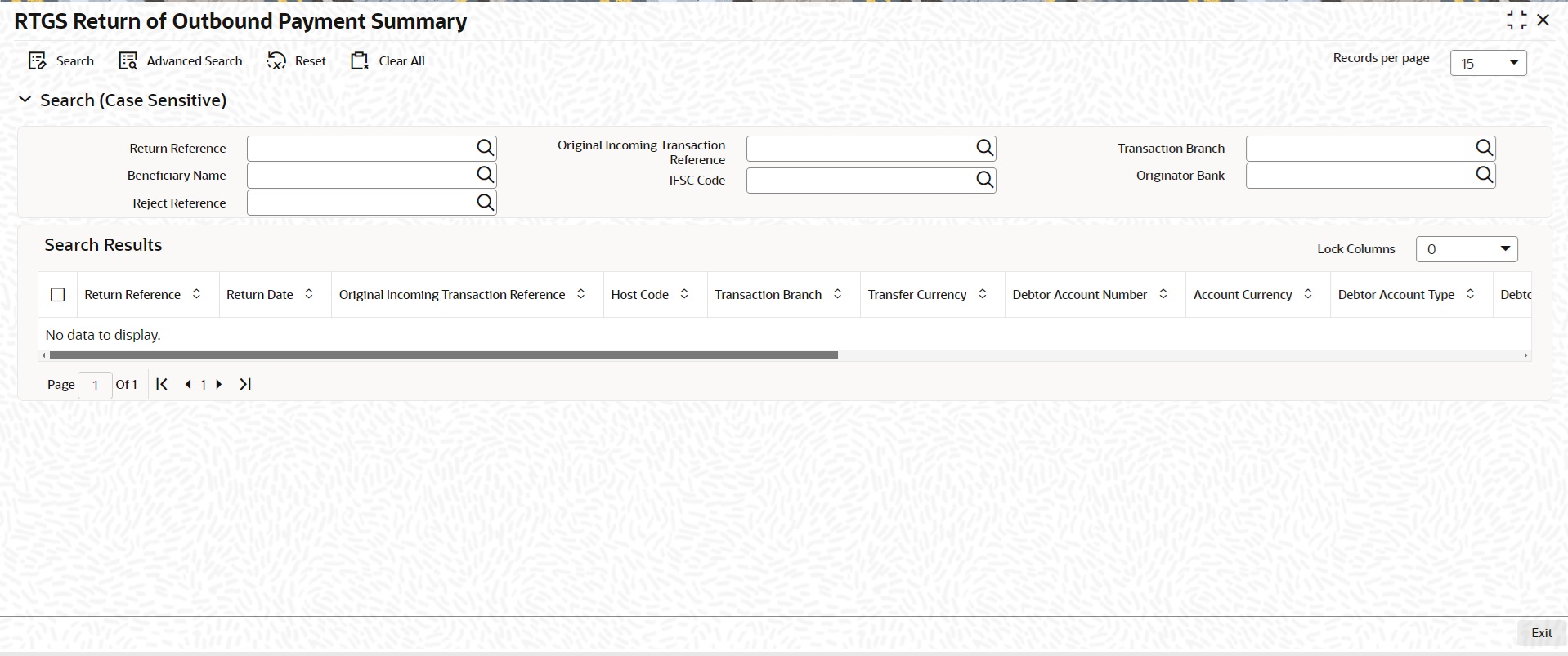
You can search using one or more of the following parameters:
l Return Reference
l Original Incoming Transaction Reference Number
l Transaction Branch
l Beneficiary Name
l IFSC Code
l Originator Bank
l Reject Reference
Once you have specified the search parameters, click ‘Search’ button. The system displays the records that match the search criteria.
Double click a record or click the ‘Details’ button after selecting a record to view the detailed screen.