FM Test Harness
A Federal Methodology (FM) Test Harness enables you to generate a feature file that can be shared with Oracle to help with replication and review of FM NAC (Need Analysis Calculator) service requests.
This section discusses:
Generating a feature file using CLI
Performing a standalone FM NAC Calculation
Note: For the 2023-2024 and prior Aid Years, the result of both the Federal Methodology (FM) and Institutional Methodology (IM) calculations for the amount of money that a student and his family are expected to contribute is referred to as Expected Family Contribution (EFC); FM EFC and IM EFC.
For the 2024-2025 and future Aid Years, FM calculation result is referred to as the Student Aid Index (SAI); replacing the FM EFC.
The FM Test Harness generates a feature file for the 2023-2024 and future aid years that contains:
The input fields with Personal Identity Information data removed or truncated sent to the FM NAC used in the most recent FM SAI/EFC calculation.
The response data from the FM NAC that's stored on the ISIR_COMPUTED table, including the intermediate and final SAI/EFC calculations, edits, and rejects applied.
|
Page Name |
Definition Name |
Navigation |
Usage |
|---|---|---|---|
|
CLI |
SFA_TEST_CLI |
|
Generate a feature file using a command-line interface (CLI) to test the FM NAC. |
|
FM Harness |
SFA_NAC_FMH |
|
Perform a standalone FM NAC call that will not update ISIR_COMPUTED. |
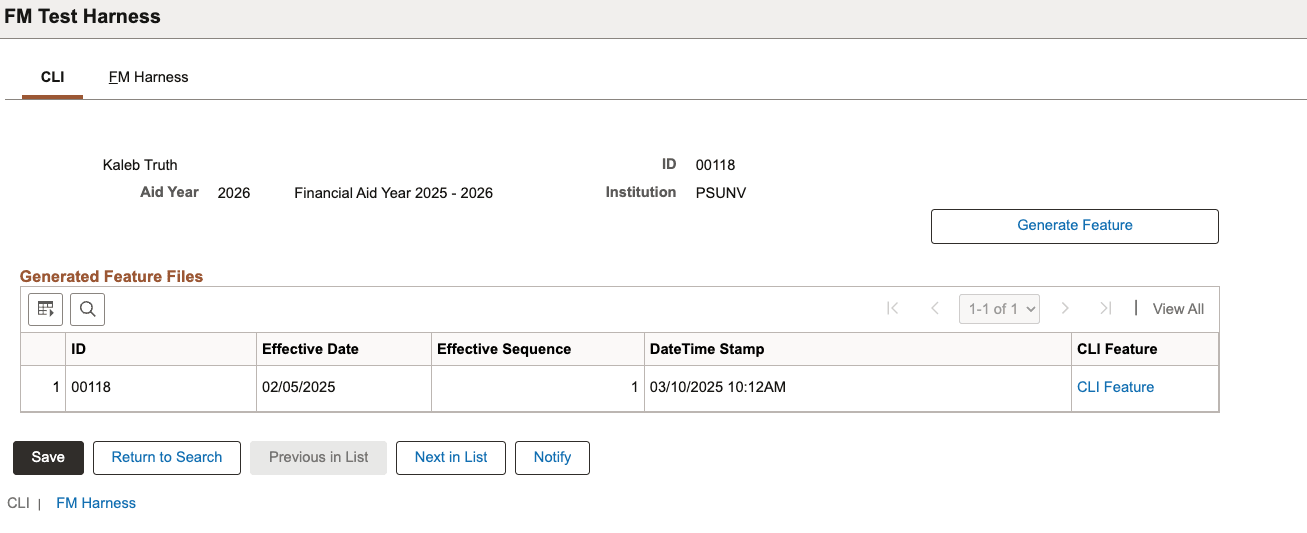
This example illustrates the fields and controls on the FM Test Harness - CLI page.
|
Field or Control |
Description |
|---|---|
|
Generate Feature |
Click this to generate feature files for testing FM NAC. |
|
Effective Date |
Displays Effective Date of the ISIR record |
|
Effective Sequence |
Displays Effective Sequence of the ISIR record |
|
DateTime Stamp |
Represents the date and time the Generate Feature button is clicked and CLI Feature link is created. |
|
CLI Feature (Command-line Interface Feature) |
Click to access the generated command-line interface (CLI) feature file based on the data stored in ISIR_COMPUTED. |
Access the FM Harness page ().
This example illustrates the fields and controls on the FM Harness page.
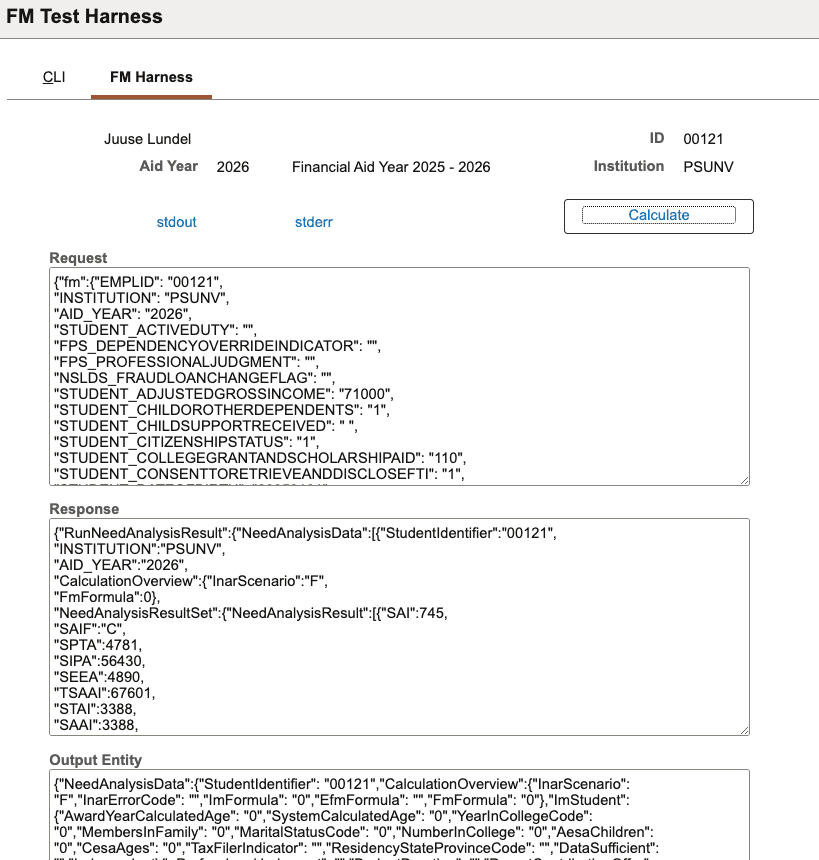
Use this page to generate a feature file to test the FM NAC.
|
Field or Control |
Description |
|---|---|
|
Calculate |
Click to perform a standalone FM NAC calculation that doesn't update ISIR_COMPUTED. |
|
Request |
Displays the input data fields that are sent to the FM NAC Java calculator code for the SAI calculation. |
|
Response |
Displays the response field values returned by the FM NAC Java calculator code based on the request input data. |
|
Output Entity |
JSON view of the response field values returned by the FM NAC Java calculator code based on the request input data. |