Creating Course Lists
To set up course lists, use the Course Lists component (CRSE_LIST_PANEL).
Course lists represent a group of linked courses. You can assign a course fee to a course list rather than attaching the fee to specific courses. Course lists can also be used with third-party contracts to control what courses are covered by the sponsor contract.
|
Page Name |
Definition Name |
Navigation |
Usage |
|---|---|---|---|
|
Course Lists |
CRSE_LIST_SF |
|
Define course lists. |
Access the Course Lists page ().
This example illustrates the fields and controls on the Course Lists page. You can find definitions for the fields and controls later on this page.
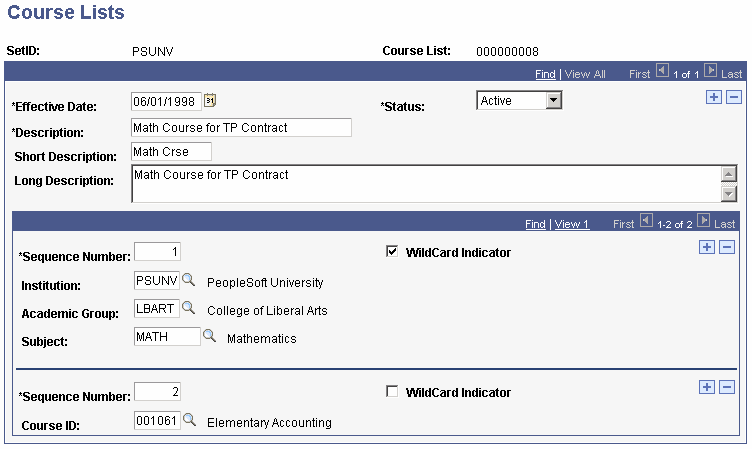
Note: The effective date of the course list cannot precede the effective date of the course catalog from which you select courses.
Field or Control |
Description |
|---|---|
Sequence Number |
Enter a sequence number for the class. Sequence numbers are important for writing course information to the table and cannot be duplicated. The sequence number does not affect the payment order. |
WildCard Indicator |
Select if you are creating a list of courses with like characteristics. When you select this option, the Institution, Acad Group, and Subject fields replace the Course ID field. |
Institution |
Select the appropriate institution. This field is available only if the WildCard Indicator check box is selected. |
Academic Group |
Select the academic group in which the courses reside. This field is available only if the WildCard Indicator check box is selected. |
Subject |
Select the subject area for the courses. This field is available only if the WildCard Indicator check box is selected. |
Course ID |
To create a course list using one or more specific courses, enter a course ID. |