Implementing Oracle GoldenGate to Offload PeopleSoft Read-only Transactions
This section contains an overview and discusses steps to configure Oracle GoldenGate to transfer (offload) PeopleSoft read-only transactions to a target database.
The information in this section applies to Oracle 19c and later databases.
To configure and manage Oracle GoldenGate you use Microservice Architecture, which includes various interfaces such as a web interface, command-line interface, and REST API. See the Oracle GoldenGate documentation for more information.
See Oracle GoldenGate, https://docs.oracle.com/en/middleware/goldengate/core/index.html
Oracle GoldenGate enables you to offload resource-intensive activities from a production database (source) to a synchronized standby (target) database. Oracle GoldenGate enables access to a physical target database for queries, sorting, reporting, web-based access, and so on, while continuously applying changes received from the source production database. If you use Oracle GoldenGate at your site, PeopleTools provides the infrastructure to use Oracle GoldenGate with your PeopleSoft application databases.
The following diagram depicts how Oracle GoldenGate enables you to incorporate a target database to offload designated read-only transactions, freeing resources to handle the read-write transactions on the source database.
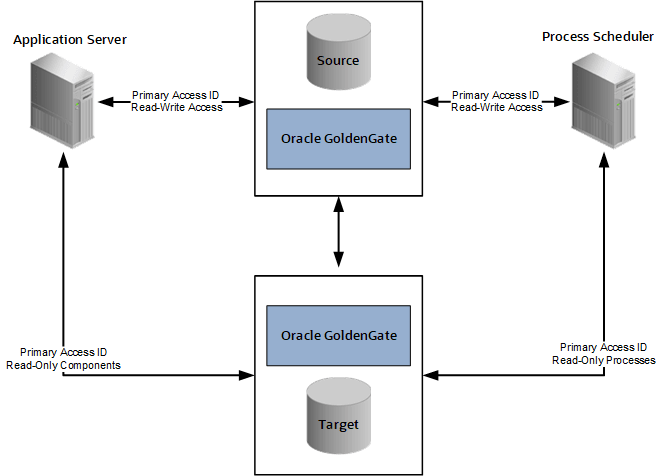
The following table describes the elements within the diagram:
|
Element |
Description |
|---|---|
|
Source Database (primary) |
Your production database, handling the read-write requests of your transactional system. For example, this database fills orders, updates employee information, adds new product offerings, and so on. |
|
Target Database (standby or reporting database) |
Your clone of the source database designed to handle read-only (RO), or mostly-read-only (MRO), requests so that those transactions can be offloaded from your source database, conserving resources on the production system. Examples of MRO requests include, PSQUERY Viewer, Tree Viewer, components that only submit SELECT SQL to display lists of employees, products, and so on. |
|
Oracle GoldenGate |
Synchronizes the data stored in the source and target databases so that they remain exact duplicates. This is achieved using a combination of Oracle GoldenGate features, DBLINKS, and Remote Synonyms defined by scripts delivered with PeopleTools. |
|
Primary Access ID |
The PeopleSoft access ID used for connecting to the source production database as well as the target database. The access ID and access ID passwords must be the same on the source and target databases. For example, if you use EMDBO as your access ID on the source database, you must also use EMDBO as the access ID on the target database, and you must keep the passwords for EMDBO the same on both databases. Note: Only one access ID is required, unlike Oracle Active Data Guard, where the PeopleSoft implementation requires two access IDs (a source and a secondary access ID). |
|
Read Only components |
When Oracle GoldenGate is enabled and PeopleSoft is configured with a target database, these components are RO enabled:
Other components can also be made to run against the target database, by setting the Read Only option in the component properties dialog box in Application Designer. See Configuring Read-Only Components. Limitations:
|
|
Read Only processes |
When PeopleSoft is configured for Oracle GoldenGate the following processes are enabled, as delivered, to run against the target database: PeopleSoft Query:
PS/nVision:
SQRs:
Audit Utilities:
Other processes can also be enabled to run against the target database by setting the Read Only option on the Process Definition properties page in Process Scheduler. Note: For Scheduled Query, if a user attempts to schedule a query to run against the target database, and selects output type Feeds on the Process Scheduler Request page, that process will be redirected to the source database. This overrides the RO enabled Run Scheduled Query process. Note: The use of Oracle GoldenGate with PeopleSoft batch processing only applies to the following: Application Engine processes run through the Process Scheduler with PSAESRV configured and SQR processes. Note: To enable SQR processes to run against the target database, refer to Configuring Read-Only Processes. SQR Processes that are generally considered reports are ideal candidates for redirection to the target database. |
Oracle GoldenGate needs to be licensed, installed, and enabled for your server before you can begin setting up your PeopleSoft system to take advantage of this feature. See Installing Oracle GoldenGate later in this topic.
The source and target databases need to be set up according to the Oracle GoldenGate documentation.
The basic configuration for PeopleSoft and Oracle GoldenGate (OGG) consists of two databases, the source database and the target database. Characteristics of the server connections to these databases are:
|
Server |
Connection Characteristics |
|---|---|
|
Application Server |
|
|
Process Scheduler Server |
|
Note: For an Oracle GoldenGate environment, the secondary connection to the target database utilizes the same login credentials used for the source connection.
Note: Whether both databases reside on the same or different servers, Oracle GoldenGate binaries need to be installed twice, in two separate directories. One installation is for the source database, and the other is for the target database.
See your Oracle Golden Gate documentation for more information.
After you install Oracle GoldenGate, you create deployments on the source and target databases. Each deployment has services that create and manage replication.
Oracle GoldenGate deployments include these services:
Service Manager — The primary watchdog service within Oracle GoldenGate Microservices that allows you to control and administer the deployments and associated microservices running on the host server.
Administration Service — Supervises, administers, manages, and monitors processes within an Oracle GoldenGate deployment.
The Administration Service operates as the central control entity for managing the replication components in your Oracle GoldenGate deployments. Oracle GoldenGate Extract and Replicat processes are created in this service.
Distribution Service — Functions as a networked data distribution agent in support of conveying and processing data and commands in a distributed deployment.
For PeopleSoft environments this service is enabled on the source deployment only.
Receiver Service — The central control service that handles all incoming trail files.
It interoperates with the Distribution Service and it replaces multiple discrete target-side Collectors with a single instance service. For PeopleSoft databases this service is enabled on the target deployment only.
Trail files — Store the extracted data as part of the replication processing.
To prepare the source and target databases to work with Oracle GoldenGate, define parameters and create the necessary users and privileges.
Enabling Oracle GoldenGate Replication
Using SQL*Plus or other utility on both the source and target databases, enter these SQL statements:
Check if the parameter
enable_goldengate_replicationis set to TRUE.In this example, it is set to False.
SQL> show parameter enable_goldengate_replication
NAME                                 TYPE        VALUE
------------------------------------ ----------- ----------------------------
enable_goldengate_replication        boolean     FALSE
If it is set to False, log into the database as sysdba and change it to True.
SQL> alter system set enable_goldengate_replication=TRUE;
System altered.
Enabling Archive Logging
Enable archive logging in the source database using the following SQL statements in SQL*Plus.
Log in to the source database as sysdba.
set ORACLE_SID=CDBPSFT
sqlplus / as sysdba
Shut down the database.
SQL> shutdown immediate
Database closed.
Database dismounted.
ORACLE instance shut down.
Enter the alter commands.
SQL> startup mount;
ORACLE instance started.
Total System Global Area 2147483648 bytes
Fixed Size                  3047720 bytes
Variable Size            1207963352 bytes
Database Buffers          922746880 bytes
Redo Buffers               13725696 bytes
Database mounted.
SQL> alter database archivelog;
Database altered.
SQL> alter database open;
Database altered.
To view the archive logging status, enter ARCHIVE LOG LIST:
SQL> ARCHIVE LOG LIST;
Database log mode              Archive Mode
Automatic archival             Enabled
Archive destination            USE_DB_RECOVERY_FILE_DEST
Oldest online log sequence     129
Next log sequence to archive   131
Current log sequence           131
Creating the Oracle GoldenGate Admin User
GoldenGate requires a separate Oracle database user that is dedicated to the Oracle GoldenGate installation, and which is defined in both the source and target databases. It can be the same user for all of the Oracle GoldenGate processes that must connect to a database, such as:
Extract (source database)
Replicat (target database)
Manager (source database, if using DDL support)
DEFGEN (source or target database)
Note: For the purposes of this document, the same Oracle GoldenGate user is defined on both databases.
Note: To preserve the security of your data, and to monitor Oracle GoldenGate processing accurately, do not permit other users, applications, or processes to log on or operate as the Oracle GoldenGate database user.
Note: Keep a record of the application database user (PeopleSoft Access ID). It is required in the Oracle GoldenGate parameter files, as in, the USERID parameter for the database.
The following table outlines the required database user privileges.
|
User Privilege |
Extract |
Replicat |
|---|---|---|
|
Create Session, Alter Session |
X |
X Note: If RESOURCE cannot be granted to Replicat, use ALTER USER <user> QUOTA {<size> | UNLIMITED} ON <tablespace>, where <tablespace> represents all tablespaces that contain target objects. |
|
Resource |
X |
X Note: Required only if Replicat owns target objects or any PL/SQL procedures. If CONNECT cannot be granted, grant CREATE <object> for any object Replicat will need to create. |
|
Connect |
X |
X |
|
Select Any Dictionary |
X |
X |
|
Flashback Any Table Or Flashback On <owner.table> |
X |
|
|
Select Any Table Or Select On <owner.table> |
X |
X |
|
Select on DBA Clusters |
X |
|
|
Insert, Update, Delete on <target tables> |
X |
|
|
Create Table Note: Required if using ADD CHECKPOINTTABLE in GGSCI to use the database checkpoint feature. |
X |
|
|
Run on DBMS_FLSHBACK package (4) Note: Oracle GoldenGate must make a call to DBMS_FLASHBACK.GET_SYSTEM_CHANGE_NUMBER. |
X |
Note: Be sure to check the most recent installation and administration guides for Oracle GoldenGate based on the Oracle GoldenGate version you are using, as permission requirements may change or be appended.
Create and grant privileges to user oggadmin on the pluggable databases (PDB) for both the source and target with these SQL statements.
SQL> alter session set container=pdbsource;
SQL> create user oggadmin identified by oggadmin;
SQL> exec dbms_goldengate_auth.grant_admin_privilege('oggadmin',container=>'<pdbname>');

GRANT CONNECT, RESOURCE to oggadmin;
GRANT CREATE SESSION to oggadmin;
GRANT ALTER SESSION to oggadmin;
GRANT SELECT ANY DICTIONARY to oggadmin;
GRANT FLASHBACK ANY TABLE to oggadmin;
GRANT ALTER ANY TABLE to oggadmin;
GRANT SELECT ANY TABLE to oggadmin;
GRANT INSERT ANY TABLE to oggadmin;
GRANT DELETE ANY TABLE to oggadmin;
GRANT UPDATE ANY TABLE to oggadmin;
GRANT CREATE TABLE to oggadmin;
GRANT UNLIMITED TABLESPACE to oggadmin;
GRANT EXECUTE on DBMS_FLASHBACK to oggadmin;
GRANT SELECT ON dba_clusters to oggadmin;
Enabling Supplemental Logging
Enable supplemental logging on the source database. Using SQL*Plus or other utility, connect as sysdba and submit these SQL statements:
SQL> ALTER DATABASE ADD SUPPLEMENTAL LOG DATA;
Database altered.

ALTER SYSTEM SWITCH LOGFILE;
System altered.

SELECT SUPPLEMENTAL_LOG_DATA_MIN FROM V$DATABASE;
Database altered.

SQL>
System altered.

SQL>
SUPPLEME
--------
YES

SQL> exitInstall Oracle GoldenGate software on both the source and target. This section describes the silent installation method. See the Oracle GoldenGate documentation for GUI installation. With the silent installation method, you specify your installation choices in a file called a response file, then run a command to perform the installation without further interaction.
Download the software to a temporary staging location.
Review the response file sample and make any necessary changes for your environment.
The software will be installed in the directory specified as SOFTWARE_LOCATION. This documentation refers to the installation location as OGG_HOME.
####################################################################
## Copyright(c) Oracle Corporation 2020,2022. All rights reserved.##
##                                                                ##
## Specify values for the variables listed below to customize     ##
## your installation.                                             ##
##                                                                ##
## Each variable is associated with a comment. The comment        ##
## can help to populate the variables with the appropriate        ##
## values.                                                        ##
##                                                                ##
## IMPORTANT NOTE: This file should be secured to have read       ##
## permission only by the oracle user or an administrator who     ##
## own this installation to protect any sensitive input values.   ##
##                                                                ##
####################################################################

#-------------------------------------------------------------------------------
# Do not change the following system generated value.
#-------------------------------------------------------------------------------
oracle.install.responseFileVersion=/oracle/install/rspfmt_ogginstall_response_schema_v23_1_0


################################################################################
##                                                                            ##
## Oracle GoldenGate installation option and details                          ##
##                                                                            ##
################################################################################

#-------------------------------------------------------------------------------
# Specify the installation option.
# Specify ora23ai for installing Oracle GoldenGate for Oracle Database 23ai and lower supported versions
#-------------------------------------------------------------------------------
INSTALL_OPTION=ora23ai

#-------------------------------------------------------------------------------
# Specify a location to install Oracle GoldenGate
#-------------------------------------------------------------------------------
SOFTWARE_LOCATION=/scratch/gg23ai/gg_home

################################################################################
##                                                                            ##
## Specify details to Create inventory for Oracle installs                    ##
## Required only for the first Oracle product install on a system.            ##
##                                                                            ##
################################################################################

#-------------------------------------------------------------------------------
# Specify the location which holds the install inventory files.
# This is an optional parameter if installing on
# Windows based Operating System.
#-------------------------------------------------------------------------------
INVENTORY_LOCATION=/srv/dpk/oracle

#-------------------------------------------------------------------------------
# Unix group to be set for the inventory directory.
# This parameter is not applicable if installing on
# Windows based Operating System.
#-------------------------------------------------------------------------------
UNIX_GROUP_NAME=oinstall
Enter this command to install using the response file oggcore.rsp.
/scratch/stage/runInstaller -silent -showProgress -responseFile /scratch/stage/response/oggcore.rsp
As mentioned earlier in this topic, the source and target servers each have one deployment.
To create a deployment on the source:
Modify the response file for the source to match your environment.
On the source server, change directory to the Oracle GoldenGate home directory, referred to as OGG_HOME.
Run the following command, using the source-specific response file:
$OGG_HOME/oggca.sh -silent -responseFile /scratch/gg23ai/oggca_source.rsp
Here is a sample response file for the source, oggca_source.rsp.
################################################################################
## Copyright(c) Oracle Corporation 2016, 2024. All rights reserved.           ##
##                                                                            ##
## Specify values for the variables listed below to customize your            ##
## installation.                                                              ##
##                                                                            ##
## Each variable is associated with a comment. The comments can help to       ##
## populate the variables with the appropriate values.                        ##
##                                                                            ##
## IMPORTANT NOTE: This file should be secured to have read permission only   ##
## by the Oracle user or an administrator who owns this configuration to      ##
## protect any sensitive input values.                                        ##
##                                                                            ##
################################################################################

#-------------------------------------------------------------------------------
# Do not change the following system generated value.
#-------------------------------------------------------------------------------
oracle.install.responseFileVersion=/oracle/install/rspfmt_oggca_response_schema_v23_1_0


################################################################################
##                                                                            ##
## Oracle GoldenGate deployment configuration options and details             ##
##                                                                            ##
################################################################################

################################################################################
##                                                                            ##
## Instructions to fill out this response file                                ##
## -------------------------------------------                                ##
## Fill out section A, B, and C for general deployment information            ##
## Additionally:                                                              ##
## Fill out sections D, E, F, G, H, I, and J for adding a deployment          ##
## Fill out section K for removing a deployment                               ##
##                                                                            ##
################################################################################

################################################################################
#                                                                              #
#                          SECTION A - GENERAL                                 #
#                                                                              #
################################################################################

#-------------------------------------------------------------------------------
# Specify the configuration option.
# Specify:
# - ADD    : for adding a new GoldenGate deployment.
# - REMOVE : for removing an existing GoldenGate deployment.
#-------------------------------------------------------------------------------
CONFIGURATION_OPTION=ADD

#-------------------------------------------------------------------------------
# Specify the name for the new or existing deployment.
#-------------------------------------------------------------------------------
DEPLOYMENT_NAME=PSFT_SOURCE


################################################################################
#                                                                              #
#                       SECTION B - ADMINISTRATOR ACCOUNT                      #
#                                                                              #
# * If creating a new Service Manager, set the Administrator Account username  #
#   and password.                                                              #
#                                                                              #
# * If reusing an existing Service Manager:                                    #
#     * Enter the credentials for the Administrator Account in                 #
#       the existing Service Manager.                                          #
#                                                                              #
################################################################################

#-------------------------------------------------------------------------------
# Specify the administrator account username for the Service Manager.
#-------------------------------------------------------------------------------
ADMINISTRATOR_USER=psft_sm

#-------------------------------------------------------------------------------
# Specify the administrator account password for the Service Manager.
#-------------------------------------------------------------------------------
ADMINISTRATOR_PASSWORD=

#-------------------------------------------------------------------------------
# Optionally, specify a different administrator account username for the deployment,
# or leave blanks to use the same Service Manager administrator credentials.
#-------------------------------------------------------------------------------
DEPLOYMENT_ADMINISTRATOR_USER=

#-------------------------------------------------------------------------------
# If creating a different administrator account username for the deployment,
# specify the password for it.
#-------------------------------------------------------------------------------
DEPLOYMENT_ADMINISTRATOR_PASSWORD=


################################################################################
#                                                                              #
#                       SECTION C - SERVICE MANAGER                            #
#                                                                              #
################################################################################

#-------------------------------------------------------------------------------
# Specify the location for the Service Manager deployment.
# This is only needed if the Service Manager deployment doesn't exist already.
#-------------------------------------------------------------------------------
SERVICEMANAGER_DEPLOYMENT_HOME=/scratch/gg23ai/psft_srvmgr

#-------------------------------------------------------------------------------
# Optionally, specify a custom location for the Service Manager deployment ETC_HOME.
#-------------------------------------------------------------------------------
SERVICEMANAGER_ETC_HOME=

#-------------------------------------------------------------------------------
# Optionally, specify a custom location for the Service Manager deployment CONF_HOME.
#-------------------------------------------------------------------------------
SERVICEMANAGER_CONF_HOME=

#-------------------------------------------------------------------------------
# Optionally, specify a custom location for the Service Manager deployment SSL_HOME.
#-------------------------------------------------------------------------------
SERVICEMANAGER_SSL_HOME=

#-------------------------------------------------------------------------------
# Optionally, specify a custom location for the Service Manager deployment VAR_HOME.
#-------------------------------------------------------------------------------
SERVICEMANAGER_VAR_HOME=

#-------------------------------------------------------------------------------
# Optionally, specify a custom location for the Service Manager deployment DATA_HOME.
#-------------------------------------------------------------------------------
SERVICEMANAGER_DATA_HOME=

#-------------------------------------------------------------------------------
# Optionally, specify a custom location for the Service Manager deployment ARCHIVE_HOME.
#-------------------------------------------------------------------------------
SERVICEMANAGER_ARCHIVE_HOME=

#-------------------------------------------------------------------------------
# Specify the host for the Service Manager.
#-------------------------------------------------------------------------------
HOST_SERVICEMANAGER=127.0.0.1

#-------------------------------------------------------------------------------
# Specify the port for the Service Manager.
#-------------------------------------------------------------------------------
PORT_SERVICEMANAGER=9902

#-------------------------------------------------------------------------------
# Specify if SSL / TLS is or will be enabled for the deployment.
# Specify true if SSL / TLS is or will be enabled, false otherwise.
#-------------------------------------------------------------------------------
SECURITY_ENABLED=false

#-------------------------------------------------------------------------------
# Specify if the deployment should enforce a strong password policy.
# Specify true to enable strong password policy management.
#-------------------------------------------------------------------------------
STRONG_PWD_POLICY_ENABLED=false

#-------------------------------------------------------------------------------
# Specify if a new Service Manager should be created.
# Specify true if a new Service Manager should be created, false otherwise.
#
# This option is only needed when CONFIGURATION_OPTION is ADD.
#-------------------------------------------------------------------------------
CREATE_NEW_SERVICEMANAGER=true

#-------------------------------------------------------------------------------
# Specify if Service Manager should be registered as a service/daemon. This option is mutually exclusive with the 'INTEGRATE_SERVICEMANAGER_WITH_XAG' option.
# Specify true if Service Manager should be registered as a service, false otherwise.
#
# This option is only needed when CONFIGURATION_OPTION is ADD.
# This option does not apply to Windows platform.
#-------------------------------------------------------------------------------
REGISTER_SERVICEMANAGER_AS_A_SERVICE=false
#-------------------------------------------------------------------------------
# Specify if Service Manager should be integrated with XAG. This option is mutually exclusive with the 'REGISTER_SERVICEMANAGER_AS_A_SERVICE' option.
# Specify true if Service Manager should be integrated with XAG, false otherwise.
#
# This option is only needed when CONFIGURATION_OPTION is ADD.
# This option is only supported for Oracle databases.
#-------------------------------------------------------------------------------
INTEGRATE_SERVICEMANAGER_WITH_XAG=false

#-------------------------------------------------------------------------------
# If using an existing Service Manager, specify if it is integrated with XAG.
# Specify true if the existing Service Manager is integrated with XAG, false otherwise.
#
# This option is only needed when CONFIGURATION_OPTION is ADD.
# This option is only supported for Oracle databases.
#-------------------------------------------------------------------------------
EXISTING_SERVICEMANAGER_IS_XAG_ENABLED=false

#-------------------------------------------------------------------------------
# Specify if Remote Metrics using StatsD protocol will be enabled for the Service Manager
# Specify true if Remote Metrics for the Service Manager will be enabled, false otherwise
#-------------------------------------------------------------------------------
ENABLE_SERVICE_MANAGER_REMOTE_METRICS=false

#-------------------------------------------------------------------------------
# If Remote Metrics for the Service Manager will be enabled, specify the listening host
#-------------------------------------------------------------------------------
SERVICE_MANAGER_REMOTE_METRICS_LISTENING_HOST=

#-------------------------------------------------------------------------------
# If Remote Metrics for the Service Manager will be enabled, specify the listening port for that server
#-------------------------------------------------------------------------------
SERVICE_MANAGER_REMOTE_METRICS_LISTENING_PORT=0

###############################################################################
#                                                                             #
#                    SECTION D - CONFIGURATION SERVICE                        #
#                                                                             #
###############################################################################

#-------------------------------------------------------------------------------
# Specify if the Configuration Service will be enabled.
# Specify true if the Configuration Service will be enabled, false otherwise.
#-------------------------------------------------------------------------------
CONFIGURATION_SERVICE_ENABLED=false

#-------------------------------------------------------------------------------
# Specify the Configuration Service backend type.
# Specify:
# - FILESYSTEM
# - ORACLE_DATABASE
#
# This is only needed if the Configuration Service will be enabled
#-------------------------------------------------------------------------------
CONFIGURATION_SERVICE_BACKEND_TYPE=FILESYSTEM

#-------------------------------------------------------------------------------
# Specify the Configuration Service connection string for the database backend
#
# This is only needed if:
#     * The Configuration Service will be enabled
#     * CONFIGURATION_SERVICE_BACKEND_TYPE is ORACLE_DATABASE
#-------------------------------------------------------------------------------
CONFIGURATION_SERVICE_BACKEND_CONNECTION_STRING=

#-------------------------------------------------------------------------------
# Specify the Configuration Service username for the database backend
#
# This is only needed if:
#     * The Configuration Service will be enabled
#     * CONFIGURATION_SERVICE_BACKEND_TYPE is ORACLE_DATABASE
#-------------------------------------------------------------------------------
CONFIGURATION_SERVICE_BACKEND_USERNAME=

#-------------------------------------------------------------------------------
# Specify the Configuration Service password for the database backend
#
# This is only needed if:
#     * The Configuration Service will be enabled
#     * CONFIGURATION_SERVICE_BACKEND_TYPE is ORACLE_DATABASE
#-------------------------------------------------------------------------------
CONFIGURATION_SERVICE_BACKEND_PASSWORD=

#-------------------------------------------------------------------------------
# Specify the Configuration Service table name for the database backend
#
# This is only needed if:
#     * The Configuration Service will be enabled
#     * CONFIGURATION_SERVICE_BACKEND_TYPE is ORACLE_DATABASE
#-------------------------------------------------------------------------------
CONFIGURATION_SERVICE_BACKEND_TABLE_NAME=


###############################################################################
#                                                                             #
#                       SECTION E - SOFTWARE HOME                             #
#                                                                             #
###############################################################################

#-------------------------------------------------------------------------------
# Specify the existing OGG software home location.
#-------------------------------------------------------------------------------
OGG_SOFTWARE_HOME=/scratch/gg23ai/gg_home


###############################################################################
#                                                                             #
#                       SECTION F - DEPLOYMENT DIRECTORIES                    #
#                                                                             #
###############################################################################

#-------------------------------------------------------------------------------
# Specify the location of the new or existing OGG deployment.
#-------------------------------------------------------------------------------
OGG_DEPLOYMENT_HOME=/scratch/gg23ai/ogg_dep_home

#-------------------------------------------------------------------------------
# Specify the location for OGG_ETC_HOME.
#-------------------------------------------------------------------------------
OGG_ETC_HOME=

#-------------------------------------------------------------------------------
# Specify the location for OGG_CONF_HOME.
#-------------------------------------------------------------------------------
OGG_CONF_HOME=

#-------------------------------------------------------------------------------
# Specify the location for OGG_SSL_HOME.
#-------------------------------------------------------------------------------
OGG_SSL_HOME=

#-------------------------------------------------------------------------------
# Specify the location for OGG_VAR_HOME.
#-------------------------------------------------------------------------------
OGG_VAR_HOME=

#-------------------------------------------------------------------------------
# Specify the location for OGG_DATA_HOME.
#-------------------------------------------------------------------------------
OGG_DATA_HOME=

#-------------------------------------------------------------------------------
# Specify the location for OGG_ARCHIVE_HOME.
#-------------------------------------------------------------------------------
OGG_ARCHIVE_HOME=

###############################################################################
#                                                                             #
#                       SECTION G - ENVIRONMENT VARIABLES                     #
#                                                                             #
###############################################################################

#-------------------------------------------------------------------------------
# Specify the value for the LD_LIBRARY_PATH environment variable.
#-------------------------------------------------------------------------------
ENV_LD_LIBRARY_PATH=${OGG_HOME}/lib/instantclient:${OGG_HOME}/lib

#-------------------------------------------------------------------------------
# Specify the value for the TNS_ADMIN environment variable.
# This environment variable is only for Oracle Databases.
#-------------------------------------------------------------------------------
ENV_TNS_ADMIN=/scratch/base/db

#-------------------------------------------------------------------------------
# This option is only needed when Sharding will be enabled.
# Specify the value for the STREAMS_POOL_SIZE environment variable.
# This environment variable is only for Oracle Databases.
#-------------------------------------------------------------------------------
ENV_STREAMS_POOL_SIZE=

#-------------------------------------------------------------------------------
# Specify any additional environment variables to be set in the deployment.
#-------------------------------------------------------------------------------
ENV_USER_VARS=


###############################################################################
#                                                                             #
#                           SECTION H - SECURITY                              #
#           This section is only needed if Security will be enabled           #
#                                                                             #
###############################################################################

# ------------------------------------------------------------------------------
# If security will be enabled, specify if TLS v1.2 will be enabled.
# Specify true if TLS v1.2 will be enabled, false otherwise.
#-------------------------------------------------------------------------------
TLS_1_2_ENABLED=false

# ------------------------------------------------------------------------------
# If security will be enabled, specify if TLS v1.3 will be enabled.
# Specify true if TLS v1.3 will be enabled, false otherwise.
#-------------------------------------------------------------------------------
TLS_1_3_ENABLED=false

#-------------------------------------------------------------------------------
# Specify if FIPS will be enabled.
#-------------------------------------------------------------------------------
FIPS_ENABLED=false

#-------------------------------------------------------------------------------
# If SSL / TLS will be enabled, specify the server certificate
#-------------------------------------------------------------------------------
SERVER_CERTIFICATE=

#-------------------------------------------------------------------------------
# If importing a server certificate, specify the private key file in PKCS#8 format
# The private key file must not be encrypted
#-------------------------------------------------------------------------------
SERVER_CERTIFICATE_KEY_FILE=

#-------------------------------------------------------------------------------
# If importing a server certificate, optionally specify the CA certificates file
#-------------------------------------------------------------------------------
SERVER_CA_CERTIFICATES_FILE=

#-------------------------------------------------------------------------------
# If SSL / TLS will be enabled, optionally specify the client certificate.
#-------------------------------------------------------------------------------
CLIENT_CERTIFICATE=

#-------------------------------------------------------------------------------
# If importing a client certificate, specify the private key file in PKCS#8 format
# The private key file must not be encrypted
#-------------------------------------------------------------------------------
CLIENT_CERTIFICATE_KEY_FILE=

#-------------------------------------------------------------------------------
# If importing a client certificate, optionally specify the CA certificates file
#-------------------------------------------------------------------------------
CLIENT_CA_CERTIFICATES_FILE=


###############################################################################
#                                                                             #
#                           SECTION I - SERVICES                              #
#                                                                             #
###############################################################################

#-------------------------------------------------------------------------------
# Specify if the Administration server will be enabled.
# Specify true if the Administration server will be enabled, false otherwise.
#-------------------------------------------------------------------------------
ADMINISTRATION_SERVER_ENABLED=true

#-------------------------------------------------------------------------------
# Required only if the Administration server will be enabled.
# Specify the port for Administration Server.
#-------------------------------------------------------------------------------
PORT_ADMINSRVR=9903

#-------------------------------------------------------------------------------
# Specify if the Distribution server will be enabled.
# Specify true if the Distribution server will be enabled, false otherwise.
#-------------------------------------------------------------------------------
DISTRIBUTION_SERVER_ENABLED=true

#-------------------------------------------------------------------------------
# Required only if the Distribution server will be enabled.
# Specify the port for Distribution Server.
#-------------------------------------------------------------------------------
PORT_DISTSRVR=9904

#-------------------------------------------------------------------------------
# If security is disabled, specify if this non-secure deployment will be used
# to send trail data to a secure deployment.
#-------------------------------------------------------------------------------
NON_SECURE_DISTSRVR_CONNECTS_TO_SECURE_RCVRSRVR=false

#-------------------------------------------------------------------------------
# Specify if the Receiver server will be enabled.
# Specify true if the Receiver server will be enabled, false otherwise.
#-------------------------------------------------------------------------------
RECEIVER_SERVER_ENABLED=false

#-------------------------------------------------------------------------------
# Required only if the Receiver server will be enabled.
# Specify the port for Receiver Server.
#-------------------------------------------------------------------------------
PORT_RCVRSRVR=9905

#-------------------------------------------------------------------------------
# Specify if Performance Metrics server will be enabled.
# Specify true if Performance Metrics server will be enabled, false otherwise.
#-------------------------------------------------------------------------------
METRICS_SERVER_ENABLED=false
#-------------------------------------------------------------------------------
# Specify if Performance Metrics server is a critical service.
# Specify true if Performance Metrics server is a critical service, false otherwise.
#
# This is optional and only takes effect when Performance Metrics server will be enabled.
# Also, this option should only be set when the Service Manager is integrated with XAG.
# The default value is false.
#
# This option is only supported for Oracle databases.
#-------------------------------------------------------------------------------
METRICS_SERVER_IS_CRITICAL=false

#-------------------------------------------------------------------------------
# Specify the port for Performance Metrics server (TCP).
#
# This option is only needed when Performance Metrics server will be enabled.
#-------------------------------------------------------------------------------
PORT_PMSRVR=9906

#-------------------------------------------------------------------------------
# Specify the DataStore type for Performance Metrics server.
# Valid values are: BDB, LMDB
#
# This option is only needed when Performance Metrics server will be enabled.
#-------------------------------------------------------------------------------
PMSRVR_DATASTORE_TYPE=BDB

#-------------------------------------------------------------------------------
# Specify the DataStore home location for Performance Metrics server.
# This is optional and only takes effect when Performance Metrics server will be enabled.
#-------------------------------------------------------------------------------
PMSRVR_DATASTORE_HOME=

#-------------------------------------------------------------------------------
# Specify if Remote Metrics using StatsD protocol will be enabled for the Deployment
# Specify true if Remote Metrics for the deployment will be enabled, false otherwise
#-------------------------------------------------------------------------------
ENABLE_DEPLOYMENT_REMOTE_METRICS=false

#-------------------------------------------------------------------------------
# If Remote Metrics for the deployment will be enabled, specify the listening host
#-------------------------------------------------------------------------------
DEPLOYMENT_REMOTE_METRICS_LISTENING_HOST=

#-------------------------------------------------------------------------------
# If Remote Metrics for the deployment will be enabled, specify the listening port for that server
#-------------------------------------------------------------------------------
DEPLOYMENT_REMOTE_METRICS_LISTENING_PORT=0


###############################################################################
#                                                                             #
#                       SECTION J - REPLICATION OPTIONS                       #
#                                                                             #
###############################################################################

#-------------------------------------------------------------------------------
# Specify the value for the GoldenGate schema.
#-------------------------------------------------------------------------------
OGG_SCHEMA=ggadmin


###############################################################################
#                                                                             #
#                  SECTION K - REMOVE DEPLOYMENT OPTIONS                      #
#                                                                             #
###############################################################################

#-------------------------------------------------------------------------------
# Specify if the deployment files should be removed from disk.
# Specify true if the deployment files should be removed, false otherwise.
#-------------------------------------------------------------------------------
REMOVE_DEPLOYMENT_FROM_DISK=
To create a deployment on the target:
Modify the response file for the target to match your environment.
On the target server, change directory to the Oracle GoldenGate home directory, referred to as OGG_HOME.
Run the following command, using the target-specific response file:
$OGG_HOME/oggca.sh -silent -responseFile /scratch/gg23ai/oggca_target.rsp
Here is a sample response file for the target, oggca_target.rsp.
################################################################################
## Copyright(c) Oracle Corporation 2016, 2024. All rights reserved.           ##
##                                                                            ##
## Specify values for the variables listed below to customize your            ##
## installation.                                                              ##
##                                                                            ##
## Each variable is associated with a comment. The comments can help to       ##
## populate the variables with the appropriate values.                        ##
##                                                                            ##
## IMPORTANT NOTE: This file should be secured to have read permission only   ##
## by the Oracle user or an administrator who owns this configuration to      ##
## protect any sensitive input values.                                        ##
##                                                                            ##
################################################################################

#-------------------------------------------------------------------------------
# Do not change the following system generated value.
#-------------------------------------------------------------------------------
oracle.install.responseFileVersion=/oracle/install/rspfmt_oggca_response_schema_v23_1_0


################################################################################
##                                                                            ##
## Oracle GoldenGate deployment configuration options and details             ##
##                                                                            ##
################################################################################

################################################################################
##                                                                            ##
## Instructions to fill out this response file                                ##
## -------------------------------------------                                ##
## Fill out section A, B, and C for general deployment information            ##
## Additionally:                                                              ##
## Fill out sections D, E, F, G, H, I, and J for adding a deployment          ##
## Fill out section K for removing a deployment                               ##
##                                                                            ##
################################################################################

################################################################################
#                                                                              #
#                          SECTION A - GENERAL                                 #
#                                                                              #
################################################################################

#-------------------------------------------------------------------------------
# Specify the configuration option.
# Specify:
# - ADD    : for adding a new GoldenGate deployment.
# - REMOVE : for removing an existing GoldenGate deployment.
#-------------------------------------------------------------------------------
CONFIGURATION_OPTION=ADD

#-------------------------------------------------------------------------------
# Specify the name for the new or existing deployment.
#-------------------------------------------------------------------------------
DEPLOYMENT_NAME=PSFT_TARGET


################################################################################
#                                                                              #
#                       SECTION B - ADMINISTRATOR ACCOUNT                      #
#                                                                              #
# * If creating a new Service Manager, set the Administrator Account username  #
#   and password.                                                              #
#                                                                              #
# * If reusing an existing Service Manager:                                    #
#     * Enter the credentials for the Administrator Account in                 #
#       the existing Service Manager.                                          #
#                                                                              #
################################################################################

#-------------------------------------------------------------------------------
# Specify the administrator account username for the Service Manager.
#-------------------------------------------------------------------------------
ADMINISTRATOR_USER=psft_sm

#-------------------------------------------------------------------------------
# Specify the administrator account password for the Service Manager.
#-------------------------------------------------------------------------------
ADMINISTRATOR_PASSWORD=

#-------------------------------------------------------------------------------
# Optionally, specify a different administrator account username for the deployment,
# or leave blanks to use the same Service Manager administrator credentials.
#-------------------------------------------------------------------------------
DEPLOYMENT_ADMINISTRATOR_USER=

#-------------------------------------------------------------------------------
# If creating a different administrator account username for the deployment,
# specify the password for it.
#-------------------------------------------------------------------------------
DEPLOYMENT_ADMINISTRATOR_PASSWORD=


################################################################################
#                                                                              #
#                       SECTION C - SERVICE MANAGER                            #
#                                                                              #
################################################################################

#-------------------------------------------------------------------------------
# Specify the location for the Service Manager deployment.
# This is only needed if the Service Manager deployment doesn't exist already.
#-------------------------------------------------------------------------------
SERVICEMANAGER_DEPLOYMENT_HOME=/scratch/gg23ai/psft_sm_dp_home

#-------------------------------------------------------------------------------
# Optionally, specify a custom location for the Service Manager deployment ETC_HOME.
#-------------------------------------------------------------------------------
SERVICEMANAGER_ETC_HOME=

#-------------------------------------------------------------------------------
# Optionally, specify a custom location for the Service Manager deployment CONF_HOME.
#-------------------------------------------------------------------------------
SERVICEMANAGER_CONF_HOME=

#-------------------------------------------------------------------------------
# Optionally, specify a custom location for the Service Manager deployment SSL_HOME.
#-------------------------------------------------------------------------------
SERVICEMANAGER_SSL_HOME=

#-------------------------------------------------------------------------------
# Optionally, specify a custom location for the Service Manager deployment VAR_HOME.
#-------------------------------------------------------------------------------
SERVICEMANAGER_VAR_HOME=

#-------------------------------------------------------------------------------
# Optionally, specify a custom location for the Service Manager deployment DATA_HOME.
#-------------------------------------------------------------------------------
SERVICEMANAGER_DATA_HOME=

#-------------------------------------------------------------------------------
# Optionally, specify a custom location for the Service Manager deployment ARCHIVE_HOME.
#-------------------------------------------------------------------------------
SERVICEMANAGER_ARCHIVE_HOME=

#-------------------------------------------------------------------------------
# Specify the host for the Service Manager.
#-------------------------------------------------------------------------------
HOST_SERVICEMANAGER=127.0.0.1

#-------------------------------------------------------------------------------
# Specify the port for the Service Manager.
#-------------------------------------------------------------------------------
PORT_SERVICEMANAGER=9902

#-------------------------------------------------------------------------------
# Specify if SSL / TLS is or will be enabled for the deployment.
# Specify true if SSL / TLS is or will be enabled, false otherwise.
#-------------------------------------------------------------------------------
SECURITY_ENABLED=false

#-------------------------------------------------------------------------------
# Specify if the deployment should enforce a strong password policy.
# Specify true to enable strong password policy management.
#-------------------------------------------------------------------------------
STRONG_PWD_POLICY_ENABLED=false

#-------------------------------------------------------------------------------
# Specify if a new Service Manager should be created.
# Specify true if a new Service Manager should be created, false otherwise.
#
# This option is only needed when CONFIGURATION_OPTION is ADD.
#-------------------------------------------------------------------------------
CREATE_NEW_SERVICEMANAGER=true

#-------------------------------------------------------------------------------
# Specify if Service Manager should be registered as a service/daemon. This option is mutually exclusive with the 'INTEGRATE_SERVICEMANAGER_WITH_XAG' option.
# Specify true if Service Manager should be registered as a service, false otherwise.
#
# This option is only needed when CONFIGURATION_OPTION is ADD.
# This option does not apply to Windows platform.
#-------------------------------------------------------------------------------
REGISTER_SERVICEMANAGER_AS_A_SERVICE=false
#-------------------------------------------------------------------------------
# Specify if Service Manager should be integrated with XAG. This option is mutually exclusive with the 'REGISTER_SERVICEMANAGER_AS_A_SERVICE' option.
# Specify true if Service Manager should be integrated with XAG, false otherwise.
#
# This option is only needed when CONFIGURATION_OPTION is ADD.
# This option is only supported for Oracle databases.
#-------------------------------------------------------------------------------
INTEGRATE_SERVICEMANAGER_WITH_XAG=false

#-------------------------------------------------------------------------------
# If using an existing Service Manager, specify if it is integrated with XAG.
# Specify true if the existing Service Manager is integrated with XAG, false otherwise.
#
# This option is only needed when CONFIGURATION_OPTION is ADD.
# This option is only supported for Oracle databases.
#-------------------------------------------------------------------------------
EXISTING_SERVICEMANAGER_IS_XAG_ENABLED=false

#-------------------------------------------------------------------------------
# Specify if Remote Metrics using StatsD protocol will be enabled for the Service Manager
# Specify true if Remote Metrics for the Service Manager will be enabled, false otherwise
#-------------------------------------------------------------------------------
ENABLE_SERVICE_MANAGER_REMOTE_METRICS=false

#-------------------------------------------------------------------------------
# If Remote Metrics for the Service Manager will be enabled, specify the listening host
#-------------------------------------------------------------------------------
SERVICE_MANAGER_REMOTE_METRICS_LISTENING_HOST=

#-------------------------------------------------------------------------------
# If Remote Metrics for the Service Manager will be enabled, specify the listening port for that server
#-------------------------------------------------------------------------------
SERVICE_MANAGER_REMOTE_METRICS_LISTENING_PORT=0

###############################################################################
#                                                                             #
#                    SECTION D - CONFIGURATION SERVICE                        #
#                                                                             #
###############################################################################

#-------------------------------------------------------------------------------
# Specify if the Configuration Service will be enabled.
# Specify true if the Configuration Service will be enabled, false otherwise.
#-------------------------------------------------------------------------------
CONFIGURATION_SERVICE_ENABLED=false

#-------------------------------------------------------------------------------
# Specify the Configuration Service backend type.
# Specify:
# - FILESYSTEM
# - ORACLE_DATABASE
#
# This is only needed if the Configuration Service will be enabled
#-------------------------------------------------------------------------------
CONFIGURATION_SERVICE_BACKEND_TYPE=FILESYSTEM

#-------------------------------------------------------------------------------
# Specify the Configuration Service connection string for the database backend
#
# This is only needed if:
#     * The Configuration Service will be enabled
#     * CONFIGURATION_SERVICE_BACKEND_TYPE is ORACLE_DATABASE
#-------------------------------------------------------------------------------
CONFIGURATION_SERVICE_BACKEND_CONNECTION_STRING=

#-------------------------------------------------------------------------------
# Specify the Configuration Service username for the database backend
#
# This is only needed if:
#     * The Configuration Service will be enabled
#     * CONFIGURATION_SERVICE_BACKEND_TYPE is ORACLE_DATABASE
#-------------------------------------------------------------------------------
CONFIGURATION_SERVICE_BACKEND_USERNAME=

#-------------------------------------------------------------------------------
# Specify the Configuration Service password for the database backend
#
# This is only needed if:
#     * The Configuration Service will be enabled
#     * CONFIGURATION_SERVICE_BACKEND_TYPE is ORACLE_DATABASE
#-------------------------------------------------------------------------------
CONFIGURATION_SERVICE_BACKEND_PASSWORD=

#-------------------------------------------------------------------------------
# Specify the Configuration Service table name for the database backend
#
# This is only needed if:
#     * The Configuration Service will be enabled
#     * CONFIGURATION_SERVICE_BACKEND_TYPE is ORACLE_DATABASE
#-------------------------------------------------------------------------------
CONFIGURATION_SERVICE_BACKEND_TABLE_NAME=


###############################################################################
#                                                                             #
#                       SECTION E - SOFTWARE HOME                             #
#                                                                             #
###############################################################################

#-------------------------------------------------------------------------------
# Specify the existing OGG software home location.
#-------------------------------------------------------------------------------
OGG_SOFTWARE_HOME=/scratch/gg23ai/gg_home


###############################################################################
#                                                                             #
#                       SECTION F - DEPLOYMENT DIRECTORIES                    #
#                                                                             #
###############################################################################

#-------------------------------------------------------------------------------
# Specify the location of the new or existing OGG deployment.
#-------------------------------------------------------------------------------
OGG_DEPLOYMENT_HOME=/scratch/gg23ai/ogg_dep_home

#-------------------------------------------------------------------------------
# Specify the location for OGG_ETC_HOME.
#-------------------------------------------------------------------------------
OGG_ETC_HOME=

#-------------------------------------------------------------------------------
# Specify the location for OGG_CONF_HOME.
#-------------------------------------------------------------------------------
OGG_CONF_HOME=

#-------------------------------------------------------------------------------
# Specify the location for OGG_SSL_HOME.
#-------------------------------------------------------------------------------
OGG_SSL_HOME=

#-------------------------------------------------------------------------------
# Specify the location for OGG_VAR_HOME.
#-------------------------------------------------------------------------------
OGG_VAR_HOME=

#-------------------------------------------------------------------------------
# Specify the location for OGG_DATA_HOME.
#-------------------------------------------------------------------------------
OGG_DATA_HOME=

#-------------------------------------------------------------------------------
# Specify the location for OGG_ARCHIVE_HOME.
#-------------------------------------------------------------------------------
OGG_ARCHIVE_HOME=

###############################################################################
#                                                                             #
#                       SECTION G - ENVIRONMENT VARIABLES                     #
#                                                                             #
###############################################################################

#-------------------------------------------------------------------------------
# Specify the value for the LD_LIBRARY_PATH environment variable.
#-------------------------------------------------------------------------------
ENV_LD_LIBRARY_PATH=${OGG_HOME}/lib/instantclient:${OGG_HOME}/lib

#-------------------------------------------------------------------------------
# Specify the value for the TNS_ADMIN environment variable.
# This environment variable is only for Oracle Databases.
#-------------------------------------------------------------------------------
ENV_TNS_ADMIN=/scratch/base/db

#-------------------------------------------------------------------------------
# This option is only needed when Sharding will be enabled.
# Specify the value for the STREAMS_POOL_SIZE environment variable.
# This environment variable is only for Oracle Databases.
#-------------------------------------------------------------------------------
ENV_STREAMS_POOL_SIZE=

#-------------------------------------------------------------------------------
# Specify any additional environment variables to be set in the deployment.
#-------------------------------------------------------------------------------
ENV_USER_VARS=


###############################################################################
#                                                                             #
#                           SECTION H - SECURITY                              #
#           This section is only needed if Security will be enabled           #
#                                                                             #
###############################################################################

# ------------------------------------------------------------------------------
# If security will be enabled, specify if TLS v1.2 will be enabled.
# Specify true if TLS v1.2 will be enabled, false otherwise.
#-------------------------------------------------------------------------------
TLS_1_2_ENABLED=false

# ------------------------------------------------------------------------------
# If security will be enabled, specify if TLS v1.3 will be enabled.
# Specify true if TLS v1.3 will be enabled, false otherwise.
#-------------------------------------------------------------------------------
TLS_1_3_ENABLED=true

#-------------------------------------------------------------------------------
# Specify if FIPS will be enabled.
#-------------------------------------------------------------------------------
FIPS_ENABLED=false

#-------------------------------------------------------------------------------
# If SSL / TLS will be enabled, specify the server certificate
#-------------------------------------------------------------------------------
SERVER_CERTIFICATE=

#-------------------------------------------------------------------------------
# If importing a server certificate, specify the private key file in PKCS#8 format
# The private key file must not be encrypted
#-------------------------------------------------------------------------------
SERVER_CERTIFICATE_KEY_FILE=

#-------------------------------------------------------------------------------
# If importing a server certificate, optionally specify the CA certificates file
#-------------------------------------------------------------------------------
SERVER_CA_CERTIFICATES_FILE=

#-------------------------------------------------------------------------------
# If SSL / TLS will be enabled, optionally specify the client certificate.
#-------------------------------------------------------------------------------
CLIENT_CERTIFICATE=

#-------------------------------------------------------------------------------
# If importing a client certificate, specify the private key file in PKCS#8 format
# The private key file must not be encrypted
#-------------------------------------------------------------------------------
CLIENT_CERTIFICATE_KEY_FILE=

#-------------------------------------------------------------------------------
# If importing a client certificate, optionally specify the CA certificates file
#-------------------------------------------------------------------------------
CLIENT_CA_CERTIFICATES_FILE=


###############################################################################
#                                                                             #
#                           SECTION I - SERVICES                              #
#                                                                             #
###############################################################################

#-------------------------------------------------------------------------------
# Specify if the Administration server will be enabled.
# Specify true if the Administration server will be enabled, false otherwise.
#-------------------------------------------------------------------------------
ADMINISTRATION_SERVER_ENABLED=true

#-------------------------------------------------------------------------------
# Required only if the Administration server will be enabled.
# Specify the port for Administration Server.
#-------------------------------------------------------------------------------
PORT_ADMINSRVR=9903

#-------------------------------------------------------------------------------
# Specify if the Distribution server will be enabled.
# Specify true if the Distribution server will be enabled, false otherwise.
#-------------------------------------------------------------------------------
DISTRIBUTION_SERVER_ENABLED=false

#-------------------------------------------------------------------------------
# Required only if the Distribution server will be enabled.
# Specify the port for Distribution Server.
#-------------------------------------------------------------------------------
PORT_DISTSRVR=9904

#-------------------------------------------------------------------------------
# If security is disabled, specify if this non-secure deployment will be used
# to send trail data to a secure deployment.
#-------------------------------------------------------------------------------
NON_SECURE_DISTSRVR_CONNECTS_TO_SECURE_RCVRSRVR=false

#-------------------------------------------------------------------------------
# Specify if the Receiver server will be enabled.
# Specify true if the Receiver server will be enabled, false otherwise.
#-------------------------------------------------------------------------------
RECEIVER_SERVER_ENABLED=true

#-------------------------------------------------------------------------------
# Required only if the Receiver server will be enabled.
# Specify the port for Receiver Server.
#-------------------------------------------------------------------------------
PORT_RCVRSRVR=9905

#-------------------------------------------------------------------------------
# Specify if Performance Metrics server will be enabled.
# Specify true if Performance Metrics server will be enabled, false otherwise.
#-------------------------------------------------------------------------------
METRICS_SERVER_ENABLED=false
#-------------------------------------------------------------------------------
# Specify if Performance Metrics server is a critical service.
# Specify true if Performance Metrics server is a critical service, false otherwise.
#
# This is optional and only takes effect when Performance Metrics server will be enabled.
# Also, this option should only be set when the Service Manager is integrated with XAG.
# The default value is false.
#
# This option is only supported for Oracle databases.
#-------------------------------------------------------------------------------
METRICS_SERVER_IS_CRITICAL=false

#-------------------------------------------------------------------------------
# Specify the port for Performance Metrics server (TCP).
#
# This option is only needed when Performance Metrics server will be enabled.
#-------------------------------------------------------------------------------
PORT_PMSRVR=9906

#-------------------------------------------------------------------------------
# Specify the DataStore type for Performance Metrics server.
# Valid values are: BDB, LMDB
#
# This option is only needed when Performance Metrics server will be enabled.
#-------------------------------------------------------------------------------
PMSRVR_DATASTORE_TYPE=BDB

#-------------------------------------------------------------------------------
# Specify the DataStore home location for Performance Metrics server.
# This is optional and only takes effect when Performance Metrics server will be enabled.
#-------------------------------------------------------------------------------
PMSRVR_DATASTORE_HOME=

#-------------------------------------------------------------------------------
# Specify if Remote Metrics using StatsD protocol will be enabled for the Deployment
# Specify true if Remote Metrics for the deployment will be enabled, false otherwise
#-------------------------------------------------------------------------------
ENABLE_DEPLOYMENT_REMOTE_METRICS=false

#-------------------------------------------------------------------------------
# If Remote Metrics for the deployment will be enabled, specify the listening host
#-------------------------------------------------------------------------------
DEPLOYMENT_REMOTE_METRICS_LISTENING_HOST=

#-------------------------------------------------------------------------------
# If Remote Metrics for the deployment will be enabled, specify the listening port for that server
#-------------------------------------------------------------------------------
DEPLOYMENT_REMOTE_METRICS_LISTENING_PORT=0


###############################################################################
#                                                                             #
#                       SECTION J - REPLICATION OPTIONS                       #
#                                                                             #
###############################################################################

#-------------------------------------------------------------------------------
# Specify the value for the GoldenGate schema.
#-------------------------------------------------------------------------------
OGG_SCHEMA=ggtarget


###############################################################################
#                                                                             #
#                  SECTION K - REMOVE DEPLOYMENT OPTIONS                      #
#                                                                             #
###############################################################################

#-------------------------------------------------------------------------------
# Specify if the deployment files should be removed from disk.
# Specify true if the deployment files should be removed, false otherwise.
#-------------------------------------------------------------------------------
REMOVE_DEPLOYMENT_FROM_DISK=After creating the deployments, set up the database connection in the Oracle GoldenGate Service Manager.
You can use the Service Manager web-based UI or the Admin Client command line utility to set up the database connections. You must set up the connection on both the source and target.
Setting Up the Database Connection in Service Manager
Enter the URL in a browser for the Oracle GoldenGate Service Manager interface:
http://<fully qualified host name>:<Service Manager port>.
The host name is the name of the host where Service Manager is running, and the Service Manager port is specified in Section C of the deployment response files. The sample response files shown in this topic are oggca_source.rsp and oggca_target.rsp.
Enter the Service Manager credentials that you entered in the response files for the deployment.
The Service Manager administrator credentials, ADMINISTRATOR_USER and ADMINISTRATOR_PASSWORD, are set in Section B of the response files. The administrator user in these examples is psft_sm.
On the Service Manager home page, select the link for the PeopleSoft deployment from the Deployment grid.
The deployment name, which is PSFT_SOURCE in this example, is specified in Section A of the deployment response file. The services for the deployment are listed.
This example illustrates the Deployments page in Oracle GoldenGate Service Manager.
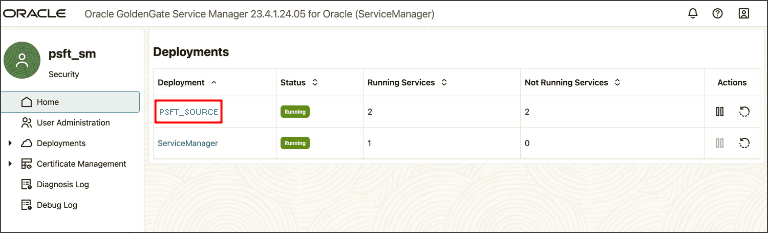
Select the Administration Service link.
This example illustrates the Services page in Oracle GoldenGate Service Manager.
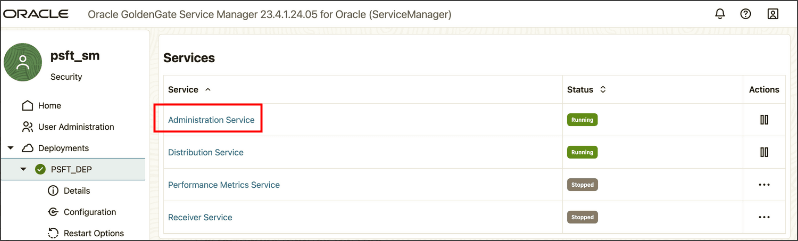
Click the DB Connections plus sign (+) to open the Credentials page.
Enter the following information:
Credential Domain — OracleGoldenGate (default)
Credential Alias — Enter an alias for the user ID.
User ID — Enter the oggadmin user that you created earlier.
Password and Verify Password — Enter the access ID password.
This example illustrates the Credentials page.
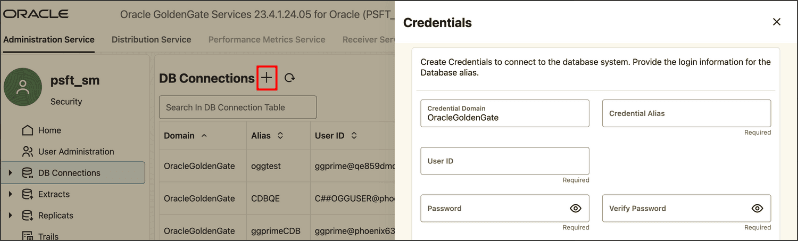
Setting Up the Database Connection with the Admin Client
Use the Microservices Architecture Admin Client on the command line as an alternative to the web interface.
Start the Oracle GoldenGate Admin Client.
$OGG_HOME/bin/adminclientConnect to the deployment.
adminclient>connect http://server.example.com:<Service Manager port> deployment <DEPLOYMENT_NAME> as <Service Manager User> password <Service Manager password>Add the database credentials — user, password, alias, and domain.
adminclient>alter credentialstore add USER "oggadmin@server.example.com:1521/p" alias ggprime domain OracleGoldenGate PASSWORD "password";
Prior to creating and editing the Oracle GoldenGate configuration files, you need to generate PeopleSoft-specific input parameters for the Oracle GoldenGate parameter files.
To generate PeopleSoft-specific Oracle GoldenGate parameter files:
Open the following SQL script in your SQL editor or text editor:
PS_HOME/scripts/psggconfiggenerateparmfilelists.sql.
Modify the following variables:
Modify all occurrences of <OWNER> to reflect the access ID for the database.
Modify all occurrences of <PATH> to reflect the script output directory path (as in, /data1/PT862/scripts/ or c:\temp\).
Note: The ending slash is mandatory for the path.
Save your changes to the SQL file.
Log into SQL*Plus using your PeopleSoft access ID.
Run the psggconfiggenerateparmfilelists.sql script.
Verify that these files appear in the output directory:
PSGGconfiggenerateparmfilelists.log
PSGGgeneratetableexcludes.txt
PSGGgeneratetrandatadeletes.txt
Note: You will add the output from the .txt files to the appropriate Oracle GoldenGate parameter files manually.
This section describes the parameter files that you need to create and modify manually for the source database. Create these files in the dirprm directory of your source Oracle GoldenGate installation. For example, OGG_HOME/dirprm.
The file samples given here include editing instructions.
sourceaddtrndata.oby — The file defines the data to be transferred to the target database. Oracle GoldenGate will transfer changes to the tables defined in the file from the source to the target database.
configure_source.oby — Records the access user ID and defines the extract.
Creating sourceaddtrndata.oby for Data Definition
Create a file named sourceaddtrndata.oby and add the following:
##########################################################################################
-- ADD Trandata Obey file for Primary
-- This file defines the tables which we are interested in having OGG capture changes from the Transaction logs.
-- We initially specify an add TRANDATA EMDBO.* with wildcard to capture all tables.
-- We then direct OGG to ignore specific table trandata.  In our case all of the PeopleSoft type ‘7’ temp tables.
-- This is done by appending the output from the PSGGgeneratetrandatadeletes.txt (eg. just the generated
-- DELETE -- TRANDATA statements) after the ADD TRANDATA EMDBO.* statement
-- ##########################################################################################
--
-- Edit and modify 'OGGUSER' to Oracle GoldenGate Admin Userid and PW
--
-- Edit and modify 'EMDBO' to PSACCESSID
--
-- Append the output from the PSGGgeneratetrandatadeletes.txt (eg. just the generated
-- DELETE TRANDATA       -- statements) after the ADD TRANDATA EMDBO .* statement
--
dblogin useridalias <alias>
ADD TRANDATA SYSADM.*
-- ##########################################################################################
-- This section lists the generated DELETE TRANDATA  statements
-- ##########################################################################################
--<Copy in the generated DELETE TRANDATA statements after the preceding ADD TRANDDATA statement.>
.
.
.
-- ##########################################################################################
-- This section lists the required static DELETE TRANDATA statements
-- ##########################################################################################
DELETE TRANDATA EMDBO.PSLOCK
DELETE TRANDATA EMDBO.PSRECDEFN
DELETE TRANDATA EMDBO.PS_SERVERMONITOR
DELETE TRANDATA EMDBO.PS_SERVERACTVTY
DELETE TRANDATA EMDBO.PS_PRCSSEQUENCE
DELETE TRANDATA EMDBO.PS_MESSAGE_LOGPARM
DELETE TRANDATA EMDBO.PS_MESSAGE_LOG
DELETE TRANDATA EMDBO.PS_AETEMPTBLMGR
DELETE TRANDATA EMDBO.PS_AERUNCONTROLPC
DELETE TRANDATA EMDBO.PS_AERUNCONTROL
DELETE TRANDATA EMDBO.PS_AELOCKMGR
DELETE TRANDATA EMDBO.PSWEBPROFHIST
DELETE TRANDATA EMDBO.PSSERVERSTAT
DELETE TRANDATA EMDBO.PSQRYTRANS
DELETE TRANDATA EMDBO.PSPRCSJOBSTATUS
DELETE TRANDATA EMDBO.PSOPRDEFN
DELETE TRANDATA EMDBO.PSIBSUBSLAVE
DELETE TRANDATA EMDBO.PSIBPUBSLAVE
DELETE TRANDATA EMDBO.PSIBFOLOCK
DELETE TRANDATA EMDBO.PSIBFAILOVER
DELETE TRANDATA EMDBO.PSIBBRKSLAVE
DELETE TRANDATA EMDBO.PSACCESSLOG
DELETE TRANDATA EMDBO.PS_PTFP_ACCESS_LOG
DELETE TRANDATA EMDBO.PS_PTFP_OPTIONS
DELETE TRANDATA EMDBO.PSIBPROFILESYNC
DELETE TRANDATA EMDBO.PSIBLOGHDR
DELETE TRANDATA EMDBO.PSIBLOGERR
DELETE TRANDATA EMDBO.PSIBLOGERRP
DELETE TRANDATA EMDBO.PSIBLOGDATA
DELETE TRANDATA EMDBO.PSIBLOGIBINFO
DELETE TRANDATA EMDBO.PSQASRUN
DELETE TRANDATA EMDBO.PSPRCSRQST
DELETE TRANDATA EMDBO.PSPRCSQUE
DELETE TRANDATA EMDBO.PSPRCSRQSTFILE
DELETE TRANDATA EMDBO.PSPRCSPARMS
DELETE TRANDATA EMDBO.PSPRCSRQSTTEXT
DELETE TRANDATA EMDBO.PSPRCSRQSTTEXT2
DELETE TRANDATA EMDBO.PS_CDM_LIST
DELETE TRANDATA EMDBO.PS_CDM_TRANSFER
DELETE TRANDATA EMDBO.PS_CDM_AUTH
DELETE TRANDATA EMDBO.PS_BAT_TIMINGS_LOG
DELETE TRANDATA EMDBO.PS_BAT_TIMINGS_DTL
DELETE TRANDATA EMDBO.PS_AE_TIMINGS_LG
DELETE TRANDATA EMDBO.PS_AE_TIMINGS_DT
DELETE TRANDATA EMDBO.PS_BAT_TIMINGS_FN
DELETE TRANDATA EMDBO.PSQRYFAVORITES
DELETE TRANDATA EMDBO.PSQRYSTATS
DELETE TRANDATA EMDBO.PSFILE_ATTDET
DELETE TRANDATA EMDBO.PSPTFILE_REF
DELETE TRANDATA EMDBO.PSPTFILE_WART
DELETE TRANDATA EMDBO.PS_PTSF_SCHED_STAT
DELETE TRANDATA EMDBO.PSPGVIEWOPT
DELETE TRANDATA EMDBO.PSPGCHARTOPT
DELETE TRANDATA EMDBO.PSPGCHRTFLRSOPT
DELETE TRANDATA EMDBO.PSPGCHTFLRSLANG
DELETE TRANDATA EMDBO.PSPGDISPOPT
DELETE TRANDATA EMDBO.PSPGGRIDOPT
DELETE TRANDATA EMDBO.PSPGQRYPROMPT
DELETE TRANDATA EMDBO.PSPGQRYPROMPLNG
DELETE TRANDATA EMDBO.PSPGCHARTOPTLNG
DELETE TRANDATA EMDBO.PSPGVIEWOPTLANG
DELETE TRANDATA EMDBO.PSPGVIEWOPTPERS
DELETE TRANDATA EMDBO.PSPGAXISPERS
DELETE TRANDATA EMDBO.PSPGAXISPERSLNG
DELETE TRANDATA EMDBO.PSPGCHARTOPTPER
DELETE TRANDATA EMDBO.PSPGQRYPRMPTPER
DELETE TRANDATA EMDBO.PSPGGRIDOPTPERS
DELETE TRANDATA EMDBO.PSPGCHTOPTPERLN
DELETE TRANDATA EMDBO.PSPGQRYPRMPTPLN
DELETE TRANDATA EMDBO.PSPGVWOPTPERLN
DELETE TRANDATA EMDBO.PSPGCORE
DELETE TRANDATA EMDBO.PSPGCORELANG
DELETE TRANDATA EMDBO.PSPGMODEL
DELETE TRANDATA EMDBO.PSPGMODELLANG
DELETE TRANDATA EMDBO.PSPGSETTINGS
DELETE TRANDATA EMDBO.PSPGAXIS
DELETE TRANDATA EMDBO.PSPGTHRESHOLDLN
DELETE TRANDATA EMDBO.PSPGNUIOPT
DELETE TRANDATA EMDBO.PSPGNUIDIMOPT
DELETE TRANDATA EMDBO.PSPGSAVEHIST
DELETE TRANDATA EMDBO.PSPTFILE_PRCS
DELETE TRANDATA EMDBO.PSUSEROBJTYPE
DELETE TRANDATA EMDBO.PSUSERSRCHDEFN
DELETE TRANDATA EMDBO.PSUSERPRSNLOPTN
DELETE TRANDATA EMDBO.PSVERSION
DELETE TRANDATA EMDBO.PSUSRTAPAGECUST
DELETE TRANDATA EMDBO.PSBATCHAUTH
DELETE TRANDATA EMDBO.PSBATCHAUTHLONG
DELETE TRANDATA EMDBO.PSPRCSCHLDINFO
DELETE TRANDATA EMDBO.PS_PTNVSLYTQRY
DELETE TRANDATA EMDBO.PSTREESELNUM
DELETE TRANDATA EMDBO.PSTREESELCTL
DELETE TRANDATA EMDBO.PSNVSBATCHRSTRT
DELETE TRANDATA EMDBO.PSNVSDRILLQRY
DELETE TRANDATA EMDBO.PSNVSDRLPROMPTS
DELETE TRANDATA EMDBO.PS_CDM_TEXT
DELETE TRANDATA EMDBO.PS_PRCSRQSTDIST
DELETE TRANDATA EMDBO.PSTREESELECT01
DELETE TRANDATA EMDBO.PSTREESELECT02
DELETE TRANDATA EMDBO.PSTREESELECT03
DELETE TRANDATA EMDBO.PSTREESELECT04
DELETE TRANDATA EMDBO.PSTREESELECT05
DELETE TRANDATA EMDBO.PSTREESELECT06
DELETE TRANDATA EMDBO.PSTREESELECT07
DELETE TRANDATA EMDBO.PSTREESELECT08
DELETE TRANDATA EMDBO.PSTREESELECT09
DELETE TRANDATA EMDBO.PSTREESELECT10
DELETE TRANDATA EMDBO.PSTREESELECT11
DELETE TRANDATA EMDBO.PSTREESELECT12
DELETE TRANDATA EMDBO.PSTREESELECT13
DELETE TRANDATA EMDBO.PSTREESELECT14
DELETE TRANDATA EMDBO.PSTREESELECT15
DELETE TRANDATA EMDBO.PSTREESELECT16
DELETE TRANDATA EMDBO.PSTREESELECT17
DELETE TRANDATA EMDBO.PSTREESELECT18
DELETE TRANDATA EMDBO.PSTREESELECT19
DELETE TRANDATA EMDBO.PSTREESELECT20
DELETE TRANDATA EMDBO.PSTREESELECT21
DELETE TRANDATA EMDBO.PSTREESELECT22
DELETE TRANDATA EMDBO.PSTREESELECT23
DELETE TRANDATA EMDBO.PSTREESELECT24
DELETE TRANDATA EMDBO.PSTREESELECT25
DELETE TRANDATA EMDBO.PSTREESELECT26
DELETE TRANDATA EMDBO.PSTREESELECT27
DELETE TRANDATA EMDBO.PSTREESELECT28
DELETE TRANDATA EMDBO.PSTREESELECT29
DELETE TRANDATA EMDBO.PSTREESELECT30
DELETE TRANDATA EMDBO.PSFP_FEED
DELETE TRANDATA EMDBO.PSFP_FEED_LANG
DELETE TRANDATA EMDBO.PSFP_SETTINGS
DELETE TRANDATA EMDBO.PSFP_ADMN_PREF
DELETE TRANDATA EMDBO.PSFP_USER_PREF
DELETE TRANDATA EMDBO.PSFP_SECURITY
DELETE TRANDATA EMDBO.PSFP_PUB_SITES
DELETE TRANDATA EMDBO.PSFP_PARMS
DELETE TRANDATA EMDBO.PSFP_PARMS_LANG
DELETE TRANDATA EMDBO.PSFP_PVALS
DELETE TRANDATA EMDBO.PSFP_PVALS_LANG
DELETE TRANDATA EMDBO.PSFP_ATTRS
DELETE TRANDATA EMDBO.PSFP_ATTRS_LANG
DELETE TRANDATA EMDBO.PSFP_FEED_DEL
DELETE TRANDATA EMDBO.PSAPMSGPUBHDR
DELETE TRANDATA EMDBO.PSAPMSGPUBDATA
DELETE TRANDATA EMDBO.PSAPMSGIBATTR
DELETE TRANDATA EMDBO.PSAPMSGSEGATTR
DELETE TRANDATA EMDBO.PSAPMSGPUBSYNC
After modifying and saving the file, use Admin Client to verify the standard output from running sourceaddtrndata.oby.
Creating configure_source.oby for Extraction Definition
Create a file named configure_source.oby and add the following.
################################################################################
--
-- Edit and modify useridalias and extract name
--

dblogin useridalias ggprime
ADD EXTRACT primecap INTEGRATED TRANLOG, BEGIN NOW
add exttrail pp, extract primecap
REGISTER EXTRACT primecap DATABASE

Create a file named primecap.prm and add the following:

##########################################################################################
--
-- Edit and modify useridalias
--
-- Edit and modify 'EMDBO' to PSACCESSID
--
-- Copy the output from the PSGGgeneratetableexcludes.txt (eg. just the generated TABLEEXCLUDE
-- statements) between the WILDCARDRESOLVE DYNAMIC statement and before the TABLE EMDBO.*
-- statement
--
-- ##########################################################################################

EXTRACT primecap
useridalias ggprime
EXTTRAIL pp
LOGALLSUPCOLS
UPDATERECORDFORMAT COMPACT
TRANLOGOPTIONS USE_ROOT_CONTAINER_TIMEZONE

-- ##########################################################################################
-- This section lists the generated TABLEEXCLUDE statements
-- ##########################################################################################

-- <Copy in the generated TABLEEXCLUDE statements after the preceding WILDCARDRESOLVE DYNAMIC
-- statement.>
.
.
.
.

-- ##########################################################################################
-- This section lists the required static TABLEEXCLUDE statements
-- ##########################################################################################


TABLEEXCLUDE EMDBO.PSLOCK;
TABLEEXCLUDE EMDBO.PSRECDEFN;
TABLEEXCLUDE EMDBO.PS_SERVERMONITOR;
TABLEEXCLUDE EMDBO.PS_SERVERACTVTY;
TABLEEXCLUDE EMDBO.PS_PRCSSEQUENCE;
TABLEEXCLUDE EMDBO.PS_MESSAGE_LOGPARM;
TABLEEXCLUDE EMDBO.PS_MESSAGE_LOG;
TABLEEXCLUDE EMDBO.PS_AETEMPTBLMGR;
TABLEEXCLUDE EMDBO.PS_AERUNCONTROLPC;
TABLEEXCLUDE EMDBO.PS_AERUNCONTROL;
TABLEEXCLUDE EMDBO.PS_AELOCKMGR;
TABLEEXCLUDE EMDBO.PSWEBPROFHIST;
TABLEEXCLUDE EMDBO.PSSERVERSTAT;
TABLEEXCLUDE EMDBO.PSQRYTRANS;
TABLEEXCLUDE EMDBO.PSPRCSJOBSTATUS;
TABLEEXCLUDE EMDBO.PSOPRDEFN;
TABLEEXCLUDE EMDBO.PSIBSUBSLAVE;
TABLEEXCLUDE EMDBO.PSIBPUBSLAVE;
TABLEEXCLUDE EMDBO.PSIBFOLOCK;
TABLEEXCLUDE EMDBO.PSIBFAILOVER;
TABLEEXCLUDE EMDBO.PSIBBRKSLAVE;
TABLEEXCLUDE EMDBO.PSACCESSLOG;
TABLEEXCLUDE EMDBO.PS_PTFP_ACCESS_LOG;
TABLEEXCLUDE EMDBO.PS_PTFP_OPTIONS;
TABLEEXCLUDE EMDBO.PSIBPROFILESYNC;
TABLEEXCLUDE EMDBO.PSIBLOGHDR;
TABLEEXCLUDE EMDBO.PSIBLOGERR;
TABLEEXCLUDE EMDBO.PSIBLOGERRP;
TABLEEXCLUDE EMDBO.PSIBLOGDATA;
TABLEEXCLUDE EMDBO.PSIBLOGIBINFO;
TABLEEXCLUDE EMDBO.PSQASRUN;
TABLEEXCLUDE EMDBO.PSPRCSRQST;
TABLEEXCLUDE EMDBO.PSPRCSQUE;
TABLEEXCLUDE EMDBO.PSPRCSRQSTFILE;
TABLEEXCLUDE EMDBO.PSPRCSPARMS;
TABLEEXCLUDE EMDBO.PSPRCSRQSTTEXT;
TABLEEXCLUDE EMDBO.PSPRCSRQSTTEXT2;
TABLEEXCLUDE EMDBO.PS_CDM_LIST;
TABLEEXCLUDE EMDBO.PS_CDM_TRANSFER;
TABLEEXCLUDE EMDBO.PS_CDM_AUTH;
TABLEEXCLUDE EMDBO.PS_BAT_TIMINGS_LOG;
TABLEEXCLUDE EMDBO.PS_BAT_TIMINGS_DTL;
TABLEEXCLUDE EMDBO.PS_AE_TIMINGS_LG;
TABLEEXCLUDE EMDBO.PS_AE_TIMINGS_DT;
TABLEEXCLUDE EMDBO.PS_BAT_TIMINGS_FN;
TABLEEXCLUDE EMDBO.PSQRYFAVORITES;
TABLEEXCLUDE EMDBO.PSQRYSTATS;
TABLEEXCLUDE EMDBO.PSFILE_ATTDET;
TABLEEXCLUDE EMDBO.PSPTFILE_REF;
TABLEEXCLUDE EMDBO.PSPTFILE_WART;
TABLEEXCLUDE EMDBO.PS_PTSF_SCHED_STAT;
TABLEEXCLUDE EMDBO.PSPGVIEWOPT;
TABLEEXCLUDE EMDBO.PSPGCHARTOPT;
TABLEEXCLUDE EMDBO.PSPGCHRTFLRSOPT;
TABLEEXCLUDE EMDBO.PSPGCHTFLRSLANG;
TABLEEXCLUDE EMDBO.PSPGDISPOPT;
TABLEEXCLUDE EMDBO.PSPGGRIDOPT;
TABLEEXCLUDE EMDBO.PSPGQRYPROMPT;
TABLEEXCLUDE EMDBO.PSPGQRYPROMPLNG;
TABLEEXCLUDE EMDBO.PSPGCHARTOPTLNG;
TABLEEXCLUDE EMDBO.PSPGVIEWOPTLANG;
TABLEEXCLUDE EMDBO.PSPGVIEWOPTPERS;
TABLEEXCLUDE EMDBO.PSPGAXISPERS;
TABLEEXCLUDE EMDBO.PSPGAXISPERSLNG;
TABLEEXCLUDE EMDBO.PSPGCHARTOPTPER;
TABLEEXCLUDE EMDBO.PSPGQRYPRMPTPER;
TABLEEXCLUDE EMDBO.PSPGGRIDOPTPERS;
TABLEEXCLUDE EMDBO.PSPGCHTOPTPERLN;
TABLEEXCLUDE EMDBO.PSPGQRYPRMPTPLN;
TABLEEXCLUDE EMDBO.PSPGVWOPTPERLN;
TABLEEXCLUDE EMDBO.PSPGCORE;
TABLEEXCLUDE EMDBO.PSPGCORELANG;
TABLEEXCLUDE EMDBO.PSPGMODEL;
TABLEEXCLUDE EMDBO.PSPGMODELLANG;
TABLEEXCLUDE EMDBO.PSPGSETTINGS;
TABLEEXCLUDE EMDBO.PSPGAXIS;
TABLEEXCLUDE EMDBO.PSPGTHRESHOLDLN;
TABLEEXCLUDE EMDBO.PSPGNUIOPT;
TABLEEXCLUDE EMDBO.PSPGNUIDIMOPT;
TABLEEXCLUDE EMDBO.PSPGSAVEHIST;
TABLEEXCLUDE EMDBO.PSPTFILE_PRCS;
TABLEEXCLUDE EMDBO.PSUSEROBJTYPE;
TABLEEXCLUDE EMDBO.PSUSERSRCHDEFN;
TABLEEXCLUDE EMDBO.PSUSERPRSNLOPTN;
TABLEEXCLUDE EMDBO.PSVERSION;
TABLEEXCLUDE EMDBO.PSUSRTAPAGECUST;
TABLEEXCLUDE EMDBO.PSBATCHAUTH;
TABLEEXCLUDE EMDBO.PSBATCHAUTHLONG;
TABLEEXCLUDE EMDBO.PSPRCSCHLDINFO;
TABLEEXCLUDE EMDBO.PS_PTNVSLYTQRY;
TABLEEXCLUDE EMDBO.PSTREESELNUM;
TABLEEXCLUDE EMDBO.PSTREESELCTL;
TABLEEXCLUDE EMDBO.PSNVSBATCHRSTRT;
TABLEEXCLUDE EMDBO.PSNVSDRILLQRY;
TABLEEXCLUDE EMDBO.PSNVSDRLPROMPTS;
TABLEEXCLUDE EMDBO.PS_CDM_TEXT;
TABLEEXCLUDE EMDBO.PS_PRCSRQSTDIST;
TABLEEXCLUDE EMDBO.PSTREESELECT01;
TABLEEXCLUDE EMDBO.PSTREESELECT02;
TABLEEXCLUDE EMDBO.PSTREESELECT03;
TABLEEXCLUDE EMDBO.PSTREESELECT04;
TABLEEXCLUDE EMDBO.PSTREESELECT05;
TABLEEXCLUDE EMDBO.PSTREESELECT06;
TABLEEXCLUDE EMDBO.PSTREESELECT07;
TABLEEXCLUDE EMDBO.PSTREESELECT08;
TABLEEXCLUDE EMDBO.PSTREESELECT09;
TABLEEXCLUDE EMDBO.PSTREESELECT10;
TABLEEXCLUDE EMDBO.PSTREESELECT11;
TABLEEXCLUDE EMDBO.PSTREESELECT12;
TABLEEXCLUDE EMDBO.PSTREESELECT13;
TABLEEXCLUDE EMDBO.PSTREESELECT14;
TABLEEXCLUDE EMDBO.PSTREESELECT15;
TABLEEXCLUDE EMDBO.PSTREESELECT16;
TABLEEXCLUDE EMDBO.PSTREESELECT17;
TABLEEXCLUDE EMDBO.PSTREESELECT18;
TABLEEXCLUDE EMDBO.PSTREESELECT19;
TABLEEXCLUDE EMDBO.PSTREESELECT20;
TABLEEXCLUDE EMDBO.PSTREESELECT21;
TABLEEXCLUDE EMDBO.PSTREESELECT22;
TABLEEXCLUDE EMDBO.PSTREESELECT23;
TABLEEXCLUDE EMDBO.PSTREESELECT24;
TABLEEXCLUDE EMDBO.PSTREESELECT25;
TABLEEXCLUDE EMDBO.PSTREESELECT26;
TABLEEXCLUDE EMDBO.PSTREESELECT27;
TABLEEXCLUDE EMDBO.PSTREESELECT28;
TABLEEXCLUDE EMDBO.PSTREESELECT29;
TABLEEXCLUDE EMDBO.PSTREESELECT30;
TABLEEXCLUDE EMDBO.PSFP_FEED;
TABLEEXCLUDE EMDBO.PSFP_FEED_LANG;
TABLEEXCLUDE EMDBO.PSFP_SETTINGS;
TABLEEXCLUDE EMDBO.PSFP_ADMN_PREF;
TABLEEXCLUDE EMDBO.PSFP_USER_PREF;
TABLEEXCLUDE EMDBO.PSFP_SECURITY;
TABLEEXCLUDE EMDBO.PSFP_PUB_SITES;
TABLEEXCLUDE EMDBO.PSFP_PARMS;
TABLEEXCLUDE EMDBO.PSFP_PARMS_LANG;
TABLEEXCLUDE EMDBO.PSFP_PVALS;
TABLEEXCLUDE EMDBO.PSFP_PVALS_LANG;
TABLEEXCLUDE EMDBO.PSFP_ATTRS;
TABLEEXCLUDE EMDBO.PSFP_ATTRS_LANG;
TABLEEXCLUDE EMDBO.PSFP_FEED_DEL;
TABLEEXCLUDE EMDBO.PSAPMSGPUBHDR;
TABLEEXCLUDE EMDBO.PSAPMSGPUBDATA;
TABLEEXCLUDE EMDBO.PSAPMSGIBATTR;
TABLEEXCLUDE EMDBO.PSAPMSGSEGATTR;
TABLEEXCLUDE EMDBO.PSAPMSGPUBSYNC;
TABLE EMDBO.*;
After modifying and saving the file, connect to Admin Client, and verify the standard output.
To set up the distribution path, complete these steps:
Create a new user in Service Manager on the target database.
Set up the path on the source database.
Create the distribution service on the source database.
Creating a New User on the Target Database
Sign in to Service Manager on the target database.
Select the link for the deployment, for example PSFT_TARGET.
Select User Administration from the menu on the left.
Click the plus sign (+) to add a user.
On the Create new User page, enter values for these options:
Authorized By — Accept the default, Password.
Role — Select Operator from the drop-down.
Username — Enter a name for the new user, which is oggnetwork in this example.
Password and Verify Password — Enter a password for the new user.
This example illustrates the Create new User page in Service Manager.
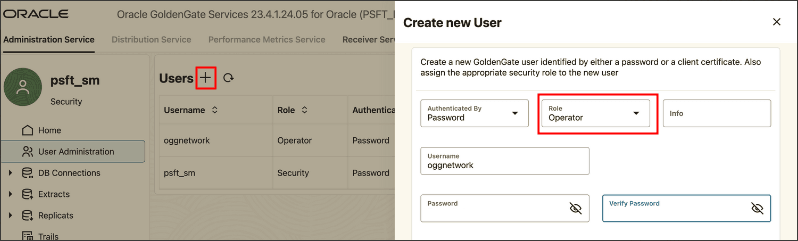
Click Submit.
Setting Up the Path on the Source Database
Configure an alias for the distribution path on the source database.
Sign in to Service Manager on the source database.
Select the link for the deployment, for example PSFT_SOURCE.
Select Administration Service.
Select Path Connections from the navigation panel on the left.
Click the Path Connections plus sign (+) to enter credentials to connect to the deployment on the target database.
On the Path Connection page, enter values for these options:
Credential Domain — This is preset as Network and cannot be changed.
Credential Alias — Enter an alias for the user credential, which is oggnetwork in this example.
User ID — Enter the new user that you created on the target database, oggnetwork in this example.
Password and Verify Password — Enter the password for the specified user.
This example illustrates the Path Connection page in Oracle GoldenGate Service Manager.
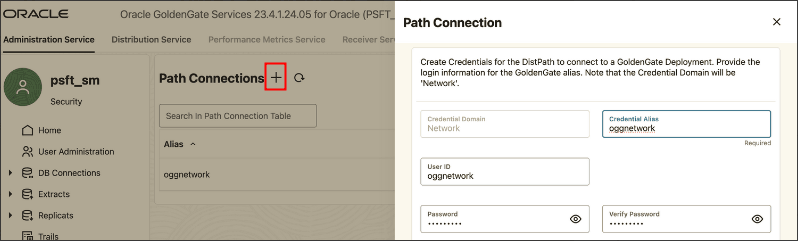
Click Submit.
Creating the Distribution Service on the Source Database
Before creating the distribution service, ensure that you have completed the previous sections to create a user and set up a path.
Select the link for the deployment from the navigation panel on the left, and then select Distribution Service.
Select Distribution Paths from the navigation panel on the left.
Click the plus sign (+) to add a Distribution Path.
On the Add Path page, enter a path name, which is PSFT-GG in this example, and an optional description.
This example illustrates the Add Path panel in Service Manager.
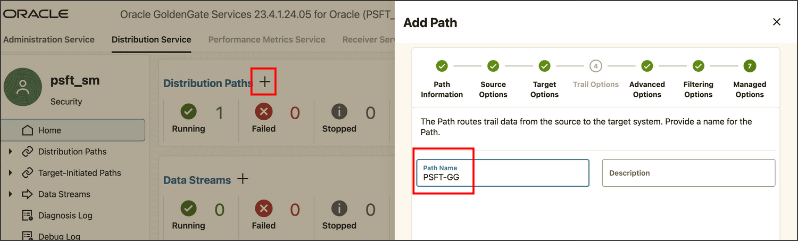
Select the file defining your extract, which is PRIMCAP in this example.
The information in the other fields on the page are supplied by the system based on the information in the parameter files.
This example illustrates Trail Options on the Add Path page.
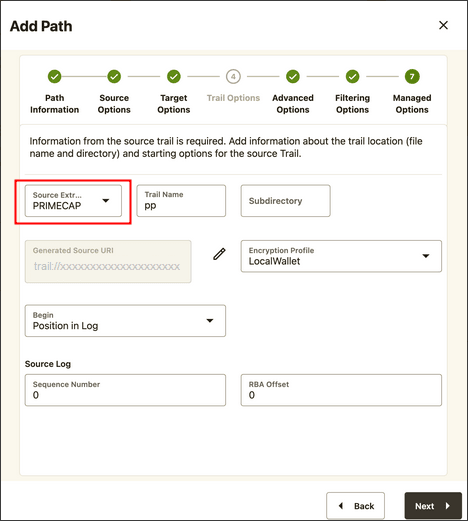
Click Next.
Select one of these target protocols:
WSS — Secure web socket
WS — Web socket, which is shown in this example.
OGG — Oracle GoldenGate protocol.
This example illustrates the Add Path page to specify target protocols.
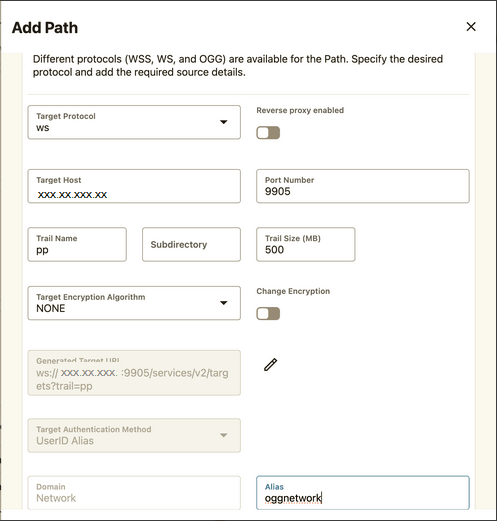
Provide the following values. You can accept the values in the other fields on the page.
IP address for the target host
The target port number, which is 9905 in this example.
Trail name, which is pp in this example.
Alias, which is oggnetwork in this example.
Click Next on the following pages until you reach the last step.
Select Create Path and Run.
You should see a distribution path with Running status.
This example illustrates the Distribution Paths page with a running distribution path.
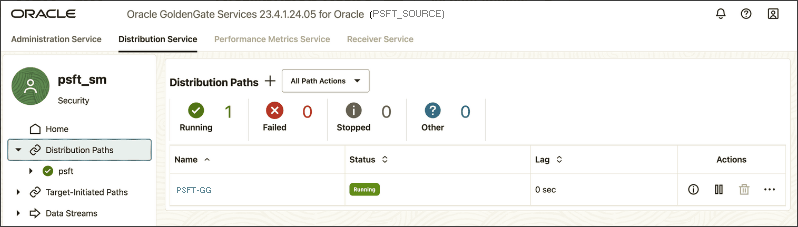
Create the configure_target.oby file on the target database for the Oracle GoldenGate REPLICAT process.
Create a file named configure_target.oby on the target database, and add the following:
##########################################################################################
-- Edit and modify 'useridalias'
-- Edit and modify EXTTRAIL

dblogin useridalias ggtrgt
ADD REPLICAT trgtrep, INTEGRATED, EXTTRAIL pp


Create a file named trgtrep.prm, and add the following

##########################################################################################
-- Edit and modify useridalias and PDB names
-- ##########################################################################################

REPLICAT trgtrep
USERIDALIAS ggtrgt
DBOPTIONS INTEGRATEDPARAMS(PARALLELISM 4)

MAP SYSADM.* , TARGET TARGET_PDB.SYSADM.*;This section contains an overview and discusses:
creating database links
creating remote synonyms.
Understanding Remote Synonyms with DBLINKS for PeopleSoft and Oracle GoldenGate
In the default Oracle GoldenGate configuration, all changes that occur on the source get replicated to the target. For the PeopleSoft reporting infrastructure to run correctly we would also need to synchronize the following tables back to the source from the target should any update be made to the following tables:
EMDBO.PSLOCK
EMDBO.PS_SERVERMONITOR
EMDBO.PS_SERVERACTVTY
EMDBO.PS_PRCSSEQUENCE
EMDBO.PS_MESSAGE_LOGPARM
EMDBO.PS_MESSAGE_LOG
EMDBO.PS_AETEMPTBLMGR
EMDBO.PS_AERUNCONTROLPC
EMDBO.PS_AERUNCONTROL
EMDBO.PS_AELOCKMGR
EMDBO.PSWEBPROFHIST
EMDBO.PSSERVERSTAT
EMDBO.PSQRYTRANS
EMDBO.PSPRCSJOBSTATUS
EMDBO.PSOPRDEFN
EMDBO.PSIBSUBSLAVE
EMDBO.PSIBPUBSLAVE
EMDBO.PSIBFOLOCK
EMDBO.PSIBFAILOVER
EMDBO.PSIBBRKSLAVE
EMDBO.PSACCESSLOG
EMDBO.PS_PTFP_ACCESS_LOG
EMDBO.PS_PTFP_OPTIONS
EMDBO.PSIBPROFILESYNC
EMDBO.PSIBLOGHDR
EMDBO.PSIBLOGERR
EMDBO.PSIBLOGERRP
EMDBO.PSIBLOGDATA
EMDBO.PSIBLOGIBINFO
EMDBO.PSQASRUN
EMDBO.PSPRCSRQST
EMDBO.PSPRCSQUE
EMDBO.PSPRCSRQSTFILE
EMDBO.PSPRCSPARMS
EMDBO.PSPRCSRQSTTEXT
EMDBO.PSPRCSRQSTTEXT2
EMDBO.PS_CDM_LIST
EMDBO.PS_CDM_TRANSFER
EMDBO.PS_CDM_AUTH
EMDBO.PS_BAT_TIMINGS_LOG
EMDBO.PS_BAT_TIMINGS_DTL
EMDBO.PS_AE_TIMINGS_LG
EMDBO.PS_AE_TIMINGS_DT
EMDBO.PS_BAT_TIMINGS_FN
EMDBO.PSQRYFAVORITES
EMDBO.PSQRYSTATS
EMDBO.PSFILE_ATTDET
EMDBO.PSPTFILE_REF
EMDBO.PSPTFILE_WART
EMDBO.PS_PTSF_SCHED_STAT
EMDBO.PSPGVIEWOPT
EMDBO.PSPGCHARTOPT
EMDBO.PSPGCHRTFLRSOPT
EMDBO.PSPGCHTFLRSLANG
EMDBO.PSPGDISPOPT
EMDBO.PSPGGRIDOPT
EMDBO.PSPGQRYPROMPT
EMDBO.PSPGCHARTOPTLNG
EMDBO.PSPGVIEWOPTLANG
EMDBO.PSPTFILE_PRCS
EMDBO.PSUSEROBJTYPE
EMDBO.PSUSERSRCHDEFN
EMDBO.PSUSERPRSNLOPTN
EMDBO.PSVERSION
EMDBO.PSUSRTAPAGECUST
EMDBO.PSBATCHAUTH
EMDBO.PSBATCHAUTHLONG
EMDBO.PSPRCSCHLDINFO
EMDBO.PS_PTNVSLYTQRY
EMDBO.PSTREESELNUM
EMDBO.PSTREESELCTL
EMDBO.PSNVSBATCHRSTRT
EMDBO.PSNVSDRILLQRY
EMDBO.PSNVSDRLPROMPTS
EMDBO.PS_CDM_TEXT
EMDBO.PS_PRCSRQSTDIST
EMDBO.PSTREESELECT01
EMDBO.PSTREESELECT02
EMDBO.PSTREESELECT03
EMDBO.PSTREESELECT04
EMDBO.PSTREESELECT05
EMDBO.PSTREESELECT06
EMDBO.PSTREESELECT07
EMDBO.PSTREESELECT08
EMDBO.PSTREESELECT09
EMDBO.PSTREESELECT10
EMDBO.PSTREESELECT11
EMDBO.PSTREESELECT12
EMDBO.PSTREESELECT13
EMDBO.PSTREESELECT14
EMDBO.PSTREESELECT15
EMDBO.PSTREESELECT16
EMDBO.PSTREESELECT17
EMDBO.PSTREESELECT18
EMDBO.PSTREESELECT19
EMDBO.PSTREESELECT20
EMDBO.PSTREESELECT21
EMDBO.PSTREESELECT22
EMDBO.PSTREESELECT23
EMDBO.PSTREESELECT24
EMDBO.PSTREESELECT25
EMDBO.PSTREESELECT26
EMDBO.PSTREESELECT27
EMDBO.PSTREESELECT28
EMDBO.PSTREESELECT29
EMDBO.PSTREESELECT30
Normally in a Oracle GoldenGate configuration you use Oracle GoldenGate to replicate changes made on these tables from the target to the source database. PeopleSoft cannot take advantage of Oracle GoldenGate's bi-directional replication mechanism due to possible issues in the PeopleSoft reporting infrastructure in an environment where both databases are active at all times. The PeopleSoft reporting infrastructure (Process Scheduler, PSAESRV, PSPRCSRV, DISTSRV, and so on) will not accommodate database synchronization lag time with sequence numbers and instance numbers. To address this issue when using Oracle GoldenGate, PeopleSoft needs to utilize Remote Synonyms and Database Links to redirect all data manipulation language (DML) requested on the target database to the source database for a subset of the tables that make up the PeopleSoft reporting infrastructure.
Creating Database Links to the Source Database
To create database links to the source database:
Drop ‘Like’ named redirected tables in the target database.
Prior to creating the database links and the remote synonyms, you need to drop ‘like’ named redirected tables on the target database by running the following script.
PS_HOME/scripts/dropredirectedtables.sql
Run this script against the target database connected as the primary access ID in SQLPlus.
Edit the createdblinktoprimary.sql script.
This script creates a fixed database link between the primary access ID on the target database to the primary access ID on the source database. Open the createdblinktoprimary.sql script in PS_HOME\scripts, and modify it as follows:
Replace <DBNAME> with the source database TNSALIAS.
<EMDBO> with the primary access ID.
<PASSWORD> with the primary access ID password.
Run the createdblinktoprimary.sql script.
Run this script against the target database connected as the primary access ID.
Make sure that the access ID has "create public database link" privileges or else the above create database link will fail with ORA-01031: insufficient privileges . Grant the
CREATE PUBLIC DATABASE
                                LINK
privilege to the access id on the target database:$ sqlplus / as sysdba SQL> Alter session set container=PT855GA; Session Altered. SQL> Grant create public database link to EMDBO;
Creating Remote Synonyms
Remote synonyms are required for the tables identified as requiring DML access. If you decide to set a component to "read-only" after your analysis, then you need to include the underlying tables that require DML access to this script manually.
To create remote synonyms, you run the PS_HOME/scripts/createremotesynonyms.sql script. You must run this script against the target database connected as the primary access ID.
Configure Oracle GoldenGate with information for the source and target databases.
Configuring the Source and Target Databases
When working with each database, ensure that the ORACLE_HOME and ORACLE_SID environment variables are set before invoking the Oracle GoldenGate command line interpreter (GGSCI). Make sure you invoke GGSCI from $OGG_HOME or add $OGG_HOME to the $PATH environment variable.
To configure the source and target databases:
Add supplemental log groups to the source database.
adminclient> obey ./priaddtrndata.Configure the Oracle GoldenGate processes on the source database.
adminclient> obey ./configure_primary.obyConfigure the Oracle GoldenGate processes on the target database.
adminclient> obey ./configure_standby.oby
Starting the Oracle GoldenGate Processes on the Source and Target Databases
To start the Oracle GoldenGate processes on the source and target databases:
Issue the following commands on the source database server to start the Oracle GoldenGate processes:
GGSCI > start manager
GGSCI> start primecap
GGSCI > info all
Issue the following commands on the target database server to start the Oracle GoldenGate processes:
GGSCI > start manager
GGSCI > info all
Issue the following command on the source database server to start the Oracle GoldenGate pump processes.
GGSCI> start primepmp
GGSCI> info all
Issue the following command on the target database server to start the Oracle GoldenGate repository processes.
GGSCI> start trgtrep
GGSCI> info all
To set up your PeopleSoft system to recognize both the source and target databases, as well to recognize the components and processes that will use the Oracle GoldenGate implementation, you need to:
Specify the target database information in the application server and Process Scheduler configuration files.
Configure read-only components.
Configure read-only processes.
The procedures for performing these tasks are identical to those for setting up Oracle ADG.
Note: Its important to understand the inherited behavior for marking a component as RO. If an initial component is marked as RO and this component calls other components, the called components will inherit the RO flag. That is, not only will the initial components SQL be redirected to the TARGET database, all the SQL from the called components will also be redirected to the TARGET database. Oracle has accounted for tables that may be involved with DML SQL operations from the supported components and processes listed in Understanding Oracle GoldenGate and PeopleSoft Environments by including those tables in the CREATEREMOTESYNONYM.SQL script. If additional components are marked RO and perform DML SQL operations on any tables not previously accounted for, then REMOTE SYNONYMS must be created for those tables as well.