Setting Up the Customization Insights Dashboards
PeopleTools delivered Customization dashboards with associated visualizations can be deployed for any PeopleSoft application, such as, FSCM or HCM, that is running on PeopleTools 8.62.02 or higher version.
In order to use the delivered dashboards, a user with the Search Administrator role should deploy the dashboard. When you deploy a dashboard, you are copying the dashboard from the PeopleSoft database to your instance of OpenSearch Dashboards.
Before you deploy a dashboard, follow these pre-requisites:
Use the Deploy Search Definition page to deploy the search definition (PeopleTools, Search Framework, Administration, Deploy Search Objects).
Note that the metadata extracted in the Insights database is for this search definition. For details refer, Understanding Lifecycle Management Insights.
Use the Schedule Search Index page to run the Build Index process (PeopleTools, Search Framework, Administration, Schedule Search Index).
Use the Deploy Insights Dashboards page to deploy the dashboards.
Access the Deploy Insights Dashboards page by selecting .
The two dashboards that need to be deployed are:
Customization Details Dashboard
Customization Insights Dashboard
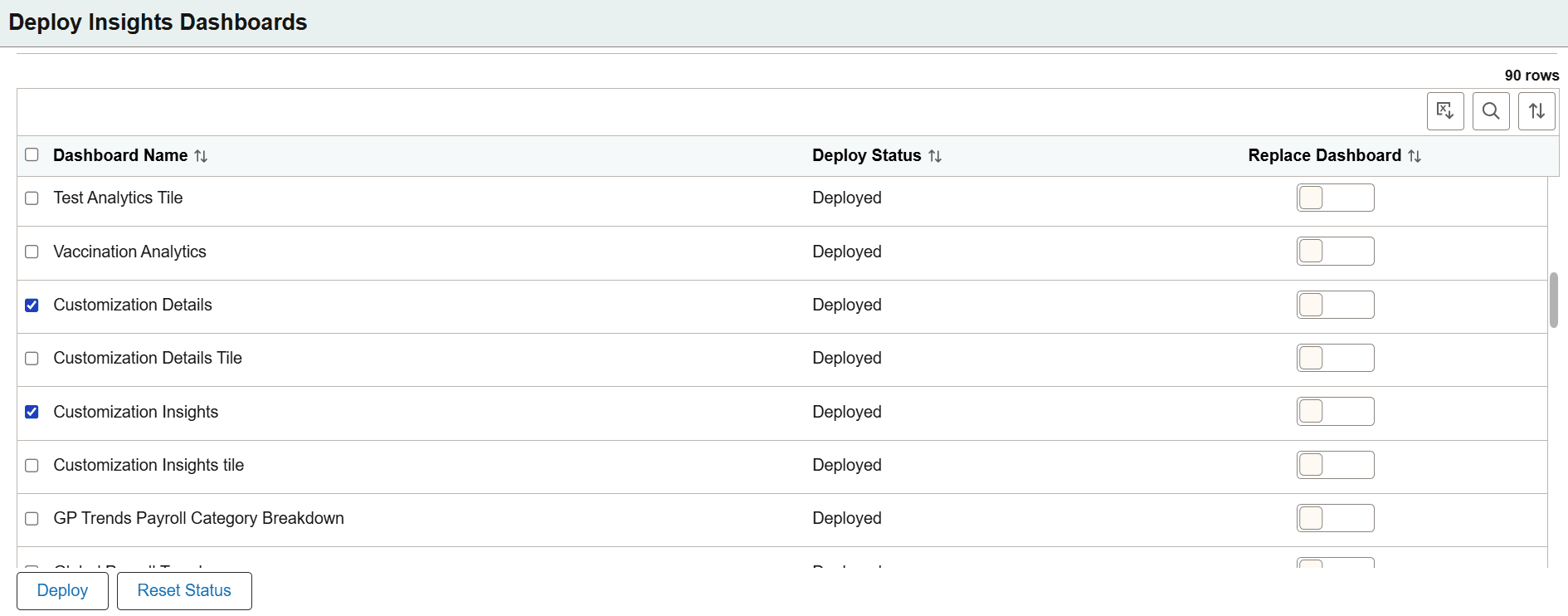
This example illustrates the fields and controls on the Deploy Insights Dashboards. You can find definitions for the fields and controls later on this page.
|
Field or Control |
Description |
|---|---|
|
Dashboard Name |
The delivered dashboards are listed on the Deploy Insights Dashboards page. |
|
Deploy Status |
Displays the status of the dashboard, that is, as deployed or undeployed. |
|
Replace Dashboard |
If you modify a dashboard after it has been imported to PeopleSoft, use the Replace Dashboard button to overwrite the dashboard that already exists in OpenSearch Dashboards server. When you enable this button, it copies the dashboard to the OpenSearch server and replaces the new dashboard in the target environment. By default, it is disabled. When you select a single dashboard and the Replace Dashboard button is not enabled, a popup appears with the option to replace the dashboard. |
|
Deploy |
Deploys the Customization dashboard to your instance of OpenSearch Dashboards. You can also use the deploy option when you migrate dashboards from one environment to another , for example, from a testing environment to the production environment. |
|
Reset Status |
Reset Status button resets the dashboard status from Deployed to Undeployed. The default dashboard status is Undeployed. The dashboard remains in OpenSearch Dashboards after a reset. |
PeopleSoft applications assign certain roles to the delivered Customization dashboards that enable users to view and use the dashboards and visualizations.
To assign roles:
Navigate to .
On the User Profiles page, select the following roles:
Lifecycle Updates: With this role you can access the Customization Insights dashboard.
LifeCycle Tools: With this role you can access the Customization Details dashboard.