機械翻訳について

Oracle ERP Cloudアダプタ・エラー・メッセージ

次のOracle ERP Cloudアダプタ・エラー・メッセージおよび考えられる原因に注意してください。

エラー・コード番号 エラー・メッセージ エラー・コード目的
CA-ERP-001
Unable to verify the call-back message sent by ERP Cloud hence the 
call-back request sent by ERP Cloud is not processed. Please ensure the steps 
described in the link https://docs.oracle.com/en/cloud/paas/integration-cloud/
erp-adapter/prerequisites-creating-connection.html#GUID-D4CF2D13-326D-41A2-A119-B932859C7041
have been completed prior to executing the integration flow that submits bulk data import
request to ERP Cloud.

前提条件が実行されていないためにコールバック・メッセージが処理されていない場合。

CA-ERP-002
The user is not created in ICS/OIC. Please execute #1 in the pre-requisites link.

ユーザーが作成されていないときの特定の例外。

CA-ERP-003
The certificates are not imported in ICS/OIC. Please execute #2 in the pre-requisites
link

証明書が作成されていない場合の特定の例外。

CA-ERP-004
Unable to process the callback message due to incomplete payload sent by ERP Cloud.
The payload sent by ERP Cloud application is not having Document ID and hence the bulk data 
import job specific report & log files could not be downloaded from ERP Cloud (UCM).

Please verify the payload sent by ERP Cloud.

You would want to visit the troubeshooting section here 
http://www.oracle.com/pls/topic/lookup?ctx=oic&id=ICSER-GUID-82650DE7-6A3B-4070-B149-03F1A5922681
for probable solution. 

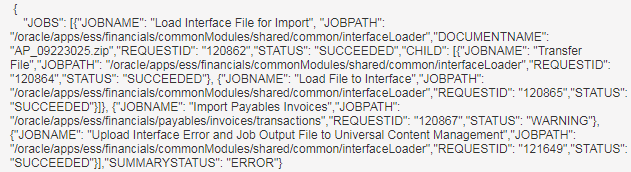
The payload sent by ERP Cloud is as follows. 
ペイロードのコンテンツ

コールバック・ペイロード内のdocumentIDがNULLの場合。