Assigning Objectives to Jobs and Position Numbers
|
Page Name |
Definition Name |
Usage |
|---|---|---|
|
LM_JOB_OBJV_2 |
Assign objectives to job codes. |
|
|
LM_POSITION_OBJV_2 |
Assign objectives to position numbers. |
|
|
LM_RUNCTL_OBJV_PG |
Run the Process Job Role Objectives process to initiate the gap analysis process for future-dated objective assignments to job codes and position numbers. |
|
|
Job Codes Map Page |
LM_OBJV_JOB_MAP |
Review job codes that are mapped to objectives. |
|
Job Positions Map Page |
LM_OBJV_POSN_MAP |
Review position numbers that are mapped to objectives. |
When you integrate with an external human resources system, you import job codes, position numbers, competencies, job role competencies, and person competencies through EIPs. The system uses this information to perform gap analysis and automatically assign objectives to learners based on job role requirements.
You can manually map objectives to job codes and position numbers if you need to assign objectives to a job code or position number outside of the requirements that are defined in your human resources system or if you do not import job role competencies from the human resources system.
Note: If you do not integrate with a human resources system, and you want to map objectives to jobs and position numbers, you must import job codes, position numbers, and learners' job codes and position numbers from another application.
Triggering the Gap Analysis Process
When you manually map objectives to job codes and positions, and save your changes, the system triggers the gap analysis process, assigning objectives to learners to fulfill learning gaps. To initiate the gap analysis process for future-dated objective assignments, you must run the Process Job Role Objectives process, which causes the system to perform gap analysis for any objectives mapped to job codes and position numbers that have met their effective date since the last run of the process.
Note: Administrators can assign objectives to a job code or position number through group or mass objective assignment; however, this is a one-time only association. Any learners who are assigned the job code or position number after the group or mass objective assignment process runs are not assigned the objective.
Removing Objectives from Job Codes and Positions
If you remove an objective from a job code or position number, the system deletes the objective from the learners current objectives record provided that the objective does not have any other association with the learner—for example, the objective was not also assigned by an administrator as a required objective for the learner. In addition, the system deletes only objectives with a status of Needed. The system does not delete objectives with a status of in progress or met.
Before you can map objectives to job codes and position numbers, you must:
Import job codes and position numbers through EIPs.
Define objectives.
Use the Define Job Code Objectives page (LM_JOB_OBJV_2) to assign objectives to job codes.
Navigation:
This example illustrates the fields and controls on the Define Job Code Objectives page.
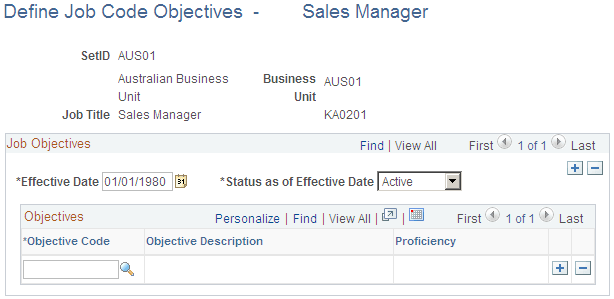
Note: When you save the page, the system triggers the gap analysis process. When applicable, the objectives will also be assigned to learners who are added to the system after the gap analysis process runs.
Field or Control |
Description |
|---|---|
Objective Code |
Select an objective code to assign. The system displays the description. |
Effective Date |
Select an effective date. If the effective date that you enter is future-dated, you must run the Process Job Role Objectives process to initiate the gap analysis process for the objective assignment. |
Status as of Effective Date |
Values are:
|
Proficiency |
Select the proficiency level of the objective if the objective is associated with a rating model. |
Use the Define Position Objectives page (LM_POSITION_OBJV_2) to assign objectives to position numbers.
Navigation:
This page is similar to the Define Job Code Objectives page.
Note: When you save the page the system triggers the gap analysis process.
Use the Process Job Role Objectives page (LM_RUNCTL_OBJV_PG) to run the Process Job Role Objectives process to initiate the gap analysis process for future-dated objective assignments to job codes and position numbers.
Navigation:
Click Run to run this request. Process Scheduler runs the Process Job Role Objectives process at user-defined intervals.
Note: Run the Process Job Role Objectives process during off-peak business hours.
See the product documentation for PeopleTools: Process Scheduler