Setting Up Security
To be able to access the ELM Full Sync Integration Guided Process and initiate full sync integration between HCM and ELM, a user must be granted security access to certain components and integrations in HCM and ELM.
Note: The examples of security setup in this topic represent a user who has limited access for processing the integration between HCM and ELM using the ELM Full Sync Integration Guided Process.
For more information on security and user profiles, see the product documentation for PeopleTools: Security Administration.
Important! From Image 25, PeopleSoft introduces alternative role names for existing role names to make it more user friendly. These alternative role names are created with the same set of permissions as the existing roles. You can map these alternative roles for your existing and newly created User IDs. The system shall retain the existing roles.
Updating Security in HCM
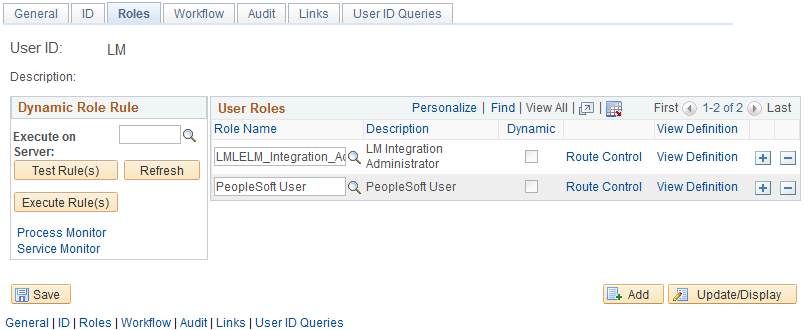
In HCM, you need to assign the user the Learning Integration Admin role, which is associated with the following permission lists:
HCSPSERVICE: Standard Service security. This permission list grants access to process all integration delivered in the PeopleSoft HCM application.
LMLELM800: LM Integration Administrator. This permission list grants access to the ELM Full Sync Integration Guided process, including the pages that allow the user to select the guided process and initiate the full sync integration.
PTPT4000: PeopleSoft Integration Network. This permission list grants access to Integration Broker Network services that are used in the ELM Full Sync Integration Guided Process.
To assign the Learning Integration Admin role in HCM, access the User Profiles - Roles page (
This example illustrates a user with the required roles in the HCM environment.
Updating Security in ELM
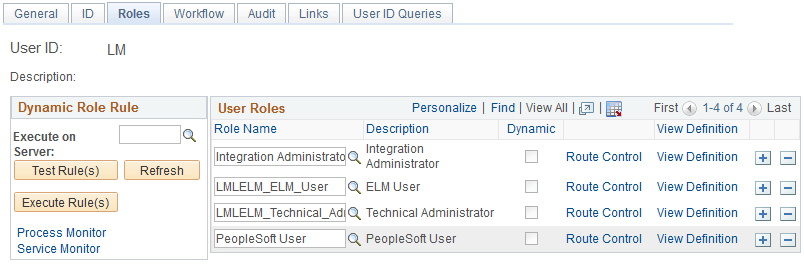
In ELM, you need to assign to the user the following delivered roles that grant access to process integration and the ability to initiate the Process Full Sync Data process:
Learning Integration Admin: This role is associated with the PTPT4000 permission list for the PeopleSoft Integration Network. This permission list grants access to Integration Broker Network services that are used in the ELM Full Sync Integration Guided Process.
Learning Technical Admin: This role is associated to two permission lists:
HCSPSERVICE: Standard Service security. This permission list grants access to process all integration delivered in the PeopleSoft HCM application.
LMLELM540: ELM Utilities. This permission lists grants access to standard utilities in ELM.
ELM User: This role is associated with multiple permission lists that grant access to standard components, component interfaces, and other objects required for an ELM user.
PeopleSoft User: This role is associated with multiple permission lists that grant access to specific PeopleSoft components for a standard user.
To assign the required roles in ELM, access the User Profiles - Roles page (
This example illustrates a user with the required roles in the HCM environment.