Using the PeopleSoft Fluid Interface to View Reports as a Learning Instructor
This topic describes how a Learning Instructor can access the Reports navigation collection to view the learning roster and survey reports.
Important! The Reports navigation collection is only accessible from the Instructor Actions section on the My Home landing page. This requires PeopleTools 8.62 or higher. To access the My Home landing page in ELM, you need to cluster your environment directly to PeopleSoft HCM.
This section discusses on the pages used to view reports.
|
Page Name |
Definition Name |
Usage |
|---|---|---|
|
LM_INST_REPORT_LP_FL |
Access the Reports navigation collection |
|
|
ADMN_INSTRUCTOR_TASKS |
Access the learning roster and survey reports. |
Use the Reports tile (LM_INST_REPORT_LP_FL) to access the Reports navigation collection as a Learning Instructor.
Navigation:
Select the Reports tile from the My Work - Instructor Actions section on the landing page.
This example illustrates the Reports tile
Use the Reports tile to access the Reports Navigation Collection.
Use the Reports Navigation Collection (ADMN_INSTRUCTOR_TASKS) to access the learning roster and survey reports.
Navigation:
Select the Reports tile from the My Work - Instructor Actions section on the landing page.
This example illustrates the Reports Navigation Collection
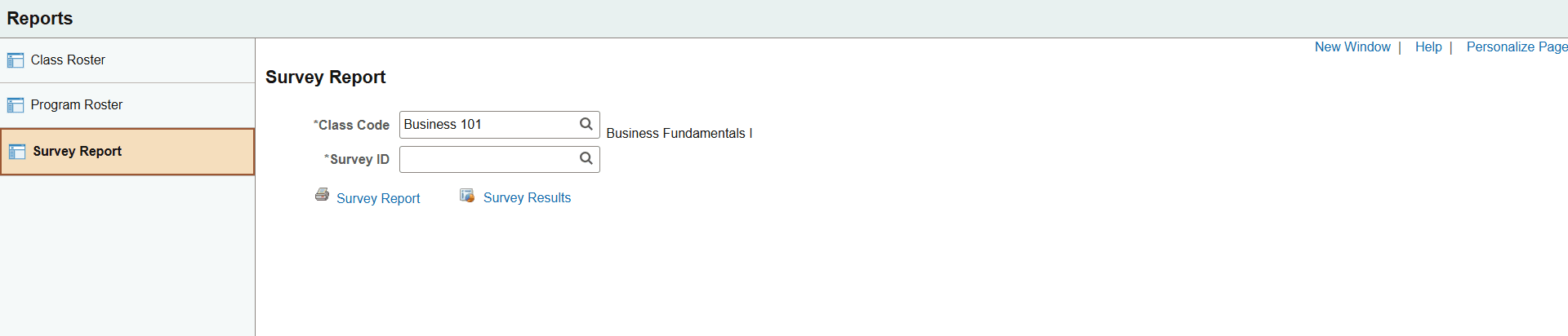
The Learning Instructor can access the following pages using the navigation collection:
Class Roster
Lists all learners enrolled for a class. You can run the report by course, class code, enrollment status and class date range.
Program Roster
Lists all the learners registered for a specific program. You can run the report for a curriculum or a certification within a specified date range. The report shows learner's name, organizations, registration status and date completed (if the status is Completed). (BI Publisher)
Survey Reports
Lists detailed survey results in PDF format.
For more information on reports, see PeopleSoft Enterprise Learning Management Reports: A to Z.