Session Cookies
Oracle Insurance Calculation Engine uses session cookies to manage user sessions. To manage user sessions, on successful log in of the user, the following attributes or headers are saved on the session storage:
- jSessionIDHeader: It identifies the current (logged in) user session.
- us_t: This is an encrypted value which is generated from the combination of personal ID and HASHSTRING.
- usg_lt: It stores a key which is generated using securityGRPList1:securityGRPList2: securityGRPList3 and so on.
These attributes and headers are used as cookies and passed to the server with each request.
Note: The us_t and usg_lt properties will be stored in a session only when HMAC is enabled.
Using Cookies in the Oracle Insurance Calculation Engine application
The Oracle Insurance Calculation Engine application is accessed by users through a Web Browser. Oracle Insurance Calculation Engine uses session cookies to manage user sessions, so cookies must be enabled in the browser.
To allow the use of cookies in a browser, follow these steps:
-
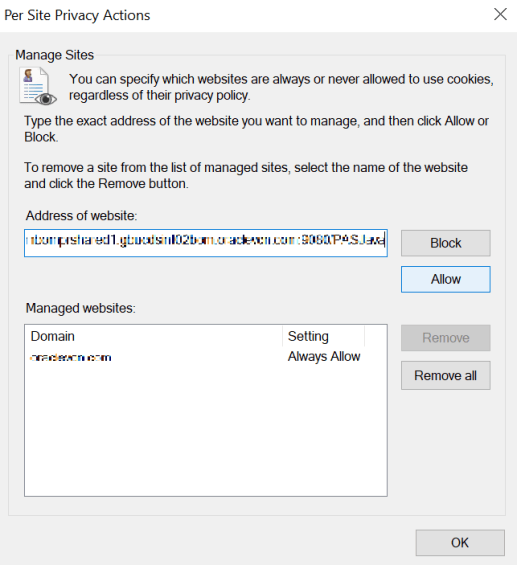
Internet Explorer: Open the Privacy tab of the Internet Options dialog, then select the Sites popup dialog and add the Oracle Insurance Calculation Engine server address to the list of Allowed sites.
-
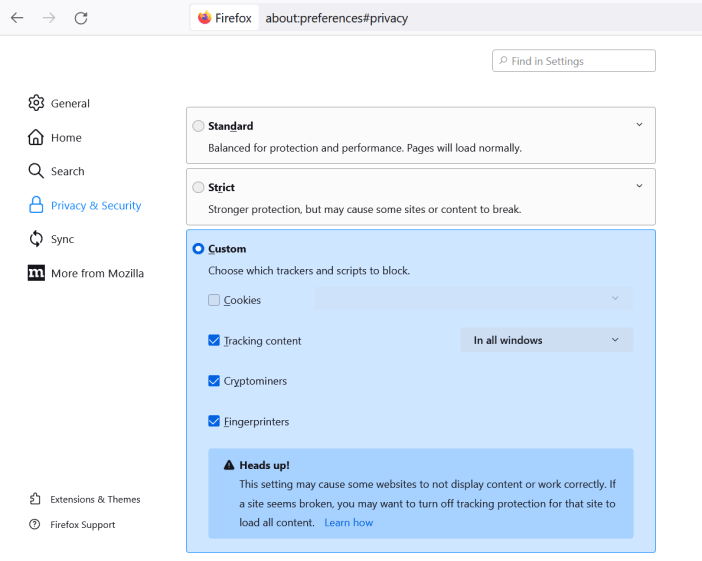
Mozilla Firefox: Navigate to Settings > Privacy and Security, then select an appropriate option that allows Oracle Insurance Calculation Engine cookies.
-
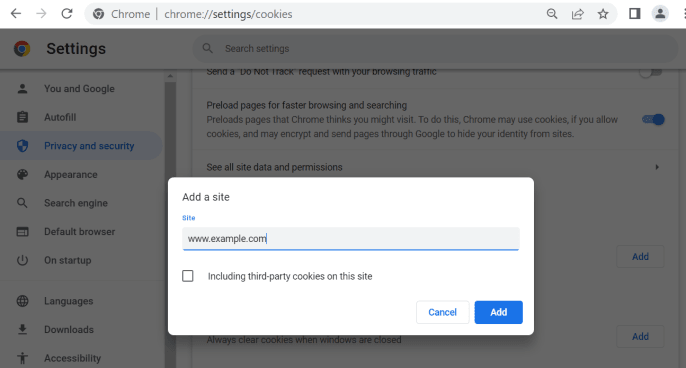
Google Chrome: Navigate to Settings > Privacy and security > Cookies and other site data. In the Sites that can always use cookies section, click Add. The Add a site page appears. Enter the Oracle Insurance Calculation Engine server address and, then click Add.
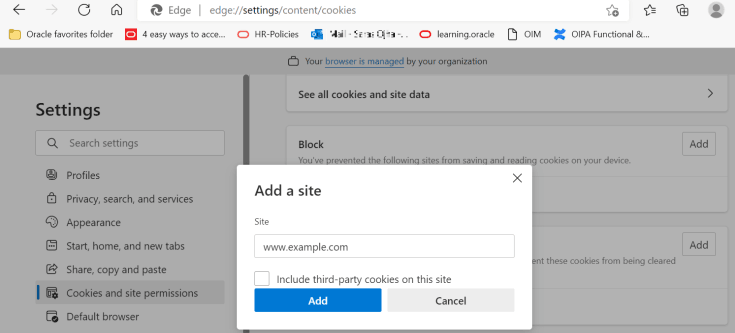
Microsoft Edge: Navigate to Settings > Cookies and site permissions > Manage and delete cookies and site data, then in the Allow section, click Add. The Add a site page appears. Enter the Oracle Insurance Calculation Engine server address and, then click Add.
Oracle Insurance Calculation Engine uses 'jSessionIDHeader' in the HTTP request header to manage data associated with the user's session. When user first logs into the Oracle Insurance Calculation Engine application successfully, system creates an unique sessionID and passes to the browser. Browser sets this to jSessionIDHeader and retains this for the duration of session. When user logs out or session expires, browser deletes this sessionID. Requests that do not contain valid session IDs are not processed by the server.
If the application server is behind any HTTP proxy server, HTTPOnly & SecureCookie flags shall be enabled for the cookies. The purpose of the secure flag is to prevent cookies from being observed by unauthorized parties due to the transmission of a the cookie in clear text.
Data Encryption
Oralce Insurance Calculation Engine uses a PKCS12 keystore (.p12 or .pfx) to store AES-256 encryption keys to encrypt activity field data, ensuring compatibility with standard tools and application servers.
Customers can rotate, revoke, or update keystores as needed, in line with their key management policies. (This will not be applicable for existing customers upgrading from prior versions to ensure backward compatibility)
The default keystore file that is shipped with product can be configured in the PAS.properties file.
When Cookies are Disabled
When cookies are disabled the application does not store jSessionIDHeader. This degrades the performance of the application, because for each request:
-
Log in credentials must be passed to the server and user should be authenticated.
-
Once, authentication is successful, application will load the security groups associated with the user and user will be authorized against the request.
Note: The same mechanism is used for us_t and usg_lt cookies.