Assigning Contract Lines to Renewal Plans
This section discusses how to assign renewable contract lines to renewal plans and cycles.
|
Page Name |
Definition Name |
Usage |
|---|---|---|
|
CA_RNW_MGMT |
Assign renewable contract lines to renewal plans/cycles. |
Use the Assign Renewal Plans/Cycles page (CA_RNW_MGMT) to assign renewable contract lines to renewal plans/cycles.
Navigation:
This example illustrates the fields and controls on the Assign Renewal Plans/Cycles Page. You can find definitions for the fields and controls later on this page.
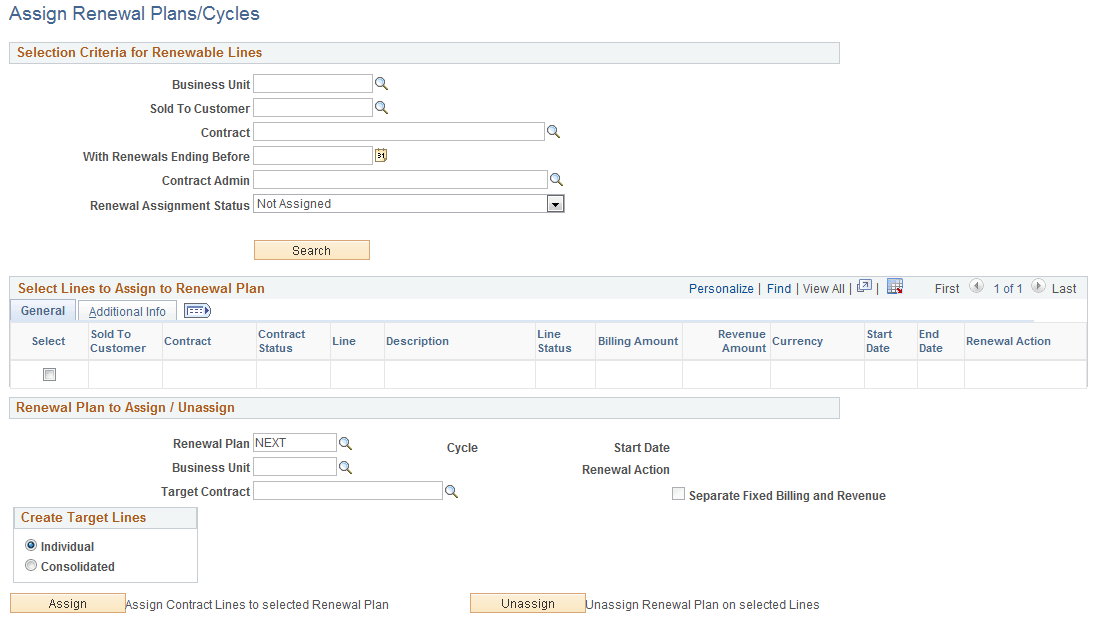
When assigning renewable contract lines to a renewal plan, you can assign one or multiple renewal contract lines to one cycle in that renewal plan.
Selection Criteria for Renewable Lines
If you accessed this page by clicking a link on the Contract - General, Contract - Lines, or Define Renewal Plan pages, the system populates these fields based on the information on the precursory page.
Filter search results by PeopleSoft Contracts business unit, sold to customer, contract, or renewal period end date. If you leave all fields deselected, the search retrieves all active, pending, and cancelled renewable contract lines matching the selected renewal assignment status in your system.
Field or Control |
Description |
|---|---|
Renewal Assignment Status |
Enables you to filter search results by the following criteria: Both Assigned and Not Assigned: Search results include renewable lines not assigned to a renewal cycle and renewable lines already assigned to a renewal cycle that is in Pending or Ready status. Note: You can reassign only contract lines assigned to a cycle in Pending status. Assigned: Search results include only renewable contract lines that have been assigned to a renewal cycle, and the cycle status is Pending or Ready. Not Assigned: Search results include only renewable contract lines that have not been assigned to a renewal cycle. |
Search |
Click to search for renewable contract lines based on the entered criteria. |
Select Lines to Assign to Renewal Plan - General Tab
The system creates a line in the search results scroll area for each contract line that matches your search criteria.
Field or Control |
Description |
|---|---|
Select |
Select the check box in this column for the contract lines that you want to assign to a particular renewal plan. You can select a contract line that is already assigned to a renewal plan; when you click Assign, the contract line is unassigned from the existing plan and then assigned to the value that you select in the Renewal Plan field. |
Contract |
Click the contract number for a contract line to transfer to the Contract - General page for that contract. |
Line |
Displays the contract line number. |
Billing Amount |
Displays the billing amount for this contract line. |
Revenue Amount |
Displays the revenue amount for this contract line. |
Renewal Action |
Displays the renewal action of the renewable contract line. Values include Manual and Automatic. This field is display-only. |
Select Lines to Assign to Renewal Plan - Additional Info Tab
Select the Additional Info tab.
Field or Control |
Description |
|---|---|
Source Renewal |
Displays the source renewal plan number, if the system created a contract line as part of a renewal cycle. If you created the contract line during contract entry, the system clears this field. |
Target Renewal |
Displays the renewal plan under which this line is set to be renewed. For contract lines assigned to a renewal plan, the renewal plan number appears. If you have not assigned the contract line to a renewal plan, the system clears this field. |
Cycle |
Click this number to view the cycle details. If you have not assigned the contract line to a renewal plan, this field is blank. |
Status |
Displays the renewal cycle status if the contract line is currently assigned to a renewal plan and cycle. |
Renewal Plan to Assign / Unassign
Use the fields in the Renewal Plan to Assign/Unassign region to assign the renewable contract lines that you selected in the Select Lines to Assign to Renewal Plan scroll area to an existing renewal plan or a new plan, or to remove them from a renewal plan to which they were assigned.
Field or Control |
Description |
|---|---|
Renewal Plan |
Link contract lines to an existing renewal plan, or select NEXT to link the selected lines to a new renewal plan. |
Cycle |
Displays the current cycle for the renewal plan, if you are assigning an existing renewal plan. |
Start Date |
Displays the start date for the cycle of the renewal plan that you are assigning, if you are assigning an existing renewal plan. |
Renewal Action |
Displays the renewal action of the renewal cycle. Values include Manual and Automatic. This field is display-only. |
Business Unit |
Displays the contracts business unit to which the selected renewal plan applies to. You can enter a contracts business unit, if you are assigning a new renewal plan. |
Target Contract |
Displays the target contract corresponding to the selected renewal plan. You can enter a target contract, if you are assigning a new renewal plan. |
Separate Fixed Billing and Revenue |
Displays whether fixed billing and revenue are separated on the targeted contract. |
Create Target Lines |
Select a value to indicate how the renewals process generates new contract lines. The system uses Individual as the default value for this field. The system copies the value that you select here onto all of the cycles of the renewal plan that is created from this page. Values include:
Note: This option is available for entry only if the Renewal Plan field has a value of NEXT. This option is not available when assigning contract lines to an existing renewal plan. |
Assign |
Click to assign contract lines to the selected renewal plan. The system assigns the renewable contract line to the current cycle of a new renewal plan or to the current cycle of an existing renewal plan. If the Separate Fixed Billing and Revenue check box is not selected for the target contract and some of the contract lines being assigned to the renewal plan have different billing and revenue amounts, then a warning message will be displayed and the revenue amounts for those lines will be ignored at the time of renewal. Note: If the renewal action of the selected renewable contract line is different from the renewal action of the renewal cycle, the system warns you that the renewal action of the renewable contract line will be changed to the renewal action of the renewal cycle. |
Unassign |
Click to remove contract lines from a renewal plan to which they were previously assigned. |