Managing ACA Annual Processing
This topic provides an overview on how benefits administrator can review and reset 1095-C preference for employees.
This table lists the pages used to review and reset 1095-C preference.
|
Page Name |
Definition Name |
Usage |
|---|---|---|
|
ACA_RC_BAC010 |
Run report to view employee's 1095-C preference status. |
|
|
ACA_RESET_RCNTL |
Reset employee's 1095-C preference status. |
|
|
ACA_REVIEW_CONSENT |
Review employee's 1095-C preferences. |
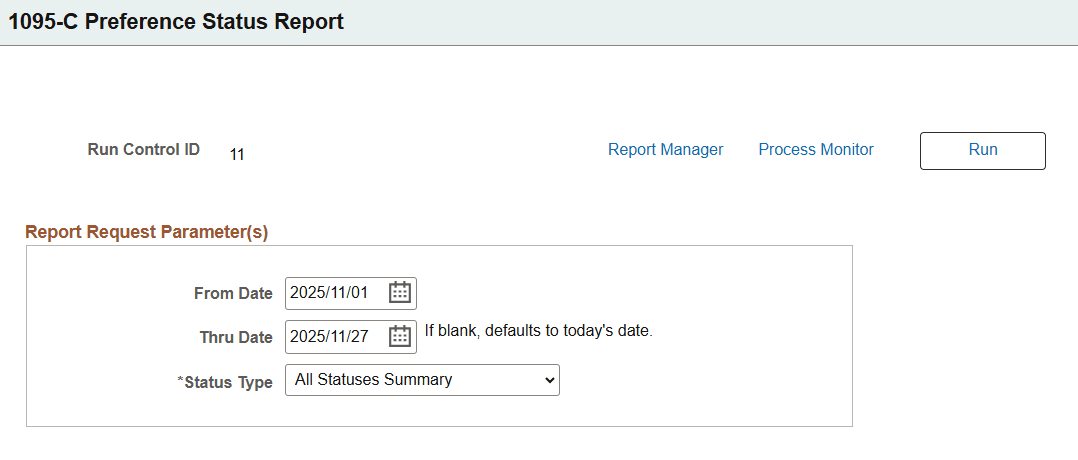
Use the 1095-C Preference Report page (ACA_RC_BAC010) for administrators to run the 1095-C Preference Report (BAC010), which lists employees’ most current 1095-C Preference status based on dates and status type that you specify in the report request parameters.
Navigation:
Select Benefits WorkCenter from the My Work section of the PeopleSoft (My Home) Landing Page. Then select
This example illustrates the fields and controls on the 1095-C Preference Report Page.
|
Field or Control |
Description |
|---|---|
|
From Date and Thru Date |
Select the date range to generate the 1095-C Preference Report. |
|
Status Type |
Select the employee's 1095-C Preference status to be included in the report. Available values are:
|
|
Run |
Select to generate the 1095-C Preference Report for the selected date range and employee's preference status. |
Use the Reset 1095-C Preference Status page (ACA_RESET_RCNTL) for administrators to reset the employee's 1095-C Preference status.
Navigation:
Select Benefits WorkCenter from the My Work section of the PeopleSoft (My Home) Landing Page. Then select
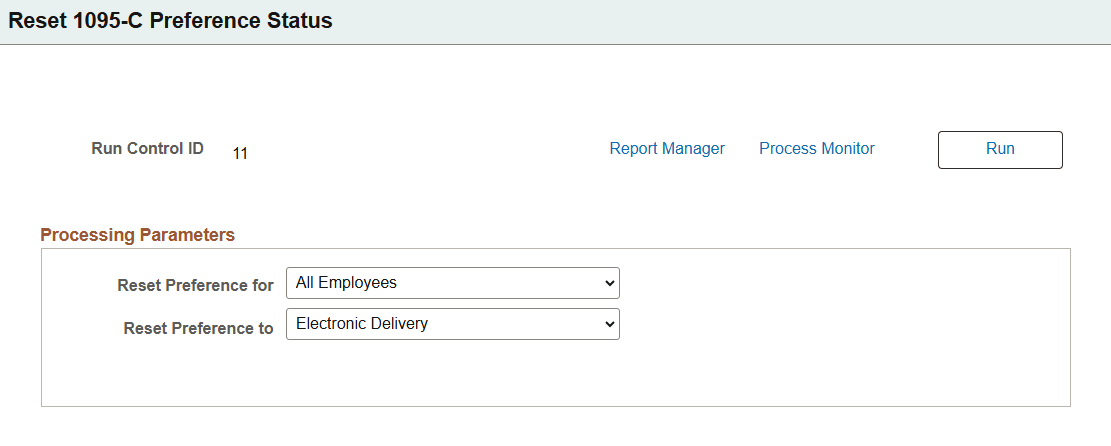
The benefits administrator can use this page to reset the ACA preference status for both active and terminated employees.
This example illustrates the fields and controls on the Reset 1095-C Preference Status page. The fields that appear on this page vary based on the type of processing.
|
Field or Control |
Description |
|---|---|
|
Reset Preference for |
Select the type of processing to reset the 1095-C preference status. Available options are: All Employees, Employees from File, Employees from Group ID, Selected ALE Members (Applicable Large Employer), and Selected Employees. Note: Based on the option you select for Reset Preference for, the fields that appear on the page varies. |
|
Browse File |
Select to upload a .csv or .txt file containing employee IDs to reset the 1095-C preference status. This field is displayed when the administrator selects Employees from File for Reset Preference for. Once a valid file is uploaded, the page displays the file name as a link. Select the link to open the file in a new browser tab. |
|
Group ID |
Select the Group ID of employees to reset the 1095-C preference status. This field is displayed when the administrator selects Employees from Group ID for Reset Preference for. Once the Group ID is selected, the View Employees List link appears. Select the link to open a modal and view the list of employees for whom the reset process is to be run. |
|
ALE Member |
Select the ALE member(s) to reset the 1095-C preference status. This field is displayed when the administrator selects Selected ALE Members for Reset Preference for. |
|
Empl ID |
Select the employee IDs to reset the 1095-C preference status. This field is displayed when the administrator selects Selected Employees for Reset Preference for. |
|
Reset Preference to |
Select the delivery preference for 1095-C form. Available options are: Electronic Delivery, Paper Form. |
|
Run |
Select to run the process to reset the 1095-C preference status for selected employees. This process resets the preference for all the employees who had opted to receive the Form 1095-C electronically. Once the process is run successfully, the employees whose preference was reset will receive an email notification. |
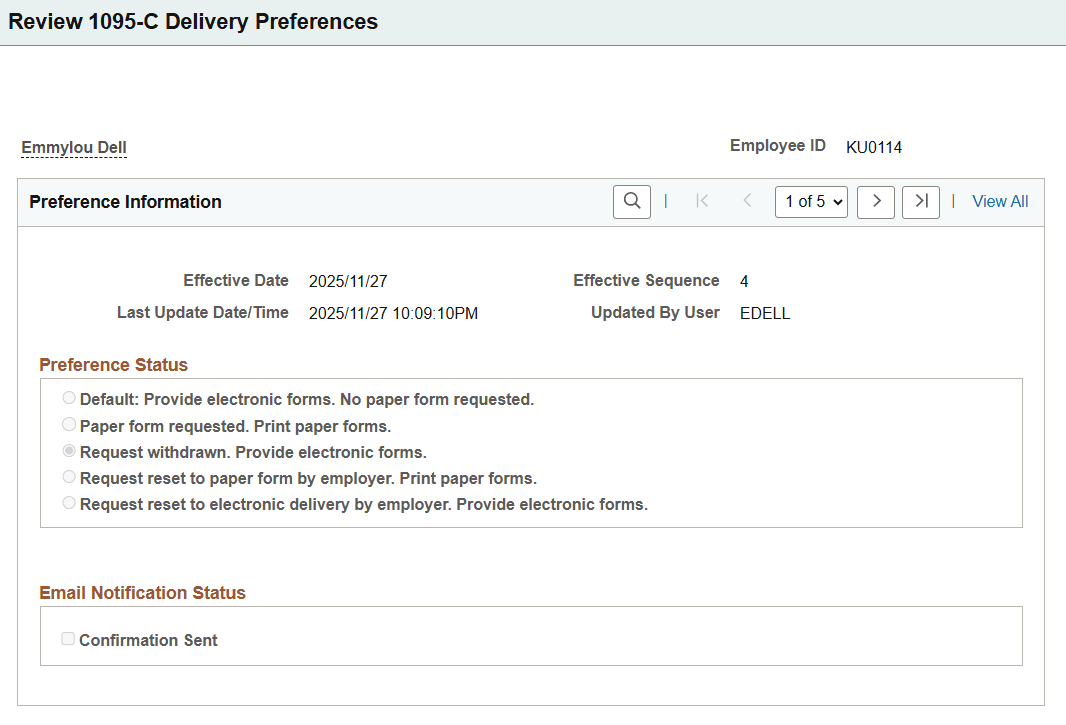
Use the Review 1095-C Preferences page (ACA_REVIEW_CONSENT) for administrators to monitor employee preference and review the history of each employee's preference and email notification status.
Navigation
Select Benefits WorkCenter from the My Work section of the PeopleSoft (My Home) Landing Page. Then select
This example illustrates the fields and controls on the Review 1095-C Delivery Preferences page.
|
Field or Control |
Description |
|---|---|
|
Preference Status |
Displays the 1095-C Delivery Preference Status for the employee based on the preference selected by employee or preference reset by the employer. |
|
Email Notification Status |
The check box is shown as checked if a confirmation email was sent to the employee for the 1095-C preference reset. |