5.5 Back Up TKLCConfigData File

This section backs up the TKLCConfigData file on all the servers. This helps to restore networking and server-related information in some cases. For example, for disaster recovery if a server is lost during an upgrade.
  1. Login to the SDS NOAM GUI, use the VIP address to access the primary SDS NOAM GUI as described in access-oam-gui-using-vip-noamsoam.html#GUID-FA5B2F0E-069F-4C52-99A4-1B05C9FAF6E9__GUID-FA5B2F0E-069F-4C52-99A4-1B05C9FAF6E9.
  2. In the Primary SDS NOAM VIP GUI, export servers. Expand Configuration click Servers. Select each server in the topology and click Export.

    Figure 5-11 Servers
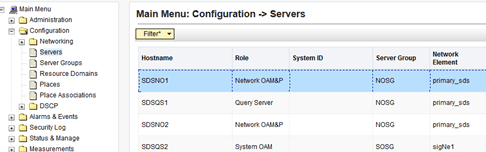

    Servers

    Figure 5-12 Export


    Export

    Note:

    The active primary SDS server displays in the GUI banner as it is connected to the VIP with a state Active Network OAM&P.
  3. Back up TKLCConfig data and access the CLI of the primary SDS NOAM, access the primary SDS NOAM server command line using ssh or a console.
    ssh admusr@<NOAM_VIP>
  4. Transfer the TKLCConfigData files for all servers in the/var/TKLC/db/filemgmt directory to a remote location.
    $ cd /var/TKLC/db/filemgmt
    $ scp TKLCConfigData.<Sever Hostname>.sh
    <username>@<remote-server>:<directory>

    For example:

    scp TKLCConfigData.SDSDRNO1.sh <username>@<remote-
    server>:<directory>

    Note:

    Back up the TKLCConfig data file for all servers.