Collections in Messages
Downstream Message Push (DMP) supports collections defined in Math. You can pass a Math collection to a DMP message and use a JSTL loop to generate a repeating message element for each collection item.
Previously, messages could use individual Math variable values but could not iterate through collection values. Consequently, repeating business information had to be handled as separate values or could not be included completely in the downstream message.
With this enhancement, a single DMP message can include repeating information such as:
-
Policy fields
-
Policy segments
-
Premium details
-
Suspense records
-
Roles or participants
-
Requirements
-
Activities
-
Other repeating business data stored in a Math collection
DMP supports the following Math collection types:
-
Map collection
-
Text array
The generated DMP payload is sent to the downstream destination configured for the event.
Understanding Collections in DMP Messages
A collection contains multiple related values. For example, a policy can contain several segments:
Policy segments
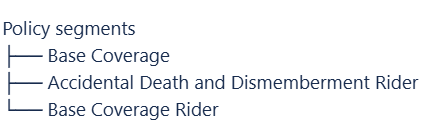
Without collection support, the message could include only individually configured values. With collection support, DMP processes each item in the collection and creates a corresponding element in the generated message.
For a map collection, a JSTL template can access the key-value data for each collection item. For a text array, the JSTL template can process each text value as an individual collection item.
Declare a MAP parameter with TYPE="COLLECTION" and DATATYPE="MAP". Declare a TEXTARRAY parameter with TYPE="TEXTARRAY" and DATATYPE="TEXTARRAY".
The <JSTLMessage>, <Parameters>, and <j:forEach> elements are configuration controls. DMP does not include them in the generated outbound payload.
JSTL Loop Requirements and Limitations
When configuring a collection loop, observe the following requirements:
-
Configure the j:forEach items attribute as [ParameterName] or ${ParameterName}. The parameter name must match the name defined in the <Parameters> block.
-
For a MAP collection, use ${row.key} to access the collection key and ${row.value} to access the collection value, where row is the value specified in the var attribute.
-
The var attribute is required. DMP uses it to resolve the collection-item tokens in the loop.
-
If a collection is empty or null, DMP removes the loop and does not generate repeated child elements. The enclosing business element can remain as an empty, valid XML element.
Combining Collections with Nested Message Structures
Collections can be included within the nested DMP message structure. The configured message hierarchy is preserved, and the JSTL loop generates repeating child elements at the appropriate location in the payload.
For example:
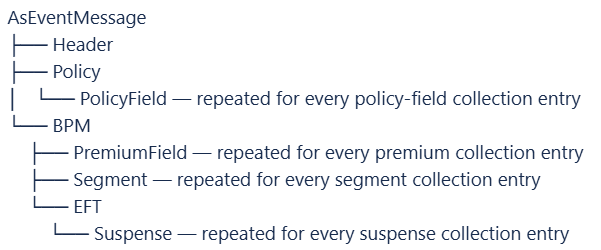
This allows a single PushNotifications message to contain both common message information and complete repeating business data while retaining the configured parent-child message structure.
A collection can be configured inside a nested message section, such as Policy, BPM, or EFT. DMP renders the repeated elements under that configured parent and preserves applicable XML namespaces.
For a transaction-failure message, declare the required collection parameters in that failure message’s own <JSTLMessage> element. Parameters are not inherited from the regular-event message.
Validation
Verify the following:
-
The required Math collection is populated before DMP processing.
-
The JSTL template iterates through every collection item.
-
A corresponding message element is generated for each item.
-
Collection data appears under the correct parent element in the nested message structure.
-
Map keys and values, or text-array values, are rendered correctly.
-
No collection items are omitted.
-
The completed payload is sent successfully to the configured downstream destination.
-
The generated payload does not include <JSTLMessage>, <Parameters>, or <j:forEach> elements.
-
If a collection is empty or null, DMP removes the loop and does not generate repeated child elements. The enclosing business element can remain as an empty, valid XML element.
For information about configuring nested message structures, see Nested Message Structures.
| Element/Tag | Attributes | Parent Element | Description | Element/Attribute Values |
|---|---|---|---|---|
| JSTLMessage |
xmlns:j |
AsEventMessage or a nested business-message parent |
Contains parameters and the dynamic message template. |
|
| Parameter | NAME, TYPE, and DATATYPE | Parameters | Maps a Math variable to a value available to the JSTL template. | MAP: TYPE="COLLECTION" DATATYPE="MAP"; TEXTARRAY: TYPE="TEXTARRAY" DATATYPE="TEXTARRAY" |
| j:forEach |
items, var |
JSTLMessage or message parent | Iterates over collection values and generates repeating message elements. | MAP items=${SuspenseCollection}, var=eachRow; TEXTARRAY items=${Segments}, var=segment |
| Suspense | None | Suspenses | One rendered outbound element for each MAP entry. | Contains SuspenseGuid and SuspenseAmount |
| SuspenseGuid | None | Suspense | Renders the MAP value. | ${eachRow.key} |
| SuspenseAmount | None | Suspense | Renders the MAP value. | ${eachRow.key} |
| Segment | None | Transaction | One rendered outbound element for each TEXTARRAY item. | ${segment} |
XML Schema - Map Collection
<PushNotifications>
<PushNotification EVENTNAME="[event name]">
<Message ID="[message id]">
<Tests>
<Test>[condition]</Test>
</Tests>
<AsEventMessage xmlns="[namespace]">
<JSTLMessage xmlns:j="jelly:core">
<Parameters>
<Parameter NAME="[map parameter name]" TYPE="COLLECTION" DATATYPE="MAP">[MAP MathVariable]</Parameter>
</Parameters>
<j:forEach items="${ParameterName}" var="eachRow"><[repeating element]>
<[key element]>${eachRow.key}</[key element]><[value element]>${eachRow.value}</[value element]></[repeating element]>
</j:forEach>
</JSTLMessage>
</AsEventMessage>
</Message>
</PushNotification>
</PushNotifications>
XML Schema - Text Array Collection
<PushNotifications>
<PushNotification EVENTNAME="[event name]">
<Message ID="[message id]">
<Tests>
<Test>[condition]</Test>
</Tests>
<AsEventMessage xmlns="[namespace]">
<JSTLMessage xmlns:j="jelly:core">
<Parameters>
<Parameter NAME="[text-array parameter name]" TYPE="TEXTARRAY" DATATYPE="TEXTARRAY">[TEXTARRAY MathVariable]</Parameter>
</Parameters>
<j:forEach items="${ParameterName}" var="item"><[repeating element]>${item}</[repeating element]></j:forEach>
</JSTLMessage>
</AsEventMessage>
</Message>
</PushNotification>
</PushNotifications>
XML Example - Map Collection
<PushNotifications>
<PushNotification EVENTNAME="Billing11">
<Message ID="AsEventMessage">
<Tests>
<Test>1=1</Test>
</Tests>
<AsEventMessage xmlns="http://xmlns.abc.com/PAS/AsEventMessage">
<JSTLMessage xmlns:j="jelly:core">
<Parameters>
<Parameter NAME="SuspenseCollection" TYPE="COLLECTION" DATATYPE="MAP">SuspenseCollectionMV</Parameter>
</Parameters>
<Suspenses>
<j:forEach items="${SuspenseCollection}" var="eachRow"><Suspense>
<SuspenseGuid>${eachRow.key}</SuspenseGuid><SuspenseAmount>${eachRow.value}</SuspenseAmount></Suspense>
</j:forEach>
</Suspenses>
</JSTLMessage>
</AsEventMessage>
</Message>
</PushNotification>
</PushNotifications>
XML Example - Text Array
<PushNotifications>
<PushNotification EVENTNAME="Billing11">
<Message ID="AsEventMessage">
<Tests>
<Test>1=1</Test>
</Tests>
<AsEventMessage xmlns="http://xmlns.abc.com/PAS/AsEventMessage">
<JSTLMessage xmlns:j="jelly:core">
<Parameters>
<Parameter NAME="Segments" TYPE="TEXTARRAY" DATATYPE="TEXTARRAY">SegmentsMV</Parameter>
</Parameters>
<Transaction name="DMPTrans">
<j:forEach items="${Segments}" var="segment"><Segment>${segment}</Segment></j:forEach>
</Transaction>
</JSTLMessage>
</AsEventMessage>
</Message>
</PushNotification>
</PushNotifications>