Configuring a program for lead scoring
Using a native CRM integration to update lead scores, a program must be created and configured that will perform updates of the Lead Score field in CRM.
To create a program:
- Navigate to Orchestration > Tools, then click Program Builder.
- Create a new program (click ‘New Marketing Program from right pane).
- Name the program “SYSTEM – Update Lead Score in CRM”.
-
Create the program flow.

Note: Depending on the order in which the decision rules are configured, your steps may appear different
Note the following:
-
In the Decision Rule “Has SFDC Contact ID ?” use a Contact Field Comparison with the decision rule parameters SFDC ContactID is Equal to ?*.
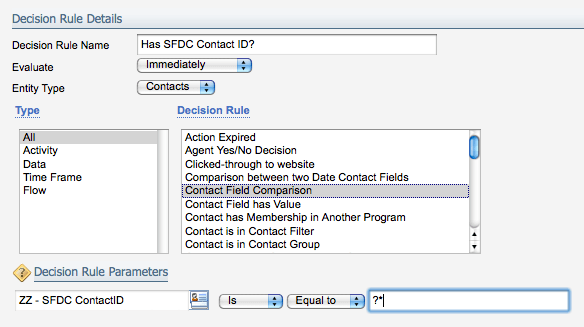
- In the Decision Rule “Has SFDC LeadID ?” use a Contact Field Comparison with the decision rule parameters SFDC LeadID is Equal to ?*.
- In Step 100. Update Score on Contact, select the Integration Event created Update Lead Score-Contacts.
- In Step 200. Update Score on Lead, select the Integration Event Update Lead Score-Leads.
Creating two internal events and external calls