All SML pages automatically have open web support and mobile support built in. All you need to do to access it is grab the relevant urls from the Settings tab in your SML editor.
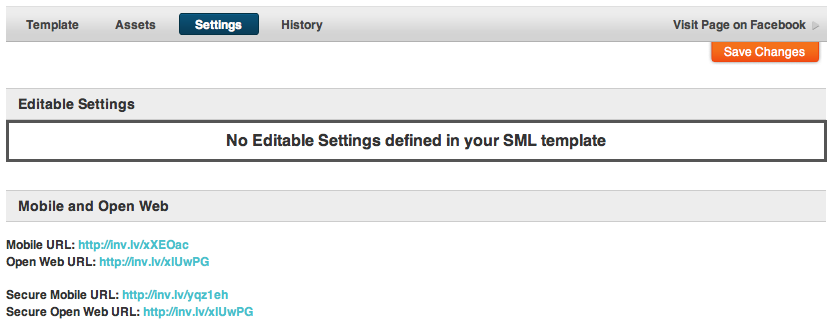
The Open Web urls can either be viewed as standalone pages or embedded into a website using an iFrame.
The Mobile url will automatically redirect an open web user to Facebook while a mobile user will see the tab directly.
You can use the following Global Context Variables to allow you to customize your tabs based on how the user is viewing it.
| is_mobile | boolean | detects whether current user is viewing tab from a mobile device |
| is_iphone | boolean | detects whether current user is viewing tab from an iphone |
| is_android | boolean | detects whether current user is viewing tab from an android device |
| is_ipad | boolean | detects whether current user is viewing tab from an ipad |
| is_phone | boolean | detects whether current user is viewing tab from a phone |
| is_tablet | boolean | detects whether current user is viewing tab from a tablet |
| is_open_web | boolean | detects whether current user is viewing tab on the open web |
Most mobile devices will automatically scale the tab's width to fit but because of the smaller screen that may result in a tab whose fonts are too small to be easily readable. We recommend using the variables listed above to customize the CSS for Mobile viewers by stripping out as many images as possible, enlarging fonts, and simplifying the design.
At present there is no way to do file uploads from Mobile devices without an installed application. On the open web and Facebook Flash plays this role but since many mobile devices do not support Flash and there is no HTML5 replacement for this functionality we are currently unable to support uploads for UGC contests from Mobile apps.
Also keep in mind that ?contest_form and several other feature blocks in SML require that the user be logged into Facebook in order to function. If you want to use the functionality provided by these tools for open web and mobile users you'll need to include a facebook login button in the mobile and open web versions of your app to give them a chance to log in seamlessly without having to leave and go to facebook.

