iSCSI Settings for Windows
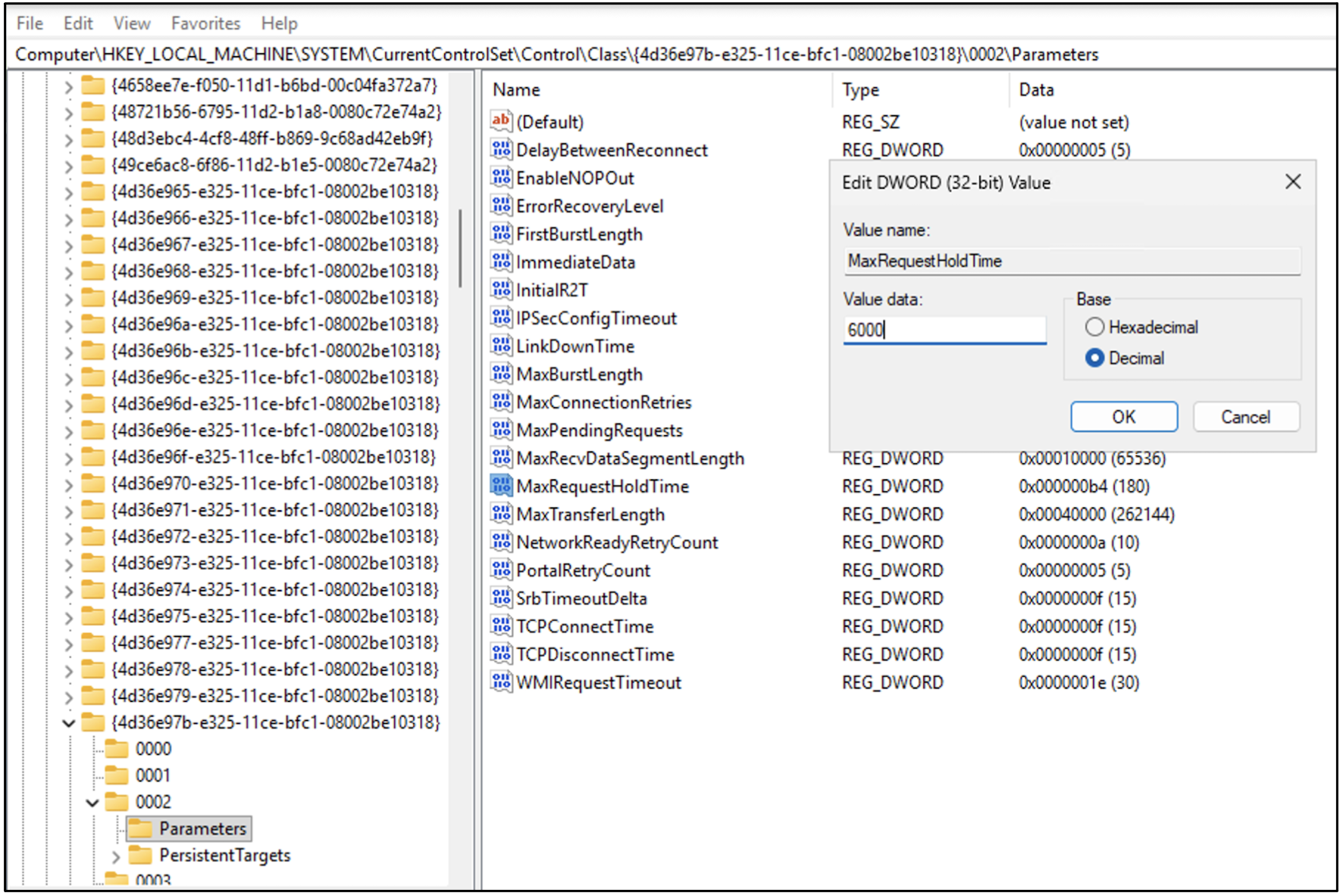
The system registry can be changed to optimize iSCSI performance. To ensure reliable iSCSI operations during system maintenance, the registry values specified in the following table must be updated.
Device category:
- SCSI, RAID, and NVMe Controllers - SCSI Adapter
- 4d36e97b-e325-11ce-bfc1-08002be10318 - Includes SCSI Host Bus Adapters (HBAs), disk-array, and NVMe controllers.
Registry settings:
| Settings | Values |
|---|---|
| Register key |
|
| Description | Maximum time (in seconds) for which requests are queued if connection to the target is lost and the connection is being retried. |
| Type | DWORD |
| Windows default (sec) | 60 |
| OCI recommended (sec) | 6000 |
Note
The following steps involves advanced system configuration changes. Changing the Windows Registry incorrectly can adversely affect system performance, stability, and reliability. It's strongly recommended to consult a qualified system administrator or IT professional before proceeding. Open a ticket with Microsoft Windows support for further clarifications or help toward preceding settings for iSCSI initiator.
The following steps involves advanced system configuration changes. Changing the Windows Registry incorrectly can adversely affect system performance, stability, and reliability. It's strongly recommended to consult a qualified system administrator or IT professional before proceeding. Open a ticket with Microsoft Windows support for further clarifications or help toward preceding settings for iSCSI initiator.
Steps for increasing the MaxRequestHoldTime value
The MaxRequestHoldTime controls how long Windows holds pending SCSI/iSCSI I/O requests when a storage path or network connection is lost. During this period, the system waits for the target to revive. If the connection isn't restored within this timeout, Windows fails the outstanding requests, which can cause applications to error out or the disk to disappear. Increasing this value helps systems tolerate brief network or storage interruptions.
| Steps | Action | Details |
|---|---|---|
| 1 | Open Run dialog | Select Win + R on the keyboard. |
| 2 | Launch Registry Editor | Enter regedit and select Enter. If prompted by User Account Control (UAC), select Yes. |
| 3 | Navigate to key | In the Registry Editor, navigate to the path of registry key defined in the previous Registry Settings table. |
| 4 | Locate or create entry | On the right side panel, find MaxRequestHoldTime. |
| 5 | Change the value | Double-click VALUE. Enter the required timeout (in seconds) for OCI recommended. |
| 6 | Save changes | Select OK to confirm and close the Registry Editor. |
| 7 | Restart system | Reboot the computer for changes to take effect. |