OCI GPU Quick Start: NVIDIA GB300
This document provides hardware specifications, supported OS images, onboarding verification, sample benchmarks, and best-practices for OCI deployments using the NVIDIA GB300 GPU shape.
GB300 is a multi-host NVLink shape. Unlike some other Nvidia GPU systems where NVLink connects GPUs within a single host, with GB300 NVLink 72 can connect the GPUs on a single rack together (up to 18 hosts of 4 GPUs each). This means that additional OCI constructs as well as Linux system level actions need to be considered.
At a Glance
- Shape:
BM.GPU.GB300.4 - GPU configuration:
4 x NVIDIA GB300 - Recommended OS baseline:
Oracle Linux 9+orUbuntu Linux 24.04+ - Recommended software baseline:
DOCA OFED 3.2.1, NVIDIA Driver 580.105+ (Open), CUDA 13.0, NCCL 2.28.7+ - Primary verification command:
nvidia-smi - Operational profile:
multi-host NVLink with GMF/GMC topology awareness
When To Use This Shape
Use this shape when you need the GB-family operational model with newer rack-scale networking and multi-host NVLink behavior.
It is best suited for customers running topology-sensitive, scale-out workloads where GMF and GMC placement, host grouping, and collective behavior across racks are central to performance validation.
First 15 Minutes
- Launch the shape with an approved image from the Provided Images table.
- Run the PyTorch container smoke test in Hello World Verification.
- Confirm fabric-aware expectations in GB300 Specific Deployment and Management Notes.
- Run the first single-node NCCL validation and then pick the matching OKE starter manifest if you are targeting Kubernetes.
Table of Contents
- Hardware Specifications
- When To Use This Shape
- First 15 Minutes
- Recommended Operating Systems
- Performance Benchmarks
- OKE GPU Getting Started
- Troubleshooting
- Further Reading & Support
Hardware Specifications
| Shape Name | GPU Model | GPUs/Node | GPU Memory (GB/GPU) | GPU Memory Total (GB) | CPU | # of CPUs | System Memory (GB) | Local Storage | Host NIC | RDMA (ROCe) NICs |
|---|---|---|---|---|---|---|---|---|---|---|
| BM.GPU.GB300.4 | B300 | 4 | 1152 | 4448 | Arm Neoverse V2 (x2) | 72 (144) | 2062 | 4 x 7.68TB NVMe | 2 x 200 Gbps | 8 x 400 Gbps |
See the OCI Compute Shapes Docs for up-to-date details.
Recommended Operating Systems
• Oracle Linux 9+\ • Ubuntu Linux 24.04+
Recommended Software Version
• DOCA OFED 3.2.1\ • NVIDIA Driver 580.x+\ • CUDA 13+\ • NCCL 2.28.7+\ • HPCX 2.24.1+\ • Oracle Cloud Agent 1.57.0+
Custom OS Image Creation with Packer
To build your images using packer clone the OCI HPC Images repo and run the commands found there OCI HPC Images GitHub Repo.
Provided Images
| OS Version | Image Packer Build Details | OCI Platform Image Link | Driver Versions |
|---|---|---|---|
| OCI GPU AI Image with Ubuntu Linux 22.04 | Canonical-Ubuntu-22.04-aarch64-64k-page-DOCA-OFED-3.2.1-GPU-580-OPEN-CUDA-13.0 |
PAR Link | NVIDIA OPEN 580, DOCA OFED 3.2.1, CUDA 13.0, OCA 1.57.0 |
| OCI GPU AI Image with Ubuntu Linux 24.04 | Canonical-Ubuntu-24.04-aarch64-64k-page-6.8-DOCA-OFED-3.2.1-GPU-580-OPEN-CUDA-13.0 |
PAR Link | NVIDIA OPEN 580, DOCA OFED 3.2.1, CUDA 13.0, Kernel 6.8, OCA 1.57.0 |
| OCI GPU AI Image with Ubuntu Linux 24.04 | Canonical-Ubuntu-24.04-aarch64-64k-page-6.17-DOCA-OFED-3.2.1-GPU-580-OPEN-CUDA-13.0 |
PAR Link | NVIDIA OPEN 580, DOCA OFED 3.2.1, CUDA 13.0, Kernel 6.17, OCA 1.57.0 |
Hello World Verification
This series of commands can be used to verify image compatability and basic GPU functionality. SSH into the GPU host and execute:
docker pull --platform=arm64 nvcr.io/nvidia/pytorch:26.01-py3
docker run --gpus 4 nvcr.io/nvidia/pytorch:26.01-py3 bash
docker run --gpus all -it --rm --ipc=host --ulimit memlock=-1 --ulimit stack=67108864 nvcr.io/nvidia/pytorch:26.01-py3 bash
python3
import torch
Then you can paste the following script into the terminal:
if torch.cuda.is_available():
    num_gpus = torch.cuda.device_count()
    print(f"Number of available GPUs: {num_gpus}")
        if num_gpus > 0:
            print("Available GPU devices:")
                for i in range(num_gpus):
                    gpu_name = torch.cuda.get_device_name(i)
                    print(f"* Device ID {i}: {gpu_name}")
                    current_device_index = torch.cuda.current_device()
                    print(f"Current CUDA device index: {current_device_index}")
                    print(f"Current CUDA device name: {torch.cuda.get_device_name(current_device_index)}")
You should get valid output showing GPUs detected with their device ID and other metadata.
Performance Benchmarks
NVIDIA publishes their NCCL (Nvidia Collective Communication Library) software as a toolkit for pre-defined routines which are optimized for their hardware. This software is meant to accelerate Artificial Intelligence & Machine Learning workloads running on NVIDIA GPU clusters. Detailed documentation can be found here. The NCCL operations which are important for this document are AllReduce and AlltoAll operations.
If the NCCL tests are not on your system, then you can build them using the commands below
git clone <https://github.com/NVIDIA/nccl-tests.git>
cd nccl-tests
make
All tests run as follows with appropriate --np and --hostfile values
provided:
mpirun --bind-to numa
        --mca pml ucx
        --mca coll ^hcoll
        -x coll_hcoll_enable=0
        -x NCCL_DEBUG=WARN
        -x NCCL_MNNVL_ENABLE=1
        -x NCCL_CUMEM_ENABLE=1
        -x UCX_NET_DEVICES=eth0
        -x NCCL_IB_HCA==mlx5_0,mlx5_1,mlx5_2,mlx5_3,mlx5_5,mlx5_6,mlx5_7,mlx5_8
        -x NCCL_NET_PLUGIN=/opt/hpcx-v2.24.1-gcc-doca_ofed-ubuntu24.04-cuda13-aarch64/nccl_rdma_sharp_plugin/lib/[libnccl-net.so](http://libnccl-net.so).0
        -x NCCL_NVLS_ENABLE=1
        -x NCCL_SOCKET_IFNAME=eth0
        -x NCCL_IB_GID_INDEX=3
        -x NCCL_IB_TC=41
        -x NCCL_IB_SL=0
        -x NCCL_IB_TIMEOUT=22
        -x RX_QUEUE_LEN=8192
        -x IB_RX_QUEUE_LEN=8192
        -x HCOLL_ENABLE_MCAST_ALL=0
        -x NCCL_BUFFSIZE=16777216
        -x NCCL_IB_QPS_PER_CONNECTION=4
        -x NCCL_IB_SPLIT_DATA_ON_QPS=0
        -x NCCL_NET_GDR_C2C=1
        -x NCCL_MNNVLS_ENABLE=1
        -x NCCL_DMABUF_ENABLE=1
        --np xxx --hostfile ./yyy all_reduce_perf -b 512K -e 16G -f 2 -g 1 -n 50
NCCL & Model Inference Performance
- OCI GPU Quick Start: NVIDIA GB300
- Table of Contents
- Hardware Specifications
- Recommended Operating Systems
- Performance Benchmarks
- OKE GPU Getting Started
- Troubleshooting
- Further Reading \& Support
NCCL All Reduce
This is a collective operation which is performing reductions on data (for example, sum, min, max) across devices and writing the result in the receive buffers of every rank.
NCCL All Reduce Scale Performance Single Node
# Collective test starting: all_reduce_perf
# nThread 1 nGpus 1 minBytes 524288 maxBytes 17179869184 step: 2(factor) warmup iters: 1 iters: 50 agg iters: 1 validation: 1 graph: 0
#
# Using devices
#  Rank  0 Group  0 Pid 563473 on   GPU-3882 device  0 [0008:06:00] NVIDIA GB300
#  Rank  1 Group  0 Pid 563474 on   GPU-3882 device  1 [0009:06:00] NVIDIA GB300
#  Rank  2 Group  0 Pid 563475 on   GPU-3882 device  2 [0018:06:00] NVIDIA GB300
#  Rank  3 Group  0 Pid 563478 on   GPU-3882 device  3 [0019:06:00] NVIDIA GB300
NCCL version 2.28.7+cuda13.0
#
#                                                              out-of-place                       in-place
#       size         count      type   redop    root     time   algbw   busbw #wrong     time   algbw   busbw #wrong
#        (B)    (elements)                               (us)  (GB/s)  (GB/s)            (us)  (GB/s)  (GB/s)
# Truncated  smaller message sizes
  8589934592    2147483648     float     sum      -1    18920  454.02  681.03      0    18916  454.10  681.15      0
 17179869184    4294967296     float     sum      -1    37610  456.79  685.19      0    37605  456.85  685.27      0
# Out of bounds values : 0 OK
# Avg bus bandwidth    : 446.673
#
# Collective test concluded: all_reduce_perf
NCCL All Reduce Scale Performance 2 Nodes on a Single Rack
# Collective test starting: all_reduce_perf
# nThread 1 nGpus 1 minBytes 524288 maxBytes 17179869184 step: 2(factor) warmup iters: 1 iters: 50 agg iters: 1 validation: 1 graph: 0
#
# Using devices
#  Rank  0 Group  0 Pid 566235 on   GPU-5188 device  0 [0008:06:00] NVIDIA GB300
#  Rank  1 Group  0 Pid 566236 on   GPU-5188 device  1 [0009:06:00] NVIDIA GB300
...
#  Rank  6 Group  0 Pid 561674 on    GPU-205 device  2 [0018:06:00] NVIDIA GB300
#  Rank  7 Group  0 Pid 561675 on    GPU-205 device  3 [0019:06:00] NVIDIA GB300
NCCL version 2.28.7+cuda13.0
#
#                                                              out-of-place                       in-place
#       size         count      type   redop    root     time   algbw   busbw #wrong     time   algbw   busbw #wrong
#        (B)    (elements)                               (us)  (GB/s)  (GB/s)            (us)  (GB/s)  (GB/s)
# Truncated  smaller message sizes
  8589934592    2147483648     float     sum      -1    17930  479.07  838.38      0    17928  479.15  838.50      0
 17179869184    4294967296     float     sum      -1    35722  480.93  841.63      0    35702  481.21  842.11      0
# Out of bounds values : 0 OK
# Avg bus bandwidth    : 474.234
#
# Collective test concluded: all_reduce_perf
NCCL All Reduce Scale Performance Multi-node 1 Rack - 16 nodes
# Collective test starting: all_reduce_perf
# nThread 1 nGpus 1 minBytes 524288 maxBytes 17179869184 step: 2(factor) warmup iters: 1 iters: 50 agg iters: 1 validation: 1 graph: 0
#
# Using devices
#  Rank  0 Group  0 Pid 568399 on   GPU-5705 device  0 [0008:06:00] NVIDIA GB300
#  Rank  1 Group  0 Pid 568400 on   GPU-5705 device  1 [0009:06:00] NVIDIA GB300
...
#  Rank 62 Group  0 Pid 480831 on   GPU-6569 device  2 [0018:06:00] NVIDIA GB300
#  Rank 63 Group  0 Pid 480833 on   GPU-6569 device  3 [0019:06:00] NVIDIA GB300
NCCL version 2.28.7+cuda13.0
#
#                                                              out-of-place                       in-place
#       size         count      type   redop    root     time   algbw   busbw #wrong     time   algbw   busbw #wrong
#        (B)    (elements)                               (us)  (GB/s)  (GB/s)            (us)  (GB/s)  (GB/s)
# Truncated  smaller message sizes
  8589934592    2147483648     float     sum      -1    18842  455.88  897.52      0    18790  457.15  900.01      0
 17179869184    4294967296     float     sum      -1    36350  472.63  930.48      0    36345  472.69  930.60      0
# Out of bounds values : 0 OK
# Avg bus bandwidth    : 455.539
#
# Collective test concluded: all_reduce_perf
NCCL All Reduce Scale Performance Multi-node 2 Racks - 32 nodes
# Collective test starting: all_reduce_perf
# nThread 1 nGpus 1 minBytes 524288 maxBytes 17179869184 step: 2(factor) warmup iters: 1 iters: 50 agg iters: 1 validation: 1 graph: 0
#
# Using devices
#  Rank  0 Group  0 Pid 571029 on   GPU-5705 device  0 [0008:06:00] NVIDIA GB300
#  Rank  1 Group  0 Pid 571030 on   GPU-5705 device  1 [0009:06:00] NVIDIA GB300
...
#  Rank 126 Group  0 Pid 553577 on    GPU-391 device  2 [0018:06:00] NVIDIA GB300
#  Rank 127 Group  0 Pid 553579 on    GPU-391 device  3 [0019:06:00] NVIDIA GB300
NCCL version 2.28.7+cuda13.0
#
#                                                              out-of-place                       in-place
#       size         count      type   redop    root     time   algbw   busbw #wrong     time   algbw   busbw #wrong
#        (B)    (elements)                               (us)  (GB/s)  (GB/s)            (us)  (GB/s)  (GB/s)
# Truncated  smaller message sizes
  8589934592    2147483648     float     sum      -1    24050  357.16  708.75      0    24006  357.83  710.06      0
 17179869184    4294967296     float     sum      -1    46170  372.10  738.39      0    46070  372.91  739.99      0
# Out of bounds values : 0 OK
# Avg bus bandwidth    : 300.755
#
# Collective test concluded: all_reduce_perf
NCCL All-to-All
This is a point-to-point operation which is a merged loop of send/recv operations to/from all peers.
NCCL All-to-All Single Node
# Collective test starting: alltoall_perf
# nThread 1 nGpus 1 minBytes 524288 maxBytes 17179869184 step: 2(factor) warmup iters: 1 iters: 50 agg iters: 1 validation: 1 graph: 0
#
# Using devices
#  Rank  0 Group  0 Pid 568623 on   GPU-3882 device  0 [0008:06:00] NVIDIA GB300
#  Rank  1 Group  0 Pid 568624 on   GPU-3882 device  1 [0009:06:00] NVIDIA GB300
#  Rank  2 Group  0 Pid 568625 on   GPU-3882 device  2 [0018:06:00] NVIDIA GB300
#  Rank  3 Group  0 Pid 568628 on   GPU-3882 device  3 [0019:06:00] NVIDIA GB300
NCCL version 2.28.7+cuda13.0
#
#                                                              out-of-place                       in-place
#       size         count      type   redop    root     time   algbw   busbw #wrong     time   algbw   busbw #wrong
#        (B)    (elements)                               (us)  (GB/s)  (GB/s)            (us)  (GB/s)  (GB/s)
# Truncated  smaller message sizes
  8589934592     536870912     float    none      -1    10308  833.31  624.98      0   9568.2  897.76  673.32    N/A
 17179869184    1073741824     float    none      -1    20527  836.92  627.69      0    18929  907.60  680.70    N/A
# Out of bounds values : 0 OK
# Avg bus bandwidth    : 381.478
#
# Collective test concluded: alltoall_perf
NCCL All-to-All Multi-Node
This section contains multi node performance results.
NCCL All to All Scale Performance 2 Hosts Single Rack
# Collective test starting: alltoall_perf
# nThread 1 nGpus 1 minBytes 524288 maxBytes 17179869184 step: 2(factor) warmup iters: 1 iters: 50 agg iters: 1 validation: 1 graph: 0
#
# Using devices
#  Rank  0 Group  0 Pid 583233 on   GPU-5188 device  0 [0008:06:00] NVIDIA GB300
#  Rank  1 Group  0 Pid 583234 on   GPU-5188 device  1 [0009:06:00] NVIDIA GB300
...
#  Rank  6 Group  0 Pid 577389 on    GPU-205 device  2 [0018:06:00] NVIDIA GB300
#  Rank  7 Group  0 Pid 577390 on    GPU-205 device  3 [0019:06:00] NVIDIA GB300
NCCL version 2.28.7+cuda13.0
#
#                                                              out-of-place                       in-place
#       size         count      type   redop    root     time   algbw   busbw #wrong     time   algbw   busbw #wrong
#        (B)    (elements)                               (us)  (GB/s)  (GB/s)            (us)  (GB/s)  (GB/s)
# Truncated  smaller message sizes
  8589934592     268435456     float    none      -1    11059  776.74  679.65      0    11171  768.98  672.86    N/A
 17179869184     536870912     float    none      -1    21943  782.92  685.06      0    22211  773.49  676.81    N/A
# Out of bounds values : 0 OK
# Avg bus bandwidth    : 407.955
#
# Collective test concluded: alltoall_perf
NCCL All to All Scale Performance 16 Hosts 1 Rack
# Collective test starting: alltoall_perf
# nThread 1 nGpus 1 minBytes 524288 maxBytes 17179869184 step: 2(factor) warmup iters: 1 iters: 50 agg iters: 1 validation: 1 graph: 0
#
# Using devices
#  Rank  0 Group  0 Pid 585240 on   GPU-5705 device  0 [0008:06:00] NVIDIA GB300
#  Rank  1 Group  0 Pid 585241 on   GPU-5705 device  1 [0009:06:00] NVIDIA GB300
...
#  Rank 62 Group  0 Pid 497099 on   GPU-6569 device  2 [0018:06:00] NVIDIA GB300
#  Rank 63 Group  0 Pid 497101 on   GPU-6569 device  3 [0019:06:00] NVIDIA GB300
NCCL version 2.28.7+cuda13.0
#
#                                                              out-of-place                       in-place
#       size         count      type   redop    root     time   algbw   busbw #wrong     time   algbw   busbw #wrong
#        (B)    (elements)                               (us)  (GB/s)  (GB/s)            (us)  (GB/s)  (GB/s)
# Truncated  smaller message sizes
  8589934592      33554432     float    none      -1    13028  659.33  649.03      0    12953  663.18  652.82    N/A
 17179869184      67108864     float    none      -1    25357  677.51  666.92      0    25565  672.01  661.51    N/A
# Out of bounds values : 0 OK
# Avg bus bandwidth    : 370.718
#
# Collective test concluded: alltoall_perf
NCCL All to All Scale Performance 32 Hosts 2 Racks
# Collective test starting: alltoall_perf
# nThread 1 nGpus 1 minBytes 524288 maxBytes 17179869184 step: 2(factor) warmup iters: 1 iters: 50 agg iters: 1 validation: 1 graph: 0
#
# Using devices
#  Rank  0 Group  0 Pid 588359 on   GPU-5705 device  0 [0008:06:00] NVIDIA GB300
#  Rank  1 Group  0 Pid 588360 on   GPU-5705 device  1 [0009:06:00] NVIDIA GB300
...
#  Rank 126 Group  0 Pid 565047 on   GPU-1631 device  2 [0018:06:00] NVIDIA GB300
#  Rank 127 Group  0 Pid 565049 on   GPU-1631 device  3 [0019:06:00] NVIDIA GB300
NCCL version 2.28.7+cuda13.0
#
#                                                              out-of-place                       in-place
#       size         count      type   redop    root     time   algbw   busbw #wrong     time   algbw   busbw #wrong
#        (B)    (elements)                               (us)  (GB/s)  (GB/s)            (us)  (GB/s)  (GB/s)
# Truncated  smaller message sizes
  8589934592      16777216     float    none      -1   180191   47.67   47.30      0   179150   47.95   47.57    N/A
 17179869184      33554432     float    none      -1   357610   48.04   47.67      0   358715   47.89   47.52    N/A
# Out of bounds values : 0 OK
# Avg bus bandwidth    : 28.0844
#
# Collective test concluded: alltoall_perf
Model Inference Performance
| ModelVariant | Scale | DataType | TimeMean_ms | TimeStd_ms | MODEL_TFLOPS_per_GPU_Mean | MODEL_TFLOPS_per_GPU_Std |
|---|---|---|---|---|---|---|
| pretrain_llama3_70b_fp8 | 64 | fp8 | 3711.880 | 6.482 | 1982.86 | 3.46 |
| pretrain_llama3_70b_fp8 | 128 | fp8 | 3740.600 | 9.992 | 1967.65 | 5.26 |
| pretrain_llama3_70b_nvfp4 | 64 | 2596.800 | 4.591 | 2834.28 | 5.01 | |
| pretrain_llama3_8b_fp8 | 8 | fp8 | 3508.760 | 8.275 | 1922.73 | 4.52 |
| pretrain_llama3_8b_fp8 | 16 | fp8 | 3507.660 | 5.967 | 1923.30 | 3.26 |
| pretrain_llama3_8b_fp8 | 64 | fp8 | 3520.720 | 16.326 | 1916.23 | 8.84 |
| pretrain_llama3_8b_fp8 | 128 | fp8 | 3519.360 | 22.972 | 1917.02 | 12.47 |
| pretrain_llama3_8b_nvfp4 | 16 | 2902.870 | 4.996 | 2324.03 | 3.97 | |
| pretrain_llama3_8b_nvfp4 | 64 | 2921.160 | 5.573 | 2309.47 | 4.40 | |
| pretrain_nemotron4_15b_bf16 | 16 | bf16 | 0.929 | 0.001 | 1571.90 | 2.07 |
| pretrain_nemotron4_15b_bf16 | 32 | bf16 | 0.932 | 0.002 | 1566.70 | 3.00 |
| pretrain_nemotron4_15b_bf16 | 64 | bf16 | 0.943 | 0.001 | 1548.90 | 2.39 |
| pretrain_nemotron4_15b_fp8 | 4 | fp8 | 0.647 | 0.001 | 2257.60 | 4.39 |
| pretrain_nemotron4_15b_fp8 | 16 | fp8 | 0.629 | 0.001 | 2322.70 | 4.22 |
| pretrain_nemotron4_15b_fp8 | 16 | fp8 | 0.629 | 0.001 | 2322.80 | 4.73 |
| pretrain_nemotron4_15b_fp8 | 64 | fp8 | 0.636 | 0.002 | 2297.10 | 5.56 |
| pretrain_nemotron4_15b_fp8 | 64 | fp8 | 0.636 | 0.002 | 2297.30 | 5.42 |
| pretrain_nemotron4_15b_fp8 | 64 | fp8 | 0.637 | 0.001 | 2292.70 | 4.98 |
| pretrain_nemotron4_15b_fp8 | 64 | fp8 | 0.637 | 0.002 | 2293.10 | 8.14 |
| pretrain_nemotron4_15b_fp8 | 72 | fp8 | 0.649 | 0.001 | 2249.70 | 4.27 |
| pretrain_nemotron4_15b_fp8 | 72 | fp8 | 0.652 | 0.001 | 2242.20 | 4.47 |
| pretrain_nemotronh_56b_fp8 | 32 | fp8 | 4411.080 | 8.646 | 1868.50 | 3.67 |
| pretrain_nemotronh_56b_fp8 | 64 | fp8 | 4411.720 | 6.388 | 1868.24 | 2.69 |
| pretrain_nemotronh_56b_fp8 | 128 | fp8 | 4609.220 | 102.219 | 1789.01 | 40.08 |
| pretrain_qwen3_235b_a22b | 64 | bf16 | 13353.740 | 61.251 | 726.52 | 3.28 |
| pretrain_qwen3_235b_a22b | 64 | fp8 | 12240.110 | 4.024 | 792.62 | 0.25 |
| pretrain_qwen3_30b_a3b | 8 | bf16 | 9022.130 | 2.131 | 668.46 | 0.16 |
| pretrain_qwen3_30b_a3b | 8 | fp8 | 9124.950 | 4.338 | 660.93 | 0.32 |
| pretrain_qwen3_30b_a3b | 16 | bf16 | 9002.620 | 2.037 | 669.90 | 0.16 |
| pretrain_qwen3_30b_a3b | 16 | fp8 | 9102.910 | 5.686 | 662.52 | 0.41 |
| pretrain_qwen3_30b_a3b | 32 | bf16 | 8999.780 | 3.286 | 670.13 | 0.25 |
| pretrain_qwen3_30b_a3b | 32 | fp8 | 9102.860 | 5.750 | 662.51 | 0.40 |
| pretrain_qwen3_30b_a3b | 64 | bf16 | 9024.360 | 4.128 | 668.30 | 0.31 |
| pretrain_qwen3_30b_a3b | 64 | fp8 | 9170.630 | 226.823 | 657.96 | 15.31 |
OKE GPU Getting Started
Information on getting up and running on OKE can be found here.
Useful GB300-specific OKE starting points in oci-hpc-oke:
Troubleshooting
Here you can find suggested troubleshooting methods.
nvidia-smi
To see information about the GPUs and the process on the system run nvidia-smi. The GPUs will be listed from 0-3 along with the relevant information
(i.e. device id, temperature, power, etc). At the very bottom you will see which processes, if any, are running on the GPUs.
ubuntu@GPU-6773:~$ nvidia-smi
Thu Dec 11 19:13:33 2025
+-----------------------------------------------------------------------------------------+
| NVIDIA-SMI 580.105.08             Driver Version: 580.105.08     CUDA Version: 13.0     |
+-----------------------------------------+------------------------+----------------------+
| GPU  Name                 Persistence-M | Bus-Id          Disp.A | Volatile Uncorr. ECC |
| Fan  Temp   Perf          Pwr:Usage/Cap |           Memory-Usage | GPU-Util  Compute M. |
|                                         |                        |               MIG M. |
|=========================================+========================+======================|
|   0  NVIDIA GB300                   On  |   00000008:06:00.0 Off |                    0 |
| N/A   33C    P0            237W / 1400W |       1MiB / 284208MiB |      0%      Default |
|                                         |                        |             Disabled |
+-----------------------------------------+------------------------+----------------------+
|   1  NVIDIA GB300                   On  |   00000009:06:00.0 Off |                    0 |
| N/A   33C    P0            233W / 1400W |       1MiB / 284208MiB |      0%      Default |
|                                         |                        |             Disabled |
+-----------------------------------------+------------------------+----------------------+
|   2  NVIDIA GB300                   On  |   00000018:06:00.0 Off |                    0 |
| N/A   35C    P0            238W / 1400W |       1MiB / 284208MiB |      0%      Default |
|                                         |                        |             Disabled |
+-----------------------------------------+------------------------+----------------------+
|   3  NVIDIA GB300                   On  |   00000019:06:00.0 Off |                    0 |
| N/A   34C    P0            234W / 1400W |       1MiB / 284208MiB |      0%      Default |
|                                         |                        |             Disabled |
+-----------------------------------------+------------------------+----------------------+

+-----------------------------------------------------------------------------------------+
| Processes:                                                                              |
|  GPU   GI   CI              PID   Type   Process name                        GPU Memory |
|        ID   ID                                                               Usage      |
|=========================================================================================|
|  No running processes found                                                             |
+-----------------------------------------------------------------------------------------+
To check the VBIOS version running on your GPU system.
ubuntu@GPU-6773:~$ nvidia-smi -q | grep -i "vbios version"
    VBIOS Version                         : 97.10.4A.00.05
    VBIOS Version                         : 97.10.4A.00.05
    VBIOS Version                         : 97.10.4A.00.05
    VBIOS Version                         : 97.10.4A.00.05
numactl
Shows the information about the number of cores and numa domains For the GB300 you should see something like\ below unless hyperthreading is disabled. In that case you would see 0-111 cores.
numactl --hardware
numactl --show
ubuntu@GPU-6773:~$ numactl --show
policy: bind
preferred node: 0
physcpubind: 0 1 2 3 4 5 6 7 8 9 10 11 12 13 14 15 16 17 18 19 20 21 22
23 24 25 26 27 28 29 30 31 32 33 34 35 36 37 38 39 40 41 42 43 44 45 46
47 48 49 50 51 52 53 54 55 56 57 58 59 60 61 62 63 64 65 66 67 68 69 70
71 72 73 74 75 76 77 78 79 80 81 82 83 84 85 86 87 88 89 90 91 92 93 94
95 96 97 98 99 100 101 102 103 104 105 106 107 108 109 110 111 112 113
114 115 116 117 118 119 120 121 122 123 124 125 126 127 128 129 130 131
132 133 134 135 136 137 138 139 140 141 142 143
cpubind: 0 1
nodebind: 0 1
membind: 0 1
preferred: 0 1
RDMA link
To see the interfaces run the command "rdma link". The frontend network is (eth0) mlx5_4. The state should show up as "ACTIVE" and the physical_state as "LINK_UP" (it is on if eth1 is DOWN unless you have enabled both front end NICs)
ubuntu@GPU-6773:~$ rdma link
link mlx5_0/1 state ACTIVE physical_state LINK_UP netdev rdma0
link mlx5_1/1 state ACTIVE physical_state LINK_UP netdev rdma1
link mlx5_2/1 state ACTIVE physical_state LINK_UP netdev rdma2
link mlx5_3/1 state ACTIVE physical_state LINK_UP netdev rdma3
link mlx5_4/1 state ACTIVE physical_state LINK_UP netdev eth0
link mlx5_5/1 state ACTIVE physical_state LINK_UP netdev rdma4
link mlx5_6/1 state ACTIVE physical_state LINK_UP netdev rdma5
link mlx5_7/1 state ACTIVE physical_state LINK_UP netdev rdma6
link mlx5_8/1 state ACTIVE physical_state LINK_UP netdev rdma7
link mlx5_9/1 state DOWN physical_state DISABLED netdev eth1
IB Write BW
The following script can be used to test bandwidth between two hosts. Note: The binary version of this is included with the OCI HPC stack.
ib_write_bw.sh
#!/bin/bash

# run ib_write_lat between two nodes
# Usage:
#   If on bastion:    ./ib_write_lat.sh <server> <client>
#   If on one compute node:  ./ib_write_lat.sh <server>

Server=$1
Client=${2:-localhost}

# Default Dev is not needed here because we will override it in the loop
# Dev=${3:-mlx5_17}

# Fetch the shape string from the given Server via the metadata service
shape=$(ssh "$Server" 'curl -sH "Authorization: Bearer Oracle" -L http://169.254.169.254/opc/v2/instance/ | jq -r .shape')

# Build a Bash array called HCA_ARRAY based on the shape
HCA_ARRAY=()
case "$shape" in
  BM.GPU4.8)
    # 16 HCAs total → split into two arrays of 8 each
    HCA_ARRAY=(mlx5_0  mlx5_1  mlx5_2  mlx5_3
               mlx5_6  mlx5_7  mlx5_8  mlx5_9
               mlx5_10 mlx5_11 mlx5_12 mlx5_13
               mlx5_14 mlx5_15 mlx5_16 mlx5_17)
    ;;
  BM.GPU.A100-v2.8)
    HCA_ARRAY=(mlx5_1  mlx5_2  mlx5_3  mlx5_4
               mlx5_5  mlx5_6  mlx5_7  mlx5_8
               mlx5_9  mlx5_10 mlx5_11 mlx5_12
               mlx5_14 mlx5_15 mlx5_16 mlx5_17)
    ;;
  BM.GPU.H100.8)
    HCA_ARRAY=(mlx5_0  mlx5_1  mlx5_3  mlx5_4
               mlx5_5  mlx5_6  mlx5_7  mlx5_8
               mlx5_9  mlx5_10 mlx5_12 mlx5_13
               mlx5_14 mlx5_15 mlx5_16 mlx5_17)
    ;;
  BM.GPU.H200.8|BM.GPU.B200.8)
    # For both H200.8 and B200.8 shapes, the same set of 8 HCAs
    HCA_ARRAY=(mlx5_0  mlx5_3  mlx5_4  mlx5_5
               mlx5_6  mlx5_9  mlx5_10 mlx5_11)
    ;;
  BM.GPU.GB200.4)
    HCA_ARRAY=(mlx5_0  mlx5_1  mlx5_3  mlx5_4)
    ;;
  BM.GPU.GB200-v2.4)
    HCA_ARRAY=(mlx5_0  mlx5_1  mlx5_3  mlx5_4)
    ;;
  BM.GPU.GB200-v3.4)
    HCA_ARRAY=(mlx5_0 mlx5_1 mlx5_2 mlx5_3 mlx5_5 mlx5_6 mlx5_7 mlx5_8)
    ;;
  BM.GPU.GB300.4)
    HCA_ARRAY=(mlx5_0 mlx5_1 mlx5_2 mlx5_3 mlx5_5 mlx5_6 mlx5_7 mlx5_8)
    ;;
  BM.GPU.B4.8)
    HCA_ARRAY=(mlx5_1  mlx5_2  mlx5_3  mlx5_4
               mlx5_5  mlx5_6  mlx5_7  mlx5_8
               mlx5_9  mlx5_10 mlx5_11 mlx5_12
               mlx5_14 mlx5_15 mlx5_16 mlx5_17)
    ;;
  BM.Optimized3.36)
    HCA_ARRAY=(mlx5_2)
    ;;
  *)
    echo "Error: Shape '$shape' is not supported."
    exit 1
    ;;
esac

# Compute where to split the array in half (integer division).
# For N HCAs, the first N/2 go to NUMA 0; the remaining go to NUMA 1.
total_hcas=${#HCA_ARRAY[@]}
half=$(( total_hcas / 2 ))

cmd_base="/usr/bin/ib_write_lat -F -x 3 -s 8 -n 10000"

# Iterate over each HCA; the index determines the NUMA node.
for idx in "${!HCA_ARRAY[@]}"; do
  Dev="${HCA_ARRAY[$idx]}"

  # Decide which NUMA node (0 or 1) based on index < half
  if (( idx < half )); then
    numa_node=0
  else
    numa_node=1
  fi

  echo -n "$Server $Client $Dev → NUMA $numa_node: "

  # Start server side in background (no output)
  ssh "$Server" "numactl -N $numa_node $cmd_base -d $Dev" \
    > /dev/null 2>&1 &

  # Give server 1 second to start listening
  sleep 1

  # On the client side, bind to the same NUMA node
  LATENCY=$(ssh "$Client" "numactl -N $numa_node $cmd_base -d $Dev $Server" \
               | grep '^ 8[[:space:]]\+10000' \
               | awk '{print $6}')

  # Print just the raw latency number
  echo "$LATENCY"

  # (Optional) If you want to wait for the server process to finish before moving on,
  # uncomment the next line. Otherwise, backgrounded server will be reaped when done.
  # wait
done
Expected results: - 380-385 Gb/sec
Server Execution:
numactl -N 0 /usr/bin/ib_write_bw -F -q 2 -x 3 --report_gbits -d mlx5_
Client Execution:
numactl -N 0 /usr/bin/ib_write_bw -F -q 2 -x 3 --report_gbits -d mlx5_
IB Write Lat
The following script can be used to test RDMA latency between two hosts. Note: The binary version of this is included with the OCI HPC stack.
ib_write_lat.sh
#!/bin/bash

# run ib_write_lat between two nodes
# Usage:
#   If on bastion:    ./ib_write_lat.sh <server> <client>
#   If on one compute node:  ./ib_write_lat.sh <server>

Server=$1
Client=${2:-localhost}

# Default Dev is not needed here because we will override it in the loop
# Dev=${3:-mlx5_17}

# Fetch the shape string from the given Server via the metadata service
shape=$(ssh "$Server" 'curl -sH "Authorization: Bearer Oracle" -L http://169.254.169.254/opc/v2/instance/ | jq -r .shape')

# Build a Bash array called HCA_ARRAY based on the shape
HCA_ARRAY=()
case "$shape" in
  BM.GPU4.8)
    # 16 HCAs total → split into two arrays of 8 each
    HCA_ARRAY=(mlx5_0  mlx5_1  mlx5_2  mlx5_3
               mlx5_6  mlx5_7  mlx5_8  mlx5_9
               mlx5_10 mlx5_11 mlx5_12 mlx5_13
               mlx5_14 mlx5_15 mlx5_16 mlx5_17)
    ;;
  BM.GPU.A100-v2.8)
    HCA_ARRAY=(mlx5_1  mlx5_2  mlx5_3  mlx5_4
               mlx5_5  mlx5_6  mlx5_7  mlx5_8
               mlx5_9  mlx5_10 mlx5_11 mlx5_12
               mlx5_14 mlx5_15 mlx5_16 mlx5_17)
    ;;
  BM.GPU.H100.8)
    HCA_ARRAY=(mlx5_0  mlx5_1  mlx5_3  mlx5_4
               mlx5_5  mlx5_6  mlx5_7  mlx5_8
               mlx5_9  mlx5_10 mlx5_12 mlx5_13
               mlx5_14 mlx5_15 mlx5_16 mlx5_17)
    ;;
  BM.GPU.H200.8|BM.GPU.B200.8)
    # For both H200.8 and B200.8 shapes, the same set of 8 HCAs
    HCA_ARRAY=(mlx5_0  mlx5_3  mlx5_4  mlx5_5
               mlx5_6  mlx5_9  mlx5_10 mlx5_11)
    ;;
  BM.GPU.GB200.4)
    HCA_ARRAY=(mlx5_0  mlx5_1  mlx5_3  mlx5_4)
    ;;
  BM.GPU.GB200-v2.4)
    HCA_ARRAY=(mlx5_0  mlx5_1  mlx5_3  mlx5_4)
    ;;
  BM.GPU.GB200-v3.4)
    HCA_ARRAY=(mlx5_0 mlx5_1 mlx5_2 mlx5_3 mlx5_5 mlx5_6 mlx5_7 mlx5_8)
    ;;
  BM.GPU.GB300.4)
    HCA_ARRAY=(mlx5_0 mlx5_1 mlx5_2 mlx5_3 mlx5_5 mlx5_6 mlx5_7 mlx5_8)
    ;;
  BM.GPU.B4.8)
    HCA_ARRAY=(mlx5_1  mlx5_2  mlx5_3  mlx5_4
               mlx5_5  mlx5_6  mlx5_7  mlx5_8
               mlx5_9  mlx5_10 mlx5_11 mlx5_12
               mlx5_14 mlx5_15 mlx5_16 mlx5_17)
    ;;
  BM.Optimized3.36)
    HCA_ARRAY=(mlx5_2)
    ;;
  *)
    echo "Error: Shape '$shape' is not supported."
    exit 1
    ;;
esac

# Compute where to split the array in half (integer division).
# For N HCAs, the first N/2 go to NUMA 0; the remaining go to NUMA 1.
total_hcas=${#HCA_ARRAY[@]}
half=$(( total_hcas / 2 ))

cmd_base="/usr/bin/ib_write_lat -F -x 3 -s 8 -n 10000"

# Iterate over each HCA; the index determines the NUMA node.
for idx in "${!HCA_ARRAY[@]}"; do
  Dev="${HCA_ARRAY[$idx]}"

  # Decide which NUMA node (0 or 1) based on index < half
  if (( idx < half )); then
    numa_node=0
  else
    numa_node=1
  fi

  echo -n "$Server $Client $Dev → NUMA $numa_node: "

  # Start server side in background (no output)
  ssh "$Server" "numactl -N $numa_node $cmd_base -d $Dev" \
    > /dev/null 2>&1 &

  # Give server 1 second to start listening
  sleep 1

  # On the client side, bind to the same NUMA node
  LATENCY=$(ssh "$Client" "numactl -N $numa_node $cmd_base -d $Dev $Server" \
               | grep '^ 8[[:space:]]\+10000' \
               | awk '{print $6}')

  # Print just the raw latency number
  echo "$LATENCY"

  # (Optional) If you want to wait for the server process to finish before moving on,
  # uncomment the next line. Otherwise, backgrounded server will be reaped when done.
  # wait
done
Expected results:
-
1.8 - 1.9 us (In rack)
-
3.15 - 3.25 us (Cross rack)
Server Execution:
numactl -N 0 /usr/bin/ib_write_lat -F -q 2 -x 3 --report_gbits -d mlx5_
Client Execution:
numactl -N 0 /usr/bin/ib_write_lat -F -q 2 -x 3 --report_gbits -d mlx5_
GFAB6
Note: To verify that you are running within a block or cross block run the following command. If the customerLocalBlock values are the same then they are in the same block. Otherwise, you are running cross block
clush -w <host list> 'curl -qs -H "Authorization: Bearer Oracle" -L http://169.254.169.254/opc/v2/host | grep customerLocalBlock' | sort -k 3
Within Block
ubuntu@<cluster>-controller:/opt/oci-hpc/scripts$ bash
ib_write_lat.sh GPU-205 GPU-391

GPU-205 GPU-391 mlx5_0 → NUMA 0: 2.75

GPU-205 GPU-391 mlx5_1 → NUMA 0: 2.82

GPU-205 GPU-391 mlx5_2 → NUMA 0: 2.82

GPU-205 GPU-391 mlx5_3 → NUMA 0: 2.79

GPU-205 GPU-391 mlx5_5 → NUMA 1: 2.80

GPU-205 GPU-391 mlx5_6 → NUMA 1: 2.79

GPU-205 GPU-391 mlx5_7 → NUMA 1: 2.79

GPU-205 GPU-391 mlx5_8 → NUMA 1: 2.81

Cross Block

ubuntu@<cluster>-controller:/opt/oci-hpc/scripts$ bash
ib_write_lat.sh GPU-205 GPU-7781

GPU-205 GPU-7781 mlx5_0 → NUMA 0: 5.12

GPU-205 GPU-7781 mlx5_1 → NUMA 0: 5.17

GPU-205 GPU-7781 mlx5_2 → NUMA 0: 5.11

GPU-205 GPU-7781 mlx5_3 → NUMA 0: 5.12

GPU-205 GPU-7781 mlx5_5 → NUMA 1: 5.09

GPU-205 GPU-7781 mlx5_6 → NUMA 1: 5.08

GPU-205 GPU-7781 mlx5_7 → NUMA 1: 5.11

GPU-205 GPU-7781 mlx5_8 → NUMA 1: 5.10
gpu-fryer
gpu-fryer is a utility that will saturate the GPUs and monitor their temperature, expected FLOPS performance, etc.
curl --proto '=https' --tlsv1.2 -sSf https://sh.rustup.rs | sh . "$HOME/.cargo/env"
cargo install --git https://github.com/huggingface/gpu-fryer.git
gpu-fryer --nvml-lib-path /usr/lib/aarch64-linux-gnu/libnvidia-ml.so.1 120
nvbandwidth
This tool measures the bandwidth using NVLink between the GPUs. To run this test, you will need to install it on \ your system. The commands below show how to install it on a Ubuntu and Debian system.
git clone https://github.com/NVIDIA/nvbandwidth
cd nvbandwidth
sudo ./debian_install.sh
sudo chown -R $USER:$USER CMakeFiles
cmake -DCMAKE_CUDA_COMPILER=/usr/local/cuda-12.8/bin/nvcc
make
./nvbandwidth | grep SUM
Example output:
SUM host_to_device_memcpy_ce 845.90
SUM device_to_host_memcpy_ce 773.99
SUM host_to_device_bidirectional_memcpy_ce 687.62
SUM device_to_host_bidirectional_memcpy_ce 684.44
SUM device_to_device_memcpy_read_ce 9222.82
SUM device_to_device_memcpy_write_ce 9310.53
SUM device_to_device_bidirectional_memcpy_read_ce_read1 9164.05
SUM device_to_device_bidirectional_memcpy_read_ce_read2 9166.43
SUM device_to_device_bidirectional_memcpy_read_ce_total 18330.48
SUM device_to_device_bidirectional_memcpy_write_ce_write1 9259.65
SUM device_to_device_bidirectional_memcpy_write_ce_write2 9254.11
SUM device_to_device_bidirectional_memcpy_write_ce_total 18513.76
SUM all_to_host_memcpy_ce 739.69
SUM all_to_host_bidirectional_memcpy_ce 363.74
SUM host_to_all_memcpy_ce 750.46
SUM host_to_all_bidirectional_memcpy_ce 365.40
SUM all_to_one_write_ce 3179.47
SUM all_to_one_read_ce 2636.80
SUM one_to_all_write_ce 2924.11
SUM one_to_all_read_ce 3179.69
SUM host_to_device_memcpy_sm 845.65
SUM device_to_host_memcpy_sm 773.50
SUM host_to_device_bidirectional_memcpy_sm 669.64
SUM device_to_host_bidirectional_memcpy_sm 670.27
SUM device_to_device_memcpy_read_sm 9435.11
SUM device_to_device_memcpy_write_sm 8606.99
SUM device_to_device_bidirectional_memcpy_read_sm_read1 8086.72
SUM device_to_device_bidirectional_memcpy_read_sm_read2 8082.65
SUM device_to_device_bidirectional_memcpy_read_sm_total 16169.37
SUM device_to_device_bidirectional_memcpy_write_sm_write1 8476.42
SUM device_to_device_bidirectional_memcpy_write_sm_write2 8474.04
SUM device_to_device_bidirectional_memcpy_write_sm_total 16950.46
SUM all_to_host_memcpy_sm 707.69
SUM all_to_host_bidirectional_memcpy_sm 347.09
SUM host_to_all_memcpy_sm 716.37
SUM host_to_all_bidirectional_memcpy_sm 349.69
SUM all_to_one_write_sm 2873.36
SUM all_to_one_read_sm 2883.14
SUM one_to_all_write_sm 2924.14
SUM one_to_all_read_sm 2873.79
SUM host_device_latency_sm 2312.78
SUM device_to_device_latency_sm 20525.53
SUM device_local_copy 13249.68
DCGMI
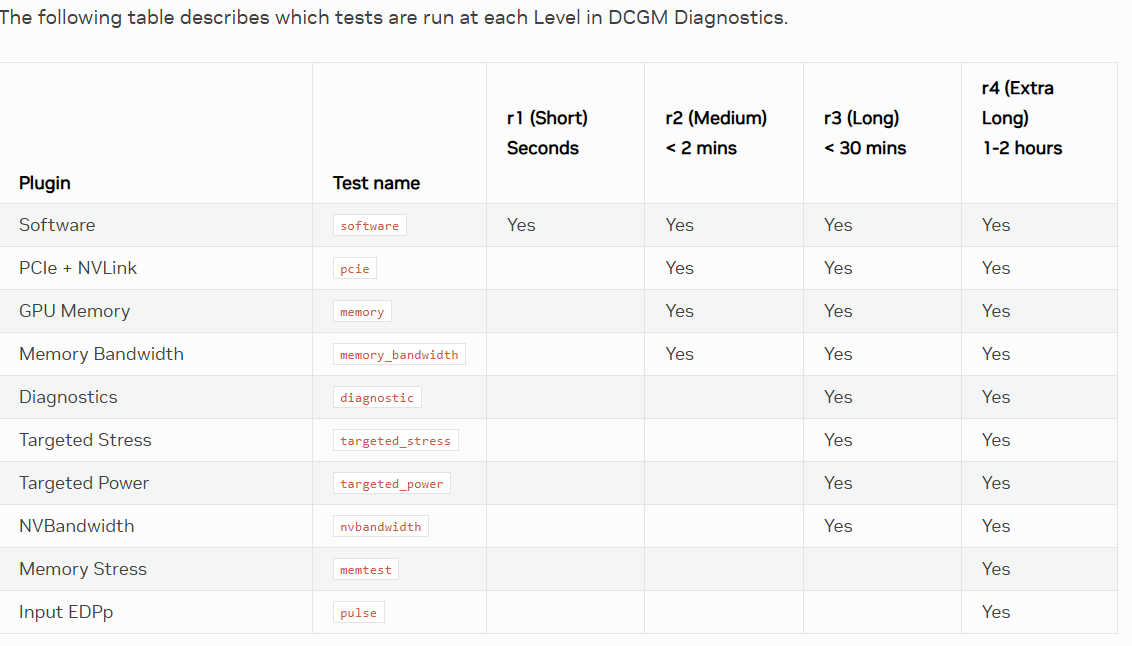
This command can be used to identify GPU issues. It has multiple levels of tests available:
dcgmi diag -r [1,2,3,4]
As of version 4.2, these are the available testing details (from https://docs.nvidia.com/datacenter/dcgm/latest/user-guide/dcgm-diagnostics.html):
Further Reading & Support
GB300 Specific Deployment and Management Notes
Below you will find specific information related to the GB300 shape.
GPU Memory Fabric (GMF)
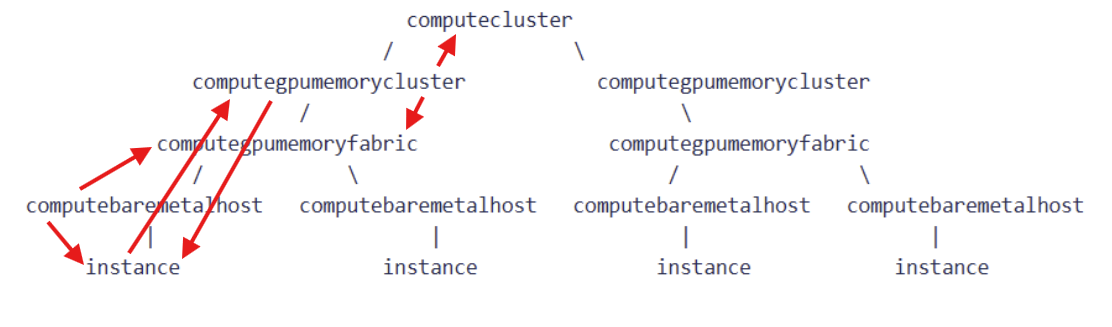
A GPU Memory Fabric OCID is a customer identifier in a capacity topology that groups the hosts connected to a single NVLink 72 switch (AKA a single rack, or single physical NVLink domain). It takes the form "ocid1.computegpumemoryfabric.oc1..."
GPU Memory Cluster (GMC)
A GPU Memory Cluster (GMC) gets created from some or all of the hosts on a single GMF. When the GMC is created the hosts that are part of the cluster are instantiated as part of the specified (and required) Compute Cluster. A GMC must be associated with a Compute Cluster, and many GMCs from different GMFs can be associated with the same Compute Cluster. The OCID takes the form \"ocid1.computegpumemorycluster.oc1...\"
Upon GMC creation, special NVLink and ROCe switch configuration takes place on the OCI side, so launch via GMC is REQUIRED to use NVLink and ROCe with GB300 shape.
Instances of different shapes may also be in the same compute cluster alongside GB300 GMCs.
Topology aware scheduling
Running your multi-host workload on thoughtfully selected hosts is especially important on GB300 clusters. As can be seen in the NCCL example results below, A2A collective bandwidth between 16 hosts in a single GMF/GMC/rack will be on the order of 620 GB/s over NVLink, whereas this drops to 48 GB/s when things scale to 32 hosts across 2 GMF/GMC/racks.
From a network topology aware scheduling perspective, computegpumemoryfabric is a 1 to 1 relationship with computelocalblock. Put another way, a single computelocalblock will not \"contain\" more than a single computegpumemoryfabric. Each Scalable Unit (SU) corresponds to an OCI computenetworkblock (32 racks). This means that existing best practices using SLURM or k8s or custom scheduler solutions based on OCI computelocalblock and computenetworkblock should continue to suffice with GPU.GB300.4.
Required IAM Policies
Required policies (any-user can be replaced by the group launching the cluster):
Allow any-user to use compute-hpc-islands in tenancy
Allow any-user to use compute-network-blocks in tenancy
Allow any-user to use compute-local-blocks in tenancy
Allow any-user to use compute-bare-metal-hosts in tenancy
Allow any-user to use compute-gpu-memory-fabrics in tenancy
Viewing Resource Connections via oci CLI:
Example resource discovery commands:
To list all GMFs in your regional dedicated capacity:
# use the root compartment / tenancy OCID for compartment-id
oci compute compute-gpu-memory-fabric list --compartment-id ocid1.tenancy.oc1...
To get more details about a specific GMF:
oci compute compute-gpu-memory-fabric get \
--compute-gpu-memory-fabric-id ocid1.computegpumemoryfabric.oc1...
To find the the GMF and instance associated with a baremetalhost:
oci compute compute-host get --compute-host-id ocid1.computebaremetalhost.oc1...
To find all baremetalhosts on a given GMF:
oci compute compute-host list --network-resource-id ocid1.computegpumemoryfabric.oc1...
To find the GMC an instance belongs to:
oci compute instance get --instance-id ocid1.instance.oc1...
To find the computecluster, GMF, and instanceonfiguration associated with a GMC:
oci compute compute-gpu-memory-cluster get --compute-gpu-memory-cluster-id ocid1.computegpumemorycluster.oc1....
To list all instances in a GMC:
oci compute compute-gpu-memory-cluster-instance-summary \
list-compute-gpu-memory-cluster-instances \
--compute-gpu-memory-cluster-id ocid1.computegpumemorycluster.oc1....
To see additional details about the computecluster:
oci compute compute-cluster get --compute-cluster-id ocid1.computecluster.oc1....
Deployment
The OCI HPC or OKE deployment stacks can be used to deploy GB300 hosts on multiple GMFs. Please see the readme associated with the version of the stack you are using for details.
From the OCI CLI, here is what is necessary to deploy GB300 hosts. When you create the GMC, OCI will attempt to instantiate \<size> hosts, no additional instance launch command is needed.
Find all of your available fabrics:
#Use the root compartment / tenancy OCID for compartment-id
oci compute compute-gpu-memory-fabric list --compartment-id ocid1.tenancy...
Create a compute cluster in which you will create the GMCs:
#Use the target compartment OCID
oci compute compute-cluster create --availability-domain XXX --compartment-id ocid1.compartment...
Create an instance configuration to use for instance launch in the GMC. Use the target compartment OCID. It may be easier to create an instance configuration via OCI web console than use JSON input file:
oci compute-management instance-configuration create --compartment-id ocid1.compartment... --instance-details XXX_JSON_XXX
Note: It is recommended that you create the GMC with all of the available hosts in the fabric. This is necessary to properly size the NVLink partition (support for multi-cast) since once the partition is created it will not be updated when adding new nodes. The only way to update it once it has be created is to delete the GMC and start over or idle the workload on the rack and then have OCI update the partition in the background.
Create the GMC. This will bring up \<size> instances. You can use the "available-host-count" from the "compute-gpu-memory-fabric list" step. Use the target compartment OCID:
oci compute compute-gpu-memory-cluster create --availability-domain XXX \
--compartment-id ocid1.compartment... --compute-cluster-id ocid1.computecluster... \
--instance-configuration-id XXX --gpu-memory-fabric-id ocid1.computegpumemoryfabric... --size XX
To increase the number of instances in an existing GMC set the size parameter to the total size you want (it is not an increment to the existing size):
oci compute compute-gpu-memory-cluster update --size XX --compute-gpu-memory-cluster-id ocid1.computegpumemorycluster...
To shrink the number of instances in a GMC, normal/direct instance termination is used.
To terminate all instances on a GMC and delete the GMC itself:
oci compute compute-gpu-memory-cluster delete --compute-gpu-memory-cluster-id ocid1.computecluster.oc1....
IMEX
Nvidia IMEX configures the hosts in a single rack to be able to communicate over NVLink. Broadly speaking, you will need to configure IMEX by adding a list of IPs or hostnames of the nodes in the rack (up to 18) that you want to be able to communicate in /etc/nvidia-imex/nodes_config.cfg on all hosts, and then restart the nvidia-imex service. Consult the Nvidia documentation for complete details.
Unhealthy Resource Tagging
Unhealthy instance tagging is supported for GB300 instances.