How OCI Functions Works
Find out how OCI Functions works when you create or deploy a function, and when you invoke a function.
What happens when you create or deploy a function?
How you provide function code depends on the function source type.
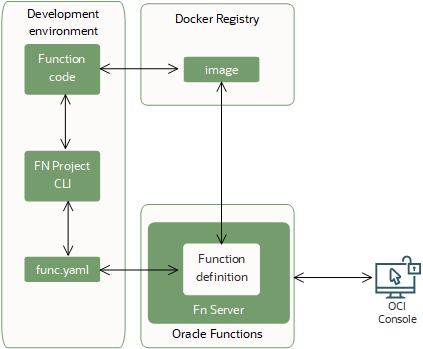
For image-based functions, you can use a single Fn Project CLI command to perform the deploy operations in sequence:
- building a container image from the function
- providing a definition of the function in a
func.yamlfile that includes:- the maximum length of time the function is allowed to execute for
- the maximum amount of memory the function is allowed to consume
- pushing the image to the specified container registry
- uploading function metadata, including the memory and time restrictions and a link to the image in the container registry, to the Fn Server
- adding the function to the list of functions shown in the Console
For code-only functions, you provide an archive that contains the function code and dependencies, select a supported managed runtime, and create the function. OCI Functions validates the archive, and stores the function source information. You do not build, push, or manage a container image.
The following diagram shows the process of deploying an image-based function to OCI Functions.
For image-based functions, after the image has been uploaded to the container registry, you are responsible for updating the image. For example, when new language versions are supported (for more information, see Function Development Kits (FDKs))
For code-only functions, OCI Functions owns managed runtime patching and publishes updated runtime versions. You control when a code-only function moves to a newer compatible runtime version.
What Happens When You Invoke a Function?
You can invoke a function that you've deployed to OCI Functions from:
- The Fn Project CLI.
- The Oracle Cloud Infrastructure SDKs.
- Signed HTTP requests to the function's invoke endpoint. Every function has an invoke endpoint.
- Other Oracle Cloud services (for example, triggered by an event in the Events service) or from external services.
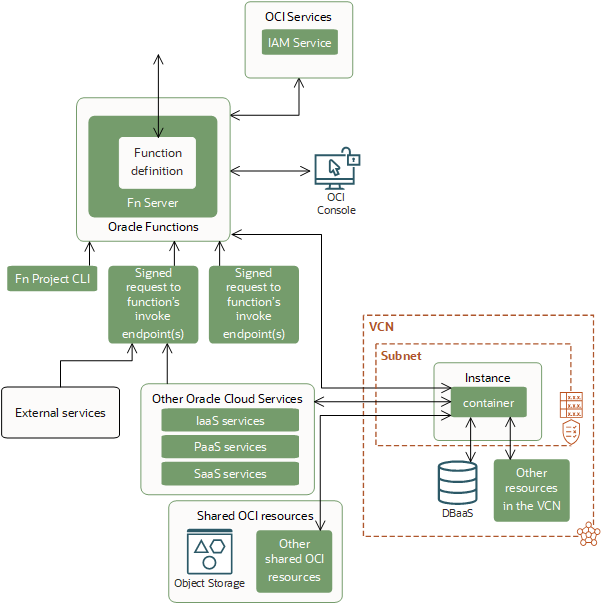
When a function is invoked for the first time, OCI Functions first verifies the request with the IAM service. Assuming the request passes authentication and authorization checks, OCI Functions prepares the execution environment for the function and executes the function code.
For image-based functions, OCI Functions uses the function definition to identify the container image to pull from the container registry, and runs the image as a container on an instance in a subnet associated with the application to which the function belongs.
For code-only functions, OCI Functions uses the function archive and managed runtime to run the function.
When the function is executing, the function can read from and write to other resources and services running in the same subnet, for example Database as a Service. The function can also read from and write to other shared resources, (for example, Object Storage), and other Oracle Cloud services. You can specify the maximum length of time the function is allowed to execute by setting a timeout in the Console, CLI, SDKs, or API.
OCI Functions stores the function's logs in Oracle Cloud Infrastructure or in an external logging destination.
When the function has finished executing and after a period of being idle, the execution environment is removed. If OCI Functions receives another call to the same function before the execution environment is removed, the request can be routed to the same running execution environment. If OCI Functions receives a call to a function that is currently executing, OCI Functions scales horizontally to serve both incoming requests.
OCI Functions shows information about function invocations in metric charts.
The following diagram shows how invoked functions interact with OCI services, tools, and external services.