Private Access
This topic gives an overview of the options for enabling private access to services within Oracle Cloud Infrastructure. Private access means that traffic doesn't go over the internet. Access can be from hosts within a virtual cloud network (VCN) or an on-premises network.
This topic doesn't discuss access to services through an internet gateway. However, remember that traffic through an internet gateway between a VCN and a public IP address that's part of Oracle Cloud Infrastructure is routed without being sent over the internet.
Highlights
- You can enable private access to certain services within Oracle Cloud Infrastructure from a VCN or on-premises network by using a private endpoint, a Private Service Access endpoint, or a service gateway. See the sections that follow.
-
For each private access option, these services or resource types are available:
- With a private endpoint: Available services
- With a service gateway or a Private Service Access endpoint: Available services
- With any of these private access options, the traffic stays within the Oracle Cloud Infrastructure network and doesn't traverse the internet. However, if you use a service gateway, requests to the service use a public endpoint for the service.
- If you don't want to access a particular Oracle service through a public endpoint, we recommend using a private endpoint or a PSA endpoint in a VCN (assuming the service supports these endpoints).
About Private Endpoints
A private endpoint is a private IP address within a VCN that you can use to access a particular service within Oracle Cloud Infrastructure. The service sets up the private endpoint in a subnet within the VCN. You can think of the private endpoint as another VNIC in the VCN. You can control access to it how you would for any other VNIC: by using security rules. However, the service sets up this VNIC and maintains its availability for you. You only need to maintain the subnet and the security rules.
The following diagram illustrates the concept.
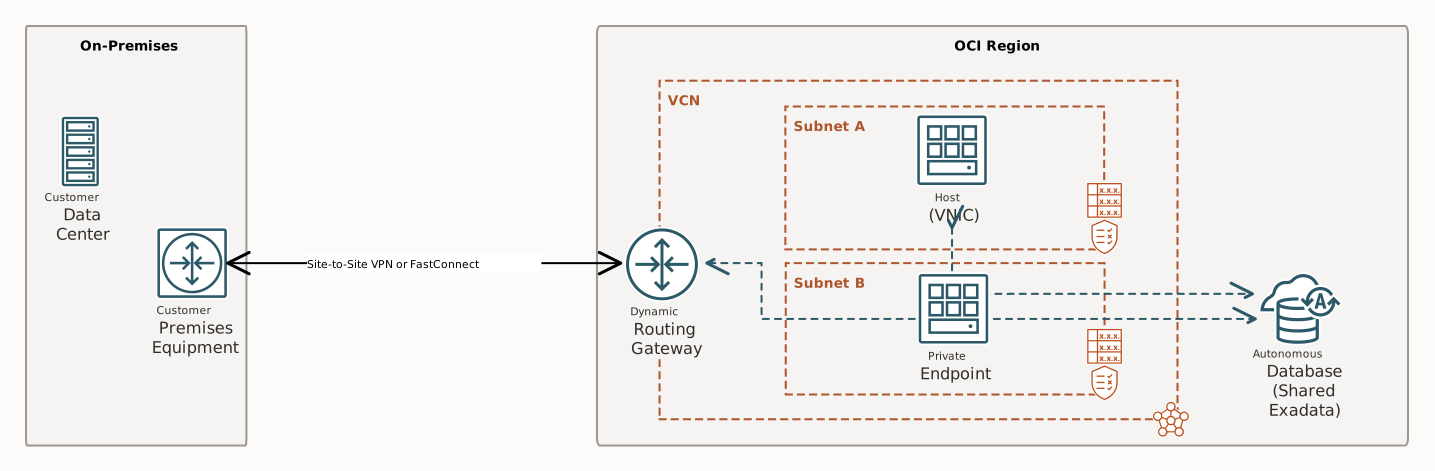
The private endpoint gives hosts within a VCN and an on-premises network access to a single resource within the Oracle service of interest (for example, one database in Autonomous AI Database Serverless). Compare that private access model with a service gateway (see the next section): If you created five Autonomous AI Databases for a specific VCN, all five would be accessible through a single service gateway by sending requests to a public endpoint for the service. However, with the private endpoint model, there would be five separate private endpoints: one for each Autonomous AI Database, and each with its own private IP address.
The service that sets up the private endpoint in the VCN might provide you a DNS name (fully qualified domain name, or FQDN) for the private endpoint, and not the private IP address itself. If you configured the network setup for DNS, hosts can access the private endpoint by using the FQDN. If the service supports the use of network security groups (NSGs) with its resources, you can request that the service set up the private endpoint in an NSG within the VCN. NSGs let you write security rules to control access to the private endpoint without knowing the private IP address assigned to the private endpoint.
If you have a private endpoint for a resource, hosts within the VCN can use the private endpoint's FQDN or private IP address to access the resource. You set up security rules to control access between hosts in the VCN and the private endpoint. For an example of how to do this with Autonomous AI Lakehouse, see Configuring Network Access with Private Endpoints.
You can also set up transit routing with your VCN so that hosts in the on-premises network can use the private endpoint. To enable on-premises hosts to use the private endpoint's FQDN instead of its private IP address, you have two options:
- Set up an instance in the VCN to be a custom DNS server. For an example of an implementation of this scenario with the Oracle Terraform provider, see Hybrid DNS Configuration.
- Manage hostname resolution yourself manually.
You might have several VCNs with hosts that need access to the specific resource of interest. You can peer the VCNs so that hosts in the other VCNs can also use the private endpoint (the preceding diagram doesn't show any peered VCNs).
About Service Gateways
A service gateway gives resources in your VCN and on-premises network private access to multiple services within Oracle Cloud Infrastructure, without the traffic going over the internet.
The following diagram illustrates the concept. The diagram refers to the Oracle Services Network, which is a conceptual network in Oracle Cloud Infrastructure that is reserved for Oracle services.
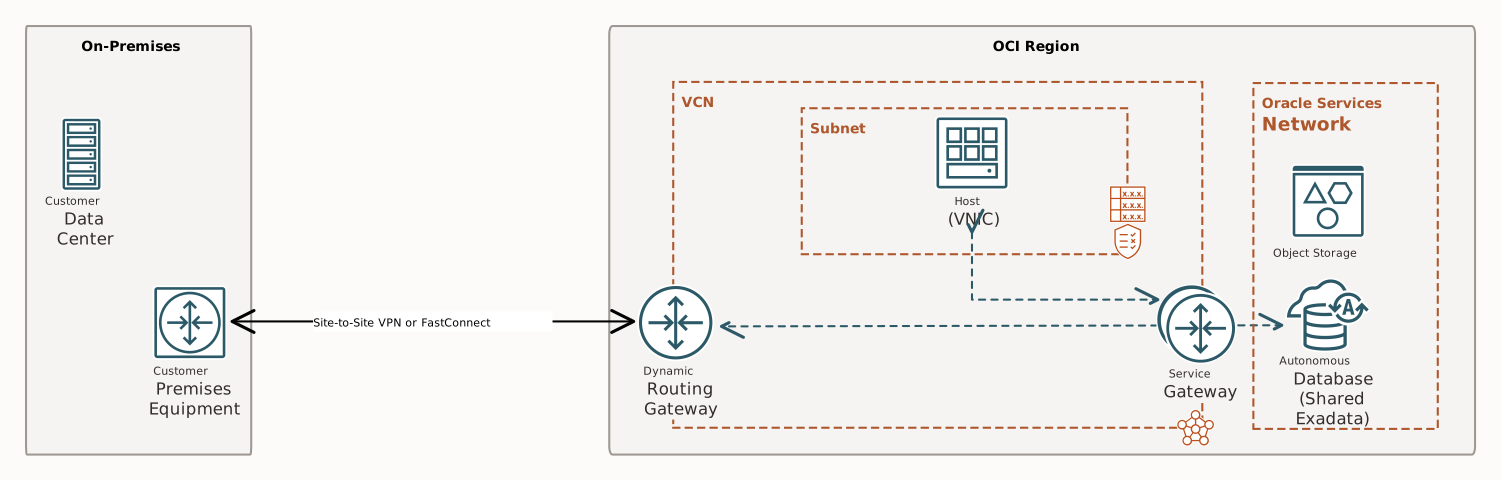
To use a service gateway from a particular subnet within your VCN, you set up a route rule in the subnet's route table, and specify the service gateway as the target of the rule. You also set up security rules to control access between hosts in the VCN and the services available through the service gateway.
If you have more than one VCN in your tenancy, you can configure each with its own service gateway.
See Gateway Limits and Creating a Limit Increase Request for more limits-related information.
You can also set up transit routing for the Oracle Services Network so that hosts in your on-premises network can use a VCN's service gateway.
About Private Service Access
You can use Oracle Cloud Infrastructure Private Service Access to create Private Service Access (PSA) endpoints that provide private IP access to a single OCI service. The PSA endpoint uses a dedicated private IP address and FQDN in a specified VCN and subnet. A PSA endpoint is available in IPv4-only or dual stack IPv4-IPv6 networks.
You set up the PSA endpoint in a subnet within the VCN. You can think of the PSA endpoint as another VNIC in the VCN. You can control access to it how you would for any other VNIC: by using security rules in a security list, an NSG, or using Zero-trust Packet Routing (ZPR) security attributes and policies that you define and implement.
The following diagram illustrates the concept.
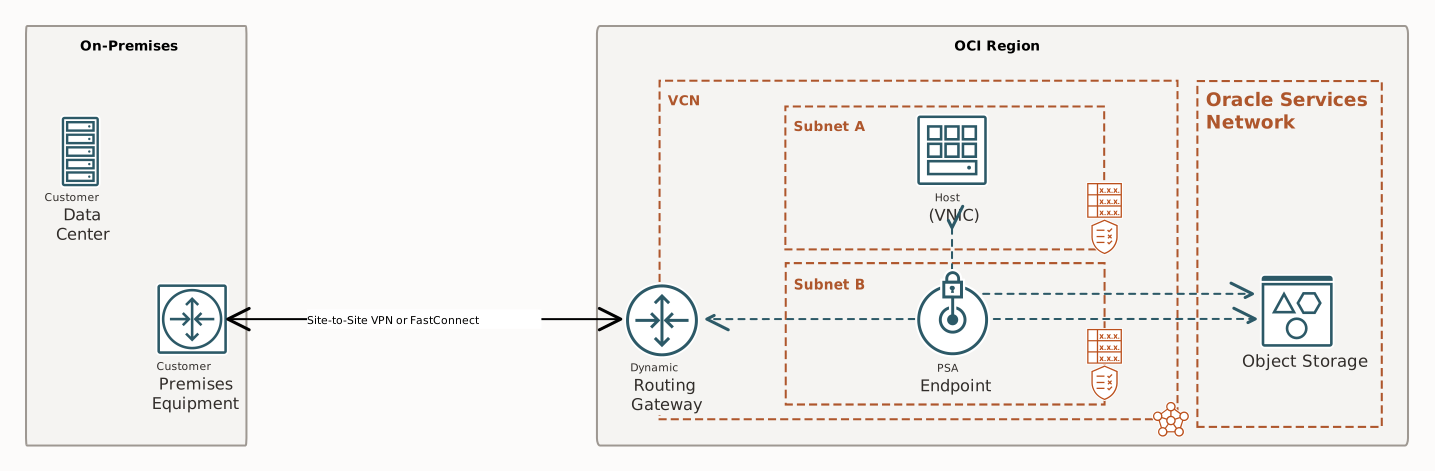
The PSA endpoint gives hosts within a VCN or an on-premises network access to the Oracle service of interest (for example, Object Storage). The PSA endpoint is available to any workload in that VCN, regardless of the workload's subnet, for communicating with the respective service. You can only have one PSA endpoint in a VCN for a specific service. If you have many VCNs, create PSA endpoints in each VCN as needed.
To access the PSA endpoint from on-premises networks, you have two choices.
- In the on-premises DNS configuration, manually map the FQDN for the PSA service to the private IP assigned to the PSA endpoint.
- Create a DNS listening endpoint in the VCN resolver. From on-premises forward FQDNs for the OCI services being used to the listening endpoint, which returns the Private IP for any associated PSA endpoint.
For more information, see About PSA Endpoints.