PeopleSoft
Oracle PeopleSoft is an Oracle enterprise application suite that supports human capital management, financials, supply chain, and campus solutions. If you want to deploy PeopleSoft in AWS or migrate PeopleSoft from your data center to AWS, you can plan for secure, low latency topology leveraging Oracle AI Database@AWS.
Learn about reference architecture to run Oracle PeopleSoft in AWS leveraging Oracle AI Database@AWS for Database layer and AWS EC2 for web and app layers. This provides the low latency configuration as the Oracle AI Database Services are deployed in same AWS data center.
Currently Exadata Infrastructure and Oracle Autonomous AI Database on Dedicated Infrastructure are available. You can check regional availability matrix to determine supported services by OCI and AWS regions.
This document is intended for cloud architects, infrastructure administrators, and PeopleSoft system administrators responsible for designing, deploying, and operating PeopleSoft environments. Familiarity with PeopleSoft architecture and components, Oracle AI Database, and cloud platforms including Oracle Cloud Infrastructure (OCI) and Amazon Web Services (AWS) is recommended.
Architecture
This architecture demonstrates the deployment of Oracle PeopleSoft applications in single availability zone of AWS region. To support disaster recovery, deploy a similar configuration across multiple AWS regions. To configure the databases to use Oracle Active Data Guard and Application stack, you can use rsync to synchronize the file systems across regions. For more information on designing and implementing disaster recovery architectures, see Oracle Maximum Availability Architecture for Oracle AI Database@AWS.
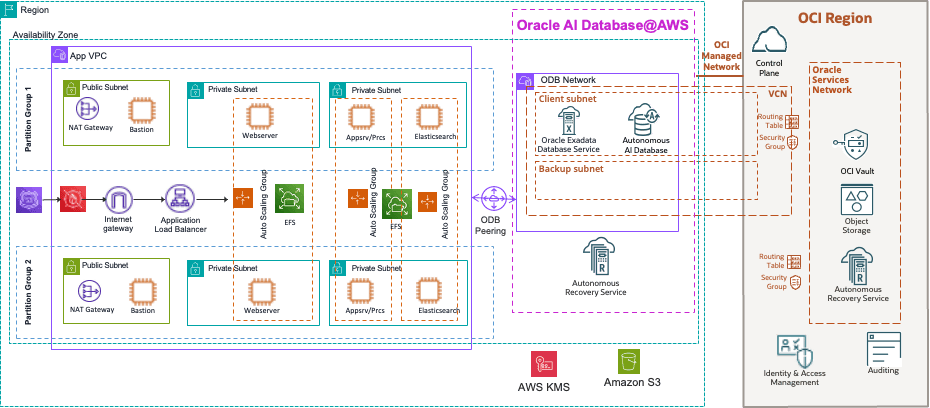
This architecture deploys all components within a single AWS region and highlights important design considerations for PeopleSoft on AWS with Oracle AI Database@AWS.
Networking Tier
This architecture shows the deployment of PeopleSoft application in a single availability zone of AWS ensuring low latency. The architecture consists of one VPC with bastion host, load balancer, web server, application server, process scheduler and elastic server in separate subnets and ODB Network with Oracle AI Database. ODB Network needs to be peered with VPC. On premise can be connected through AWS Direct Connect and AWS Transit Gateway. EC2 instances for web server, application server, process scheduler and elastic server can be placed in multiple partition groups.
The bastion host is deployed in a public subnet, and all other instances are deployed in private subnets. You can access the instances in private subnets over port 22 through the bastion host or the AWS direct connect if you have set up a direct connectivity between your data center and AWS. All instances are active in the two placement groups. Database is hosted on single availability zone with RAC enabled by default. Database can be deployed in second availability zone with data guard enabled for redundancy at Region level.
Networking Design Considerations
- Oracle AI Database@AWS supports various networking topologies. For more information, see the Learn About Network Topologies for Oracle AI Database@AWS documentation to select the topology best suited to your requirements.
- When you design for IP address spaces, plan for Oracle AI Database@AWS ODB Network and Exadata Infrastructure dependency requirements. For more information, see ODB Network Design to understand address space consumption scenarios.
- Deploy Application tier in the same Availability Zone as Database for low latency
-
For multi-region disaster recovery architectures, consider detailed network connectivity patterns and inter-region routing for Oracle AI Database@AWS. Following are the various networking path options for single region and cross region deployments. Once the network path is established, Active Data Guard needs to be enabled for both primary and standby database to be in sync.
-
Cross Availability Zone: This is the scenario where multiple Oracle AI Database@AWS services are being deployed across multiple Availability Zones
- Option 1: OCI: You can peer both Virtual Cloud Networks (VCN) that are hosting Oracle AI Database@AWS through Local Peering Gateway (LPG).
- Option 2: AWS: You can peer the VPC hosting the App tier to peer with both ODB Networks hosting Oracle AI Database@AWS.
- Option 3: AWS: You can use Transit Gateway to connect both ODB Networks through Transit VPC. Each ODB Network is peered with Transit VPC and both Transit VPCs are connected through Transit Gateway.
-
Cross Region: This is the scenario where multiple Oracle AI Database@AWS services are being deployed across multiple Regions.
- Option 1: OCI: you can peer Virtual Cloud Networks (VCNs) across regions leveraging Dynamic Routing Gateway (DRG) and a hub VCN in each of the regions.
- Option 2: You can use Transit Gateway to connect both ODB Networks through Transit VPC. Each ODB Network is peered with Transit VPC and both Transit VPCs are connected through Transit Gateway.
-
- Review the Prerequisites documentation early in the design phase to ensure that network access requirements are met.
-
Use Network Security Groups (NSGs) to restrict access to database virtual machines:
- Allow SSH (port 22) access only through Bastion.
- Allow database traffic (port 1521) exclusively from approved PeopleSoft application subnets and authorized on-premises networks.
Bastion Host
The AWS Bastion host is a managed service that provides a secure and controlled entry point to AWS virtual networks from outside AWS.
AWS Bastion is deployed in a dedicated subnet (AWSBastionSubnet) and enables secure access to virtual machines placed in private subnets that are not directly reachable from the public internet. By using AWS Bastion, the architecture maintains a single, known access point that can be centrally monitored and audited, while avoiding the need to expose public IP addresses or open inbound ports on individual virtual machines.
In this architecture, AWS Bastion does not require a public IP address on the target virtual machines. Administrative access is established over TLS (port 443) through the AWS Portal or supported native clients. Network Security Groups on the target subnets do not require inbound SSH or RDP rules, which reduces the attack surface. Access to AWS Bastion can be restricted and managed using AWS role-based access control (RBAC) and AWS Active Directory authentication.
AWS Bastion enables administrators to connect to virtual machines in private subnets using SSH for Linux and RDP for Windows. Connections are initiated from the administrator’s local workstation and proxied through the Bastion service, ensuring that credentials and sessions are not exposed to the public network.
By centralizing administrative access and eliminating direct VM exposure, AWS Bastion enhances security while maintaining operational access to private workloads.
PeopleSoft Application Tier
All instances in the application tier are configured and connected to database instances that are in the active state. The application tier contains the following PeopleSoft Internet Architecture components:
- PeopleSoft web servers: The PeopleSoft web servers receive application requests from the web environment, the internet, and the intranet through the load balancer. Incoming traffic is distributed by the load balancer over port 8000 (example). It forwards the requests to the Oracle Tuxedo Jolt port on the application server. In the architecture diagram, multiple web servers are deployed to support high availability.
- ElasticSearch servers: The Oracle PeopleSoft search framework provides a standard method to use search indexes for all PeopleSoft applications. The search framework depends on ElasticSearch servers and interacts with the PeopleSoft web servers over port 9200 (example).
- PeopleSoft application servers: PeopleSoft application servers handle the bulk of the workload in the PeopleSoft system. It runs the business logic and processes all application requests from the web server over Oracle Tuxedo Jolt ports over port 9000 (example). The application server also maintains the SQL connection to the database over port 1521. Application requests are received at the web server, forwarded to the application servers, and then submitted to the database servers.
- PeopleSoft Process Scheduler: An instance of the PeopleSoft Process Scheduler is required in order to run batch processes or jobs, such as NVision.
- PeopleTools client: PeopleTools clients are Windows-based and are also referred to as the PeopleTools Development Environment. These clients run on supported Microsoft Windows platforms and can connect to the PeopleSoft database using client connectivity software (two-tier connection) over port 1521 or through a PeopleSoft application server (three-tier connection) over port 7000. The PeopleTools client is an integrated part of the PeopleSoft Internet Architecture, as it helps administrators perform management and migration tasks.
Set up AWS File Storage to stage PeopleSoft software. A single file storage file system can be created to share software binaries across application servers, web servers, and ElasticSearch servers.
Database Tier
For high availability requirements, we recommend using one of the following Oracle AI Database@AWS options:
- Oracle Autonomous AI Database on Dedicated Infrastructure
- Oracle Exadata Database Service on Dedicated Infrastructure
The database instances are configured for high availability with Oracle Real Application Clusters (RAC) enabled. To achieve availability zone redundancy for the database, use Oracle Active Data Guard in synchronous mode to replicate the database across availability zones.
A prerequisite for Active Data Guard is to establish a private networking path between availability zones, either through:
- AWS backbone connectivity using TGW.
- OCI backbone connectivity using VCN peering with Local Peering Gateways or Dynamic Routing Gateways.
Port 1521 must be open for communication with Oracle Active Data Guard, as Data Guard transport services use port 1521 to transmit redo log files. For detailed networking design considerations, see Maximum Availability Architecture(MAA).
Backup and Recovery
Automated database backups can be configured using Oracle Autonomous Recovery Service or Amazon S3 or OCI Object Storage, depending on the selected database service and recovery requirements.
Data Encryption
For data in transit, Oracle AI Database@AWS services are accessible only through encrypted communication channels. By default, the Oracle Net client is configured to use encrypted sessions, ensuring that all database connections are protected in transit.
Oracle AI Database@AWS protects data at rest using Transparent Data Encryption (TDE), which is enabled by default with no customer configuration required. TDE automatically encrypts database files, redo and undo logs, backups, and other persistent data when written to storage, and transparently decrypts the data when accessed by authorized processes. Encryption is managed using a hierarchical key model, where a master encryption key protects tablespace keys that in turn encrypt the data.
Note
Oracle AI Database@AWS supports both Oracle-managed and customer-managed key options for TDE. With Oracle-managed keys, encryption keys are generated, stored, and managed automatically by Oracle. With customer-managed keys, customers can centrally control key lifecycle management, rotation, and auditing by integrating with OCI Vault, Oracle Key Vault, or AWS Key Management Service (KMS).
Note: Cross-region Oracle Data Guard is not supported when customer-managed encryption keys are stored in AWS Key Management Service (KMS)
Migration to Oracle AI Database@AWS
Oracle Zero Downtime Migration (ZDM) provides multiple migration workflows to move Hyperion databases toOracle AI Database@AWS.
Migration to Exadata Database
-
Physical Online Migration:
The physical online migration workflow supports migrations between the same database versions and platforms. This approach uses direct data transfer and the restore from service method to create the target database, avoiding the use of intermediate backup storage. Oracle Data Guard is used to keep the source and target databases synchronized, enabling minimal-downtime migration.
-
Physical Offline Migration:
The physical offline migration workflow supports migrations between the same database versions and platforms. The target database is created using Recovery Manager (RMAN) backup and restore. Amazon Elastic File System or Amazon S3 is used to provide an NFS file share for storing RMAN backup files during the migration process.
-
Logical Online Migration:
The logical online migration workflow supports migrations between the same or different database versions and platforms. This workflow uses Oracle Data Pump export and import to create the target database. Amazon Elastic File System or Amazon S3 provides an NFS file share to store the Data Pump dump files. Oracle GoldenGate is used to synchronize the source and target databases, enabling minimal-downtime migration.
-
Physical Offline Migration:
The logical offline migration workflow supports migrations between the same or different database versions and platforms. The target database is created using Oracle Data Pump export and import. Amazon Elastic File System or Amazon S3 provides an NFS file share to store the Data Pump dump files used during the migration.
Migration to Autonomous AI Database
-
Logical Online Migration
The logical online migration workflow supports migrations between the same or different database versions and platforms. This workflow uses Oracle Data Pump export and import to create the target Autonomous AI Database. Amazon Elastic File System or Amazon S3 provides an NFS file share for storing Data Pump dump files, while Oracle GoldenGate keeps the source and target databases synchronized to enable minimal-downtime migration.
-
Logical Offline Migration
The logical offline migration workflow supports migrations between the same or different database versions and platforms. The target Autonomous AI Database is created using Oracle Data Pump export and import. Amazon Elastic File System or Amazon S3 provides an NFS file share to store the Data Pump dump files used during migration.
Components Overview
| Component | Purpose |
|---|---|
| Amazon S3 | A highly durable and scalable object storage service used to store and retrieve unlimited amounts of data from anywhere |
| Autonomous Recovery Service | Autonomous Recovery Service provides automated backup, continuous data protection, and fast recovery for Oracle AI Database(s). It reduces data loss and recovery time by autonomously managing backups, validation, and restore operations. |
| AWS Bastion | AWS Bastion enables secure RDP and SSH access to virtual machines over HTTPS without requiring public IP addresses. It improves security by centralizing administrative access and reducing exposure to inbound internet threats. |
| Amazon Elastic File System | A fully managed, scalable NFS-based file storage service from AWS that provides shared file system access to multiple compute instances across Availability Zones |
| AWS Load Balancer | AWS Load Balancer distributes incoming traffic across web or application servers and continuously monitors backend health probes to send traffic only to healthy instances. This ensures even traffic distribution, high availability, and automatic failover without application |
| Object Storage | Object Storage provides durable, scalable storage for unstructured data using a bucket-and-object model. It is commonly used for backups, archival, and data sharing with built-in security and lifecycle controls |
| OCI Vault | OCI Vault provides centralized management of encryption keys and secrets using Oracle-managed HSMs. It enables strong security, key rotation, and access control for protecting data across OCI services. |
| Oracle AI Database@AWS | Oracle AI Database@AWS provides Oracle Exadata Database Service on Dedicated Infrastructure, deployed and operated in AWS with native AWS integration. It combines Exadata performance and Oracle AI Database capabilities with AWS networking, security, and consumption models. The offering includes , Oracle Exadata Database Service on Dedicated Infrastructure, and Oracle Autonomous AI Database on Dedicated Infrastructure , for hosting database layer for PeopleSoft. |
| AWS KMS | AWS Key Management Service (AWS KMS) is a managed security service that simplifies creating, controlling, and managing cryptographic keys to encrypt data across AWS services and applications. |
Learn more
- PeopleSoft Information Portal
- PeopleSoft on the Oracle Help Center
- Support for PeopleSoft Applications Running in a Multicloud Environment (Doc ID 3066912.1)
-
Learn more about Single Sign on for PeopleSoft
- E-SEC: What Is Microsoft Entra and Is Entra Supported For Authentication Into PeopleSoft? (Doc ID 3073875.1)
- E-SEC: PT 8.x How to Setup External Single Signon Solutions with PeopleSoft (KB563357)