Federation (Optional)
Identity Federation is an enterprise security capability that allows administrators to maintain employee credentials in a single authoritative enterprise identity repository and enables the single-sign-on experience for their employees.
Setting up identity federation for Oracle AI Database@AWS is optional. Federation allows administrators to configure the ability for users to sign in to the OCI tenancy associated with their existing Identity provider. While deployment operations are performed in the AWS console and don't require the Oracle Cloud Console, other database management tasks require access to the Oracle Cloud Console.
To simplify security management and minimize administrative overhead, Oracle AI Database@AWS customers can configure identity federation between their existing identity provider and the OCI tenancy. With federation in place, authorized users can access the Oracle Cloud Console using their existing enterprise credentials from Azure Entra ID, simplifying login and improving security management.
Without federation, Oracle AI Database@AWS users must create and maintain separate credentials for OCI users when accessing the Oracle Cloud Console by using the "Manage in OCI" button.
OCI IAM supports SAML, OAuth 2.0, and OpenID Connect (OIDC), and can be federated with any IDP that supports these protocols.
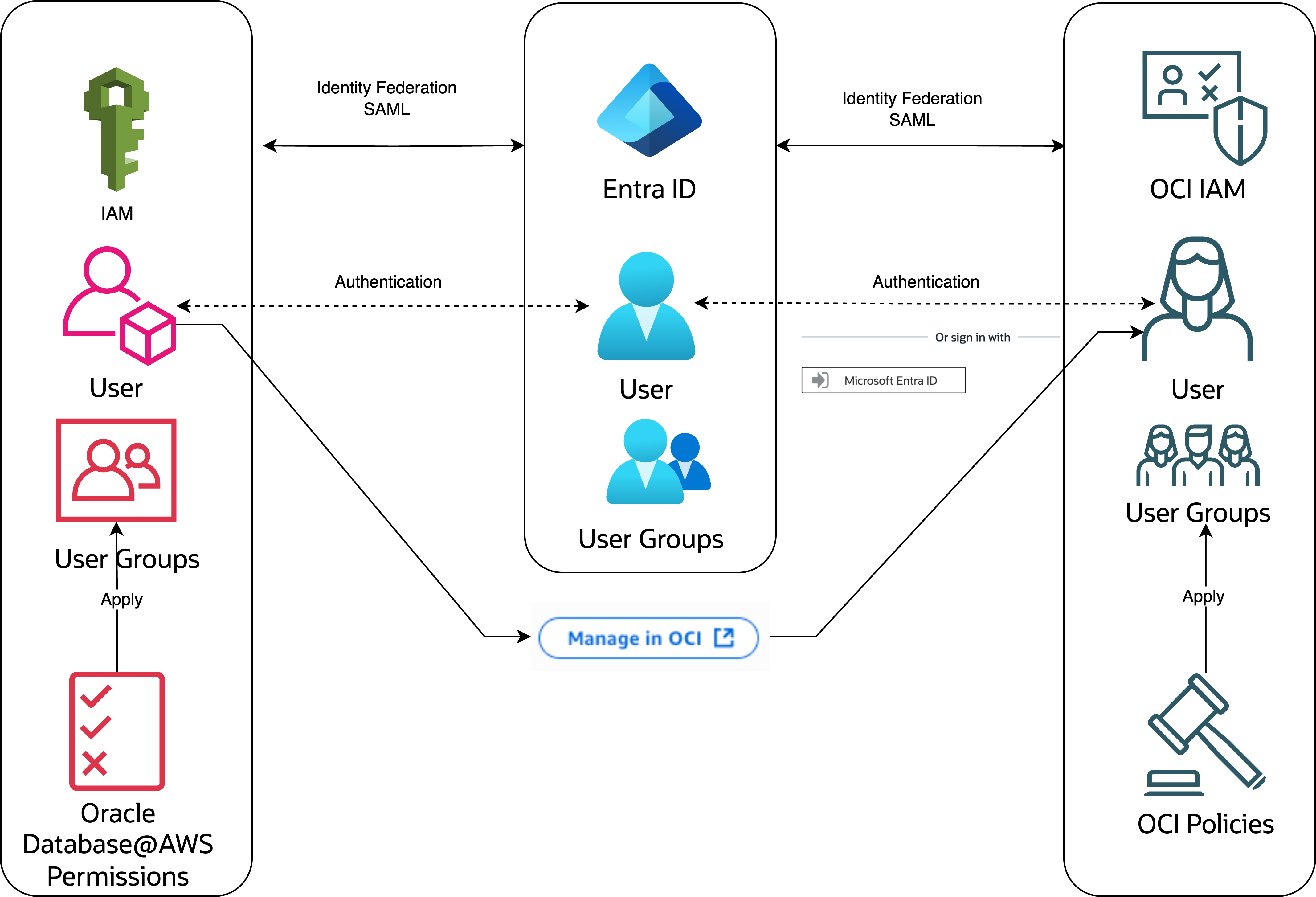
In the following diagram, AWS IAM is federated with third-party identity providers (Azure EntraID, Google Cloud IAM, Okta). OCI IAM is federated with the same provider.
Users are assigned to groups and access permissions are managed through policies. We recommend that you define groups and assign permissions following the principle of least privilege approach. For guidance, see the predefined groups and policies examples in OCI and AWS permissions in Role-Based Access Control.
The following high-level steps demonstrate how to set up OCI IAM Identity Federation with Azure Entra ID, already federated with AWS IAM.
- Configure Azure Entra ID for integration with OCI IAM, using the following tutorials
- In Entra ID
- Create Oracle AI Database@AWS groups
- We recommend following the OCI naming convention
- Optional: sync groups to AWS
- We recommend following the OCI naming convention
- Add users to groups
- Create Oracle AI Database@AWS groups
- In AWS
- Define policies (based on RBAC requirements)
- Create groups (if not sync)
- Associate policies and groups
- Add users to groups
- In OCI
IAM
- Configure federation with Azure Entra ID
- Verify that automation (from Oracle AI Database@AWS provisioning) has created the necessary policies and groups
AWS Federation
To configure AWS IAM with your identity provider, see the AWS documentation: https://docs.aws.amazon.com/singlesignon/latest/userguide/tutorials.html
To configure OCI IAM federation with your identity provider of choice, see the relevant OCI documentation:
- Azure EntraID: Federation (Optional)
- Okta: OCI IAM with Okta Tutorials
- PingOne Identity: Set up Single Sign-On Between Oracle Cloud Infrastructure Identity and Access Management and PingOne
- Microsoft Active Directory Federation Services (ADFS): OCI IAM with ADFS Tutorials