Autonomous AI Database (Serverless) - Cross-Region
Oracle Autonomous AI Database Service provides you with the capability to set up and modify disaster recovery configurations. It is crucial to establish your recovery time objective (RTO) and recovery point objective (RPO) for different levels of failures, including both planned and unplanned events.
- Backup-based disaster recovery:
Oracle Autonomous AI Database Service on Azure supports backup-based disaster recovery (DR).
- Autonomous Data Guard:
Autonomous Data Guard for Oracle Autonomous AI Database Service provides high availability and disaster recovery by maintaining a standby database in a separate availability zone (AZ) or region. When enabled, it ensures that the primary and standby databases remain synchronized with a RPO of 1 minute and it allows automatic failover in the event of an outage or disaster.
If you have selected deployment mode as Secure access from everywhere or Secure access from allowed IPs, you may create up to 1 local peer. If you have selected deployment mode as Managed private virtual network IP only, you may create up to 1 local peer and one cross region peer for every remote paired region.
Cross-Region Disaster Recovery Region Pairs
North America (NA)
| Source Region | Peer Region |
|---|---|
|
|
|
|
|
|
|
|
|
|
|
|
|
|
|
|
|
|
|
|
Europe, Middle East, Africa (EMEA)
| Source Region | Peer Region |
|---|---|
|
|
|
|
|
|
|
|
|
|
|
|
|
|
|
|
|
|
|
|
|
|
|
|
|
|
|
|
Latin America (LATAM)
| Source Region | Peer Region |
|---|---|
|
|
|
|
Asia Pacific (APAC)
| Source Region | Peer Region |
|---|---|
|
|
|
|
|
|
|
|
|
|
|
|
|
|
Add Oracle Disaster Recovery
Complete the following steps to set up a disaster recovery.- From the Azure portal, select Oracle AI Database@Azure.
- From the left navigation menu, select Oracle Autonomous AI Database.
- Select your Autonomous AI Database that you want to modify.
- Expand the Settings section, and then select the Disaster recovery link.
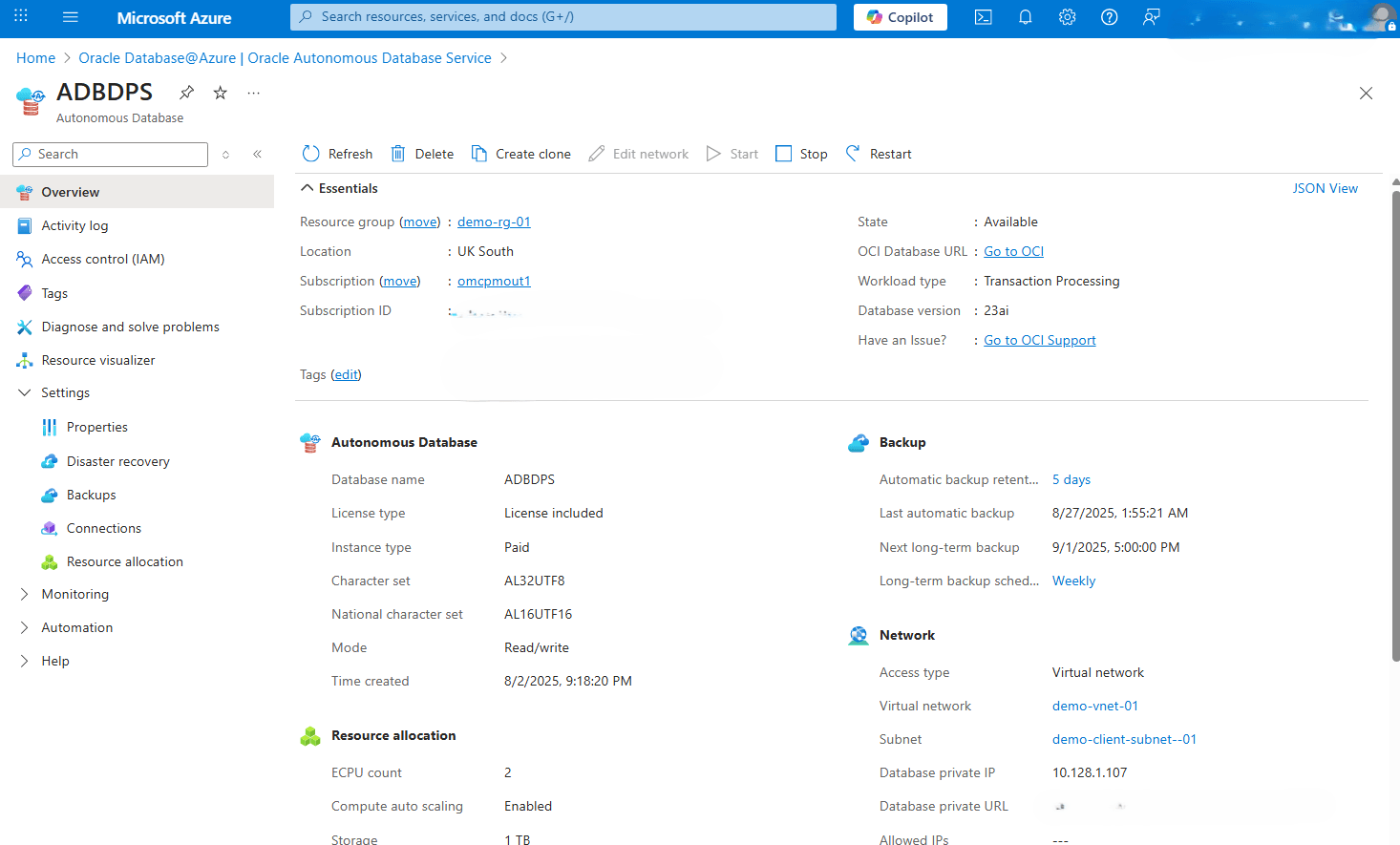
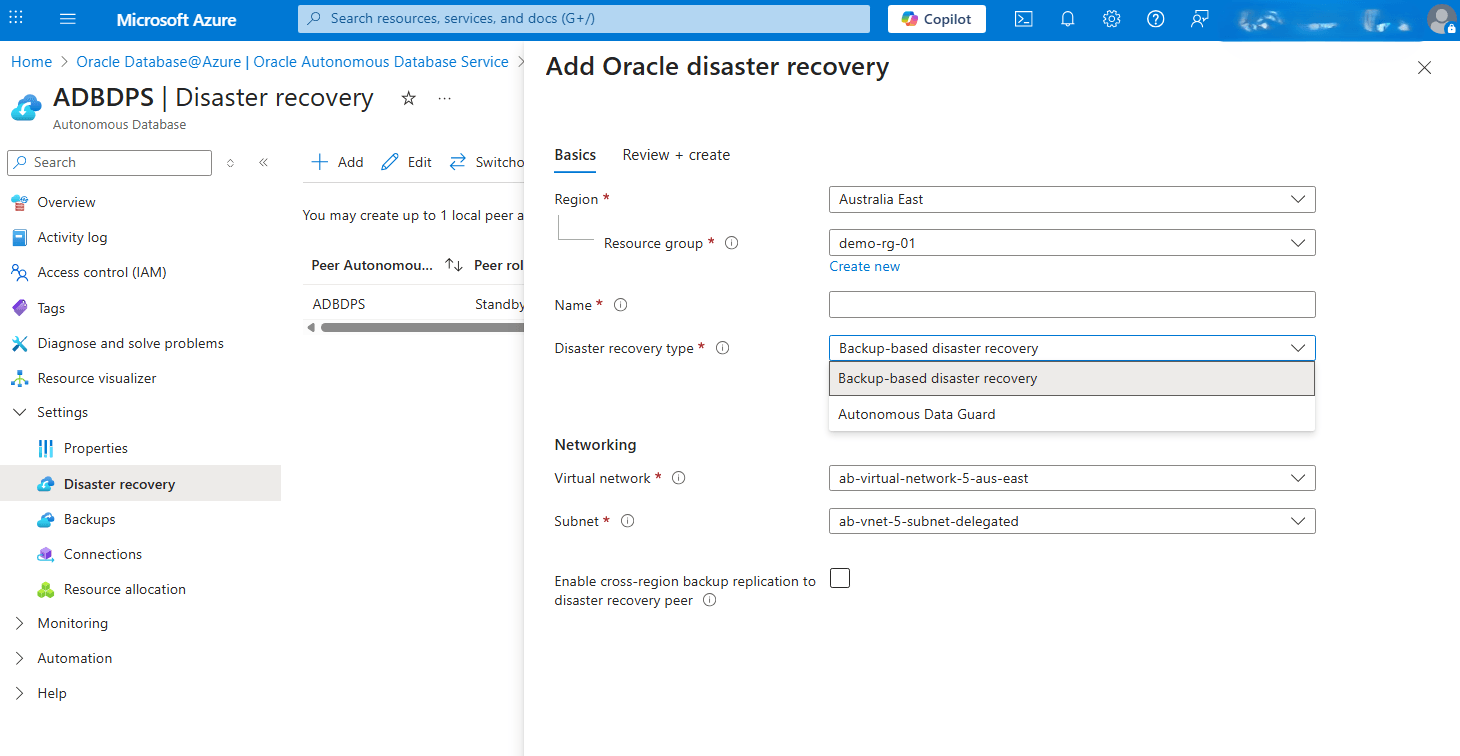
- Click the Add button, and then complete the following substeps.
- From the dropdown list, select your Region.
- From the dropdown list, select your Resource group.
- Enter an unique Name. The value must contain only letters and numbers, starting with a letter. 30 characters max. Spaces are not allowed.
- Select your Disaster recovery type from the dropdown list. Choose either the Backup-based disaster recovery or Autonomous Data Guard option.
- From the Networking section, select your Virtual network and Subnet.
- To Enable cross-region backup replication to disaster recovery peer, select the checkbox.
- Select the Next button to proceed.
- From Review + create tab, select the Create button.
- Once you review your information, select the Review + create button.
For more information, see Service Level Objectives (SLOs).
Edit Oracle Disaster Recovery
Complete the following steps to edit a disaster recovery.- From the Azure portal, select Oracle AI Database@Azure.
- From the left navigation menu, select Oracle Autonomous AI Database.
- Select your Autonomous AI Database that you want to modify.
- Expand the Settings section, and then select the Disaster recovery link.
- Click the Edit button, and then complete the following substeps.
- From the dropdown list, select Peer autonomous database.
- The Disaster recovery type field has two options. Choose either Autonomous Data Guard or Backup-based disaster recovery.
- Enable the Automatic Failover with data loss limit in seconds option if it is required.
- Select the Edit button.
Switchover
Switchover is a planned transition from the primary database to its standby. This operation is typically used for maintenance, testing, or proactively shifting the workloads. When using Oracle Autonomous Data Guard, switchover ensures minimal downtime and zero data loss by promoting the standby database to primary status while demoting the original primary to standby. To perform a switchover, your Autonomous AI Database must be part of a configured Disaster Recovery Protection Group.
Complete the following steps to perform a switchover.- From the Azure portal, select Oracle AI Database@Azure.
- From the left navigation menu, select Oracle Autonomous AI Database.
- Select your Autonomous AI Database that you are using.
- Expand the Settings section, and then select the Disaster recovery link.
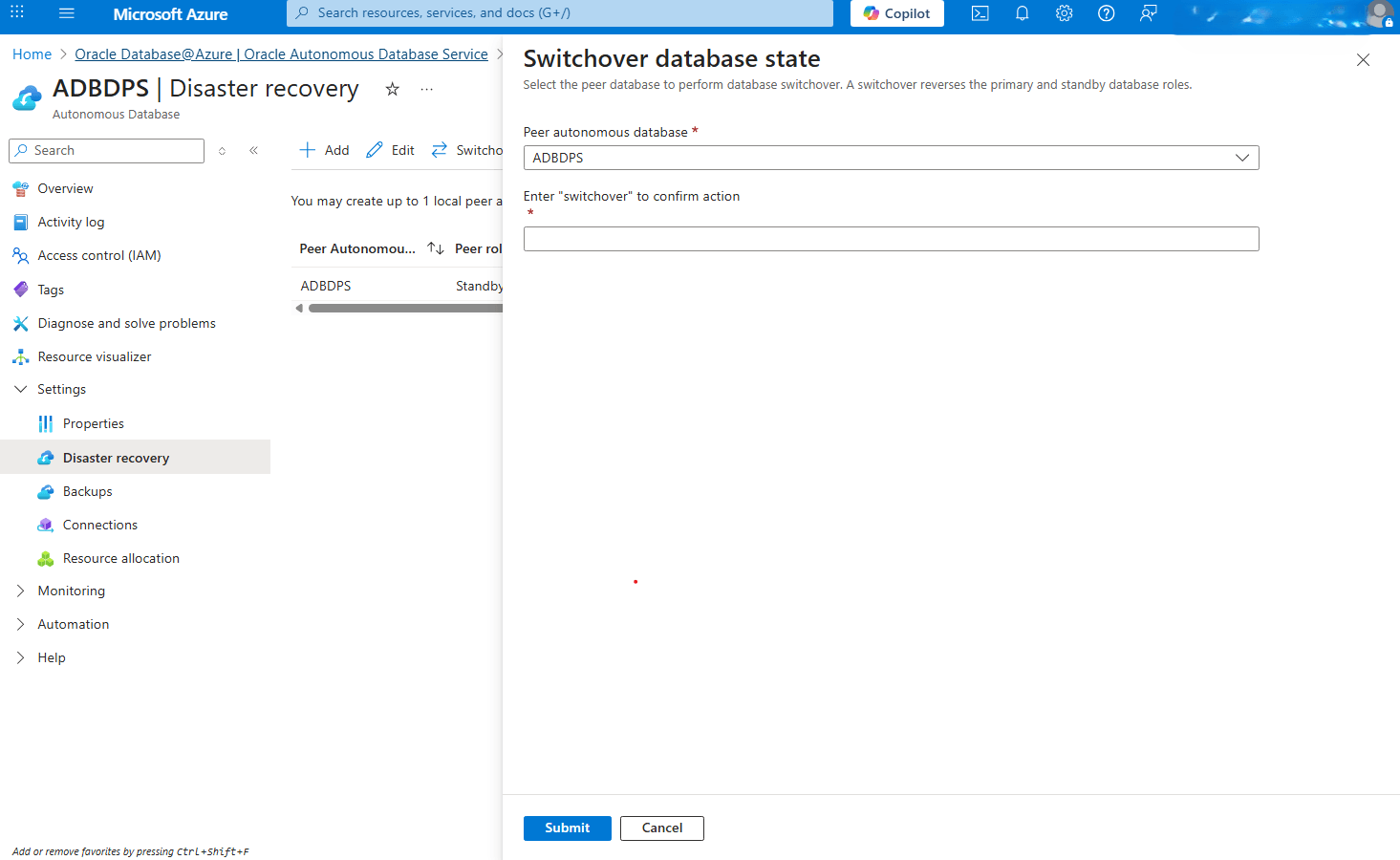
- Select the Switchover button and from the Swithover database state page, complete the following substeps:
- From the dropdown list, select your Peer autonomous database.
- Enter switchover into the field to confirm your action.
- Select the Submit button to apply the changes.
Cross-region disaster recovery is only available through the Azure Portal and Azure CLI.
You can configure cross-region Autonomous Data Guard for Autonomous AI Database Serverless by using the Azure CLI.
This documentation describes how to:
- Create a cross-region Autonomous Data Guard standby database.
- Validate the relationship between the primary and standby databases.
- Perform switchover and failover operations.
- Change an existing cross-region disaster recovery configuration from Autonomous Data Guard to backup-based disaster recovery.
Prerequisites
Before you create a cross-region standby database, confirm the following requirements:
- The primary Autonomous AI Database Serverless exists and is in a stable lifecycle state.
- You have permission to manage Oracle AI Database@Azure resources in the Azure subscription.
- The target region is a supported peer region for the primary database.
- The primary database uses the Managed private virtual network IP only deployment mode.
- A virtual network and delegated subnet are available in the target region.
- The target subnet has sufficient IP address capacity.
- The peer database name is unique, starts with a letter, contains only letters and numbers, does not contain spaces, and is 30 characters or fewer.
- If the primary database uses a customer-managed encryption key, ensure that a key replica exists in the standby or clone region before you create the cross-region standby database.
- Determine whether to enable cross-region backup replication.
- Determine whether to use Autonomous Data Guard or backup-based disaster recovery.
Azure CLI Prerequisites
- Azure CLI version >= 2.87.0
oracle-database(extension) version >= 2.0.4
Complete the following steps:
- Set Environment Variables
- Define variables for Autonomous AI Database Serverless:
# Define variables for the Autonomous Database AZURE_SUBSCRIPTION="my_azure_subscription" AZURE_SUBSCRIPTION_ID="my_azure_subscription_id" RESOURCE_GROUP="my_resource_group" PRIMARY_ADB_NAME="autonomous_database_primary_name" PRIMARY_LOCATION="azure_location_primary" PRIMARY_ADB_ID="/subscriptions/${AZURE_SUBSCRIPTION_ID}/resourceGroups/${RESOURCE_GROUP}/providers/Oracle.Database/autonomousDatabases/${PRIMARY_ADB_NAME}" STANDBY_ADB_NAME="autonomous_database_standby_name" STANDBY_LOCATION="azure_location_standby" STANDBY_VNET="standby_vnet_name" STANDBY_SUBNET="standby_subnet_name" STANDBY_VNET_ID="/subscriptions/${AZURE_SUBSCRIPTION_ID}/resourceGroups/${RESOURCE_GROUP}/providers/Microsoft.Network/virtualNetworks/${STANDBY_VNET}" STANDBY_SUBNET_ID="/subscriptions/${AZURE_SUBSCRIPTION_ID}/resourceGroups/${RESOURCE_GROUP}/providers/Microsoft.Network/virtualNetworks/${STANDBY_VNET}/subnets/${STANDBY_SUBNET}" - Select and verify the Azure subscription:
az account set --subscription "$AZURE_SUBSCRIPTION" az account show \ --query "{name:name,id:id,isDefault:isDefault,tenantId:tenantId,user:user.name}" \ --output json - Show the primary Autonomous AI Database Serverless:
az oracle-database autonomous-database show \
  --resource-group "$RESOURCE_GROUP" \
  --name "$PRIMARY_ADB_NAME" \
  --query "{id:id,name:name,resourceGroup:resourceGroup,location:location,lifecycleState:properties.lifecycleState,dbVersion:properties.dbVersion,dbWorkload:properties.dbWorkload,computeModel:properties.computeModel,computeCount:properties.computeCount,storageGbs:properties.dataStorageSizeInGbs,licenseModel:properties.licenseModel,subnetId:properties.subnetId,vnetId:properties.vnetId,supportedRegionsToCloneTo:properties.supportedRegionsToCloneTo}" \
  --output json
- Define variables for Autonomous AI Database Serverless:
- Create Cross-Region Autonomous Data Guard Standby
- Do not enclose the entire
--cross-region-disaster-recoveryobject in quotation marks. The Azure CLI extension expects separatekey=valuetokens for this object argument.az oracle-database autonomous-database create \ --resource-group "$RESOURCE_GROUP" \ --name "$STANDBY_ADB_NAME" \ --location "$STANDBY_LOCATION" \ --subnet-id "$STANDBY_SUBNET_ID" \ --vnet-id "$STANDBY_VNET_ID" \ --display-name "$STANDBY_ADB_NAME" \ --compute-model $COMPUTE_MODEL \ --compute-count $COMPUTE_COUNT \ --data-storage-size-in-gbs 1024 \ --license-model $LICENSE_MODEL \ --db-version $DB_VERSION \ --character-set $CHARACTER_SET \ --ncharacter-set $NCHARACTER_SET \ --cross-region-disaster-recovery \ remote-disaster-recovery-type=Adg \ source=CrossRegionDisasterRecovery \ source-id="$PRIMARY_ADB_ID" \ source-location="$PRIMARY_LOCATION" \ is-replicate-automatic-backups=true
Note
- Use
--no-waitonly when the runbook, script, or infrastructure automation includes a separate polling step. This option starts the long-running Azure operation and returns control immediately instead of keeping the CLI process blocked until the database operation completes. This option is useful in the following situations:- A shell script or pipeline needs to start the operation, log the request, and poll by using
az resource wait. - Terraform, CI/CD, or another orchestrator manages wait, retry, and error handling outside the Azure CLI command.
- A higher-level workflow launches and monitors multiple independent operations.
- A shell script or pipeline needs to start the operation, log the request, and poll by using
- Do not use
--no-waitduring a manual run unless the next command explicitly waits for the database to reach a stable state. Always validate the final resource state before continuing with switchover, failover, encryption, or application cutover tasks.
- Do not enclose the entire
- Validate Cross-Region Autonomous Data Guard
- View existing Autonomous AI Database.
az oracle-database autonomous-database list \ --query "[?name=='$PRIMARY_ADB_NAME' || name=='$STANDBY_ADB_NAME'].{name:name,resourceGroup:resourceGroup,location:location,lifecycle:properties.lifecycleState,provisioningState:properties.provisioningState,role:properties.role,localDG:properties.isLocalDataGuardEnabled,remoteDG:properties.isRemoteDataGuardEnabled,peerDbId:properties.peerDbId,peerDbIds:properties.peerDbIds}" \ --output table - Display the standby configuration:
az oracle-database autonomous-database show \
  --resource-group "$RESOURCE_GROUP" \
  --name "$STANDBY_ADB_NAME" \
  --query "{name:name,state:properties.lifecycleState,provisioningState:properties.provisioningState,role:properties.role,remoteDR:properties.remoteDisasterRecoveryConfiguration,peerDbIds:properties.peerDbIds,vnet:properties.vnetId,subnet:properties.subnetId}" \
  --output json
- View existing Autonomous AI Database.
- Obtain the Peer Database ID
- For cross-region switchover and failover, use
with the peer database Azure resource ID fromproperties.peerDbIds[0]instead of the OCI OCID. The Azure CLI help text can be misleading, but the working commands use the Azure value.Get the peer database ID from the database where you run the action. For the working cross-region command pattern, run the action on the current standby or disaster recovery resource so the peer is the current primary database.
# Define variables for the Source Autonomous Database name ACTION_SOURCE_ADB_NAME="$STANDBY_ADB_NAME" PEER_DB_ID=$(az oracle-database autonomous-database show \ --resource-group "$RESOURCE_GROUP" \ --name "$ACTION_SOURCE_ADB_NAME" \ --query "properties.peerDbIds[0]" \ --output tsv) PEER_DB_LOCATION=$(az resource show \ --ids "$PEER_DB_ID" \ --query location \ --output tsv) echo "$PEER_DB_ID" echo "$PEER_DB_LOCATION" - If the current primary database variables are already defined and up to date, these values are equivalent:
PEER_DB_ID="$PRIMARY_ADB_ID"
PEER_DB_LOCATION="$PRIMARY_LOCATION"
- For cross-region switchover and failover, use
- Switchover
A switchover is a planned role transition between the current primary database and the remote standby database.
- For cross-region Autonomous Data Guard, run the
switchoveragainst the current standby or disaster recovery resource. The peer is the current primary database. This approach matches the working failover command pattern and avoids theResourcePostActionFailed: Conflicterror that occurs when the action runs against the current primary database.SWITCHOVER_SOURCE_ADB_NAME="$ACTION_SOURCE_ADB_NAME" - Perform the switchover:
az oracle-database autonomous-database switchover \
  --resource-group "$RESOURCE_GROUP" \
  --autonomousdatabasename "$SWITCHOVER_SOURCE_ADB_NAME" \
  --peer-db-id "$PEER_DB_ID" \
  --peer-db-location "$PEER_DB_LOCATION"
- For cross-region Autonomous Data Guard, run the
- Failover
Use failover only when the primary database is unavailable or when the disaster recovery procedure authorizes a failover test.
- For cross-region Autonomous Data Guard, run the failover from the current standby or disaster recovery resource. Use the current primary database as the peer database. Running the failover against the current primary database can return the
ResourcePostActionFailed: Conflicterror. - Set the failover source and peer database details:
FAILOVER_SOURCE_ADB_NAME="$ACTION_SOURCE_ADB_NAME" - In this example, the failover operation runs on the standby or disaster recovery resource and uses the primary database as the peer database. Perform the failover:
az oracle-database autonomous-database failover \
  --resource-group "$RESOURCE_GROUP"\--autonomousdatabasename"$FAILOVER_SOURCE_ADB_NAME"\
  --peer-db-id "$PEER_DB_ID"\
  --peer-db-location "$PEER_DB_LOCATION"
- For cross-region Autonomous Data Guard, run the failover from the current standby or disaster recovery resource. Use the current primary database as the peer database. Running the failover against the current primary database can return the
- Change Cross-Region Autonomous Data Guard to Backup-Based Disaster Recovery
Use this procedure when an existing cross-region disaster recovery configuration must use backup-based disaster recovery instead of Autonomous Data Guard.
- For cross-region disaster recovery, run the change against the current standby or disaster recovery resource. Running the change against the current primary database can return the
ResourcePostActionFailed: Conflicterror.DR_CONFIG_SOURCE_ADB_NAME="$STANDBY_ADB_NAME" az oracle-database autonomous-database change-disaster-recovery-configuration \ --resource-group "$RESOURCE_GROUP"\--autonomousdatabasename"$DR_CONFIG_SOURCE_ADB_NAME"\ --disaster-recovery-type BackupBased \ --is-replicate-automatic-backups true - Set
--is-replicate-automatic-backupstofalseif the design does not require replication of seven days of backups to the peer region. - To change the relationship back to Autonomous Data Guard:
az oracle-database autonomous-database change-disaster-recovery-configuration \ --resource-group "$RESOURCE_GROUP"\--autonomousdatabasename"$DR_CONFIG_SOURCE_ADB_NAME"\ --disaster-recovery-type Adg \ --is-replicate-automatic-backups true - Validate the disaster recovery type on the disaster recovery resource after the change:
az oracle-database autonomous-database show \
  --resource-group "$RESOURCE_GROUP" \
  --name "$DR_CONFIG_SOURCE_ADB_NAME" \
  --query "{name:name,lifecycle:properties.lifecycleState,provisioningState:properties.provisioningState,role:properties.role,remoteDG:properties.isRemoteDataGuardEnabled,peerDbIds:properties.peerDbIds,remoteDR:properties.remoteDisasterRecoveryConfiguration}" \
  --output json
- For cross-region disaster recovery, run the change against the current standby or disaster recovery resource. Running the change against the current primary database can return the
- Delete Cross-Region Autonomous Data Guard Standby
- Use this procedure only to remove the remote standby database from Azure.
az oracle-database autonomous-database delete \
  --resource-group "$RESOURCE_GROUP"\--name"$STANDBY_ADB_NAME"\--yes\
  --no-wait
- Use this procedure only to remove the remote standby database from Azure.
Cross-region disaster recovery is only available through the Azure Portal and Azure CLI.
There is currently no content for this page. Oracle AI Database@Azure team intends to add content here, and this placeholder text is provided until that text is added. The Oracle AI Database@Azure team is excited about future new features, enhancements, and fixes to this product and this accompanying documentation. We strongly recommend you watch this page for those updates.