Migrate to Exadata Database
Oracle Exadata Database Service on Dedicated Infrastructure on Oracle AI Database@Azure provides built-in high availability, scalability, and performance by running on Oracle Exadata Database and Oracle Real Application Clusters (RAC), natively integrated into the Azure platform. This integration maintains a low-latency connection to your Azure applications.
Oracle Zero Downtime Migration (ZDM) is a free migration solution that simplifies and automates Oracle AI Database migrations, including migrations that require minimal downtime. Following Oracle Maximum Availability Architecture (MAA) best practices, ZDM provides prevalidation and controlled automation for single database or database fleet migrations to Oracle AI Database@Azure.
-
Minimize business disruption and achieve near-zero downtime.
-
Migrate databases across versions and hardware platforms.
-
Use automation and orchestration to reduce risk and complexity.
Key Benefits of Using Oracle Zero Downtime Migration for Oracle Exadata Database Migrations
Minimal/Zero Downtime Oracle Zero Downtime Migration uses Oracle Data Guard and Oracle GoldenGate to maintain synchronization between source and target, ensuring availability throughout the migration process. Automated Orchestration The utility provides a simplified, one-button experience by automating prevalidation checks, data transfer, and final cutover, therefore reducing manual effort and potential human error. Platform Flexibility Oracle Zero Downtime Migration supports migrations between identical or different database platforms and versions, allowing simultaneous modernization as part of the move. Cost Efficiency Oracle Zero Downtime Migration is available at no cost, helping you reduce overall migration project costs. Risk Reduction By following Oracle Maximum Availability Architecture (MAA) best practices and using automated validation, Oracle Zero Downtime Migration provides a reliable migration path. Supported Migration Workflows
Oracle Zero Downtime Migration supports four workflows, giving you flexibility to select the best option based on your availability requirements and the compatibility of your source and target environments.
-
Physical Online Migration
The physical online migration workflow supports migrations between the same database versions and platforms. It uses direct data transfer and the restore from service method to create the target database and avoids backup of the source database to an intermediate storage location. Oracle Data Guard keeps the source and target databases synchronized to achieve minimal downtime.
-
Logical Online Migration
The logical online migration workflow supports migrations between the same and different database versions and platforms. It uses Oracle Data Pump export and import to create the target database. The Azure Files service provides an NFS file share to store the Data Pump dump files. Oracle GoldenGate keeps the source and target databases synchronized to achieve minimal downtime.
-
Physical Offline Migration
The physical offline migration workflow supports migrations between the same database versions and platforms. It creates the target database using Recovery Manager (RMAN) backup and restore. The Azure Files service provides an NFS file share to store the RMAN backup files.
-
Logical Offline Migration
The logical offline migration workflow supports migrations between the same and different database versions and platforms. It uses Oracle Data Pump export and import to create the target database. The Azure Files service provides an NFS file share to store the Oracle Data Pump dump files.
For more information on Oracle Zero Downtime Migration, see the following resources:
-
In multicloud environments, you can transfer data between cloud providers or store data in one environment while you query or access it from another. The DBMS_CLOUD PL/SQL package in Oracle AI Database enables direct access to object storage services, including Oracle Cloud Infrastructure Object Storage and Azure Blob Storage. You can query data by using external tables or load data directly into database tables.
This document provides a step-by-step guide on accessing and importing data from Azure Blob Storage into an Oracle AI Database.
Solution Architecture
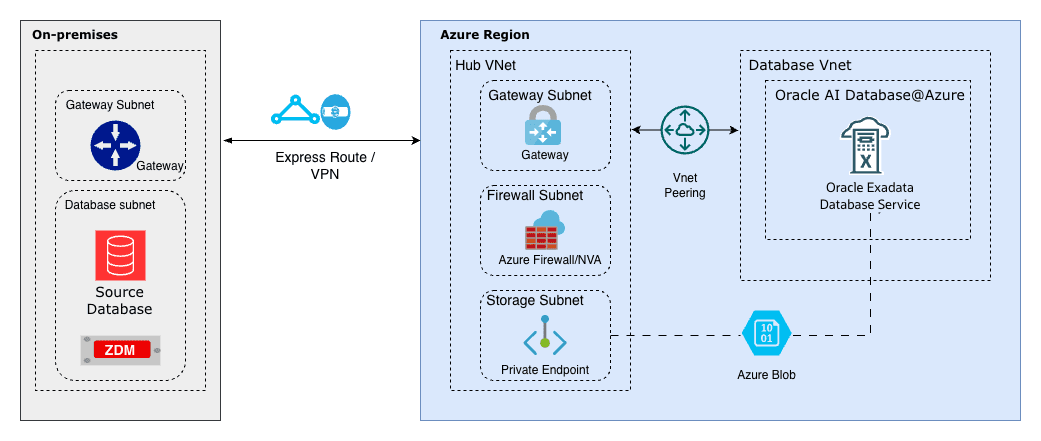
This solution demonstrates how Azure Blob Storage can be used as a landing zone for backups and files.
The Oracle DBMS_CLOUD package lets you query data directly from Azure Blob Storage buckets (Parquet, CSV, JSON, etc.) as external tables without moving it, join it in real time with Oracle tables for unified analytics, bulk import files into Oracle AI Database efficiently with parallel loading, minimize data duplication and costs in multicloud setups, and support hybrid scenarios like blending ERP data with Azure-stored logs, IoT streams, or ML features for faster insights and reporting.
The architecture illustrates a workflow in which the source is an Oracle AI Database running on Linux or Oracle Exadata Database, and the target is an Oracle AI Database environment running on Azure infrastructure (Oracle AI Database@Azure). Azure Blob Storage is used by both the source and target database systems, enabling RMAN backups and Data Pump exports to be written once and restored directly, without additional file transfer steps.
By leveraging Azure Blob Storage as shared storage, migration workflows benefit from a managed service that supports movement of data with ease.
Prerequisites
-
Oracle Database Environment
-
Source: An Oracle AI Database platform, such as Oracle Exadata Database, Oracle RAC, or a standalone Oracle AI Database instance on Linux.
-
Target: Oracle Exadata Database running on Oracle AI Database@Azure.
-
-
Azure Blob Storage Container
- A container that contains the data files, such as a Data Pump dump file.
-
Network Connectivity
-
For Oracle AI Database@Azure: The service supports internal connectivity within the same Azure region and virtual network by default, often by using private endpoints for performance and security.
-
For on-premises or other OCI-based sources: Use internet connectivity or a private link by using Oracle Interconnect for Microsoft Azure, if applicable.
-
-
Credentials
-
An Azure Storage account name and access key with permissions to access the container.
-
Alternatively, use an Azure service principal for improved security in supported setups.
-
These are the steps for configuration.
Note
Note: Ensure that you have Azure Blob Storage configured with a private endpoint.-
Assign an Azure Role for Access to Blob Data in a Storage Account
To grant the required roles to access data in Azure Blob Storage, see the Assign an Azure role for access to blob data documentation. For example, you can assign the roles by using the Azure CLI, as shown in the following example:
# replace the placeholder values in brackets with your own values az role assignment create \ --role "Storage Blob Data Contributor" \ --assignee <email> \ --scope "/subscriptions/<subscription>/resourceGroups/<resource-group>/providers/Microsoft.Storage/storageAccounts/<storage-account>/blobServices/default/containers/<container>" -
Copy the Access Key of Your Storage Account
-
Open your storage account page.
-
Select Access keys under Security + networking.
-
Select Show keys.
-
Copy the Storage account name and Key information. Store them in a secure location. Then, you can select the Hide button.
Note
Note: You need these keys when you run theCREATE_CREDENTIALcommand on the database.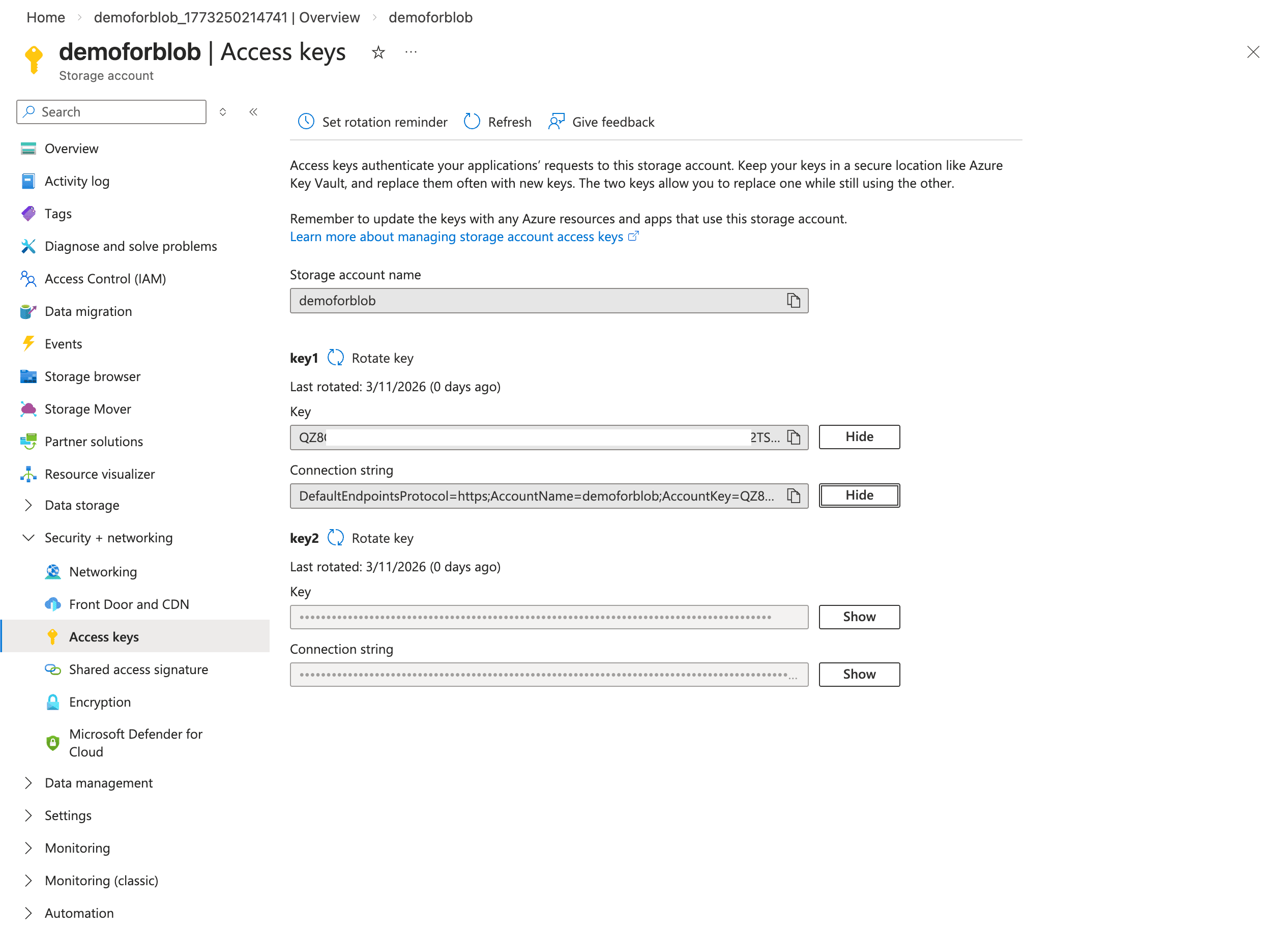
-
-
Obtain Your Azure Blob Storage URL
To obtain the direct URL of the file stored in your Azure Blob Storage container for importing into Oracle AI Database, complete the following steps:
-
In the Azure portal, open your storage account.
-
Select Containers in the left menu.
-
Select the target container.
-
Select the specific object or file.
-
Note
Copy the value shown as Object URL. Note: You need this URL for the HOST parameter in the DBMS_NETWORK_ACL_ADMIN.APPEND_HOST_ACE command.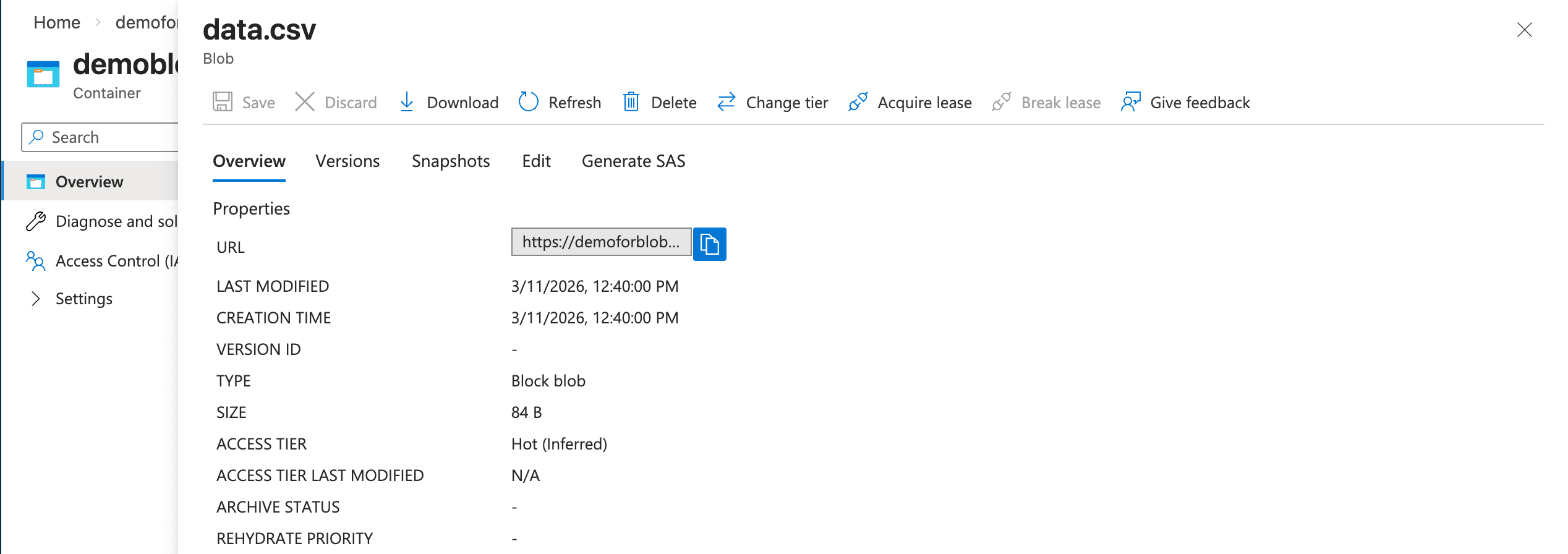
-
-
In this example, the
data.csvfile is a sample file that contains two rows of comma-separated values:SNO NAME City 1 Alice Chicago 2 Bob New York 3 Charlie San Francisco 4 Diana Austin
Connect the Oracle Exadata Database to Azure Blob Storage
-
Obtain the Azure Blob Storage Fully Qualified Domain Name (FQDN)
Note
Note: Ensure that you have a running Azure Blob Storage configured with a private endpoint.-
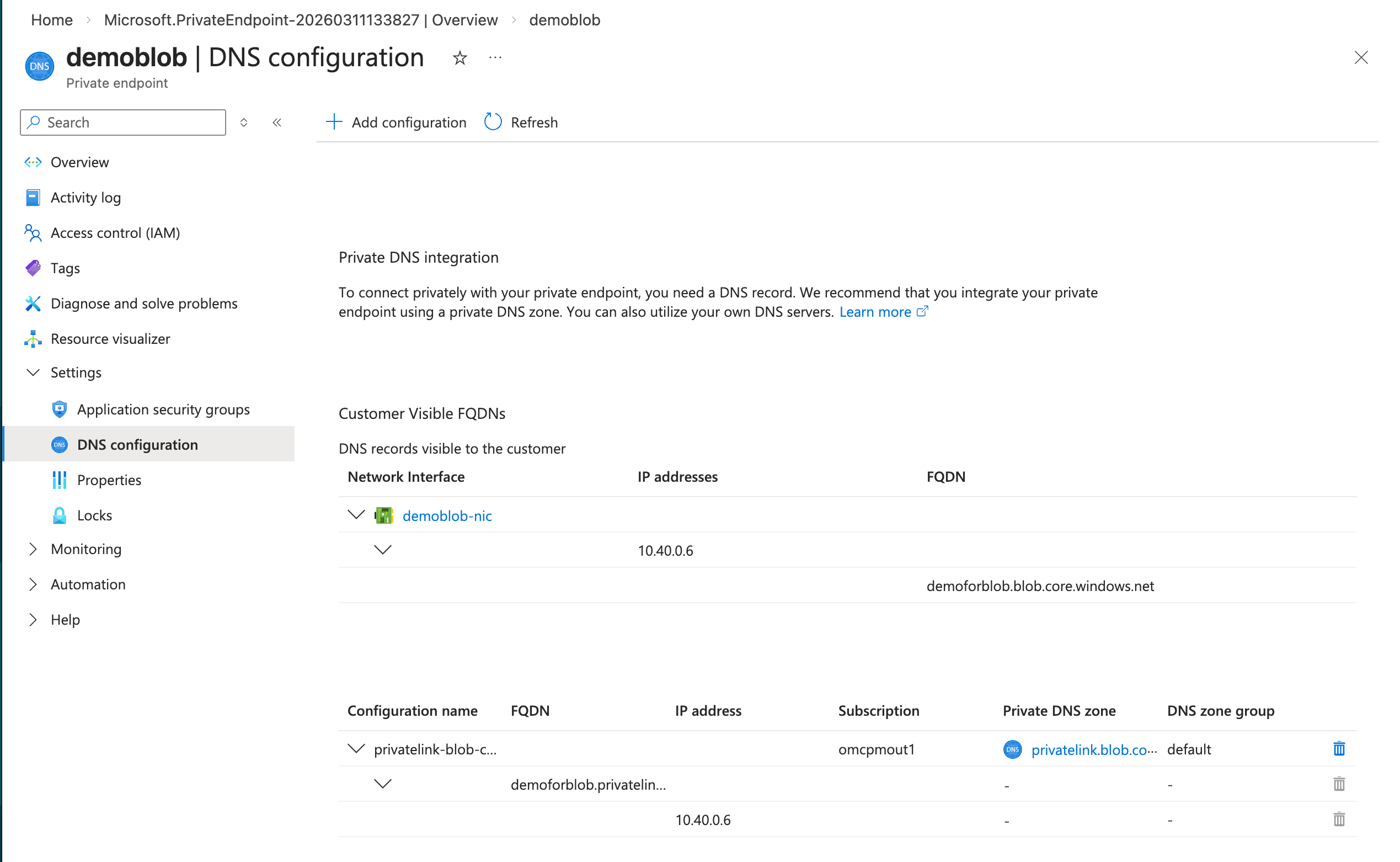
From the Azure portal, navigate to Storage accounts, and then select your account from the list.
-
From the left menu, expand the Security + networking section, and then select Networking.
-
Select the Private endpoints tab and select your private endpoint from the list.
-
From the left menu, expand the Settings section and then select DNS configuration.
-
From the Network interface section, obtain the FQDN and IP address information. Record this information because it is required when creating a Private DNS Zone in OCI.
-
-
Configure the OCI DNS
- From the Azure portal, navigate to your resource. From the Overview section, select the Go to OCI link.
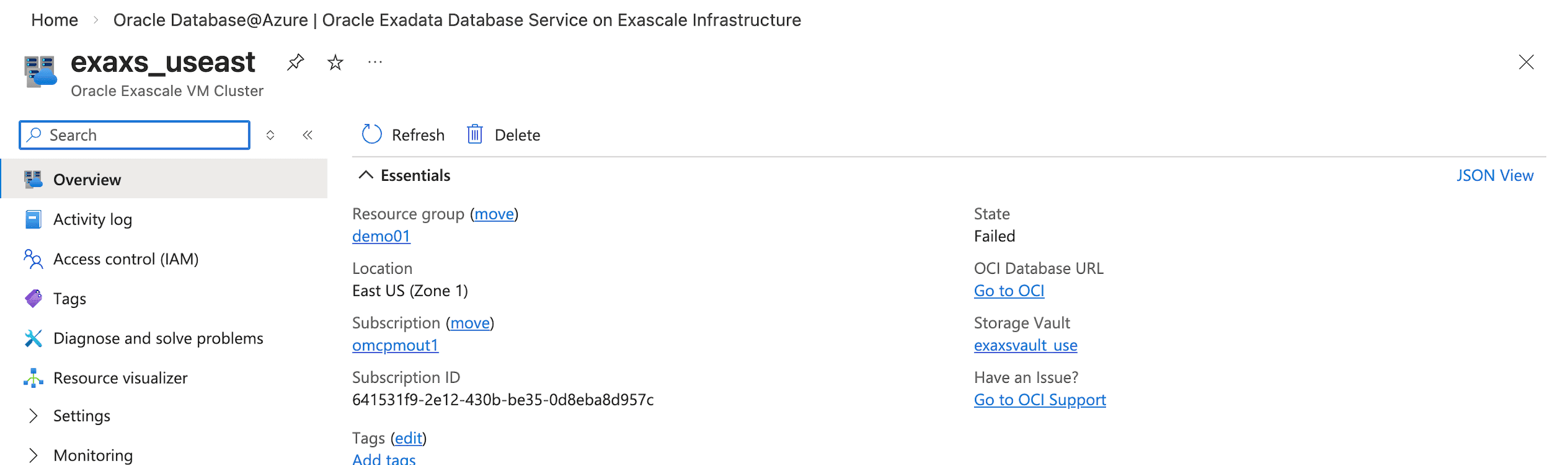
- From the Azure portal, navigate to your resource. From the Overview section, select the Go to OCI link.
-
Create Private DNS Zone
Create a private DNS zone that matches the fully qualified domain name of the NFS share in Azure. When Oracle Exadata Database resolves that fully qualified domain name, it queries the VCN resolver, which checks the zones in the private view. The zone includes an A record that maps to the private endpoint for the Azure NFS storage.
Note
Note: Use the FQDN and IP address that you copied previously to create your Private DNS zone.-
From the OCI console, select Networking and then select Virtual cloud networks.
-
From the list, select your Virtual Cloud Network (VCN) that you are using.
-
From the Details tab, select the DNS Resolver link.
-
From the Private resolvers page, select the Details tab and then select the Default private view link.
-
From the Private views page, select the Private zones tab and then select the Create zone button. For example,
blob.core.windows.net. -
After creating a private zone, select the Records tab and then add a record. For example,
demoforblob. Ensure that the record points to the actual IP address of Azure Blob Storage. -
Publish the changes.
-
Update the Network Security Group (NSG) in OCI to allow traffic from the VPC where the Azure Blob Storage resides.
-
After you complete the configuration, the fully qualified domain name from the OCI database resolves to the Azure Blob Storage endpoint.
-
Complete the following steps in OCI:
-
Create the credentials in the Oracle AI Database:
-
Ensure that you have a successful connection from an Oracle AI Database client or tool to Oracle Exadata Database. For more information, see Connect - Exadata Database.
-
Make sure that all outbound connections to the target host comply with the private endpoint egress rules and are limited by those rules.
ALTER DATABASE PROPERTY SET ROUTE_OUTBOUND_CONNECTIONS = 'ENFORCE_PRIVATE_ENDPOINT'; -
Add the Azure Blob Storage FQDN to the Access Control List (ACL).
-
Use the
DBMS_NETWORK_ACL_ADMIN.APPEND_HOST_ACEprocedure to add an Access Control Entry (ACE) for the network host. The following is an example to replace it with your Azure Blob Storage endpoint from previous (FQDN).BEGIN DBMS_NETWORK_ACL_ADMIN.APPEND_HOST_ACE( host => 'demoforblob.blob.core.windows.net', ace => xs$ace_type(privilege_list => xs$name_list('connect', 'resolve'), principal_name => 'ADMIN', principal_type => xs_acl.ptype_db)); END; -
Run the appropriate
DBMS_CLOUD.CREATE_CREDENTIALstatement (or similar procedure) to register credentials for Azure Blob Storage access. Make sure to provide the Access Key from above in the credential parameters.BEGIN DBMS_CLOUD.CREATE_CREDENTIAL( credential_name => '<Credential_Name>', username => '<Storage_Account_Name>', password => '<Key>' ); END;Replace the placeholders with your values:
-
<Credential_Name>: A name for the credential in the database. -
<Storage_Account_Name>: Your Azure Storage account name. -
<Key>: The access key for the Azure Storage account.
-
-
-
Test the access to Azure Blob Storage:
-
To verify that your Oracle AI Database can access the Azure Blob Storage container, list the objects inside it by using the
LIST_OBJECTSfunction in theDBMS_CLOUDpackage. -
Use the credential name that you created in step 1 and the container location URL that you obtained previously.
-
Make sure to omit the specific object name at the end of the URL.
select * from dbms_cloud.list_objects('AZURECRED','https://demoforblob.blob.core.windows.net/demoblob/');
-
Importing Data
-
Import the data from
.csvfile.-
To import the data, use the
COPY_DATAprocedure of theDBMS_CLOUDpackage.create table mytab (id number, name VARCHAR2(64), city VARCHAR2(64)); -
Run the following procedure to load data from a file in Azure Blob Storage into a table in your Oracle AI Database:
BEGIN DBMS_CLOUD.COPY_DATA( table_name => 'mytab', credential_name => 'AZURECRED', file_uri_list => 'https://demoforblob.blob.core.windows.net/demoblob/data.csv', format => json_object('delimiter' value ',') ); END; -
Run the following query to retrieve all columns and all rows from the table named
MYTAB:select * from mytab; -
Run the following procedure to import the data from
.txtfile:BEGIN DBMS_CLOUD.COPY_DATA( table_name => 'mydata', credential_name => 'AZURECRED', file_uri_list => 'https://demoforblob.blob.core.windows.net/demoblob/data.txt', format => json_object('delimiter' value ',') ); END; -
Run the following procedure to import the data using
.dmpfile.# data pump parameter file: impdemo.par directory=DATA_PUMP_DIR credential=AZURECRED schemas=demouser dumpfile=https://demoforblob.blob.core.windows.net/demoblob/demouser.dmp logfile=demoimp.log # data pump import commandimpdp userid=ADMIN@adb_high parfile=impdemo.par
-
-
Access to import Log file in Exadata Database
-
After you import data by using Data Pump into Exadata Database, you can check the files that the import creates in
DATA_PUMP_DIRon the database server:select object_name from DBMS_CLOUD.LIST_FILES('DATA_PUMP_DIR') order by last_modified desc; -
Copy the log file directly to Azure Blob Storage and download it from there:
BEGIN DBMS_CLOUD.PUT_OBJECT( 'AZURECRED', 'https://demoforblob.blob.core.windows.net/demoblob/logs/', 'DATA_PUMP_DIR', 'demoimp.log'); END; -
If you keep files in Azure Blob Storage and want to query them as tables in Oracle AI Database, use the
DBMS_CLOUD.CREATE_EXTERNAL_TABLEprocedure to define an external table that references the Azure Blob Storage location.BEGIN DBMS_CLOUD.CREATE_EXTERNAL_TABLE( table_name => 'exttab', credential_name => 'AZURECRED', file_uri_list => 'https://demoforblob.blob.core.windows.net/demoblob/data.csv', column_list => 'id NUMBER, name VARCHAR2(64)', format => json_object('delimiter' value ',') ); END; -
Run the following query to retrieve all columns and all rows from the table :
select * from exttab;
-
Learn More
For more information, see the following resources:
-
DBMS_CLOUD package
-
Cloud providers offer different capabilities. As demand for cloud native capabilities grows, many organizations adopt multicloud strategies to use services from each platform and reduce vendor lock in.
Databases remain central to enterprise architectures. Oracle AI Database supports high volume transaction workloads and analytics, and it provides consistency and availability that support business requirements. In a multicloud model, Oracle AI Database can help organizations run and manage data across multiple cloud environments.
This topic describes the network configuration that enables Oracle Exadata Database deployed on Oracle AI Database@Azure to mount the Network File System (NFS) Azure File Shares.
Creating the Azure file share and setting up connectivity between the NFS private endpoint and the Oracle Exadata Database endpoint are outside the scope of this article.
Before you continue, ensure that you are familiar with the Oracle AI Database@Azure network topologies, Oracle Exadata Database provisioning, NFS storage options, and Oracle AI Database@Azure DNS options.
Solution Architecture
Oracle Exadata Database in Oracle AI Database@Azure uses the VCN DNS resolver. The resolver first checks the private DNS zones in the VCN private view. If the resolver does not find the fully qualified domain name in the private view, it forwards the request to the OCI public DNS resolver. As a result, Azure DNS and the Oracle AI Database@Azure DNS capability operate separately, and private DNS zones do not resolve across clouds.
When you provision Oracle Exadata Database networking, the service assigns a fully qualified domain name under the Oracle Cloud domain. OCI hosts that domain as a private DNS zone. After you create the service, OCI replicates the DNS records into a matching Azure Private DNS zone. Applications in Azure resolve the Exadata Database fully qualified domain name by using that Azure private zone.
Azure links the Azure Private DNS zone to the virtual network where Exadata Database is deployed.
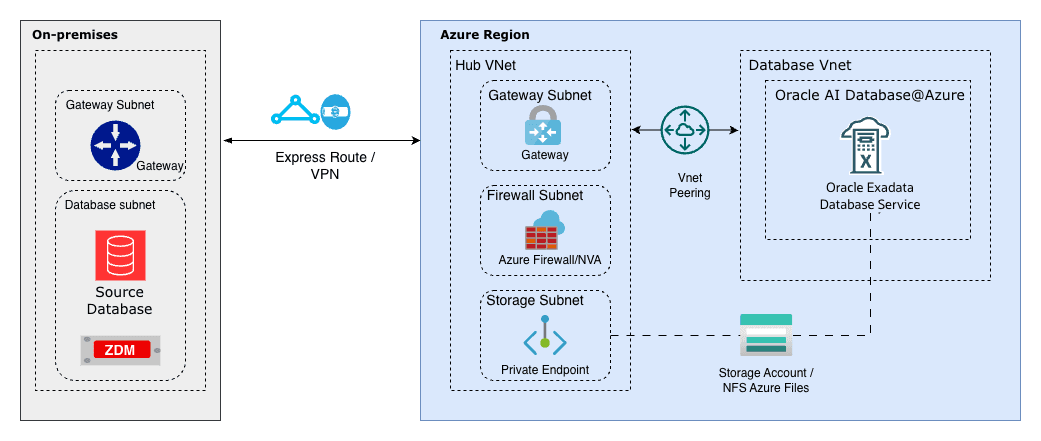
Ensure that you already have an Azure Files NFS share that is exposed through a private endpoint. If you do not have this configuration, see the Create an Azure classic file share to create one.
-
Obtain the Fully Qualified Domain Name (FQDN)
-
From the Azure portal, navigate to Storage accounts, and then select your account from the list.
-
From the left menu, expand the Security + networking section, and then select Networking.
-
Select the Private endpoints tab and select your private endpoint from the list.
-
From the left menu, expand the Settings section and then select DNS configuration.
-
From the Network interface section, obtain the FQDN and IP address information. Record this information because it is required when creating a Private DNS Zone in OCI.
-
-
Configure the OCI DNS
- From the Azure portal, navigate to your resource. From the Overview section, select the Go to OCI link.
- From the Azure portal, navigate to your resource. From the Overview section, select the Go to OCI link.
-
Create Private DNS Zone
Create a private DNS zone that matches the fully qualified domain name of the NFS share in Azure. When Oracle Exadata Database resolves that fully qualified domain name, it queries the VCN resolver, which checks the zones in the private view. The zone includes an A record that maps to the private endpoint for the Azure NFS storage.
Note
Note: Use the FQDN and IP address that you copied previously to create your Private DNS zone.-
From the OCI console, select Networking and then select Virtual cloud networks.
-
From the list, select your Virtual Cloud Network (VCN) that you are using.
-
From the Details tab, select the DNS Resolver link.
-
From the Private resolvers page, select the Details tab and then select the Default private view link.
-
From the Private views page, select the Private zones tab and then select the Create zone button. For example,
file.core.windows.net. -
After creating a private zone, select the Records tab and then add a record. For example,
demofornfs. Ensure that the record points to the actual IP address of Azure NFS storage. -
Publish the changes.
-
Update the Network Security Group (NSG) in OCI to allow traffic from the VPC where the Azure NFS server resides.
-
After you complete the configuration, the fully qualified domain name from the OCI database resolves to the Azure NFS endpoint.
-
Mount the NFS Azure File Share on Oracle Exadata Database
On the Exadata Database service, you can access the Exadata VM Cluster. After you connect to the VM cluster, run the mount command. For more information, see Connect - Exadata Database.
Note
Note: NFSv4.1 uses port 2049. If you connect from an on-premises network, allow outbound traffic on port 2049. If you use network security groups for the virtual networks, make sure that the rules allow traffic on port 2049.-
Switch to the root user.
-
Create a mount point directory:
mkdir /mnt/azure -
Mount the NFS share:
sudo mount -t nfs <storage-account>.file.core.windows.net:/<storage-account>/<share-name> /mnt/azure_nfs -o vers=4,minorversion=1,sec=sys,nconnect=4,noresvport,actimeo=30 -
Verify the mount:
mount | grep azure_nfs df -h /mnt/azure_nfs -
Create a directory object, or use an existing directory object, to attach the NFS file system.
CREATE or replace DIRECTORY FSS_DIR AS 'fss'; -
Attach NFS to a directory in Exadata Database:
exec DBMS_CLOUD_ADMIN.ATTACH_FILE_SYSTEM( file_system_name => 'AZURE_FILES', file_system_location =>'demofornfs.file.core.windows.net:/demo_nfs/backup', directory_name => 'FSS_DIR', description => 'Attach Azure Files', params => JSON_OBJECT('nfs_version' value 4) ); -
Verify the result:
SELECT file_system_name, file_system_location, directory_path FROM dba_cloud_file_systems; -
Validate with Data Pump import:
As a validation step, import a database dump into Exadata Database from a source environment. Mounting the NFS share on the source database is outside the scope of this article. From the source system, copy the export dump file to the NFS backed storage so Exadata Database can import it.
In this example, an export of the HR schema is placed on the NFS mount and imported into a new schema named HRNEW.
$ ./impdp admin/********@adbdemo_high directory=fss_dir dumpfile=hrexp.dmp logfile=impsh.log full=y remap_schema=HR:HRNEW

Import: Release 23.0.0.0.0 - Production on Tue Feb 25 17:48:29 2025
Version 23.4.0.24.05

Copyright (c) 1982, 2024, Oracle and/or its affiliates.  All rights reserved.

Connected to: Oracle Database 19c Enterprise Edition Release 19.0.0.0.0 - Production
Master table "ADMIN"."SYS_IMPORT_FULL_01" successfully loaded/unloaded
Starting "ADMIN"."SYS_IMPORT_FULL_01":  admin/********@adbdemo_high directory=fss_dir dumpfile=hrexp.dmp logfile=impsh.log full=y remap_schema=HR:HRNEW
Processing object type SCHEMA_EXPORT/SYSTEM_GRANT
Processing object type SCHEMA_EXPORT/ROLE_GRANT
Processing object type SCHEMA_EXPORT/DEFAULT_ROLE
Processing object type SCHEMA_EXPORT/PRE_SCHEMA/PROCACT_SCHEMA
Processing object type SCHEMA_EXPORT/TABLE/TABLE
Processing object type SCHEMA_EXPORT/TABLE/TABLE_DATA
. . imported "HRNEW"."REGIONS"                     3.20 KB   15 rows
. . imported "HRNEW"."LOCATIONS"                 6.8 KB   36 rows
. . imported "HRNEW"."DEPARTMENTS"                59.17 KB     24 rows
. . imported "HRNEW"."JOBS"                  2.3 KB       15 rows
. . imported "HRNEW"."EMPLOYEES"                 12.53 MB     122345 rows
. . imported "HRNEW"."JOB_HISTORY" 14.6 KB   4500 rows
Processing object type SCHEMA_EXPORT/TABLE/GRANT/OWNER_GRANT/OBJECT_GRANT
Processing object type SCHEMA_EXPORT/TABLE/COMMENT
Processing object type SCHEMA_EXPORT/TABLE/CONSTRAINT/CONSTRAINT
Processing object type SCHEMA_EXPORT/TABLE/CONSTRAINT/REF_CONSTRAINT
Processing object type SCHEMA_EXPORT/TABLE/STATISTICS/TABLE_STATISTICS
Processing object type SCHEMA_EXPORT/STATISTICS/MARKER
Processing object type SCHEMA_EXPORT/POST_SCHEMA/PROCACT_SCHEMA
Job "ADMIN"."SYS_IMPORT_FULL_01" successfully completed
Conclusion
Loading data from external storage is a key capability for Exadata Database bulk loads, migrations, and data ingestion. This article describes the configuration to attach Azure based NFS storage to an Exadata Database environment, including prerequisites, setup steps, and validation steps.
-
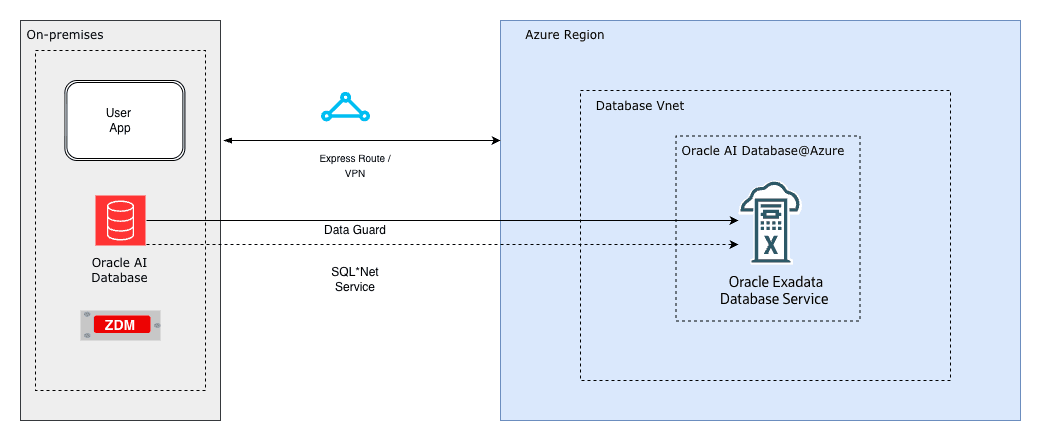
Oracle Data Guard supports high availability and disaster recovery by maintaining a synchronized standby database. For migration, you can set up a physical standby database in the target environment, such as new hardware, cloud infrastructure, or a different database version for an upgrade. Synchronize the standby database with the primary database, and then perform a switchover so that the standby database becomes the new primary database. This approach reduces downtime to seconds during the switchover.
This topic describes a physical standby configuration for migration based on standard practices. It assumes a single-instance configuration for simplicity. For Oracle Real Application Clusters (RAC) configurations, adjust the steps accordingly. For upgrades, such as from 12c to 19c, the standby database runs a higher database version by using mixed-version support, available from 11.2.0.1 and later. If applicable, use Zero Downtime Migration (ZDM) to automate cloud migrations.
Assumptions:
-
The source (primary) server and the target (standby) server have compatible operating systems and sufficient resources.
-
Oracle Database Enterprise Edition (Oracle Data Guard is included).
-
Basic networking such as firewalls allow port 1521 for the listener and port 22 for SSH.
Solution Architecture
Prerequisites
Before you start, ensure the following prerequisites:
-
Source Database:
-
Run the database in
ARCHIVELOGmode.SELECT log_mode FROM v$database;The query returns
ARCHIVELOG. If the database does not run inARCHIVELOGmode, enableARCHIVELOGmode. This change requires downtime:SHUTDOWN IMMEDIATE; STARTUP MOUNT; ALTER DATABASE ARCHIVELOG; ALTER DATABASE OPEN; -
Enable
FORCE LOGGING.ALTER DATABASE FORCE LOGGING; -
Add standby redo logs (one more group than online redo logs, same size). Query
v$logfor sizes, then add standby redo logs for each thread:ALTER DATABASE ADD STANDBY LOGFILE GROUP <n> ('<path>') SIZE <size>; -
Configure
tnsnames.oraentries for the primary database and the standby database. -
Configure RMAN control file autobackup:
CONFIGURE CONTROLFILE AUTOBACKUP ON; -
For upgrades, ensure that the source and target database versions are compatible per Oracle Support guidance. For example,
Doc ID 785347.1.
-
-
Target Server
-
Install the Oracle binaries. Use the same database version, or a higher version for an upgrade.
-
Create directories that match the source environment, for example:
/u01/oradata,/u01/frafor the Fast Recovery Area. -
Configure SSH key-based access from the source to the target and from the target to the source for users such as
oracle. -
Start the listener and configure
tnsnames.oraentries for the primary database and the standby database. -
For Zero Downtime Migration (optional automation), install the ZDM software on a separate host and configure the response file.
-
-
Networking
-
Use Azure ExpressRoute (recommended) or Site-to-Site VPN Gateway to create a private, dedicated connection for consistent Data Guard synchronization to the Azure standby.
-
Ensure the SQL*Net connectivity. Test
tnspingbetween hosts. -
Configure time synchronization. Use NTP.
-
-
Backup Storage
If you use ZDM or external backups.
- Ensure access to Object Storage, NFS, or ZDLRA.
-
Tools (Optional)
-
Use Oracle AutoUpgrade for upgrades.
-
Use ZDM for cloud migrations. ZDM uses Oracle Data Guard automatically.
-
Use the following table to configure key initialization parameters on the primary database and propagate these parameter settings to the standby database.
Parameter Value Example Purpose DB_NAME'orcl'Same on primary and standby. DB_UNIQUE_NAME'orcl_primary' (primary), 'orcl_standby' (standby)Unique identifier for Data Guard. LOG_ARCHIVE_CONFIG'DG_CONFIG=(orcl_primary,orcl_standby)'Enables sending/receiving logs. STANDBY_FILE_MANAGEMENT'AUTO'Auto-creates files on standby. FAL_SERVER'standby_tns'Fetch Archive Log server for gap resolution. LOG_ARCHIVE_DEST_2'SERVICE=standby_tns ASYNC VALID_FOR=(ONLINE_LOGFILES,PRIMARY_ROLE) DB_UNIQUE_NAME=orcl_standby'Remote archive destination. -
Prepare the Primary Database
-
Enable the required features as SYS:
ALTER DATABASE FORCE LOGGING; ALTER SYSTEM SET LOG_ARCHIVE_CONFIG='DG_CONFIG=(<primary_unique_name>,<standby_unique_name>)' SCOPE=BOTH; ALTER SYSTEM SET STANDBY_FILE_MANAGEMENT=AUTO SCOPE=BOTH; -
Add standby redo logs (for example, 3 online groups, add 4 standby groups).
ALTER DATABASE ADD STANDBY LOGFILE THREAD 1 GROUP 4 ('/u01/oradata/standby_redo04.log') SIZE 100M; -- Repeat for additional groups. -
Create a backup of the primary database using RMAN (include
archivelogsfor synchronization):CONNECT TARGET / BACKUP DATABASE FORMAT '/backup/db_%U' PLUS ARCHIVELOG FORMAT '/backup/arc_%U'; BACKUP CURRENT CONTROLFILE FOR STANDBY FORMAT '/backup/standby_ctl.ctl'; -
Copy the backup files, password file (
orapw<sid>), and parameter file (init.oraorspfile) to the target server.
-
-
Prepare the Standby Database Server
-
Install Oracle software (match or higher version for upgrade).
-
Create necessary directories:
mkdir -p /u01/oradata/<db_name>mkdir -p /u01/fra/<DB_UNIQUE_NAME_upper>mkdir -p /u01/app/oracle/admin/<db_name>/adump -
Edit the copied parameter file on standby:
-
Set
DB_UNIQUE_NAMEto the standby value. -
Set
FAL_SERVERto the primary TNS name. -
Adjust paths if needed. For example,
CONTROL_FILES, DB_RECOVERY_FILE_DEST.
-
-
Start the standby instance in
NOMOUNT:CREATE SPFILE FROM PFILE='/path/to/init.ora';STARTUP NOMOUNT;
-
-
Create the Standby Database
-
Use RMAN to duplicate the database from the active database :
CONNECT TARGET sys/<password>@primary_tns CONNECT AUXILIARY sys/<password>@standby_tns
          DUPLICATE TARGET DATABASE FOR STANDBY FROM ACTIVE DATABASE DORECOVER
          NOFILENAMECHECK;
Alternative: If you use backup files, duplicate the database for standby from a backup location:
DUPLICATE DATABASE FOR STANDBY BACKUP LOCATION '/backup' NOFILENAMECHECK; -
On standby, start managed recovery:
ALTER DATABASE RECOVER MANAGED STANDBY DATABASE USING CURRENT LOGFILE;
-
-
Configure Data Guard
-
On primary, set remote logging:
ALTER SYSTEM SET LOG_ARCHIVE_DEST_2='SERVICE=<standby_tns> ASYNC VALID_FOR=(ONLINE_LOGFILES,PRIMARY_ROLE) DB_UNIQUE_NAME=<standby_unique_name>' SCOPE=BOTH;ALTER SYSTEM SET LOG_ARCHIVE_DEST_STATE_2=ENABLE SCOPE=BOTH;ALTER SYSTEM SET FAL_SERVER='<standby_tns>' SCOPE=BOTH; -
On standby:
ALTER SYSTEM SET FAL_SERVER='<primary_tns>' SCOPE=BOTH; -
(Optional) Enable Data Guard Broker for easier management:
-
Set
DG_BROKER_START=TRUEon both. -
Create configuration:
DGMGRL> CREATE CONFIGURATION dg_config AS PRIMARY DATABASE IS <primary_unique_name> CONNECT IDENTIFIER IS <primary_tns>; -
Add standby:
DGMGRL> ADD DATABASE <standby_unique_name> AS CONNECT IDENTIFIER IS <standby_tns>; -
Enable the configuration:
DGMGRL> ENABLE CONFIGURATION;
-
-
-
Verify Synchronization
-
On primary, force log switches:
ALTER SYSTEM SWITCH LOGFILE; -
On standby, check apply status:
SELECT PROCESS, STATUS, THREAD#, SEQUENCE# FROM v$managed_standby;Look for ‘MRP0’ applying logs.
-
Check for gaps:
SELECT * FROM v$archive_gap;Should return no rows.
-
Monitor lag:
SELECT NAME, VALUE FROM v$dataguard_stats WHERE NAME = 'apply lag';
Allow time for full sync before migration.
-
-
Perform Switchover (Migration Cutover)
-
Stop applications connected to primary (minimal downtime starts here).
-
Verify no gaps and stop recovery on standby:
ALTER DATABASE RECOVER MANAGED STANDBY DATABASE CANCEL; -
Using Broker (recommended):
DGMGRL> SWITCHOVER TO <standby_unique_name>;-
Manual alternative:
-
On primary:
ALTER DATABASE COMMIT TO SWITCHOVER TO PHYSICAL STANDBY WITH SESSION SHUTDOWN; -
On old primary (now standby):
STARTUP MOUNT; ALTER DATABASE RECOVER MANAGED STANDBY DATABASE DISCONNECT; -
On new primary (old standby):
ALTER DATABASE COMMIT TO SWITCHOVER TO PHYSICAL PRIMARY WITH SESSION SHUTDOWN; ALTER DATABASE OPEN;
-
-
-
Verify roles:
SELECT DATABASE_ROLE FROM v$database;New primary should be
PRIMARY. -
Redirect applications to new primary.
-
(Optional) Decommission old primary or keep as new standby.
-
Optional: Upgrading During Migration
If you migrate to a later database version:
-
Install the later-version Oracle Database binaries on the target server.
-
After the step 3, activate the standby database for the upgrade:
ALTER DATABASE ACTIVATE STANDBY DATABASE; -
Start the database in upgrade mode:
STARTUP UPGRADE; -
Use AutoUpgrade:
-
Create the configuration file.
-
Run the following command.
java -jar autoupgrade.jar -config <file> -mode upgrade
-
-
After the upgrade:
-
Run the following command.
datapatch -
Open the database.
-
Continue with the database as the new primary database.
-
Using Zero Downtime Migration (ZDM) for Automation
For cloud migrations, for example, to Oracle Cloud Infrastructure (OCI):
-
Install ZDM on a dedicated host.
-
Create a response file with parameters such as
MIGRATION_METHOD=ONLINE_PHYSICAL,DATA_TRANSFER_MEDIUM=OSS, andTGT_DB_UNIQUE_NAME. -
Run
zdmcli migrate database -rsp <file> -sourcesid <sid> ...with an evaluation run first, and then run the full migration. Pause after the Data Guard configuration step for verification.
-
ZDM automates the backup, standby database creation, and switchover.
Troubleshooting Tips
-
Common errors:
- ORA-01110 (file mismatch): Check file paths.
-
Apply lag:
- Verify the network connection and increase available bandwidth.
-
For additional details:
-
Review the alert log and Oracle Data Guard dynamic performance views, such as
v$dataguard_status
-
-
Test the procedure in a non-production environment first.
-
Refer to Oracle documentation for version-specific differences.
This process supports a near-zero-downtime migration.
-