Autonomous AI Database (Serverless) - Clone
Learn how to clone an Autonomous AI Database.
Clone from Automatic or Long-Term Backup
Complete the following steps to clone your Autonomous AI Database from an automatic backup or long-term backup using the Azure portal.
- From the Azure Portal, select Oracle AI Database@Azure, and then select the Oracle Autonomous AI Database.
- From the Oracle Autonomous AI Database list, select your Autonomous AI Database that you want to clone.
- Expand the Settings section, and then select Backups.
- Select the Create clone from backup button to start the process.
Note
- You must select Clone form a backup as your Clone source from the Basics tab of flow. For more information, see the Create Automous Database section.
- The Backup timestamp in the list of backup is shown in the timezone of your Azure account while the Backup timestamp in the dropdown menu is displayed in the timezone of the database, which is UTC by default.
- Select the Clone source to Clone from a backup, then select the Backup timestamp to be cloned. Then, fill out the other details as Create Autonomous AI Database.
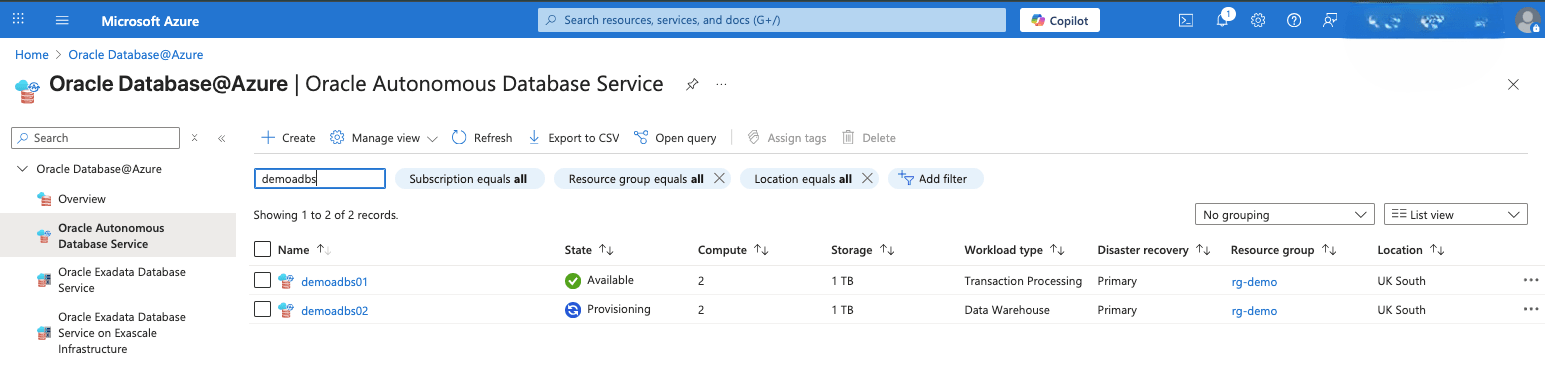
- Navigate back to Oracle Autonomous AI Database page to view the details of the database clone. The State field will change from Provisioning to Available once the cloning is complete.
There is currently no content for this page. Oracle AI Database@Azure team intends to add content here, and this placeholder text is provided until that text is added. The Oracle AI Database@Azure team is excited about future new features, enhancements, and fixes to this product and this accompanying documentation. We strongly recommend you watch this page for those updates.
There is currently no content for this page. Oracle AI Database@Azure team intends to add content here, and this placeholder text is provided until that text is added. The Oracle AI Database@Azure team is excited about future new features, enhancements, and fixes to this product and this accompanying documentation. We strongly recommend you watch this page for those updates.
There is currently no content for this page. Oracle AI Database@Azure team intends to add content here, and this placeholder text is provided until that text is added. The Oracle AI Database@Azure team is excited about future new features, enhancements, and fixes to this product and this accompanying documentation. We strongly recommend you watch this page for those updates.
There is currently no content for this page. Oracle AI Database@Azure team intends to add content here, and this placeholder text is provided until that text is added. The Oracle AI Database@Azure team is excited about future new features, enhancements, and fixes to this product and this accompanying documentation. We strongly recommend you watch this page for those updates.