Exadata Database - Manual
Learn how to back up an Exadata Database using the Manual Backup (Standalone Backup) option.
There is currently no content for this page. Oracle AI Database@Google Cloud team intends to add content here, and this placeholder text is provided until that text is added. The Oracle AI Database@Google Cloud team is excited about future new features, enhancements, and fixes to this product and this accompanying documentation. We strongly recommend you watch this page for those updates.
Manual Backup (Standalone Backups)
-
From the OCI Exadata VM Cluster details page select on Databases tab.
-
In the list of databases, find the database for which you want to create an on-demand full backup and select its name to display database details.
-
Under Resources, select Backups.
A list of backups is displayed.
-
Select Create Backup.
-
On the resulting Create backup window, do the following
-
Enter a Name for your backup.
-
Select the Create button to complete the creation step.
-
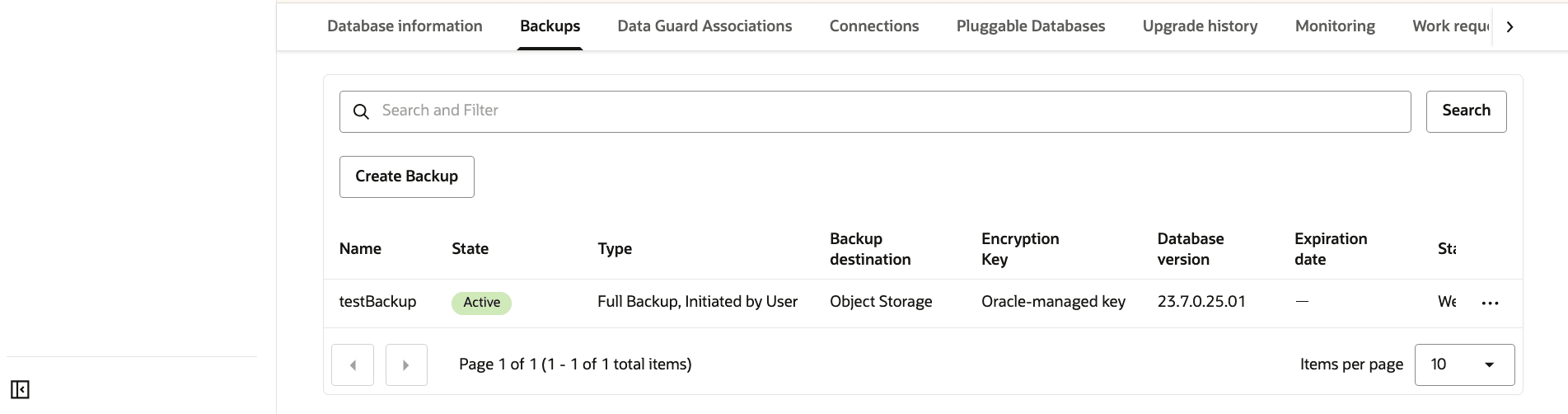
Return to the Backups tab within your Exadata VM Cluster to view the State of your backup. Once your backup is created, the state will change from Creating to Active.
-
-
Alternatively, you can select Standalone backups from the OCI console to view the State of your backup.
-
There is currently no content for this page. Oracle AI Database@Google Cloud team intends to add content here, and this placeholder text is provided until that text is added. The Oracle AI Database@Google Cloud team is excited about future new features, enhancements, and fixes to this product and this accompanying documentation. We strongly recommend you watch this page for those updates.
There is currently no content for this page. Oracle AI Database@Google Cloud team intends to add content here, and this placeholder text is provided until that text is added. The Oracle AI Database@Google Cloud team is excited about future new features, enhancements, and fixes to this product and this accompanying documentation. We strongly recommend you watch this page for those updates.
There is currently no content for this page. Oracle AI Database@Google Cloud team intends to add content here, and this placeholder text is provided until that text is added. The Oracle AI Database@Google Cloud team is excited about future new features, enhancements, and fixes to this product and this accompanying documentation. We strongly recommend you watch this page for those updates.