DNS
Learn about DNS configuration and management for Oracle AI Database@Google Cloud.
Oracle AI Database@Google Cloud uses DNS names for database connections and service endpoints. This page explains the domain names used by each service, the default and custom domain options, how clients in Google Cloud resolve database names, and how database resources resolve names in Google Cloud or connected on-premises networks.
DNS resolution returns an address for a name. Clients also need a network route and the appropriate security rules to connect to that address.
A fully qualified domain name (FQDN) is the complete DNS name of a database host or service endpoint. For example, in oradb-scan.db.example.com, oradb-scan is the endpoint label, db.example.com is the domain name, and the complete value is the FQDN.
Domain Names by Service
The following table shows the default namespaces and custom domain support for each service.
Use the complete FQDN shown in the deployed resource's connection details.
| Service | Default domain | Custom domain support |
|---|---|---|
| Oracle Exadata Database Service on Dedicated Infrastructure |
oraclevcn.com
|
Supported |
| Oracle Exadata Database Service on Exascale Infrastructure |
oraclevcn.com
|
Not supported |
| Oracle Autonomous AI Database Serverless |
|
Not supported |
| Oracle Base Database Service |
oraclevcn.com
|
Not supported |
| OCI GoldenGate | Service-provided deployment console URL | Supported as a customized deployment console endpoint |
For supported services and connection methods, a customer-managed DNS alias can provide an alternative connection name. An alias doesn't change the service-provided database FQDN.
Autonomous AI Database Serverless DNS
Autonomous AI Database Serverless uses oraclecloud.com for database connections and oraclecloudapps.com for application and tool endpoints.
Database connection endpoints use the following format:
<instance-name>.adb.<oci-region>.oraclecloud.comAlways use the complete endpoint names supplied in the database connection details and application URLs.
Default and Custom Domains
During ODB Network creation, keep the default domain or create a custom domain for supported database services.
When you select a custom domain, the service also creates the default domain.
Use the default domain when you don't require an organization-owned database namespace. Use a custom domain, such as db.example.com, when a supported database service must use your organization's namespace.
The domain choice determines the database namespace. DNS forwarding and peering determine how clients resolve names in that namespace.
Plan the Namespace and Resolution Path
Plan the database domain and its resolution path before provisioning.
For additional customer-managed forwarding or peering configuration, use the domain shown in the deployed configuration.
Each forwarded domain must lead to a resolver that can answer for all required names beneath it. If deployments use different resolution paths, keep each domain associated with the path that serves its records.
Avoid creating overlapping private zones that hide records available through forwarding. On the OCI resolver, private views and zones are evaluated before forwarding rules.
Customer-Managed DNS Aliases
A CNAME record in a customer-managed Cloud DNS private zone can point an alternative name to the database's existing FQDN.
This option is supported for Exadata Dedicated, Exadata Exascale, and Base Database in Oracle AI Database@Google Cloud.
For example, an alias such as orders-db.example.com can point to the complete database connection FQDN supplied by the service. The client must be able to resolve both the alias and its canonical target. Creating the alias doesn't replace the forwarding configuration used to resolve the target.
For supported alias scenarios and configuration steps, see Configure DNS resolution.
Managed DNS Components
Oracle AI Database@Google Cloud provisions DNS components in Google Cloud and OCI to support database name resolution.
Google Cloud Components
During deployment, the service creates a Cloud DNS private forwarding zone in the Google Cloud project and makes it available to the VPC network associated with the ODB Network.
The forwarding zone sends queries for its configured database domain to the OCI DNS listening endpoint provided during provisioning. The database records are resolved by the OCI VCN resolver; the forwarding zone provides the path to that resolver.
Clients using a customer-managed DNS service need a resolution path to the service's database namespace through the appropriate DNS configuration.
OCI Components
The service provisions the following components as part of the database network and deployment configuration.
| Component | Purpose |
|---|---|
| Private DNS resolver | Provides DNS resolution for the VCN. |
| Default private view | Contains the system-managed private DNS zones available to the resolver. |
| Private DNS zones | Contain records for the VCN's primary and backup subnet namespaces. |
| DNS listening endpoint | Receives queries sent to the VCN resolver. The endpoint is provisioned per VCN, with its IP address allocated in the primary subnet. |
| Listening endpoint network security group | Controls the DNS queries permitted to reach the listening endpoint. The service creates the associated security rules during provisioning. |
The listening endpoint receives queries for the OCI resolver.
The DNS listening endpoint is shared by database resources that use the VCN. The subnet containing the endpoint can't be deleted or reallocated while dependent resources remain.
Resolve Database Names from Google Cloud
Cloud DNS forwards database name queries from Google Cloud to the OCI VCN resolver.
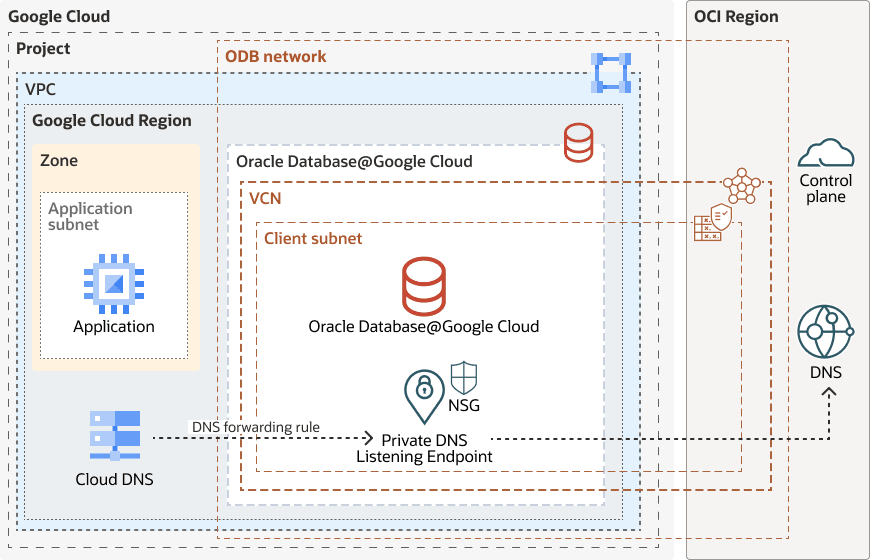
- The client sends a query for the database FQDN to its configured DNS service.
- Cloud DNS matches the database domain to the private forwarding zone.
- Cloud DNS sends the query to the OCI DNS listening endpoint.
- The OCI VCN resolver resolves the record using its available private views and zones.
- The answer returns through Cloud DNS to the client.
The listening endpoint must be reachable through the supported private network path. DNS security rules must permit both UDP and TCP port 53 from the DNS forwarding sources used by the configuration.
Resolve Google Cloud or On-Premises Names from Database Resources
Resolving Google Cloud names from database resources requires a separate forwarding configuration with an inbound DNS server policy in Google Cloud and an OCI DNS forwarding endpoint and rule for the private namespace.
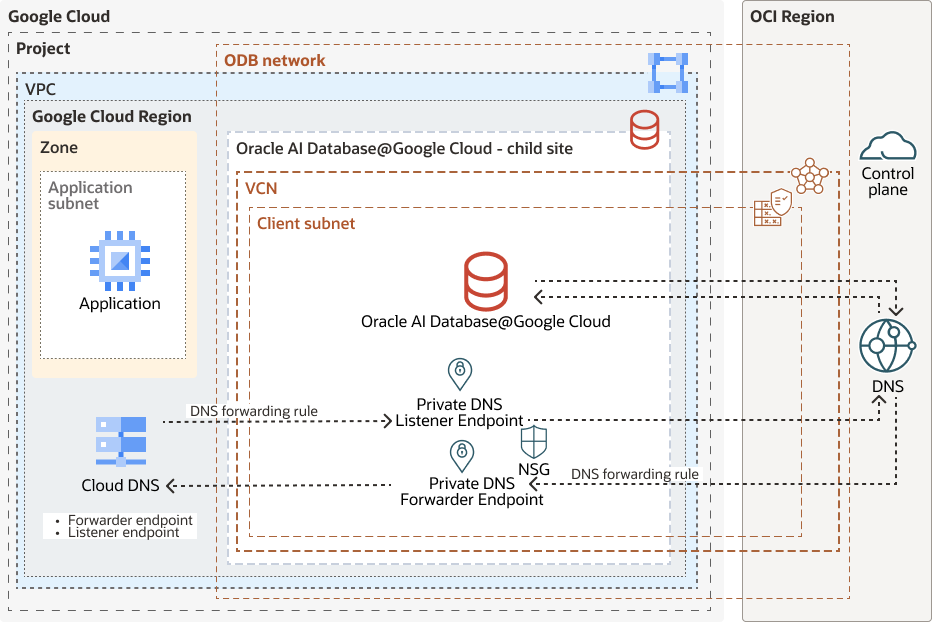
- The database resource queries the OCI VCN resolver for a Google Cloud FQDN.
- A forwarding rule matches the requested domain and selects the OCI forwarding endpoint and Google Cloud target address.
- The forwarding endpoint sends the query to the Cloud DNS inbound forwarding address.
- Cloud DNS resolves the name using the DNS configuration available to the receiving VPC network.
- The answer returns to the database resource through the OCI resolver.
For an on-premises namespace, configure forwarding to a reachable DNS server that can resolve that namespace, using the supported network path.
Permit outbound UDP and TCP port 53 from the OCI forwarding endpoint to the target resolver addresses. Verify the required routing and return path for the selected connectivity design.
As an alternative for a particular namespace, you can create and maintain private records in an OCI private zone. You're responsible for keeping those records synchronized with the source records. An overlapping OCI private zone takes precedence over forwarding for the same namespace.
For configuration steps, see Configure DNS resolution.
Extend Resolution to Other VPC Networks and Projects
Use Cloud DNS peering to make the database namespace resolvable from another VPC network or project.
The VPC network with the existing database forwarding configuration is the DNS producer network. The VPC network whose clients need to resolve database names is the DNS consumer network.
Create a private DNS peering zone available to the consumer network and target the producer network. Queries matching the peering zone use the producer network's DNS resolution configuration, including its forwarding zone for the database domain.
DNS peering and VPC Network Peering are separate services. VPC Network Peering alone doesn't share private DNS configuration. Clients also need network connectivity and security rules to connect to the resolved database addresses.
For steps, see Configure DNS resolution. For Google Cloud concepts, see Cloud DNS peering.
Verify DNS Resolution
Verify DNS resolution from each network that requires access.
Run checks from each network that requires access:
- Obtain the database FQDN from the service connection details. Obtain the separate application endpoint FQDN if the client uses an application or tool endpoint.
-
From the application network, run
nslookup <service-fqdn>and confirm that the answer contains the expected endpoint addresses. - If using a customer-managed alias, verify that both the alias and the canonical target resolve.
- If database resources must resolve Google Cloud or on-premises names, test a name from each required namespace using a lookup method supported by the database service.
- If resolution fails, inspect the client's configured DNS service, the matching forwarding or peering zone, OCI private views and forwarding rules, and resolver endpoint reachability. Check both UDP and TCP port 53.
- If the name resolves but the connection fails, inspect routing, security rules, and the database listener or service port separately.
DNS Naming Limits
These limits apply to Exadata VM cluster provisioning.
The cluster name, hostname prefix, and complete host and domain name are separate values.
| Value | Constraints |
|---|---|
| Hostname prefix | Maximum 23 characters. Must start with a letter and end with a letter or number. Hyphens are allowed. Must not be localhost or -version. |
| Exadata cluster name | Maximum 11 characters. Must start with a letter and contain only letters, numbers, and hyphens. Underscores aren't allowed. |
| Host and domain name | Maximum combined length of 112 characters. Allow space for the generated hostname and the separating dot when choosing the prefix and domain. |
Use the complete names shown in the deployed resource's connection details when configuring clients and testing resolution.