Route Model Requests Across OCI Regions
Create a routing profile for an on-demand model, then use the routing profile OCID in Chat Completions and Responses requests from Python applications.
Overview
A routing profile specifies one supported on-demand model and one or more target OCI regions in the same realm where that model is available. Applications send requests to a regional OCI Generative AI API endpoint and pass the routing profile OCID as the model value. Generative AI serves each request from an eligible region in the profile.
Use one profile when applications need the same model and approved set of serving regions. You can update the profile's configuration in OCI instead of maintaining a region list in each application. A profile with multiple target regions doesn't imply round-robin routing or a fixed region priority.
In this tutorial, two Python applications call the Chicago API endpoint. One uses Chat Completions and the other uses Responses. Both use a routing profile for openai.gpt-oss-120b that allows serving from Chicago, Frankfurt, or Osaka.
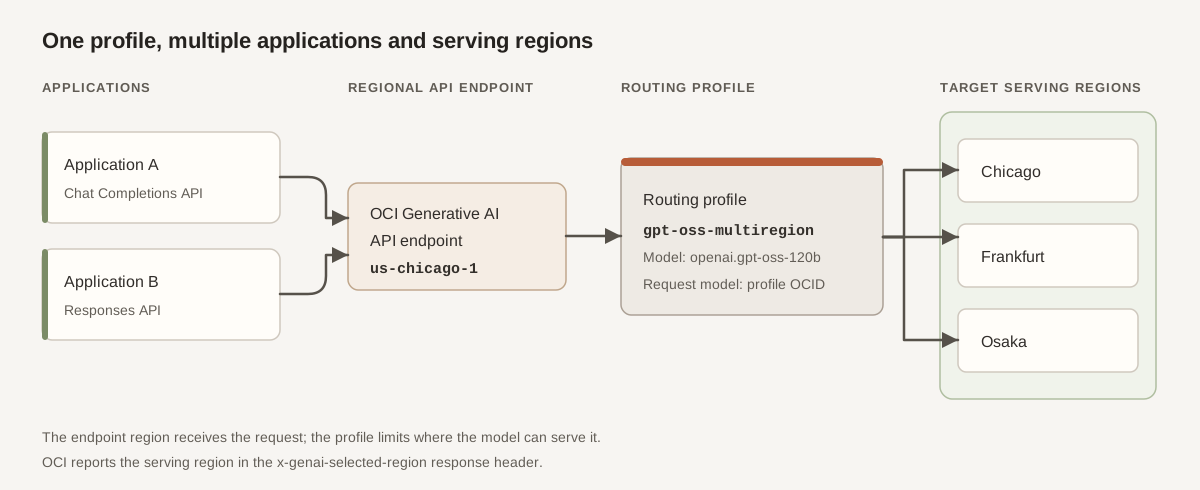
You create a profile, install the OpenAI Python SDK, run both examples, and check the x-genai-selected-region response header to see which region served each request.
You can use a profile with both APIs only if its selected model supports both the OCI Chat Completions API and OCI Responses API. Both APIs are available through routing profiles in regions with no local model processing. When calling from one of these regions, use that region's API endpoint and select target regions where the model is available.
Before You Begin
To complete this tutorial, you need:
- Access to OCI Generative AI, permission to create a routing profile in the selected compartment, and permission to use it for inference. See API-Level Permissions for Routing Profiles.
- A supported on-demand model available to your tenancy in the target regions. To run both examples with one profile, select a model that supports both APIs. See Generative AI Models by Region.
- An OCI Generative AI API key authorized for requests through the Chicago endpoint. Don't put the key in source code or commit it to a repository.
- Python 3.11 or later, and
uvinstalled on macOS, Linux, or Windows Subsystem for Linux. The commands in this tutorial use a Bash-compatible shell.
The examples use the OpenAI Python SDK with OCI's OpenAI-compatible endpoint. They don't require the OCI Python SDK or OCI CLI.
1. Create a Routing Profile
This example creates a profile in US Midwest (Chicago). Its target regions can differ from the API endpoint region, but they must be available for the selected model and in the same realm. If a model or region in this example isn't available to your tenancy, select an available option.
2. Prepare the Python Environment
3. Run the Chat Completions Example
4. Run the Responses Example
Use this example only if the model selected in the routing profile supports the Responses API. It uses the same profile OCID and regional endpoint as the Chat Completions example.
Verify the Result and Troubleshoot
In either script, enter a prompt such as Explain model routing in two sentences. The assistant's response should stream to the terminal. If OCI returns x-genai-selected-region, the script displays the region that served the request. It can differ from Chicago, the region of the API endpoint, but must be one of the target regions in the profile.
Both examples skip empty prompts. Enter exit or quit, press Ctrl+C, or send end-of-input at the prompt to stop. History is retained only while the script is running.
| Symptom | What to check |
|---|---|
| Authentication or authorization error | Check the OCI Generative AI API key, its region and access, routing-profile read permission, and the permission for the inference operation. |
| Profile not found or invalid model value | Use the full profile OCID in OCI_ROUTING_PROFILE_OCID. Confirm the profile is Active and that OCI_REGION points to the endpoint region you intend to call. |
| Unsupported API or request parameter | Confirm that the profile's selected model supports the API used by the script. This tutorial doesn't require a model-specific reasoning parameter. |
| Request can't be served | Check that the selected model is available in the profile's target regions and review the returned error. |
Serving region is not reported |
The script didn't find x-genai-selected-region in the response headers. Check the response and service behavior; don't infer the serving region from the API endpoint alone. |
The examples show profile-based requests and streaming text. They don't define or verify a routing priority, load-balancing algorithm, or failover policy.