Scenario: Working with IoT Digital Twins
To set up your digital twins you can work with the digital twin instances, adapters, relationships, and models.
Use these concepts to work with digital twin resources.
When you receive unstructured data, you must create a digital twin instance. A digital twin model and adapter are not required, see Scenario: Sending Unstructured Data Using HTTPS or MQTTS.
When you receive structured data, you must create a digital twin instance, a model, and an adapter.
- Digital Twin Models: A digital twin model defines the semantics of a digital twin and is based on the DTDL v3 specifications. A digital twin uses a Digital Twin Model Identifier (DTMI) as a unique identifier.
For example:
dtmi:com:yourcompany:iot:example;1 - Digital Twin Adapters: Translate data to digital twin models for data snapshots and if configured, captures historized data. The data passed to the digital twin adapter is a JSON object containing the data and mapping. Digital twin adapters are required for structured data.
- Default adapter format: If the device can be programmed to send data in the format you want to work with, then create a default digital twin adapter. For a specific example, see Scenario: Sending Structured Data in a Default Format using HTTPs.
- Custom adapter format: If the device can not be programmed to send data in the format you want to work with, then create a custom digital twin adapter. For a specific example, see Step 3: Create a Digital Twin Adapter.
- Digital Twin Relationships: Connects multiple digital twin instances. If a digital twin relationship links to a digital twin instance then you can create a graph of the digital twin and its relationships to other digital twin instances. For a specific example, see Scenario: Query a Digital Twin Relationship.
Note
Depending on the interface you use the payloads, adapter mappings, digital twin models, attributes, and properties in your files use a different casing convention. For example, the API interface uses
Depending on the interface you use the payloads, adapter mappings, digital twin models, attributes, and properties in your files use a different casing convention. For example, the API interface uses
camelCase and the CLI interface uses a hyphenated-lowercase format. The CLI can accept either camelCase or hyphenated-lowercase format for the digital twin model and digital twin adapter files and uses hyphenated-lowercase for commands and parameters. For example: - API:
digitalTwinInstanceId - CLI:
digital-twin-instance-id
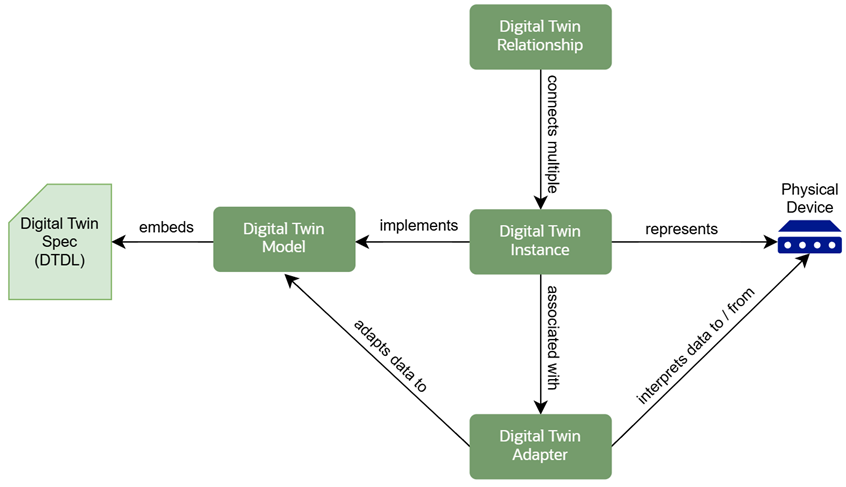
Digital Twin Concepts
When you work with your digital twin resources use these key concepts:
- Reference JSON files for digital twin model specifications and adapters: Depending on your operating system, you may have slightly different syntax with quotes, slashes, or location of the file by default. When you upload an adapter using the CLI you can use JSON files specify data mapping. See Managing CLI Input and Output and Using a JSON File for Complex Input.
- Sample Data: To set up and test your configuration, when you create a digital twin instance if you do not include an external key it is automatically generated. Use this external key as the device user name to post data.
- Digital Twin Model and Adapter Options: Create a digital twin model to define using the DTDL v3 Specifications and create a digital twin adapter to normalize the device data to fit the digital twin model.
- External Key and Authentication : To test your IoT configuration use a vault secret with basic authentication to ingest sample data. When you send data using the digital twin instance’s specify the username for the device as the
--external-keyand--auth-idas the device password. The--auth-idcan be a vault secret or a mTLS certificate, either secret or the certificate's OCID can be associated to the digital twin instance when you create the digital twin instance or update the digital twin instance. - External Key and mTLS certificate: If you use a mTLS certificate instead of the vault secret then the external key must be the certificate common name, to find the certificate's common name you can list your certificates and go to the certificate details.
- Relationships: Digital Twin Relationships link instances usually a source and a target and also a content path defined by your digital twin model’s relationships for example,
servedBy.