Budgets
Using the Budgets subject area, you can create reports about Budgets resources. With these reports, you can track the different attributes and metrics for Budgets resources across tenancies and compartments.
Business Questions
The subject area can answer the following business questions:
- What is my actual spend?
- What is the total amount of my spend?
- What is the current forecasted spend?
- What are my spends across compartments, tenancies, and regions?
- What is the total number of alert rules?
Logical Model
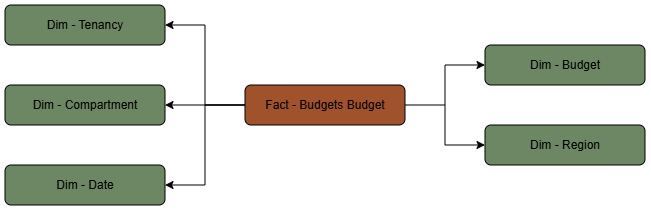
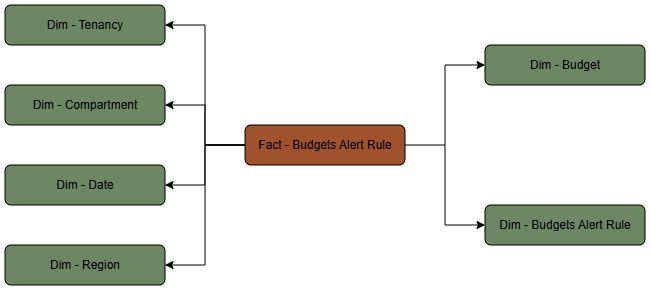
The Budgets subject area is based on a relationship-driven logical model.
This diagram shows how the Budget fact table is related to the following dimension tables:
This diagram shows how the Alert Rule fact table is related to the following dimension tables:
Metric Details
The fact folders in this subject area show the following metrics:
| Metric | Description |
|---|---|
| Actual Spend | This metric is calculated as the sum of total actual spend in currency for the current budget cycle. |
| Alert Rule Count | This metric is calculated as the sum of total number of Alert Rules. |
| Amount | This metric is calculated as the sum of total amount of the budget expressed in the currency of the customer's rate card. |
| Forecasted Spend | This metric is calculated as the sum of total forecasted spend in currency by the end of the current budget cycle. |
| Budget Count | This metric is calculated as the sum of total number of Budget. |