Compute
Using the Compute subject area, you can create reports about the Compute instance resources.
With these reports, you can track the different attributes and metrics for Compute instance resources across tenancies and compartments.
You can also see details on additional network components, such as NSGs, Route Tables, and public and private IPs associated with a Compute instance. And, for more specific use cases, you can view the Compute instances along with their assigned tags.
Business Questions
The subject area can answer the following business questions:
- What is the total number of secondary Vnics attached to Compute instances?
- What is the total number of volumes attached to Compute instances?
- What is the total number of Compute count?
- What is the total number of GPU count?
- What is the total number of OCPU count?
- What is the total amount of memory used?
- What NSGs are associated with my Compute instance?
- What public and private IPs are associated with my Compute instance?
- What Route Table is associated with my Compute instance?
- What are the tags for my Compute instance?
Logical Model
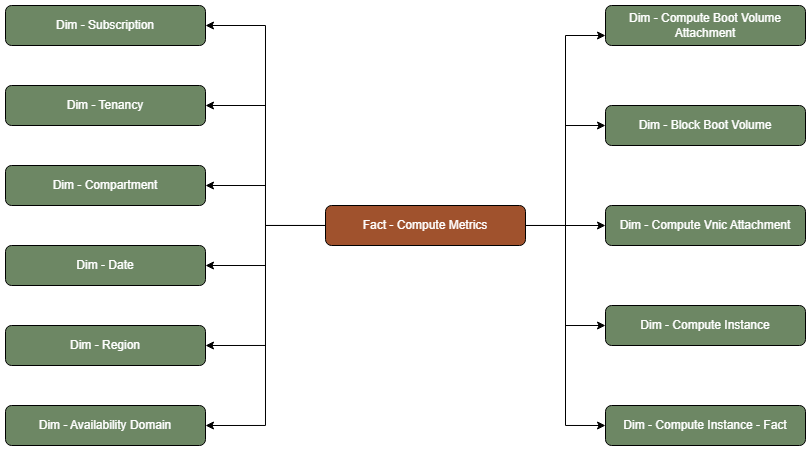
A Compute Metrics fact table is connected to the following dimension tables:
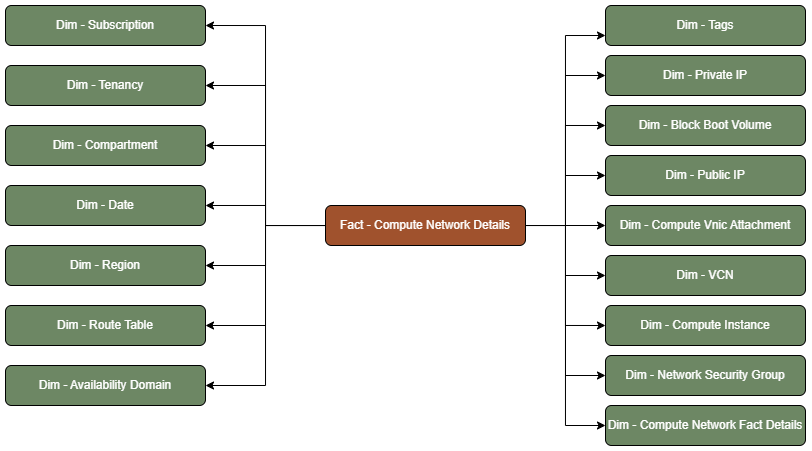
A Compute Network Details fact table is connected to the following dimension tables:
Metric Details
The fact folders in this subject area show the following metrics:
| Metric | Description |
|---|---|
| Attached Secondary Vnic Count | This metric is calculated as the sum of total number secondary VNICs attached |
| Attached Volumes Count | This metric is calculated as the sum of total number of boot volumes attached |
| Compute Count | This metric is calculated as the count of total records in Compute fact |
| Gpu Count | This metric is calculated as the sum of total GPU usage over the hour |
| Memory Usage Size In Mb | This metric is calculated as the sum of total memory usage over the hour in megabytes |
| Ocpu Usage | This metric is calculated as the sum of total OCPU usage over the hour |