Database Migration
Using the Database Migration subject area, users can create reports and dashboards to analyze and visualize Database Migration (ODMS) resources, with a primary focus on Migration inventory and operational status across tenancies, compartments, and regions. This subject area enables visibility into migration lifecycle state, job type, migration type, and related connection/database associations.
Business Questions
The subject area can answer the following business questions:
- List all Database Migration jobs in a specific compartment.
- How can I see all migration jobs created in my production compartment?
- Get detailed information about a specific Database Migration job.
- What are the status and configuration details for migration job jobA?
- List all migrations and their statuses.
- Which migration are currently active or have failed?
- Find all Database Connection resources used in migration jobs.
- Which source and target database connections exist for migration activities?
- Find all migrations targeting a specific destination database.
- How many migration jobs are moving data to my targetDB instance?
- Track status for all ongoing Database Migration jobs.
- Which migration jobs are in progress, completed, or failed?
- List all objects included/excluded in a migration job.
- For a given migration job, what schemas or tables are being migrated, and which are excluded?
- List all migration jobs created within a specific date range.
- Which migration jobs have been created or started in the last 30 days?
- Monitor resource usage for Database Migration processes.
- How many migration jobs are currently consuming Compute resources or running at the same time?
- Identify migration jobs by source/target database type or version.
- Which migration jobs are from Oracle 11g to Oracle Autonomous AI Database?
- Identify jobs by their phase and status.
- Which jobs failed in import phase?
Logical Model
The Database Migration subject area is based on a relationship-driven logical model.
A Database Migration fact table is connected to the following dimension tables:
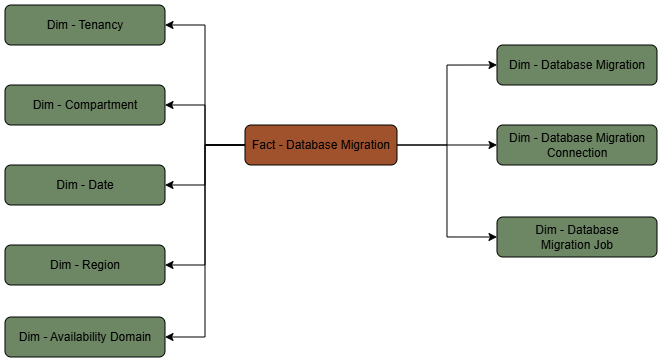
Metric Details
The fact folders in this subject area show the following metrics:
| Metric | Description |
|---|---|
| Migration Count | COUNT(migrationId) from database_migration_fact.migrationId (primary-key in fact) |
Note
Additional "counts" are typically implemented as filtered counts of
Additional "counts" are typically implemented as filtered counts of
migrationId grouped by dimensions/attributes (for example jobType, type, lifecycleState, region, compartmentId).