File Storage with Lustre
Using the File Storage with Lustre subject area, you can create reports about File Storage with Lustre resources. This subject area enables tracking Lustre file system inventory, capacity, lifecycle state, and basic association counts (for example, number of Object Storage links).
Business Questions
The subject area can answer the following business questions:
- What are my current service limits per tenancy, per region, or per availability domain?
- What is my current usage for each service limit?
- How can I view the details of a File system?
- How do I list all file systems in a compartment?
- What are the performance tiers of my file system in a compartment, region, AD?
- What is the next maintenance schedule for all the file systems?
- When was the last maintenance completed for the file systems?
- How much of my file system's capacity has been consumed?
- How many object links are configured for my file system?
- Is an object copy in progress on my file system?
Logical Model
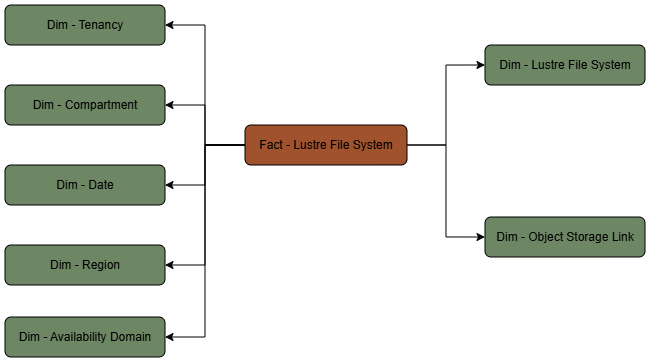
The File Storage with Lustre subject area is based on a relationship-driven logical model.
A File Storage with Lustre fact table is connected to the following dimension tables:
Metric Details
The fact folders in this subject area show the following metrics:
| Metric | Description |
|---|---|
| Lustre File System Count | COUNT(ocira_fact_key) from the fact view's ocira_fact_key (maps to ocira$fact_key) |
| Total Capacity (GB) | SUM(capacityInGBs) from lustre_file_system_fact.capacityInGBs |
| Object Storage Link Count | SUM(objectStorageLinkCount) from lustre_file_system_fact.objectStorageLinkCount |