Conditional Masking
Conditional masking allows you to set multiple logical conditions that alter the masking format of a masking column. Conditional masking can only be done when editing an existing masking format of a masking column in a masking policy.
Conditional masking can be configured for stand-alone columns or related columns (database-defined or application-defined relationships).
Conditional Masking for Stand-Alone Columns
For stand-alone columns, each row follows the masking rule that matches its attributes. The following are examples that illustrate how you can apply conditional masking to stand-alone columns.
Example 1: Protecting Sensitive Identifiers Across Diverse Geographic Regions
In this example, conditional masking is used to mask unique personal identifiers based on the country.
Problem: A large organization manages a database containing personal identifiers, such as Social Security Numbers, National Insurance Numbers, and so on, from individuals living in various countries. They are required by regulations and data protection laws to safeguard the sensitive information while having to maintain usability for authorized purposes. However, sharing this data for testing, development, or analysis poses significant privacy risks.
Solution: By using Data Masking in Oracle Data Safe, the organization is able to assign the appropriate masking formats to the personal identifiers to comply with the privacy regulations. Using conditional masking allows for the masking format to change based on the country of residence listed in the database.
Consider a database that contains the following information about employee personal identifiers:
| Employee | Country | Identifier |
|---|---|---|
| Alice | US | 987-65-4320 |
| Bill | UK | BH 123654G |
| Carol | UK | AJ 763482K |
| Denise | US | 798-66-4329 |
After implementing a conditional masking format on based on the country, the database may look something like the following:
| Employee | Country | Identifier |
|---|---|---|
| Alice | US | 674-58-2371 |
| Bill | UK | PA 123456C |
| Carol | UK | AB 987654B |
| Denise | US | 543-23-5431 |
Benefits: By implementing conditional masking formats, an organization:
- Prevents unauthorized access to sensitive personal identifiers.
- Complies with diverse regional privacy laws and data protection requirements.
- Preserves data integrity and usefulness for authorized activities, such as testing and analysis.
- Reduces the risk of data breaches and potential harm to individuals.
- Enables secure data sharing for collaboration and knowledge advancement.
Example 2: Protecting Sensitive Salary Data Across Different Employee Groups
Learn how conditional masking can be used to mask salary data based on an employee’s role.
Problem: A company needs to analyze salary data to identify potential pay gaps between different employee groups, but is unable to share actual salary figures due to internal privacy concerns or competitive reasons.
Solution: By using Data Masking in Oracle Data Safe, the company is able to create a pseudonymized dataset suitable for salary disparity analysis. Using conditional masking allows for the original salary data to be masked by a random number in a specified range based on the employee group.
Consider a database that contains the following information about employee salary data:
| Employee | Job Category | Salary |
|---|---|---|
| Alice | Manager | 90,000 |
| Bill | Manager | 88,000 |
| Carol | Worker | 72,000 |
| Denise | Worker | 57,000 |
| Eddie | Worker | 70,000 |
| Frank | Worker | 45,000 |
| George | Assistant | 45,000 |
After implementing a conditional masking format on job category as follows:
- If the job category is Manager, replace the salary with a random number from 100000 through 150000.
- If the job category is Worker, set the salary to a fixed number (75000).
- The default is to preserve the existing value.
The employee salary data may look something like the following:
| Employee | Job Category | Salary |
|---|---|---|
| Alice | Manager | 100,200 |
| Bill | Manager | 132,000 |
| Carol | Worker | 75,000 |
| Denise | Worker | 75,000 |
| Eddie | Worker | 75,000 |
| Frank | Worker | 75,000 |
| George | Assistant | 45,000 |
Benefits: By implementing conditional masking formats, the company:
- Protects individual employee salary information while enabling analysis of potential pay gaps between different job categories.
- Maintains data utility by creating a masked dataset that retains the statistical properties necessary for identifying salary disparity trends.
- Supports internal fairness by enabling data-driven decisions to promote fair compensation practices within the organization.
Conditional Masking for Related Data
For database-defined relationships, the database constraint identifies one unambiguous parent record for each child record. Oracle Data Safe will apply the same masked value to the parent key and matching child foreign keys.
For application-defined relationships, a child table may not contain the attribute used by the masking condition. If multiple masked values are possible for one original value, Oracle Data Safe selects the lowest masked value (lexicographically lowest value for non-numeric values) for the child column to preserve a valid parent-child relationship.
Example: Legacy Customer IDs
In an integrated environment, the same legacy customer ID can occur in multiple source systems. The true identifier is the combination of Legacy Customer ID and Source System.
Assume the policy applies different masking rules:
- CRM records: mask the ID to a value in one range (10000 - 20000).
- ERP records: mask the ID to a value in a different range (30000 - 40000).
The following table shows the original parent data.
| Legacy Customer ID | Source System | Customer Type |
|---|---|---|
| 12345 | CRM | Individual |
| 12345 | ERP | Business |
| 67890 | CRM | Individual |
| 67890 | ERP | Business |
| 24680 | ERP | Business |
The following table shows the masked parent data.
| Original Legacy Customer ID | Source System | Masked Legacy Customer ID |
|---|---|---|
| 12345 | CRM | 10210 |
| 12345 | ERP | 38750 |
| 67890 | CRM | 10560 |
| 67890 | ERP | 39025 |
| 24680 | ERP | 37100 |
The parent table honors the applicable masking condition for every row. Therefore, the same original ID can have different masked results.
The child table contains only Legacy Customer ID; it does not contain Source System, as shown in the following table.
| Original Child Legacy Customer ID | Masked Child Legacy Customer ID |
|---|---|
| 12345 | 10210 |
| 67890 | 10560 |
| 24680 | 37100 |
| 99999 | Null |
For 12345, the possible masked values are 10210 and 38750. Since the child record does not identify whether it belongs to CRM or ERP, Oracle Data Safe selects the lowest masked value: 10210. Similarly, for 67890, Oracle Data Safe selects 10560, the lower of 10560 and 39025. The value 99999 becomes NULL because no matching parent value exists.
Recommendation: To preserve both the exact conditional result and parent-child matching, define the relationship using both Legacy Customer ID and Source System. Each child record can then resolve to the correct parent record and masked value.
Add Conditions to a Masking Format
You can implement conditional masking formats in your masking policies.
-
Under Data Safe - Database Security, select Data masking.
-
Under Data masking, select Masking policies.
-
Select the name of a masking policy.
-
Locate the row for the column for which you want to add conditional masking in the Masking Columns tab.
-
Select View/Edit masking format from the ... menu at the end of a row.
The Edit format entry panel opens.
-
Enter the desired condition in the Condition field, removing the default condition
1=1. -
Select the Masking Format Entry.
-
Fill out any additional fields related to the selected masking format.
-
To add another condition, select Another format entry and repeat steps six through eight.
Here are some examples of how to configure the Edit format entry panel.
Example 1: Personal Identifiers Based on Country
In this example, the goal is to create a masking format where personal identifiers are masked differently according to the country associated with each identifier. American (USA) identifiers can be masked using the Social Security Number masking format, and British (UK) identifiers can be masked using the National Insurance Number masking format. The screenshot below shows the conditions that could be set to implement a similar conditional masking format.
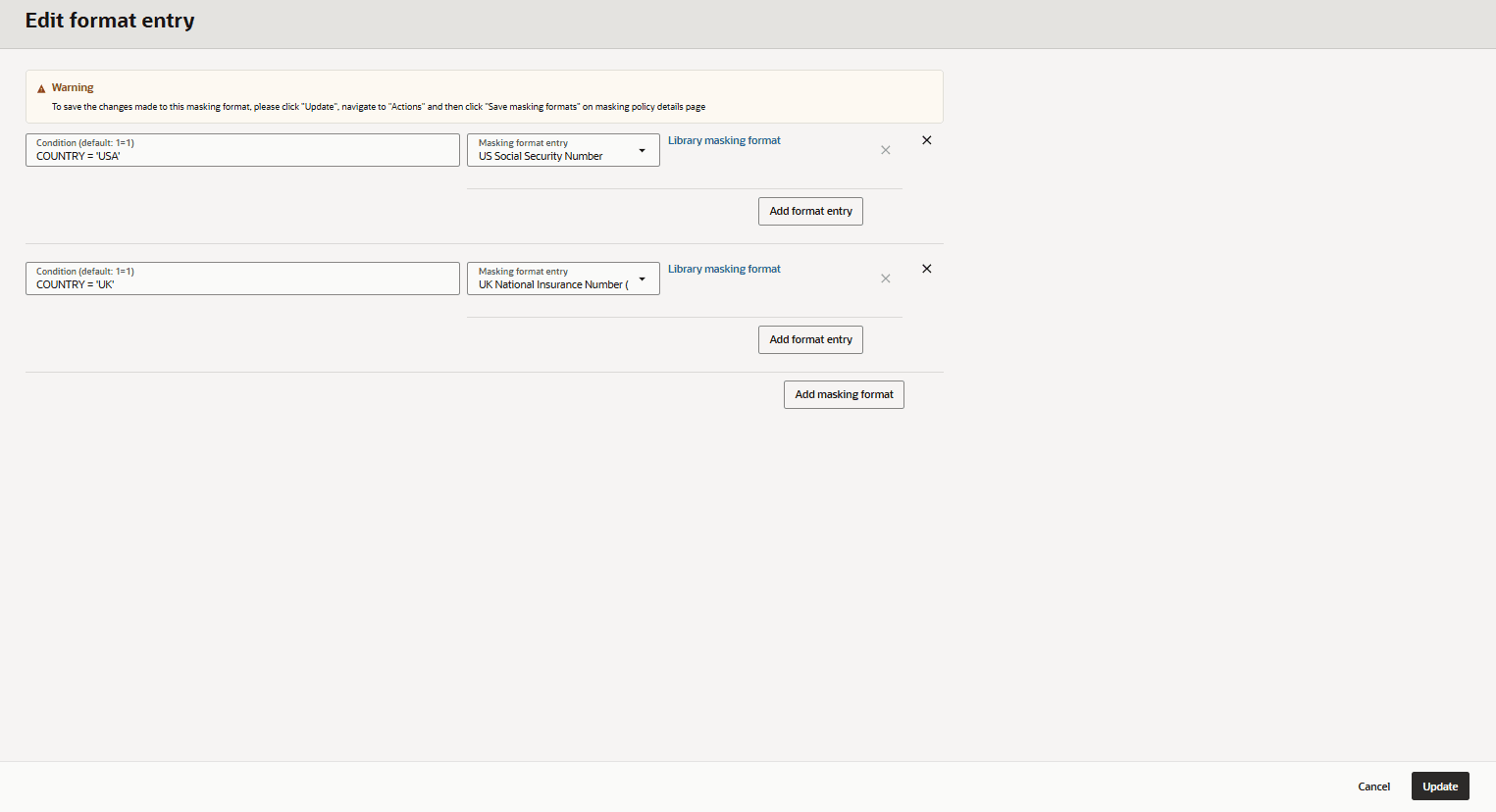
Description of the illustration conditional_masking_country.png
Example 2: Fixed Salary Based on Job Category
In this example, the goal is to create a masking format where salaries are masked by being set to different values based on the employees’ job category. The screenshot below shows the conditions that could be set to implement a similar conditional masking format.
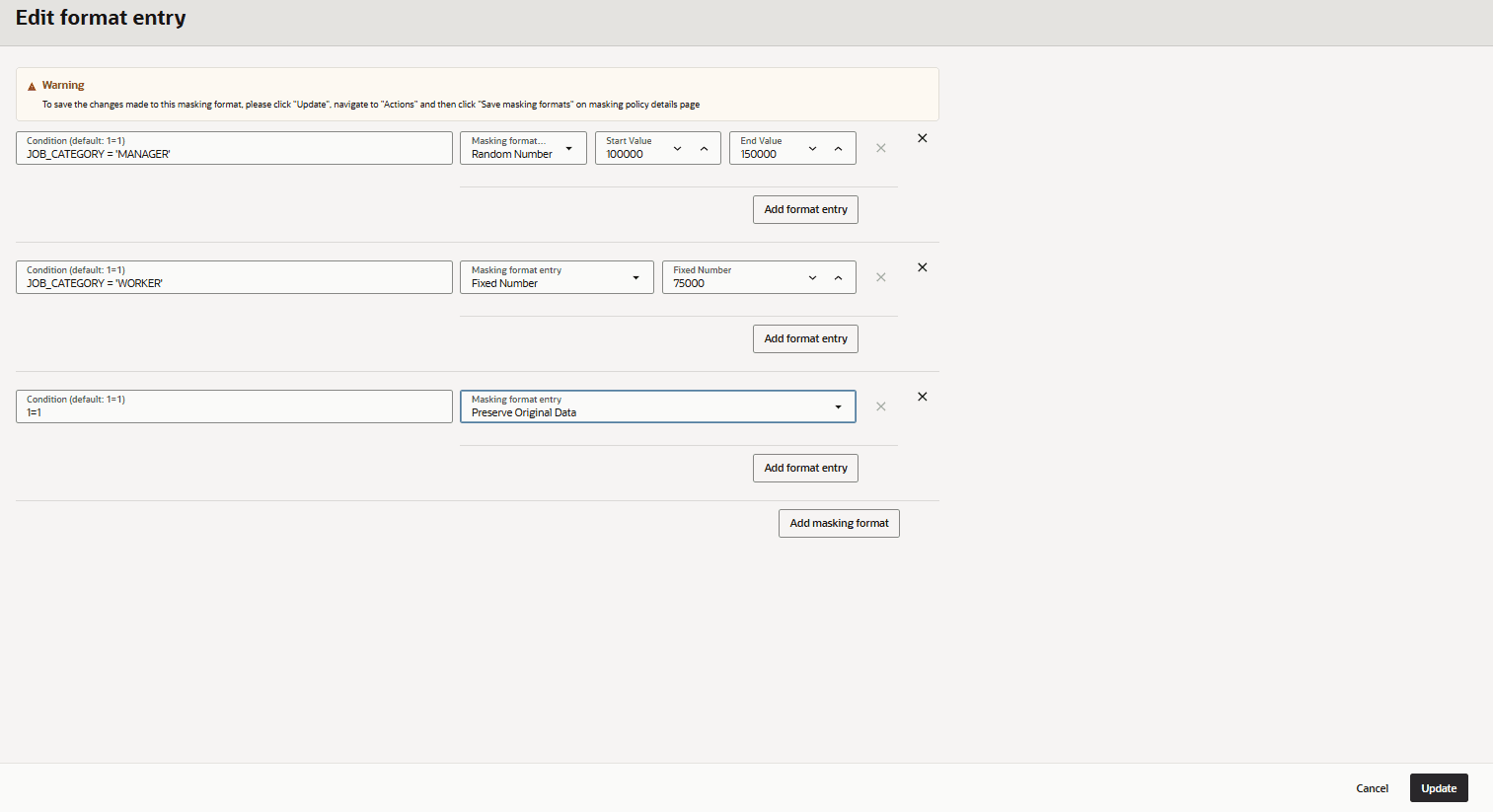
Description of the illustration conditional_masking_employee1.png
Example 3: Fixed Salary Based on Salary Amount
In this example, the goal is to create a masking format where salaries are masked by being set to fixed values based on the salary amount. The screenshot below shows the conditions that could be set to implement a similar conditional masking format.
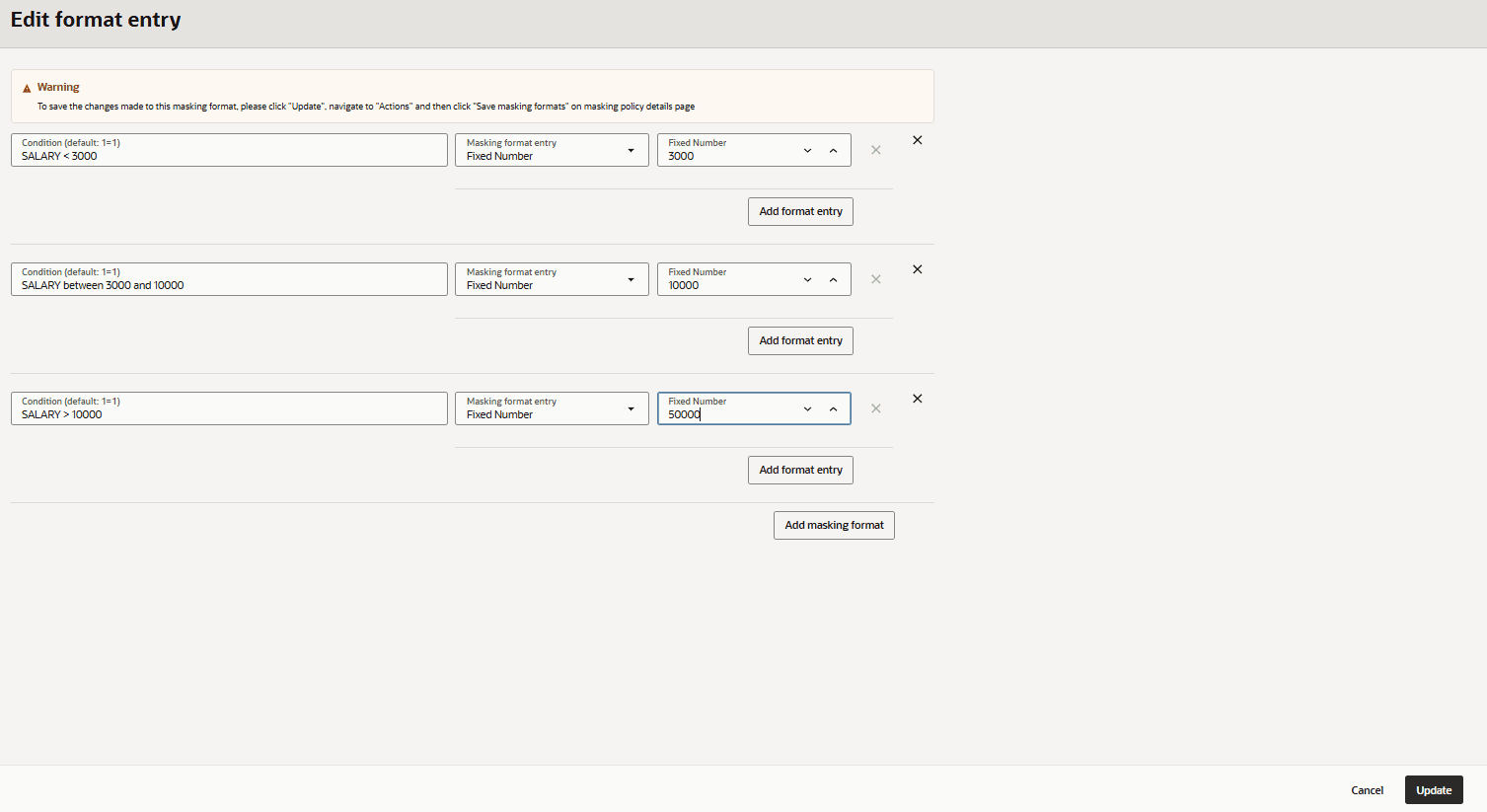
Description of the illustration conditional_masking_fixed_income.png
-
Select Update once you have set all your conditional masking formats.