Database Management for Exadata Infrastructure
You can use the Oracle Cloud Infrastructure Database Management service to monitor the Exadata Infrastructure deployed on premises or in the cloud.
Database Management supports the Exadata Storage Infrastructure or the storage servers in the Exadata Infrastructure deployed on premises and in the following Oracle Database cloud solutions:
- Oracle Exadata Database Service on Dedicated Infrastructure (ExaDB-D)
- Oracle Exadata Database Service on Cloud@Customer (ExaDB-C@C)
The term “Exadata Infrastructure” in Database Management documentation only refers to the Exadata Storage Infrastructure. Also, the terms External Exadata Infrastructure and Oracle Cloud Exadata Infrastructure are used to denote Exadata Infrastructure deployed on premises or in Oracle Database cloud solutions, respectively.
Oracle Exadata, deployed as the on-premises Exadata Database Machine or as Exadata on the Cloud (ExaDB-D or ExaDB-C@C), remains one of the best platforms for running Oracle Databases. It features database servers, storage servers, and InfiniBand, which is the primary interconnect between database servers and storage servers. It's designed to handle a wide range of Oracle Database workloads and provides reliability and enhances the performance of those workloads. As with any system, the Exadata Infrastructure must be monitored to ensure that it's running optimally to significantly reduce the time spent on determining the root cause of issues. For information on:
- Exadata Database machine, see Exadata Database Machine Documentation
- ExaDB-D, see Oracle Exadata Database Service on Dedicated Infrastructure
- ExaDB-C@C, see Oracle Exadata Database Service on Cloud@Customer
The Database Management feature set for Exadata Infrastructure monitoring builds on the Database Management capabilities for the External Database System and the Oracle Cloud Database System. As a first step, you must discover the corresponding External Database System in the on-premises Exadata Database machine or the Oracle Cloud Database System in ExaDB-D or ExaDB-C@C. You can then discover the Exadata Infrastructure, add connections to the associated Exadata Storage Servers (storage servers), and monitor them in Database Management. For information on how to discover and monitor Database Systems in Database Management, see:
- Database Management for External Database Systems
- Database Management for Oracle Cloud Database Systems
Here's a diagram that illustrates the steps involved in discovering External Exadata Infrastructure:
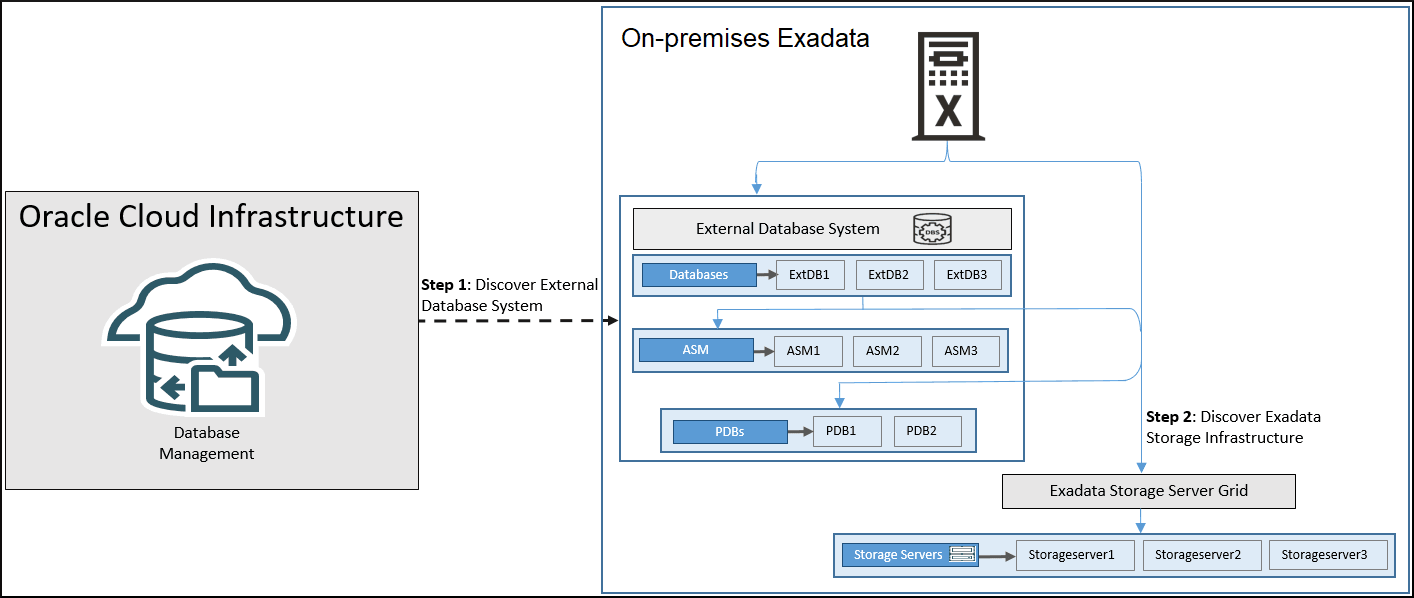
Database Management supports Exadata System Software version 20.1 and later. Here are some of the important tasks you can perform using Database Management for Exadata Infrastructure:
- Discover the Exadata Infrastructure on premises and add connections to the associated storage servers.
- Monitor the key performance and configuration metrics of the Exadata Infrastructure resources at the fleet level and at the single Exadata Infrastructure resource level.
- Monitor the performance and status of the storage server grid and the storage servers.