Database Tools MCP Servers
Policies
The policies for Database Tools MCP server depend on the following:
- the MCP Server runtime identity
- the Database Tools Connection runtime identity
- the database authentication method
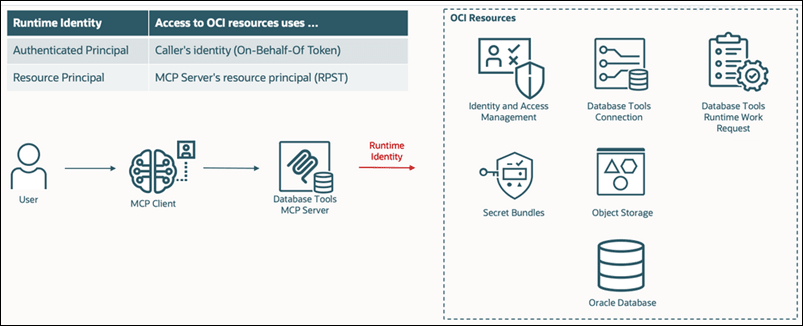
The following diagram shows how the Database Tools MCP Server uses the configured runtime identity to access OCI resources. Depending on the runtime identity configuration, OCI resource access is performed either using the authenticated user identity (On-Behalf-Of token) or the MCP Server resource principal.
Required IAM Permissions
IAM policies use the following syntax:
Allow <subject> to <verb> <resource-type> in <location> where <conditions>Based on this policy structure, the following table lists the IAM permissions required for the Database Tools MCP server.
| Verb | Resource Type | Description | Required When | Subject | Location |
|---|---|---|---|---|---|
| use | database-tools-mcp-servers-invocation | Allows users to invoke the MCP Server | Always | MCP Users | Tenancy or Compartment |
| use | database-tools-connections | Allows use of Database Tools connections | Always | MCP Users or MCP Server | Tenancy or Compartment |
| use | database-tools-db-connect-obo | Allows the MCP Server to obtain database tokens on behalf of users | Using Token authentication | MCP Server | Tenancy |
| use | database-connections | Allows IAM-based database authentication | Using Token authentication | MCP Users | Tenancy or Compartment |
| use | database-tools-runtime-work-requests | Allows long-running asynchronous requests | Using asynchronous requests | MCP Users or MCP Server | Tenancy or Compartment |
| use | generative-ai-nl2sql | Allows use of Gen AI SQL Assistant | When using GenAI SQL Assistant MCP Toolset | MCP Users or MCP Server | Tenancy or Compartment |
| read | secret-bundles | Allows access to Vault secrets | Using password-based authentication or a key store | MCP Users or MCP Server or Connection | Tenancy or Compartment |
| use | buckets | Allows access to Object Storage buckets | Using asynchronous requests | MCP Users or MCP Server or Connection | Tenancy or Compartment |
| manage | objects | Allows object creation and management | Using asynchronous requests | MCP Users or MCP Server or Connection | Tenancy or Compartment |
The
DATABASE_TOOLS_DB_CONNECT_OBO permission is required at the
tenancy level because OCI IAM and DBaaS cannot currently limit IAM-authenticated,
on-behalf-of database connections to specific databases or compartments. This
permission allows a Database Tools MCP server to obtain a database token on behalf
of the requesting user. Grant this permission only to MCP servers managed by trusted
administrators.
Runtime Identity Models
The required policies depend on the runtime identity configuration.
-
MCP Server Runtime Identity
Determines which identity the MCP Server uses when accessing resources.
-
Authenticated Principal: Requests run using the logged-in user identity.
-
Resource Principal: Requests run using the MCP server identity.
-
-
Connection Runtime Identity
Determines which identity is used for database access.
-
Authenticated Principal: Database access uses the user identity.
-
Resource Principal: Database access uses the Database Tools Connection resource identity.
Note
Asynchronous requests require at least one resource principal. To use asynchronous MCP requests, configure either the MCP Server runtime identity or the Database Tools Connection runtime identity as a Resource Principal. Configurations that use Authenticated Principal for both runtime identities do not support asynchronous requests. -
-
Authentication Types
-
Token: Uses IAM token-based authentication.
-
Password: Uses database username and password authentication.
-
Policies can be applied at either the resource level or compartment level. The scope identifies the context for which access is being requested, enabling permissions to be granted at the appropriate resource or compartment level.
-
Resource (default): Restricts access to a specific resource.
-
Compartment: Allows access to all matching resources in the compartment.
Required Policy Statements by Configuration
Use the following guidance to generate and identify the OCI IAM policy statements required for your MCP server configuration.
Generate Recommended Policies
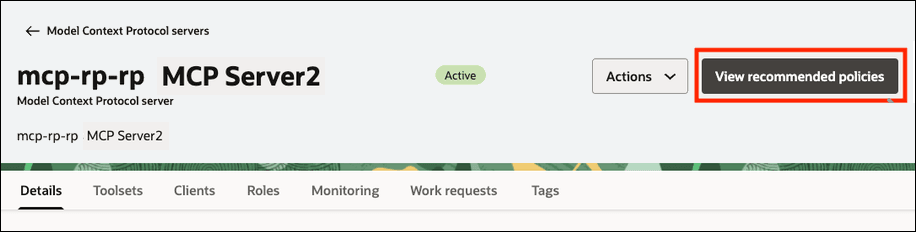
To generate the OCI policy statements required for your MCP server configuration, click View recommended policies.
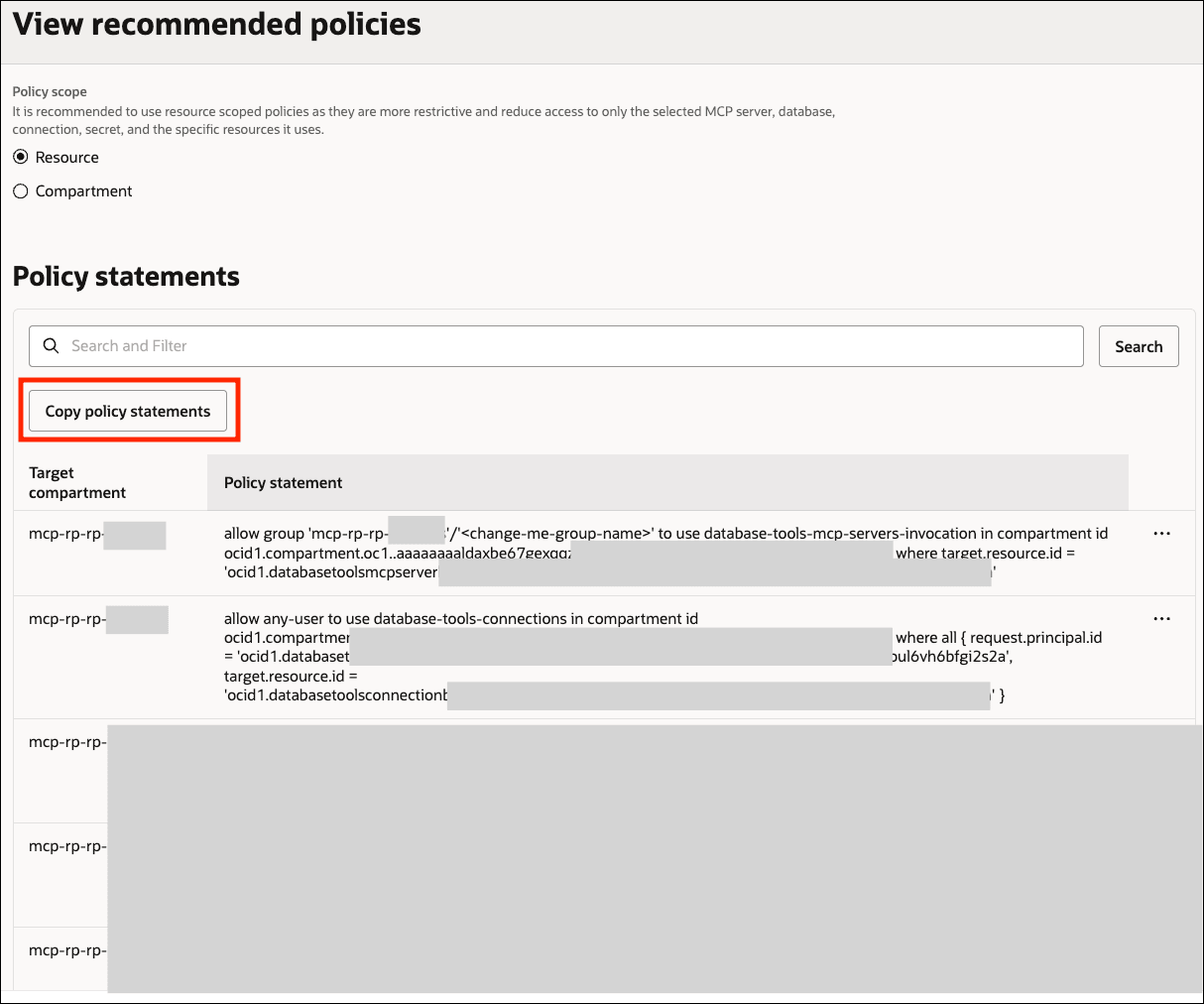
The generated policy statements can be copied and used to create the required OCI IAM policies.
Policy Details
Use the following table to identify the policy statements for your MCP server and connection configuration.
In the table, AP is used for Authenticated Principal, and RP is used for Resource Principal.
| Option | MCP Server Runtime Identity | Connection Runtime Identity | Authentication Type | Scope |
|---|---|---|---|---|
| Option 1 | AP | AP | Token | Resource |
| Option 2 | AP | AP | Token | Compartment |
| Option 3 | AP | AP | Password | Resource |
| Option 4 | AP | AP | Password | Compartment |
| Option 5 | AP | RP | Token | Resource |
| Option 6 | AP | RP | Token | Compartment |
| Option 7 | AP | RP | Password | Resource |
| Option 8 | AP | RP | Password | Compartment |
| Option 9 | RP | AP | Password | Resource |
| Option 10 | RP | AP | Password | Compartment |
| Option 11 | RP | RP | Password | Resource |
| Option 12 | RP | RP | Password | Compartment |
Option 1: AP / AP / Token / Resource Scope
- MCP Server runtime identity: AUTHENTICATED_PRINCIPAL
- Connection runtime identity: AUTHENTICATED_PRINCIPAL
- Authentication type: TOKEN
Resource-Scope Policy Statements
allow any-user to use database-tools-db-connect-obo in tenancy where request.principal.id = '<mcp-server-ocid>'
allow group '<domain_name>'/'<group_name>' to use database-tools-mcp-servers-invocation in compartment <compartment_name> where target.resource.id = '<mcp-server-ocid>'
allow group '<domain_name>'/'<group_name>' to use database-connections in compartment <compartment_name> where target.database.id = '<database-ocid>'
allow group '<domain_name>'/'<group_name>' to use database-tools-connections in compartment <compartment_name> where target.resource.id = '<connection-ocid>'
allow group '<domain_name>'/'<group_name>' to read secret-bundles in compartment <compartment_name> where target.secret.id = '<secret-ocid>'Optional: Required only when using the Generative AI SQL assistant toolset.
allow group '<domain_name>'/'<group_name>' to use generative-ai-nl2sql in compartment <compartment_name> where target.generative-ai-semantic-store.id = '<generative-ai-semantic-store-ocid>'Option 2: AP / AP / Token / Compartment Scope
- MCP Server runtime identity: AUTHENTICATED_PRINCIPAL
- Connection runtime identity: AUTHENTICATED_PRINCIPAL
- Authentication type: TOKEN
Compartment-Scope Policy Statements
allow any-user to use database-tools-db-connect-obo in tenancy where request.principal.id = '<mcp-server-ocid>'
allow group '<domain_name>'/'<group_name>' to use database-tools-mcp-servers-invocation in compartment <compartment_name>
allow group '<domain_name>'/'<group_name>' to use database-connections in compartment <compartment_name>
allow group '<domain_name>'/'<group_name>' to use database-tools-connections in compartment <compartment_name>
allow group '<domain_name>'/'<group_name>' to read secret-bundles in compartment <compartment_name>Optional: Required only when using the Generative AI SQL assistant toolset.
allow group '<domain_name>'/'<group_name>' to use generative-ai-nl2sql in compartment <compartment_name>Option 3: AP / AP / Password / Resource Scope
- MCP Server runtime identity: AUTHENTICATED_PRINCIPAL
- Connection runtime identity: AUTHENTICATED_PRINCIPAL
- Authentication type: PASSWORD
Resource-Scope Policy Statements
allow group '<domain_name>'/'<group_name>' to use database-tools-mcp-servers-invocation in compartment <compartment_name> where target.resource.id = '<mcp-server-ocid>'
allow group '<domain_name>'/'<group_name>' to use database-tools-connections in compartment <compartment_name> where target.resource.id = '<connection-ocid>'
allow group '<domain_name>'/'<group_name>' to read secret-bundles in compartment <compartment_name> where any {target.secret.id = '<secret-ocid-1>', target.secret.id = '<secret-ocid-2>'}Optional: Required only when using the Generative AI SQL assistant toolset.
allow group '<domain_name>'/'<group_name>' to use generative-ai-nl2sql in compartment <compartment_name> where target.generative-ai-semantic-store.id = '<generative-ai-semantic-store-ocid>'Option 4: AP / AP / Password / Compartment Scope
- MCP Server runtime identity: AUTHENTICATED_PRINCIPAL
- Connection runtime identity: AUTHENTICATED_PRINCIPAL
- Authentication type: PASSWORD
Compartment-Scope Policy Statements
allow group '<domain_name>'/'<group_name>' to use database-tools-mcp-servers-invocation in compartment <compartment_name>
allow group '<domain_name>'/'<group_name>' to use database-tools-connections in compartment <compartment_name>
allow group '<domain_name>'/'<group_name>' to read secret-bundles in compartment <compartment_name>Optional: Required only when using the Generative AI SQL assistant toolset.
allow group '<domain_name>'/'<group_name>' to use generative-ai-nl2sql in compartment <compartment_name>Option 5: AP / RP / Token / Resource Scope
- MCP Server runtime identity: AUTHENTICATED_PRINCIPAL
- Connection runtime identity: RESOURCE_PRINCIPAL
- Authentication type: TOKEN
Resource-Scope Policy Statements
allow any-user to use database-tools-db-connect-obo in tenancy where request.principal.id = '<mcp-server-ocid>'
allow group '<domain_name>'/'<group_name>' to use database-tools-mcp-servers-invocation in compartment <compartment_name> where target.resource.id = '<mcp-server-ocid>'
allow group '<domain_name>'/'<group_name>' to use database-connections in compartment <compartment_name> where target.database.id = '<database-ocid>'
allow group '<domain_name>'/'<group_name>' to use database-tools-connections in compartment <compartment_name> where target.resource.id = '<connection-ocid>'
allow any-user to read secret-bundles in compartment <compartment_name> where all {request.principal.id = '<connection-ocid>', target.secret.id = '<secret-ocid>'}Optional: The following statements are required for work requests, object storage or when using Generative AI SQL assistant toolset.
Work Requests
allow group '<domain_name>'/'<group_name>' to use database-tools-runtime-work-requests in compartment <compartment_name> where target.resource.created-by-principal-id = request.principal.id
Object Storage
allow any-user to use buckets in compartment <compartment_name> where all {request.principal.id = '<connection-ocid>', target.bucket.name = '<bucket-name>'}
allow any-user to manage objects in compartment <compartment_name> where all {request.principal.id = '<connection-ocid>', target.bucket.name = '<bucket-name>'}
Generative AI SQL assistant toolset
allow group '<domain_name>'/'<group_name>' to use generative-ai-nl2sql in compartment <compartment_name> where target.generative-ai-semantic-store.id = '<generative-ai-semantic-store-ocid>'Option 6: AP / RP / Token / Compartment Scope
- MCP Server runtime identity: AUTHENTICATED_PRINCIPAL
- Connection runtime identity: RESOURCE_PRINCIPAL
- Authentication type: TOKEN
Compartment-Scope Policy Statements
allow any-user to use database-tools-db-connect-obo in tenancy where request.principal.id = '<mcp-server-ocid>'
allow group '<domain_name>'/'<group_name>' to use database-tools-mcp-servers-invocation in compartment <compartment_name>
allow group '<domain_name>'/'<group_name>' to use database-connections in compartment <compartment_name>
allow group '<domain_name>'/'<group_name>' to use database-tools-connections in compartment <compartment_name>
allow any-user to read secret-bundles in compartment <compartment_name> where request.principal.id = '<connection-ocid>'Optional: The following statements are required for work requests, object storage or when using Generative AI SQL assistant toolset.
Work Requests
allow group '<domain_name>'/'<group_name>' to use database-tools-runtime-work-requests in compartment <compartment_name>
Object Storage
allow any-user to use buckets in compartment <compartment_name> where request.principal.id = '<connection-ocid>'
allow any-user to manage objects in compartment <compartment_name> where request.principal.id = '<connection-ocid>'
Generative AI SQL assistant toolset
allow group '<domain_name>'/'<group_name>' to use generative-ai-nl2sql in compartment <compartment_name>Option 7: AP / RP / Password / Resource Scope
- MCP Server runtime identity: AUTHENTICATED_PRINCIPAL
- Connection runtime identity: RESOURCE_PRINCIPAL
- Authentication type: PASSWORD
Resource-Scope Policy Statements
allow group '<domain_name>'/'<group_name>' to use database-tools-mcp-servers-invocation in compartment <compartment_name> where target.resource.id = '<mcp-server-ocid>'
allow group '<domain_name>'/'<group_name>' to use database-tools-connections in compartment <compartment_name> where target.resource.id = '<connection-ocid>'
allow any-user to read secret-bundles in compartment <compartment_name> where any {all {request.principal.id = '<connection-ocid>', target.secret.id = '<secret-ocid-1>'}, all{request.principal.id = '<connection-ocid>', target.secret.id = '<secret-ocid-2>'}}Optional: The following statements are required for work requests, object storage or when using Generative AI SQL assistant toolset.
Work Requests
allow group '<domain_name>'/'<group_name>' to use database-tools-runtime-work-requests in compartment <compartment_name> where target.resource.created-by-principal-id = request.principal.id
Object Storage
allow any-user to use buckets in compartment <compartment_name> where all {request.principal.id = '<connection-ocid>', target.bucket.name = '<bucket-name>'}
allow any-user to manage objects in compartment <compartment_name> where all {request.principal.id = '<connection-ocid>', target.bucket.name = '<bucket-name>'}
Generative AI SQL assistant toolset
allow group '<domain_name>'/'<group_name>' to use generative-ai-nl2sql in compartment <compartment_name> where target.generative-ai-semantic-store.id = '<generative-ai-semantic-store-ocid>'Option 8: AP / RP / Password / Compartment Scope
- MCP Server runtime identity: AUTHENTICATED_PRINCIPAL
- Connection runtime identity: RESOURCE_PRINCIPAL
- Authentication type: PASSWORD
Compartment-Scope Policy Statements
allow group '<domain_name>'/'<group_name>' to use database-tools-mcp-servers-invocation in compartment <compartment_name>
allow group '<domain_name>'/'<group_name>' to use database-tools-connections in compartment <compartment_name>
allow any-user to read secret-bundles in compartment <compartment_name> where request.principal.id = '<connection-ocid>'Optional: The following statements are required for work requests, object storage or when using Generative AI SQL assistant toolset.
Work Requests
allow group '<domain_name>'/'<group_name>' to use database-tools-runtime-work-requests in compartment <compartment_name>Object Storage
allow any-user to use buckets in compartment <compartment_name> where request.principal.id = '<connection-ocid>'
allow any-user to manage objects in compartment <compartment_name> where request.principal.id = '<connection-ocid>'
Generative AI SQL assistant toolset
allow group '<domain_name>'/'<group_name>' to use generative-ai-nl2sql in compartment <compartment_name>Option 9: RP / AP / Password / Resource Scope
- MCP Server runtime identity: RESOURCE_PRINCIPAL
- Connection runtime identity: AUTHENTICATED_PRINCIPAL
- Authentication type: PASSWORD
Resource-Scope Policy Statements
allow group '<domain_name>'/'<group_name>' to use database-tools-mcp-servers-invocation in compartment <compartment_name> where target.resource.id = '<mcp-server-ocid>'
allow any-user to use database-tools-connections in compartment <compartment_name> where all {request.principal.id = '<mcp-server-ocid>', target.resource.id = '<connection-ocid>'}
allow any-user to read secret-bundles in compartment <compartment_name> where any {all {request.principal.id = '<mcp-server-ocid>', target.secret.id = '<secret-ocid-1>'}, all {request.principal.id = '<mcp-server-ocid>', target.secret.id = '<secret-ocid-2>'}}Optional: The following statements are required for work requests, object storage or when using Generative AI SQL assistant toolset.
Work Requests
allow any-user to use database-tools-runtime-work-requests in compartment <compartment_name> where all {request.principal.id = '<mcp-server-ocid>', target.resource.created-by-principal-id = request.principal.id}Object Storage
allow any-user to use buckets in compartment <compartment_name> where all {request.principal.id = '<mcp-server-ocid>', target.bucket.name = '<bucket-name>'}
allow any-user to manage objects in compartment <compartment_name> where all {request.principal.id = '<mcp-server-ocid>', target.bucket.name = '<bucket-name>'}
Generative AI SQL assistant toolset
allow any-user to use generative-ai-nl2sql in compartment <compartment_name> where all {request.principal.id = '<mcp-server-ocid>', target.generative-ai-semantic-store.id = '<generative-ai-semantic-store-ocid>'}Option 10: RP / AP / Password / Compartment Scope
- MCP Server runtime identity: RESOURCE_PRINCIPAL
- Connection runtime identity: AUTHENTICATED_PRINCIPAL
- Authentication type: PASSWORD
Compartment-Scope Policy Statements
allow group '<domain_name>'/'<group_name>' to use database-tools-mcp-servers-invocation in compartment <compartment_name>
allow any-user to use database-tools-connections in compartment <compartment_name> where request.principal.id = '<mcp-server-ocid>'
allow any-user to read secret-bundles in compartment <compartment_name> where request.principal.id = '<mcp-server-ocid>'Optional: The following statements are required for work requests, object storage or when using Generative AI SQL assistant toolset.
Work Requests
allow any-user to use database-tools-runtime-work-requests in compartment <compartment_name> where request.principal.id = '<mcp-server-ocid>'Object Storage
allow any-user to use buckets in compartment <compartment_name> where request.principal.id = '<mcp-server-ocid>'
allow any-user to manage objects in compartment <compartment_name> where request.principal.id = '<mcp-server-ocid>'
Generative AI SQL assistant toolset
allow any-user to use generative-ai-nl2sql in compartment <compartment_name> where request.principal.id = '<mcp-server-ocid>'Option 11: RP / RP / Password / Resource Scope
- MCP Server runtime identity: RESOURCE_PRINCIPAL
- Connection runtime identity: RESOURCE_PRINCIPAL
- Authentication type: PASSWORD
Resource-Scope Policy Statements
allow group '<domain_name>'/'<group_name>' to use database-tools-mcp-servers-invocation in compartment <compartment_name> where target.resource.id = '<mcp-server-ocid>'
allow any-user to use database-tools-connections in compartment <compartment_name> where all {request.principal.id = '<mcp-server-ocid>', target.resource.id = '<connection-ocid>'}
allow any-user to read secret-bundles in compartment <compartment_name> where any {all {request.principal.id = '<connection-ocid>', target.secret.id = '<secret-ocid-1>'}, all {request.principal.id = '<connection-ocid>', target.secret.id = '<secret-ocid-2>'}}Optional: The following statements are required for work requests, object storage or when using Generative AI SQL assistant toolset.
Work Requests
allow any-user to use database-tools-runtime-work-requests in compartment <compartment_name> where all {request.principal.id = '<mcp-server-ocid>', target.resource.created-by-principal-id = request.principal.id}Object Storage
allow any-user to use buckets in compartment <compartment_name> where all {request.principal.id = '<connection-ocid>', target.bucket.name = '<bucket-name>'}
allow any-user to manage objects in compartment <compartment_name> where all {request.principal.id = '<connection-ocid>', target.bucket.name = '<bucket-name>'}
Generative AI SQL assistant toolset
allow any-user to use generative-ai-nl2sql in compartment <compartment_name> where all {request.principal.id = '<mcp-server-ocid>', target.generative-ai-semantic-store.id = '<generative-ai-semantic-store-ocid>'}Option 12: RP / RP / Password / Compartment Scope
- MCP Server runtime identity: RESOURCE_PRINCIPAL
- Connection runtime identity: RESOURCE_PRINCIPAL
- Authentication type: PASSWORD
Compartment-Scope Policy Statements
allow group '<domain_name>'/'<group_name>' to use database-tools-mcp-servers-invocation in compartment <compartment_name>
allow any-user to use database-tools-connections in compartment <compartment_name> where request.principal.id = '<mcp-server-ocid>'
allow any-user to read secret-bundles in compartment <compartment_name> where request.principal.id = '<connection-ocid>'Optional: The following statements are required for work requests, object storage or when using Generative AI SQL assistant toolset.
Work Requests
allow any-user to use database-tools-runtime-work-requests in compartment <compartment_name> where request.principal.id = '<mcp-server-ocid>'Object Storage
allow any-user to use buckets in compartment <compartment_name> where request.principal.id = '<connection-ocid>'
allow any-user to manage objects in compartment <compartment_name> where request.principal.id = '<connection-ocid>'
Generative AI SQL assistant toolset
allow any-user to use generative-ai-nl2sql in compartment <compartment_name> where request.principal.id = '<mcp-server-ocid>'Least-Privilege IAM Policies for MCP Administrators
This section describes the IAM policies and identity domain roles that are required for administrators to manage Database Tools MCP servers, toolsets and Connections.
For a user in a specific identity domain, the following table lists the required policy statements.
| Policy | Access Level |
|---|---|
| allow group '<identity_domain_name>'/'<group_name>' to manage database-tools-mcp-family in compartment <compartment> | Manage Database Tools MCP servers, MCP toolsets, Database Tools connections and Database Tools private endpoints |
| allow group '<identity_domain_name>'/'<group_name>' to use vaults in compartment <compartment> | Required to work with vault resources used for secrets. |
| allow group '<identity_domain_name>'/'<group_name>' to use keys in compartment <compartment> | Required to work with vault encryption keys used by secrets. |
| allow group '<identity_domain_name>'/'<group_name>' to manage secret-family in compartment <compartment> | Create, update, and delete vault secrets referenced by connections or MCP server configuration. |
| allow group '<identity_domain_name>'/'<group_name>' to manage virtual-network-family in compartment <compartment> | Required to create and manage Database Tools private endpoints. |
| allow group '<identity_domain_name>'/'<group_name>' to read autonomous-database-family in compartment <compartment> | Required to get the display name of Autonomous Database. |
| allow group '<identity_domain_name>'/'<group_name>' to read database-family in compartment <compartment> | Required to get the display name of databases and pluggable databases. |
| allow group '<identity_domain_name>'/'<group_name>' to manage logging-family in compartment <compartment> | Required to manage log groups and log objects. |
Identity Domain Roles
To manage MCP clients of MCP servers a, user in an identity domain requires the Application Administrator or the Identity Domain Administrator role.
See Assigning Users to Roles for information about assigning users to administrator roles.
| Role | Description |
|---|---|
| Application Administrator | Manage applications in an identity domain. They can create, update, activate, deactivate, and delete applications. |
| Identity Domain Administrator | Have superuser privileges for an identity domain. They can manage users, groups, applications, and system configuration settings. |