Replicate data between cloud databases in different regions with VCN peering
Learn to set up and configure Oracle Cloud Infrastructure GoldenGate and Virtual Cloud Network (VCN) peering to replicate data between two Autonomous AI Databases located in two different regions.
Overview
Oracle Cloud Infrastructure GoldenGate enables you to replicate data in supported OCI databases located in different regions with private endpoints. This example demonstrates how to connect OCI GoldenGate in Phoenix (Region A) to an Autonomous AI Database instance in Frankfurt (Region B) with a private endpoint.
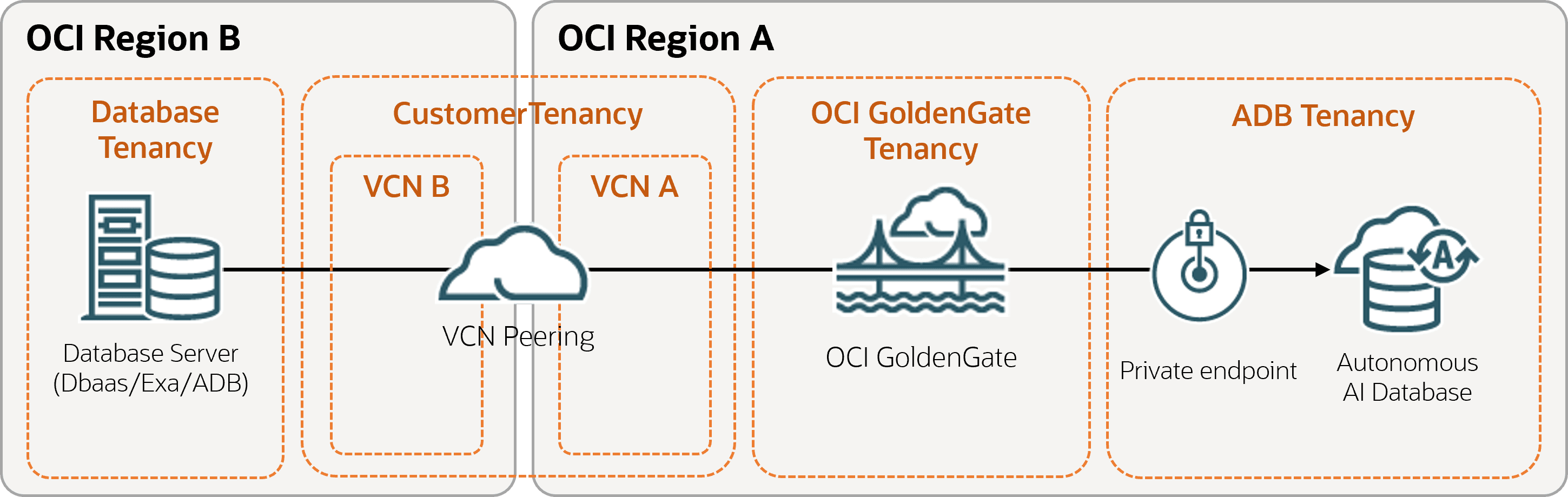
Description of the illustration diff-region-vcn.png
Before you begin
You must have the following in order to proceed:
- An existing source database in one region (Region A)
- An existing target database in a different region (Region B)
- Both should only allow private network connectivity
- An existing Dynamic Routing Gateway (DRG)
Task 2: Create a deployment
Ensure that you use VCN A in Region A, which was peered with VCN B in Region B.
To see which regions OCI GoldenGate is available in, see Cloud Data Regions.
Follow the instructions to create a deployment.
Task 5: Replicate data
- Navigate back to the Deployments page, and then select the deployment you created in Task 2.
- On the Deployment details page, click Launch console.
- Log in to the OCI GoldenGate deployment console
- Add transaction information and a a checkpoint table.
- Add and run an Extract.
- Add and run a Replicat.