Show Cost
Ops Insights provides an alternate view for usage and allocation by converting these values into a configurable currency (dollar value). This option located within the Trend & forecast chart will show the calculated resource usage cost, usage forecast cost, and unused allocation cost as stacked bar in the trend chart.
The Show cost option is available only when a single database is selected.
Show cost is currently not available for MySQL HeatWave Database Systems and external MySQL Database Systems.
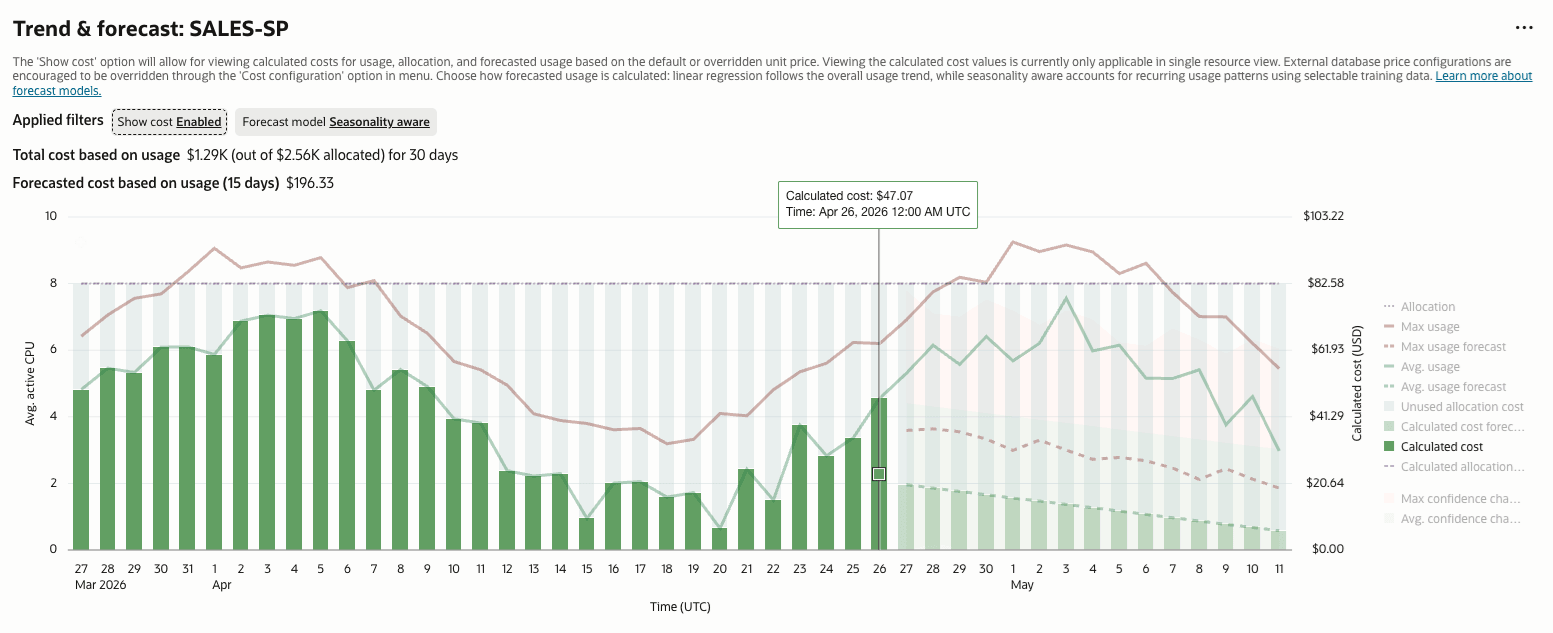 The following Show cost bar graphs are displayed:
- Calculated cost: Shows the calculated cost per day of the time period selected. If the time range selected is less than 8 days, the calculated cost will be per hour. The Calculated cost is based on the usage, it is calculated by multiplying the days average usage by the configured unit price.
- Calculated cost forecast: Projects estimated costs for time period selected into the future.
- Unused allocation cost: Shows the total cost not being used per day.
The total calculated usage and allocation costs for the defined time period and the forecast usage and allocation costs are shown below the Trend & forecast graph.
These values are cost estimates based on Ops Insights data and do not display actual billing data.
Edit Show Cost Configuration
To edit the Show cost configuration:
- In the Trend & forecast chart, click the Actions menu in the upper-right corner, and then select Cost configuration.
- In the Cost configuration panel, update the following fields as needed:
- Currency: Select the currency used to display calculated cost values.
- Unit price: View or edit the unit price used to calculate cost values.
- Tenancy discount (% off): Enter the discount percentage to apply to cost calculations across resource types in the tenancy.
- Click Update.
Calculated cost values are based on the usage and allocation values shown in the Trend & forecast chart and on the configured unit price and discount.