High Availability for Network Services
For systems that provide network services to clients inside the network, network availability becomes a priority to ensure that the services are continuous and interruptions are prevented. With virtual local area networks (VLANs), you can also organize the network such that systems with similar functions are grouped together as though they belong to their own virtual networks. This feature improves network management and administration.
For a system to avail of these advanced features, it must have several NICs. The more NICs, the better assurances of network availability that a server can provide.
Network Bonding
A system's physical network interfaces that are connected to a network switch can be grouped together into a single logical interface to provide better throughput or availability. This grouping, or aggregation, of physical network interfaces is known as a network bond.
A bonded network interface can increase data throughput by load balancing or can provide redundancy by activating failover from one component device to another. By default, a bonded interface appears similar to a normal network device to the kernel, but it sends out network packets over the available secondary devices by using a round-robin scheduler. You can configure bonding module parameters in the bonded interface's configuration file to alter the behavior of load-balancing and device failover.
The network bonding driver within the kernel can be used to configure the network bond in different modes to take advantage of different bonding features, depending on the requirements and the available network infrastructure. For example, the balance-rr mode can be used to provide basic round-robin load-balancing and fault tolerance across a set of physical network interfaces; while the active-backup mode provides basic fault tolerance for high availability configurations. Some bonding modes, such as 802.3ad, or dynamic link aggregation, require particular hardware features and configuration on the switch that the physical interfaces connect to. Basic load-balancing modes (balance-rr and balance-xor) work with any switch that supports EtherChannel or trunking. Advanced load-balancing modes (balance-tlb and balance-alb) don't impose requirements on the switching hardware, but do require that the device driver for each component interfaces implement certain specific features such as support for ethtool or the ability to change the hardware address while the device is active.
For more information on the kernel bonding driver, see the upstream documentation at https://www.kernel.org/doc/Documentation/networking/bonding.txt or included at /usr/share/doc/iputils-*/README.bonding.
For network configurations where systems are directly cabled together for high availability, a switch is required to support certain network interface bonding features such as automatic failover. Otherwise, the mechanism might not work.
Configuring Network Bonding
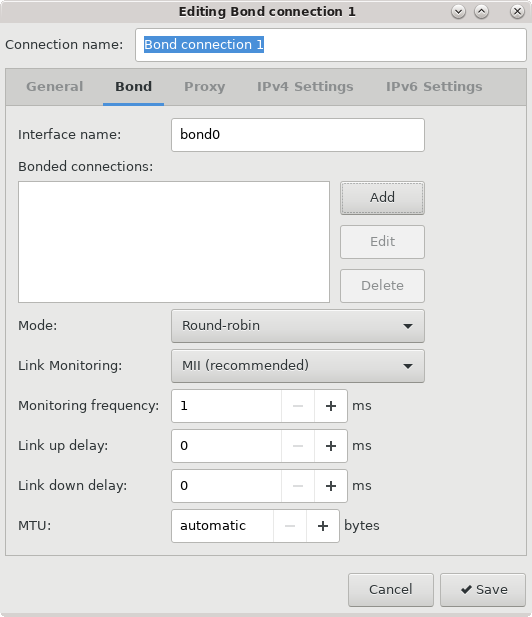
You can configure network bonding either by using the command line or the Network Connections Editor.
Configuring Network Bonding Using the Command Line
nmcli command line tool.Configuring Network Bonding Using the Network Connections Editor
nm-connection-editor graphical interface. -
From the window's drop-down list, and under the Virtual section, select Bond, then select Create.
The Network Bond Editor window opens.
Verifying the Network Bond Status
VLANs and Untagged Data Frames
A VLAN is a group of machines that can communicate as though they're attached to the same physical network. With a VLAN, you can group systems regardless of their actual physical location on a LAN.
In a VLAN that uses untagged data frames, you create the broadcast domain by assigning the ports of network switches to the same permanent VLAN ID or PVID (other than 1, which is the default VLAN). All the ports that you assign with this PVID are in a single broadcast domain. Broadcasts between devices in the same VLAN aren't visible to other ports with a different VLAN, even if they exist on the same switch.
Creating VLAN Devices by Using the ip Command
ip utility. VLAN devices created using
ip don't persist across system reboots.ip command with the following arguments:
ip link add link device name name-for-device type vlan id id-for-vlanThe following example shows the input that would create a VLAN device on the interface en1 named en1.5 with a PVID of 5:
sudo ip link add link eth1 name eth1.5 type vlan id 5For more information, see the following manual pages:
ip(8)ip-link(8)