Analyze Secondary and Reporting Currency Ledgers in Account Analysis Dashboard
This enhancement lets Account Analysis users review period activities and journals for secondary ledgers and reporting currency ledgers. Users can focus on one ledger at a time based on their security access.
The enhancement requires Oracle Enterprise Command Center Framework Release 12.2 V12. It supports both subledger-level and journal-level secondary ledgers, improving reconciliation and analysis for reporting and compliance needs.
The dashboard displays secondary ledger PTD activities and journals recorded in the secondary ledger.
Account Analysis Dashboard - Secondary Ledgers
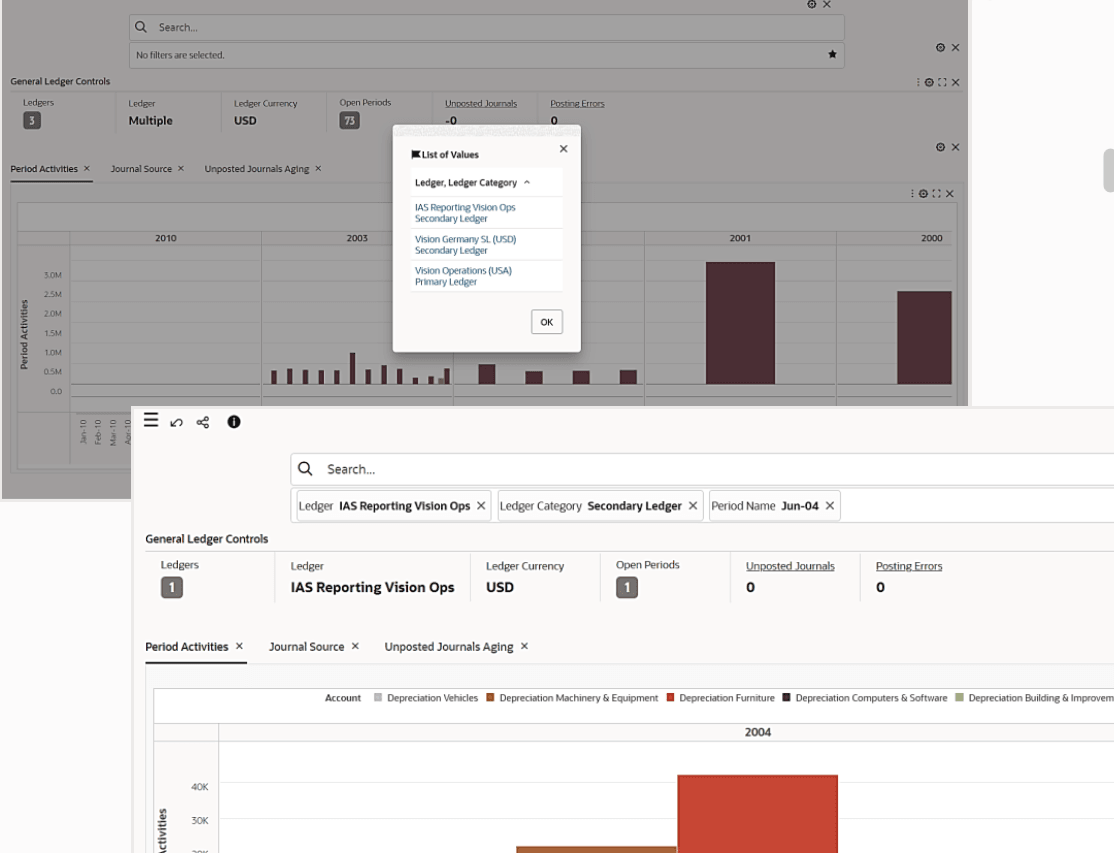
Steps to enable and configure
- Confirm Oracle Enterprise Command Center Framework Release 12.2 V12 or later.
- Validate secondary ledger and reporting currency ledger setup and ledger security access.
- Grant users access to the secondary or reporting currency ledgers they must review.
- Run or refresh the Account Analysis data load for the ledgers in scope.
- Validate that users can select a secondary or reporting currency ledger and drill to journal or subledger detail.
Tips and considerations
- Users view one ledger at a time; train users to change the ledger filter before comparing primary and secondary ledger activity.
- Ledger security controls visibility, so test with users who have different ledger assignments.
- Confirm currency context in screenshots and training examples to avoid confusion across primary and reporting currencies.
Key resources
Oracle General Ledger User's Guide
Oracle General Ledger Implementation Guide
Transfer of Information
R12.2.13+ TOI: Implement and Use General Ledger - Oracle General Ledger Command Center
Access requirements