Capture E-Signature (ERES) for Receiving Inspections
Secure your receiving inspection process by capturing Electronic Records and Electronic Signatures (ERES) in Oracle Inventory Management. Before Release 12.2.13, there was no integrated mechanism to record electronic signatures during receiving inspections, potentially leading to compliance gaps in regulated industries or environments requiring audit trails. This enhancement allows you to document approvals and inspections with ERES, ensuring traceability and accountability in the quality control processes.
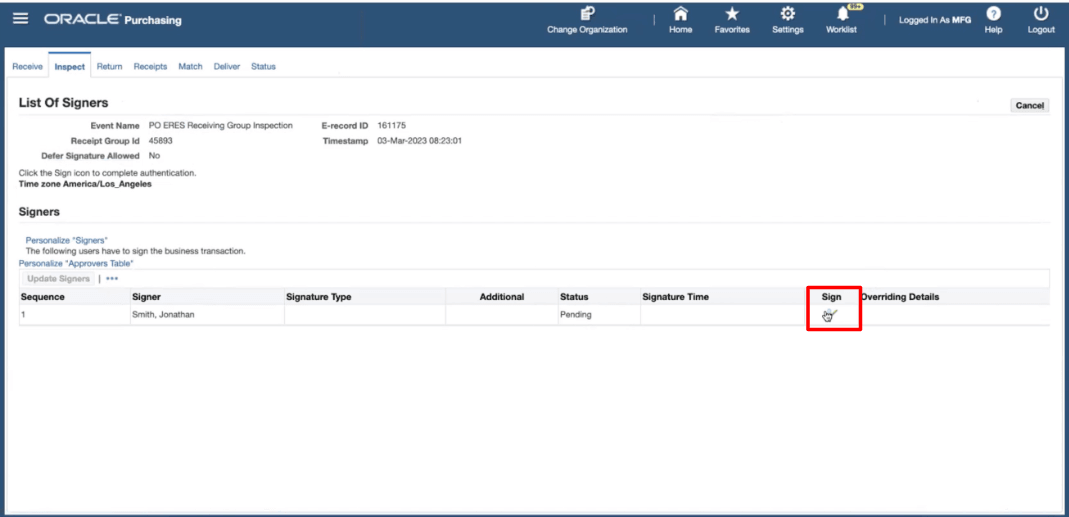
List of Signers Page with Sign Column
The business benefit of this feature includes enhanced compliance with regulatory standards and improved process integrity. It addresses the critical need for documented evidence in industries such as pharmaceuticals, food and beverage, and aerospace, where proof of inspection and approval is mandatory. Use cases include maintaining audit-ready records for regulatory inspections or internal quality reviews. Implementation considerations include ensuring that your organization has the necessary ERES infrastructure in place and aligning this feature with existing compliance workflows to meet industry-specific requirements.
Steps to enable and configure
1. Set the profile option EDR: E-records and E-signatures to Yes.
2. Set the profile option QA:PO Inspection to Oracle Quality.
3. Enable deferred mode for eSignature.
Tips and considerations
- Ensure that users authorized to provide electronic signatures are properly identified and trained on the process to avoid delays in inspection workflows.
- Regularly back up ERES data to prevent loss of critical compliance records.
- Integrate this feature with existing audit processes to streamline regulatory reporting.
Key resources
E-records and E-signatures (ERES), Inspecting Received Goods with Oracle Quality, Receiving, Oracle Purchasing User's Guide