Run Discrete Job Component Pick Release Concurrent Program with Additional Parameters
You can run the Discrete Job Component Pick Release (SRS) concurrent program using the following additional parameters to select the discrete jobs that require pick release tasks to be performed:
- Organization
- Material Requirement
- Date Basis
- From Job
- To Job
- From Assembly
- To Assembly
- Class
- From Schedule Group
- To Schedule Group
- From Build Sequence
- To Build Sequence
- From Line
- To Line
- Component Category Set
- From Component Category
- To Component Category
- Project
- Task
- Scheduling Priority
Use the following steps to run the Discrete Job Component Pick Release (SRS) concurrent program:
- Create a discrete job with the supply type as Push Components.
- Navigate to Oracle Work In Process > Concurrent Requests.
- In the Submit Requests window, select the Discrete Job Component Pick Release (SRS) concurrent program.
- In the Parameters window, enter information in the additional parameters.
- Click OK to run Discrete Job Component Pick Release (SRS) program with the additional parameters. Note that move orders are generated based on the filters that you selected and applied.
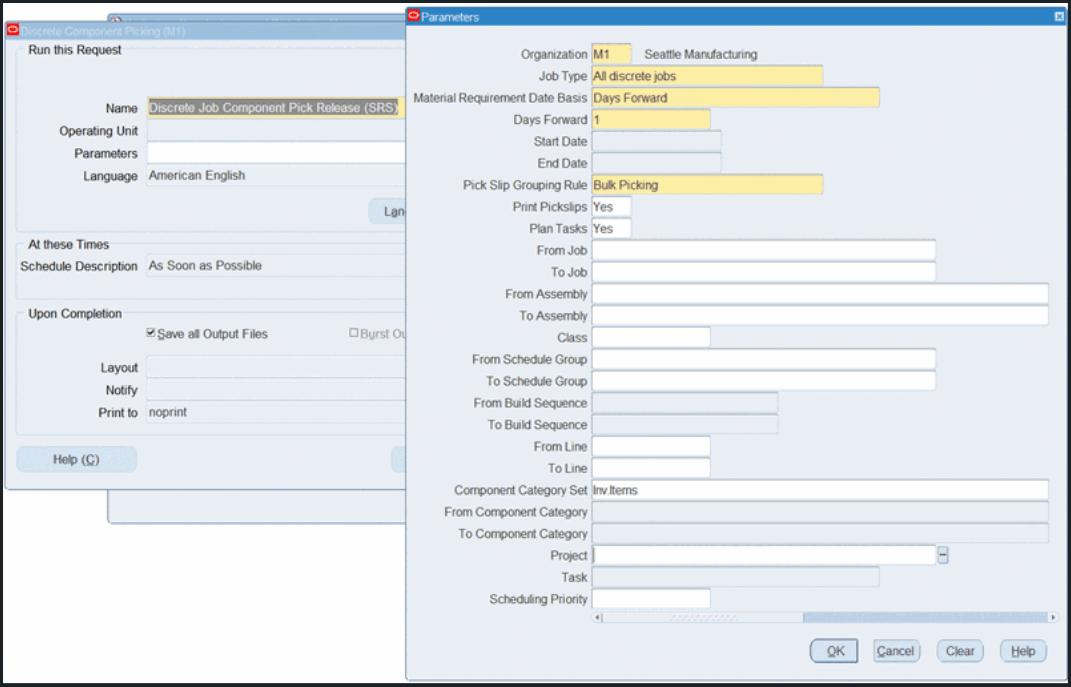
Discrete Job Component Pick Release (SRS) program
Running the “Discrete Job Component Pick Release (SRS)” concurrent program using the additional parameters enables you to:
- Auto schedule the concurrent program for each organization separately.
- Specify Material requirement date basis as either Date range or Days forward.
- Specify the range of Jobs, Assembly, Scheduling Group, Build Sequence, Line, or Component Category.
- Specify any other parameters such as Class, Component Category Set, Project, Task, or Scheduling Priority.
Prior to this release, the ability to use additional parameters such as Organization, Item, Category, and Line was limited to the Discrete Job Component Pick Release window, restricting the flexibility of automated pick release processes.
Steps to enable and configure
You don't need to do anything to enable this feature.
Tips and considerations
- Ensure that the additional parameters (such as Organization, Item, Category, Line) are accurately defined to target the correct discrete jobs for pick release.
- Test the concurrent program with various parameter combinations in a non-production environment to confirm alignment with production requirements.
Key resources
- Oracle Work in Process User's Guide:
- Chapter: Material Control
- Topic: Component Pick Release Submit Requests Program
- Chapter: Material Control
- R12.2.14 TOI: Implement and Use Discrete Manufacturing - Work in Process Enhancements