Delete Regions and Zones
Gain flexibility in managing shipping configurations by allowing the deletion of Regions and Zones in Oracle E-Business Suite Release 12.2.12. Before this release, you could not delete Regions and Zones once they were created, which could lead to cluttered setups or outdated configurations that no longer aligned with business needs. This enhancement provides the ability to remove unnecessary or obsolete Regions and Zones, ensuring a cleaner and more relevant shipping setup.
Delete regions and zones:
- Using UI:
From the Regions and Zones window you can select Delete icon in the Regions tab or the Zones tab.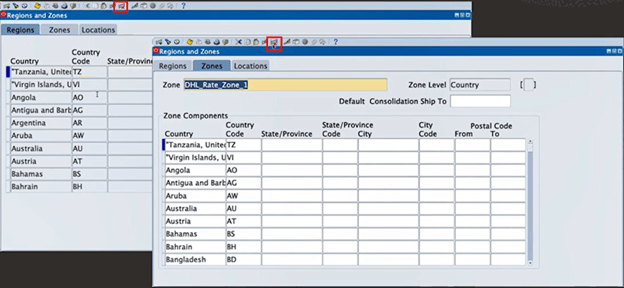
Delete Icon in the Regions and Zones tabs
- Using public APIs:
- WSH_REGIONS_ZONES_PUB.Delete_Region to delete a region with information specified in the P_REGION_INFO_TAB parameter.
- WSH_REGIONS_ZONES_PUB.Delete_Zone to delete a zone with information specified in the P_ZONE_INFO_TAB parameter.
Business Benefits
- Allows you to maintain an organized and up-to-date shipping configuration that improves operational efficiency and reduce errors in delivery routing.
- Addresses the industry need to create adaptable logistics setups, particularly in dynamic environments where shipping territories or priorities frequently change.
Steps to enable and configure
You don't need to do anything to enable this feature.
Tips and considerations
- Establish strict access controls or approval processes to prevent unauthorized deletion of Regions and Zones that are still in use.
- Before deletion, verify that the Regions or Zones are not associated with active delivery routes or rules to avoid unintended disruptions in shipping operations.
Key resources
- Setting Up Region and Zone Information, Oracle Order Management Implementation Manual
- Delete Zone API and Delete Region API, Oracle Integration Repository