Record OTM Reference Information in Trip and Trip Stop Descriptive Flexfields
Enhance integration capabilities by utilizing Descriptive Flexfields in Shipping Execution to capture and store additional information related to trips and trip stops from Oracle Transportation Management. Prior to Release 12.2.14, there was no provision to enter and store such contextual data, like reference numbers or remarks, directly within Shipping Execution, limiting the ability to maintain comprehensive shipment details in a single system.
To provide additional information in the descriptive flexfields (DFF) for trips and trip stops, you must set the attribute values in the following custom APIs:
- WSH_CUSTOM_PUB.POST_OTM_TRIP_DFF
- WSH_CUSTOM_PUB.POST_OTM_TRIP_STOP_DFF
These APIs are called when data is inserted into the shipping interface table. The DFF values entered in the interface tables are processed by the Planned Shipment Interface and are visible in the Shipping Transactions window after enabling the standard DFFs for trips and trip stops.
This feature does not include automated data fetch from Oracle Transportation Management.
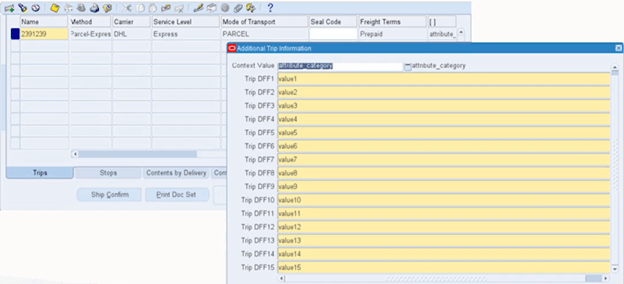
Additional Trip Information Window
Steps to enable and configure
You don't need to do anything to enable this feature.
Tips and considerations
- Determine the specific data points (e.g., reference number, remarks) that need to be captured via Descriptive Flexfields to align with business requirements.
- Ensure that users are trained on entering and accessing data in these flexfields to maximize their utility in day-to-day operations.
- Consider the impact on reporting and downstream processes when additional data is stored in flexfields, as it may require updates to existing reports or integrations.