Review Suspicious Domain Warning Messages in Supplier Profile Management
Review warning messages when supplier profile contacts use suspicious email domains. Before this enhancement, supplier profile maintenance could accept contact email values without giving the same level of warning when the domain appeared on a configured suspicious domain list.
The warning messages help supplier administrators and approvers identify potentially risky or inappropriate email domains during supplier profile management. This supports supplier data governance, security review, and fraud-prevention practices by bringing attention to suspicious domains before profile changes are accepted without review.
A supplier user maintains standard company profile details such as address, contacts, business or diversity classifications, products and services category, and banking details. Supplier management administrators review and approve the updates made by suppliers.
To assist administrators within the buying organization to identify potentially fraudulent information when they receive a request for a new supplier registration, or a request to add or update the profile details for an existing supplier (particularly key for any bank account change requests), the application displays a warning message if the information came from a user with a suspicious email domain.
This warning message is displayed on the following pages:
- New Supplier Request page for a new registration request. From the Prospective Supplier Registrations page, you can click Review to navigate to the New Supplier Request page. Before approving the new registration, review and confirm whether the request details are correct.
- Notification page for a new registration request. Before approving the registration request of the supplier, review the details of the contact by clicking the "View/Edit Registration Request" link.
- Supplier Profile Change Requests page. Click Update or Add to review the change request by the supplier.
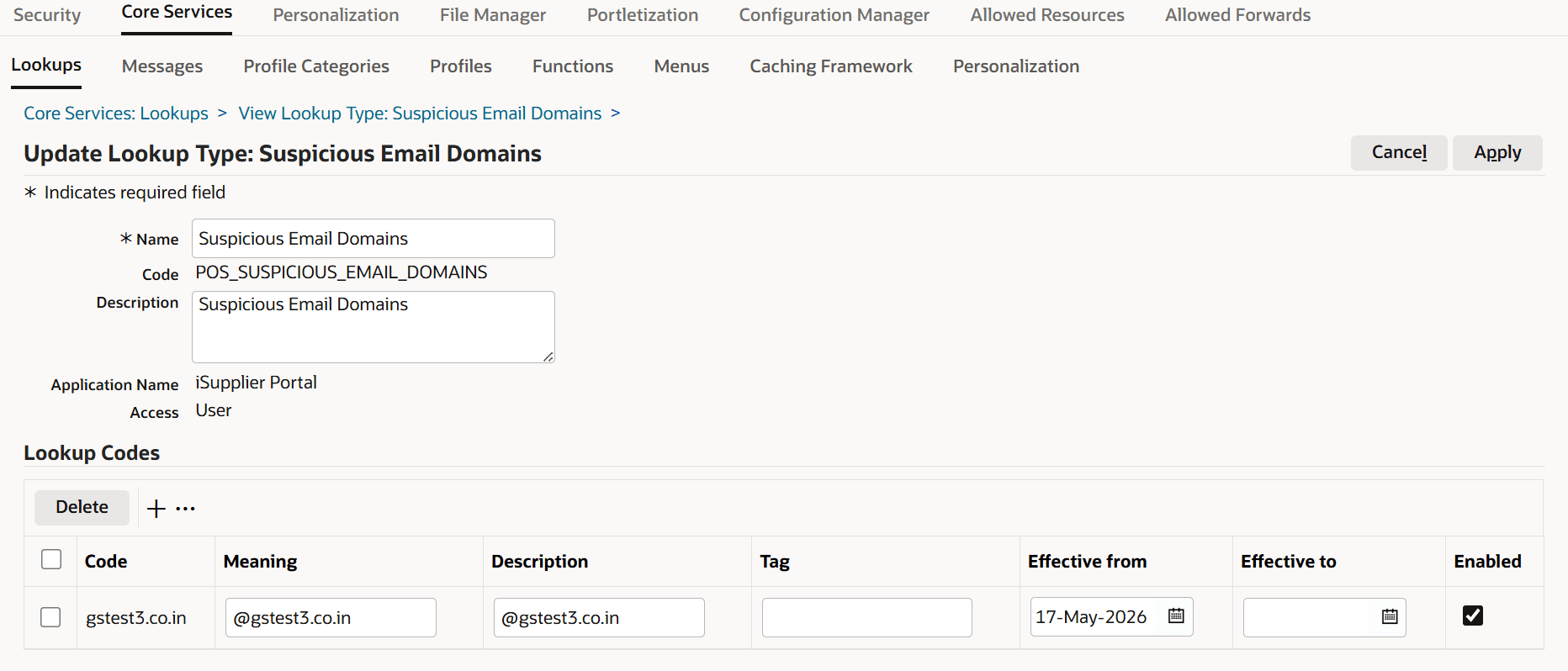
Buying organizations can use this feature to maintain a lookup list of common suspicious email domains, so that administrators receive the extra warning message for any updates and can apply additional caution, or seek additional confirmation from the supplier before accepting those changes. To identify suspicious domains in the email address of suppliers, administrators can maintain a list of suspicious domains using the Suspicious Email Domains (POS_SUSPICIOUS_EMAIL_DOMAINS) lookup. Enter all suspicious domains in the Meaning field.
Suspicious Email Domains Lookup
Steps to enable and configure
- Review the Suspicious Email Domains lookup values.
- Add, update, enable, or end-date lookup codes for email domains that should trigger supplier profile warning messages.
- Test supplier contact maintenance using an email address with a configured suspicious domain.
Tips and considerations
- Treat suspicious domain warnings as review prompts; the warning should lead to investigation before accepting questionable supplier contact information.
- Maintain lookup values periodically so the suspicious domain list remains useful and does not create noise for legitimate supplier contacts.
Key resources
Oracle Supplier Management Implementation and Administration Guide
Topics:
- Supplier Profile Creation Flow
- Overview of Notifications
Oracle Supplier Management User's Guide
- Managing Suppliers with Supplier User Management
- Approving New Suppliers