Group IGT Requisition Lines to Create One Order Line
When there are several requisition lines with similar information, the requisition lines are grouped to create one order line with multiple schedules in order to simplify the intragovernmental order. This enhancement simplifies intragovernmental order creation by automatically grouping requisition lines with similar attributes into a single order line containing multiple schedules. Requisition lines are grouped when the following attributes have identical values: Description, Category ID, Order Type Lookup Code, Purchase Basis, Matching Basis, Unit of Measurement, and Source Document ID. By reducing the number of order lines, the resulting intragovernmental order is easier to manage and execute between trading partners.
Prior to Release 12.2.14, each requisition line was added to the intragovernmental order as a separate order line, even when multiple requisition lines contained identical information. This often resulted in lengthy and complex orders that required additional effort to review, process, and manage.
Automatically grouping similar requisition lines reduces the complexity of intragovernmental orders, making them easier for both requesting and servicing agencies to review and process. This enhancement improves operational efficiency, streamlines order execution between trading partners, and reduces the administrative burden associated with managing large orders.
The feature improves the requisition-to-order conversion process for agencies that receive multiple related IGT request lines. Instead of creating one order line for every requisition line, buyers can use the document builder process to create a cleaner order structure while preserving traceability to the original requests.
Group IGT Requisition Lines to Automatically Create IGT Order
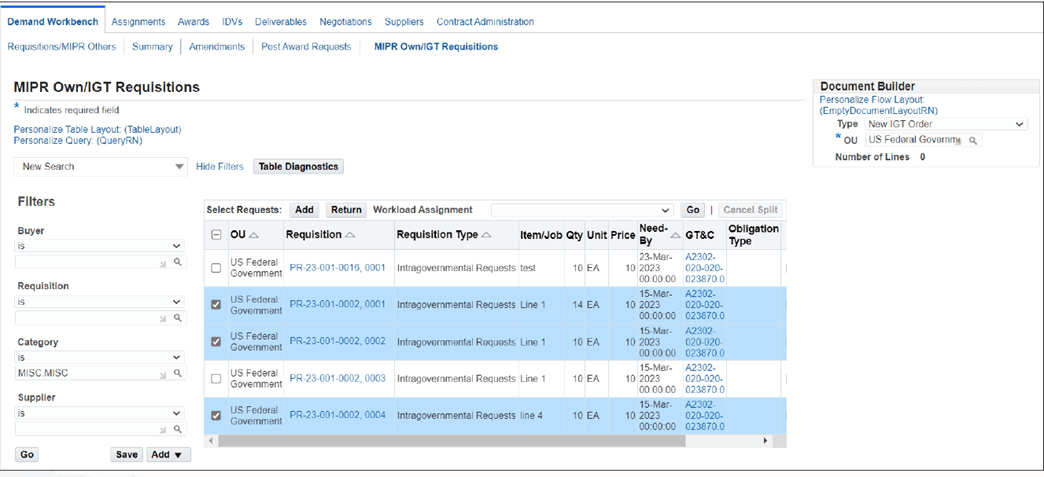
Steps to enable and configure
- Set the profile PO: Default Requisition Grouping, which is used to set default value for group requisition lines based on the following parameters
- If the value is Default, then the requisition lines will be grouped and added to same line as different schedule.
- If the value is Requisition, then the requisition lines will not be grouped and will add as separate lines
- The grouping parameters are: Item description, Purchasing category, Line Type (Order type lookup code), Purchase basis, Matching basis, Unit of measure, Source document ID, Applicable for New Order, New Modification and Add to Order or Modification.
- Review business processes related to intragovernmental order creation to understand the new grouping behavior.
- Ensure requisition line data is entered consistently so eligible lines can be grouped successfully.
- Create or import requisition lines with matching grouping attributes.
- Generate the intragovernmental order and verify that qualifying requisition lines are consolidated into a single order line with multiple schedules.
- Validate the generated order to ensure it meets agency requirements before submission.
Tips and considerations
- Requisition lines are grouped only when all supported grouping attributes contain identical values.
- Any variation in Description, Category ID, Order Type Lookup Code, Purchase Basis, Matching Basis, Unit of Measurement, or Source Document ID will result in separate order lines.
- Review requisition data entry practices to maximize grouping opportunities and reduce unnecessary order complexity.
- Grouping affects the presentation of order lines but preserves the underlying schedule-level details.
- Agencies should test the functionality with representative requisition data to understand how grouping impacts order structure and downstream processing.
- The streamlined order format can improve collaboration and communication between trading partners by reducing the number of order lines that must be reviewed and managed.
Key resources
- Oracle E-Business Suite G-Invoicing Process Guide
- Oracle Contract Lifecycle Management for Public Sector Implementation Guide
- Oracle Contract Lifecycle Management for Public Sector Purchasing User Guide
Transfer of Information
R12.2.13 TOI: Implement and Use Contract Lifecycle Management for Public Sector - G-Invoicing
R12.2.14 TOI: Implement and Use Procurement - G-Invoicing