Multiple Selects and Deselects
You can select or deselect multiple items using the check uncheck (X) icons that are located at the top of the Tables tab.
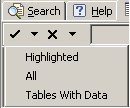
Each icon has an associated drop-down list that enables you to perform the batch selection of:
Selects
Highlighted
All
Tables with Data
The check icon's drop-down list to select Tables With Data instructs the system to calculate the record count on all the tables. Note that this process can take considerable time to complete depending on the extent of the database.
Deselects
Highlighted
All
Tables without Data
This selection is temporarily disabled (grayed out) until the counts for the All Tables panel or the Search result panel have been completed and populated.
If this functionality is disabled (that is, the icon group is completely grayed out), it is because the configuration is read-only. For example, all JD Edwards Configurations are set to read-only.