Configuration Overview
Every configuration setting (*.INI, .PROPERTIES, etc.) is manageable through the management console. The configuration files still exist in the same form as prior tools releases. The management console provides a front end for modifying the configuration values and adds the following benefits:
Every configuration item is present and documented with online help.
A list of values, when applicable, is used for settings that have distinct allowed values.
Changes to configuration settings are recorded for historical analysis and auditing, including the user that made the change.
The configurations of multiple managed instances may be compared to identify differences.
New configuration settings are merged into existing configuration files when a tools release upgrade is performed.
Configuration is accessed from the management page for an instance. Configuration settings are grouped into high level categories. Selecting a category displays all the settings contained within.
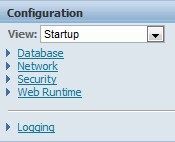
Each high level category is divided into sub-categories containing the individual configuration parameters.
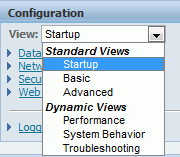
There is also a drop down menu that displays options for Standard and Dynamic views.
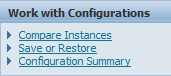
The Work with Configurations section provides the following:
Compare Instances
Save or Restore
Configuration Summary
Configure Business Intelligence Publisher Server Connection Settings
Use the BI Server and BI Port settings to specify the BI Publisher server and listener port that EnterpriseOne uses for embedded BI Publisher content.
In Server Manager, select the HTML server instance. Under Configuration, select Advanced, and then select Web Runtime.
By default, BI Server is blank, and BI Port is set to 0. In BI Server, enter the BI Publisher server host name. In BI Port, enter the BI Publisher listener port.
After you modify either setting, click Apply, and then synchronize or restart the HTML server instance for the changes to take effect. EnterpriseOne validates embedded BI Publisher requests against the configured BI Server and BI Port values.
For more information about BI Bridge servlet request validation, see "Oracle BI Publisher and JD Edwards EnterpriseOne Security" in the JD Edwards EnterpriseOne Tools BI Publisher for JD Edwards EnterpriseOne Guide.