Before You Begin
Purpose
This Oracle By Example (OBE) describes how to extract Event Rules from EnterpriseOne objects in Web OMW.
Time to Complete
15 minutes.
Background
In this OBE, let's consider a scenario in which you are a developer extracting the existing Event Rules (ER) for an object. To complete this task, you use Web OMW (P98220W) to add the object (or related batch version or business function) to a project, run the Extract Event Rules action, and download the generated text file.
What Do You Need?
To perform the steps in this OBE, you will need:
- Access to a JD Edwards EnterpriseOne environment with Tools Release 9.2.26.2 or later.
- Appropriate permissions to view EnterpriseOne objects in Web Object Management Workbench (Web OMW on a web client) and to extract Event Rules.
- An existing project or your default project in Web OMW.
Task 1: Extracting ER Using Web OMW
- Sign in to the EnterpriseOne web client.
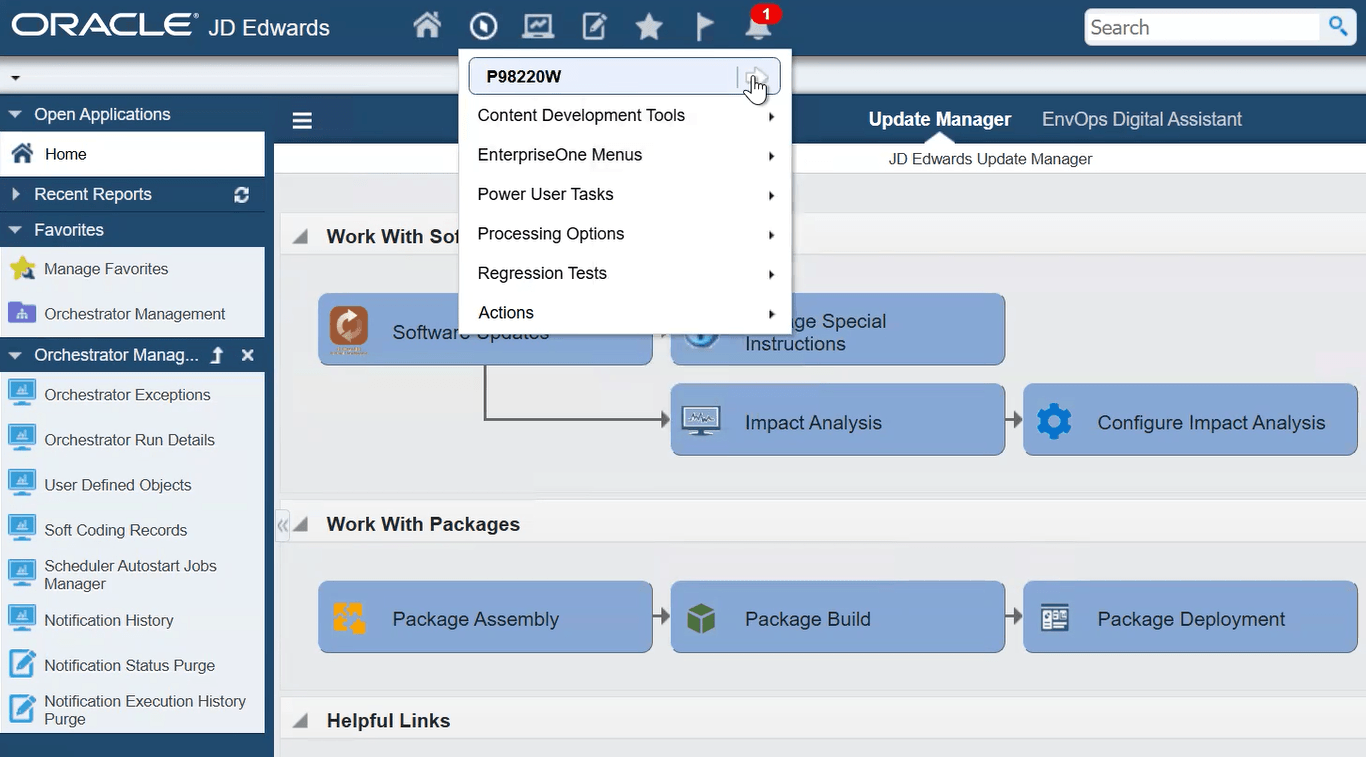
- From the EnterpriseOne Home page, click the Navigator icon, and enter P98220W to access the Object Management Workbench - Web.
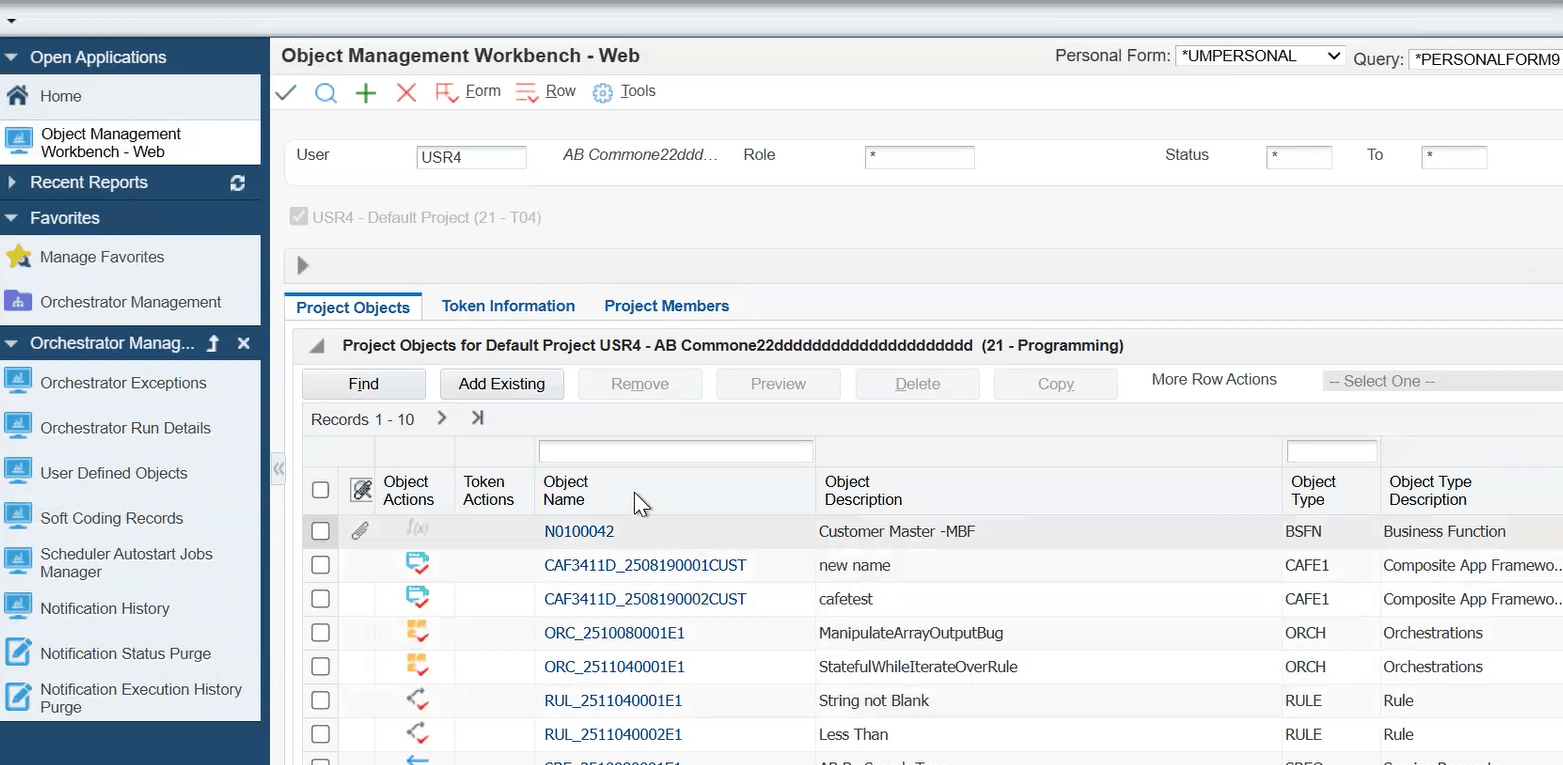
- On Object Management Workbench - Web, verify that a default project is selected, or if needed, select another project.
- On the Project Objects tab, select Add Existing.
- The Add EnterpriseOne Object to Project form appears.
From the General Object drop-down list, select a non-UDO
object, such as a Business Function.
The supported EnterpriseOne object types that contain ER are:
- Application
- Batch Application (also called a report or UBE [Universal Batch Engine])
- Batch Version (also called a UBE version)
- Table (table triggers are in ER)
- Business Function (two types: C-based and Named Event Rule (NER); only NER is applicable.)
- Table Conversion (also called TC; a type of batch application used to make changes to a database table)
- Click OK.
Alternatively, you can select an existing object by searching for the object using the search option.
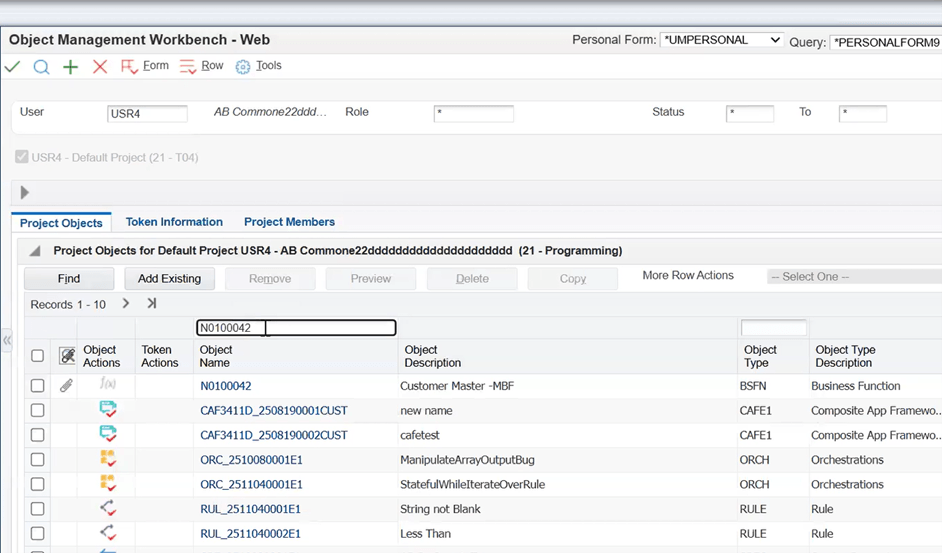
- Enter an object name in the Object Name field (for example, N0100042) and click Find.
- Select the object row.
- Click OK.
- On the Project Objects tab, click Find if the object is not displayed in the grid.
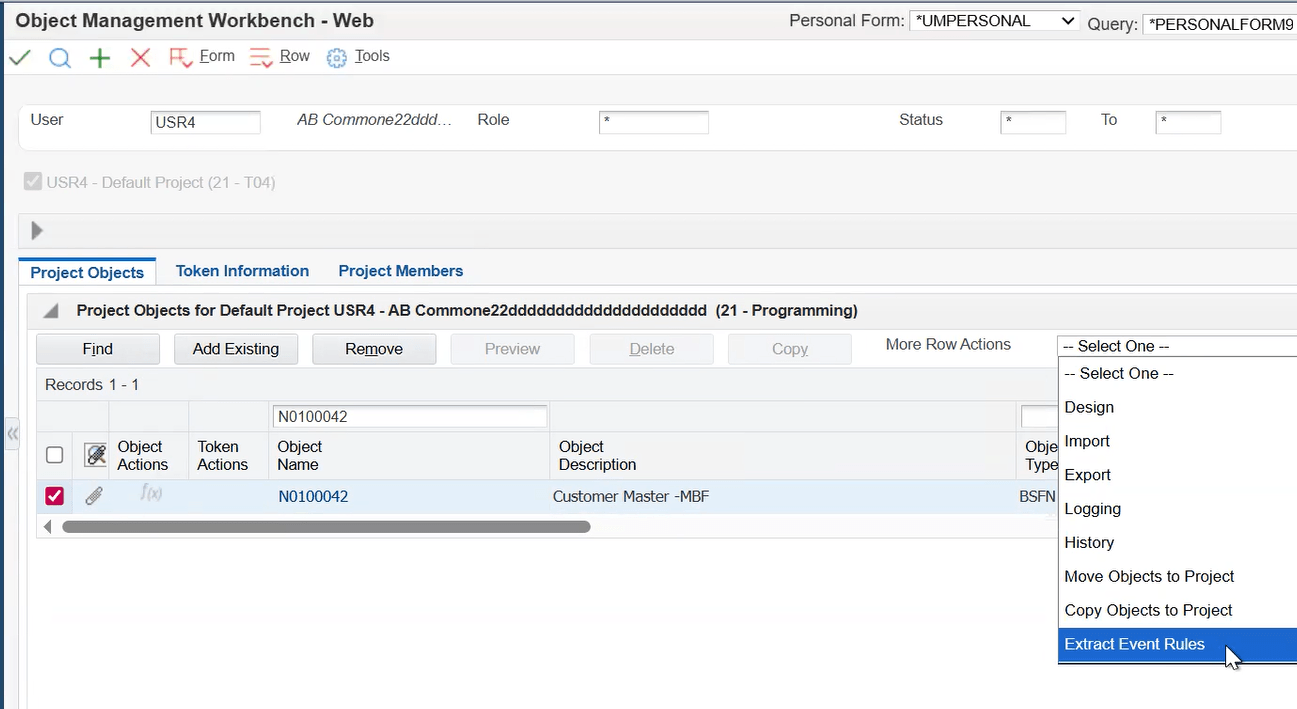
- Select the object row. (Select only one row).
- From the More Row Actions drop-down, select Extract Event Rules.
- On the confirmation dialog box, click OK.
- On the File Download page, select click here or select the highlighted file name.
- Open the download folder of your browser (for example:
C:\Users\<username>\Downloads).
The output file name uses the following format:
<object_name>_<version>_YYYYMMDD_hhmmss.txt
Where:
<object_name>is the name of the selected object.<version>is the version of the object, if applicable.YYYYis the year.MMis the month.DDis the day of the month.hhis the hour.mmis the minute.ssis the second.NOTE: The timestamp is based on the date and time of the server where the background process runs, so it might not match your local time.


Troubleshooting
- The Extract Event Rules option is unavailable.
- Cause: More than one object is selected.
Resolution: Select only one object. - Cause: An unsupported object type is selected.
Resolution: Select one of the following object types: Application, Batch Application, Batch Version, Table, Business Function, Table Conversion. - Cause: You do not have permission to view objects in Web
OMW.
Resolution: Ask your administrator for the correct permissions.
- Cause: More than one object is selected.
- No Event Rules (ER) are written to the output file.
- Cause: The selected object does not contain any ER.
Resolution: Select an object that contains ER. - Cause: The selected object is a C business function.
Resolution: C business functions do not have ER. Select a Named Event Rule (NER) instead.
- Cause: The selected object does not contain any ER.
Conclusion
In this OBE, you learned how to extract Event Rules (ER) from
supported JD Edwards EnterpriseOne object types by using Web OMW
(P98220W). You added an object to a project, initiated the
Extract Event Rules action, and downloaded the resulting text
file using the standard naming convention: <object_name>_<version>_YYYYMMDD_hhmmss.txt
Related Links
Extracting Event Rules from EnterpriseOne Objects Using Web Object Management Workbench
G54056-01
April 2026
Copyright © 2026, Oracle and/or its affiliates.