Introduction
This Oracle by Example (OBE) demonstrates how to set up the JD Edwards EnterpriseOne Sustainability Framework to record and report on Scope 1 – Mobile Combustion. In this OBE, you will configure determinants, activity types, and ledger entries to track sustainability.
Background
Organizations are increasingly required to track and report embodied greenhouse gas emissions from the mobile combustion as part of regulatory compliance and sustainability management, as part of Scope 1. The JD Edwards EnterpriseOne Sustainability Framework provides foundational components and activity ledgers to record these details.
Scenario
A petrochemical company operates a fleet of vehicles, such as trucks, forklifts, and service vans, to transport raw materials, equipment, and personnel within its refinery and production plants. To meet environmental compliance and sustainability reporting requirements, the company needs to track fuel consumption and emissions from these company-owned vehicles. The company records this for sustainability reporting under Scope 1. Let us set up the components of the Sustainability Foundation:
Prerequisites
- Access to Oracle JD Edwards EnterpriseOne with Sustainability Framework enabled (system code 20S active).
- Appropriate roles and permissions to update Sustainability Foundation configurations.
- Next Numbers configured for activity document number and activity batch.
1: Setting Up Determinants
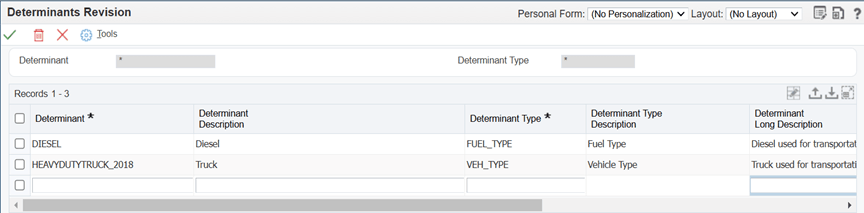
In this scenario, emissions vary depending on the type of fuel and the type of the vehicle used for transportation. Therefore, we will configure determinants DIESEL and HEAVYDUTYTRUCK_2018 representing diesel and heavy duty truck respectively:
- Sign in to the EnterpriseOne web client.
- From the EnterpriseOne Menus, select Sustainability Framework Setup (G20S41), and then select Determinants (P20S05).
- On the Work with Determinants form, click Add to open the Determinants Revision form (W20S05C).
- For each row, enter values in the following fields:
Determinant DIESELDeterminant Description DieselDeterminant Type FUEL_TYPEDeterminant HEAVYDUTYTRUCK_2018Determinant Description TruckDeterminant Type VEH_TYPE - Click OK to save the determinants.
2: Mapping Determinant Type
To store the determinant in the Activity Ledger table, map the determinant type to its corresponding column.
- From the EnterpriseOne Menus, select Sustainability Framework Setup (G20S41), and then select Determinant Types Mapping (P20S09).
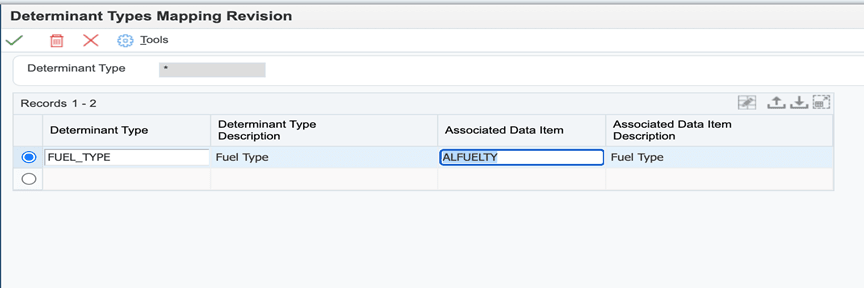
- On the Work with Determinant Types Mapping form, click Add to open the Determinant Types Mapping Revision form (W20S09B).
- Enter the following mapping for the determinant type:
- Determinant Type:
FUEL_TYPE - Associated Data Item:
ALFUELTY - Click OK to save the changes.
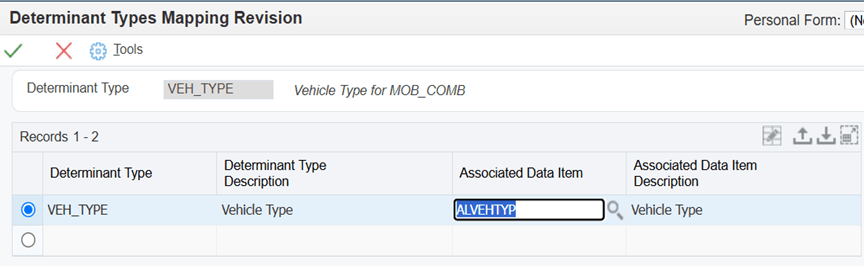
- To map the Veh_Type Determinant Type to the ALVEHTYP column of the Activity Ledger (F20S11) table, access the Determinant Type Mapping Revision form and enter the following mapping for the determinant type:
- Determinant Type:
VEH_TYPE - Associated Data Item:
ALVEHTYP - Click OK to save the changes.
3: Defining Fuel Type
- From the EnterpriseOne Menus, select Sustainability Framework Setup (G20S41), and then select Fuel Types (P20S02).
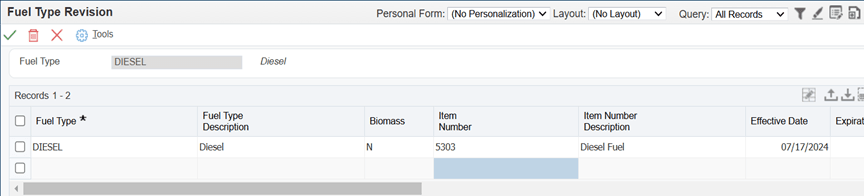
- On the Work with Fuel Types form, click Add to open the Fuel Type Revision form (W20S02B).
- Enter the following values:
- Click OK to save the changes.
| Fuel Type | DIESEL |
| Biomass/td> | N |
| Item Number | 5303 |
| Effective Date | System Date |
| Expiration Dates | 31/12/2050 |
| (Optional) Carbon Content | 0.72 |
| (Optional) Carbon Content UoM and per unit UoM | KG/LT |
| (Optional) Higher Heating Values | 45.50 |
| (Optional) Higher Heating Values UoM and per unit UoM | MJ/KG |
| (Optional) Lower Heating Values | 42.60 |
| (Optional) Lower Heating Values UoM and per unit UoM | MJ/KG |
4: Defining Activity Type
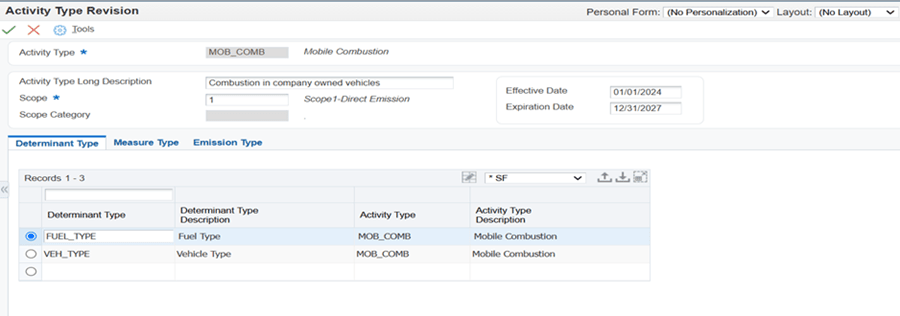
In this scenario, diesel is combusted in company-owned vehicles, so this activity falls under the Mobile Combustion activity type.
- From the EnterpriseOne Menus, select Sustainability Framework Setup (G20S41), and then select Activity Types (P20S01).
- On the Work with Activity Types form, click Add to open the Activity Type Revision form (W20S01D).
- Enter the following values:
- Determinant Type:
FUEL_TYPEandVEH_TYPE - In addition to fuel type and vehicle type, if emission factors change due to other attributes such as Percent Laden, you can add these attributes as determinant types in User Defined Code (UDC) 20S|DT and associate them with the Activity Type.
- For any additional determinant types that you add, ensure the required mapping is done using Determinant Types Mapping (P20S09) program and respective determinants is set up in the Determinants (P20S05) program.
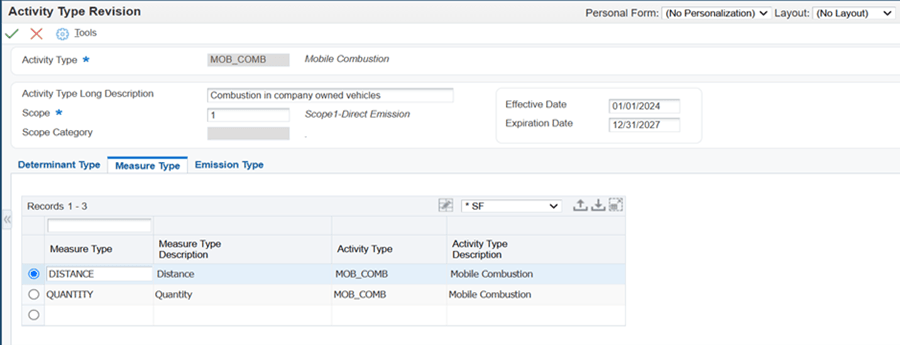
- Enter measure type
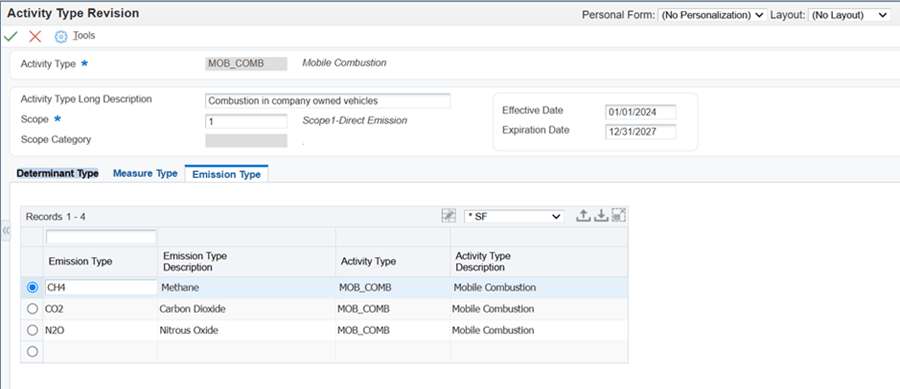
QUANTITYin the Measure Type field on the Measure Type tab, and then in the next row, enter measure typeDISTANCEin the Measure Type field. - (Optional) On the Emission Types tab, enter these values in the Emission Type field in three different rows:
- Emission Type:
CO2,CH4,N2O - Click OK to save the changes.
| Activity Type | MOB_COMB |
| Activity Type Description | Mobile Combustion |
| Scope | 1 |
| (Optional) Effective Date | 01/01/2024 |
| (Optional) Expiration Dates | 12/31/2027 |
On the Determinant Types tab, enter these values in two rows:
NOTE:
5: Defining Activity Source
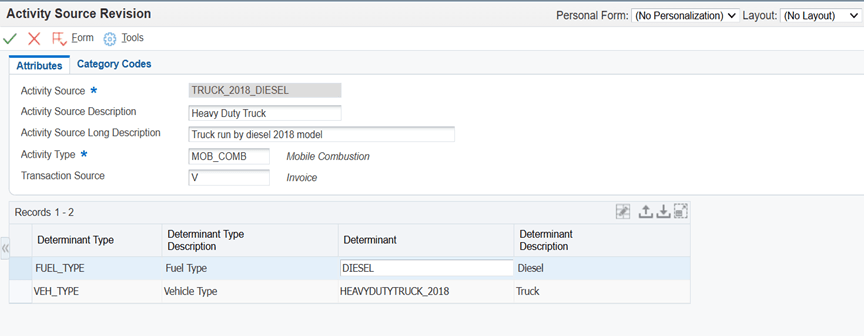
To account for the diesel consumed to operate vehicles such as trucks for the transportation of goods, we will set up TRUCK_2018_DIESEL as the activity source.
- From the EnterpriseOne Menus, select Sustainability Framework Setup (G20S41), and then select Activity Source (P20S07).
- On the Work with Activity Source form, click Add to open the Activity Source Revision form (W20S07C).
- Enter the following values:
- Click OK to save the changes.
| Activity Source | TRUCK_2018_DIESEL |
| Activity Source Description | Heavy Duty Truck |
| Activity Source Long Description | Truck run by diesel 2018 model |
| Activity Type | MOB_COMB |
| (Optional) Transaction Source | V |
Enter these values in the grid column:
-
Determinant:
DIESEL for FUEL_TYPE and HEAVYDUTYTRUCK_2018
for VEH_TYPE (for the two determinant type rows)
6: Entering the Sustainability Activity Record in Activity Ledger (P20S11)
At the company, the vehicle operators record fuel purchases and distances traveled in a standard daily log sheet. The Sustainability Manager then consolidates these log sheets and enters the data into the Sustainability Activity Ledger to ensure accurate tracking of fuel consumption and emissions.
Set up processing options for Activity Ledger (P20S11):
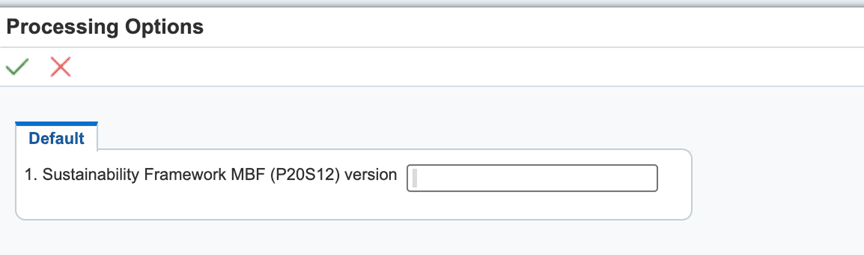
- From the EnterpriseOne Menus, select Sustainability Framework Processing (G20S10), and then right-click Standard Voucher Entry (P20S11IZJDE0001) and select Processing Options.
- Select the Default tab, and then enter value for Version processing option. You can leave it blank for the system to consider ZJDE0001.
Enter Sustainability Activity Record in Activity Ledger (P20S11)
- From the EnterpriseOne Menus, select Sustainability Framework Processing (G20S10), and then select Sustainability Activity Ledger (P20S11).
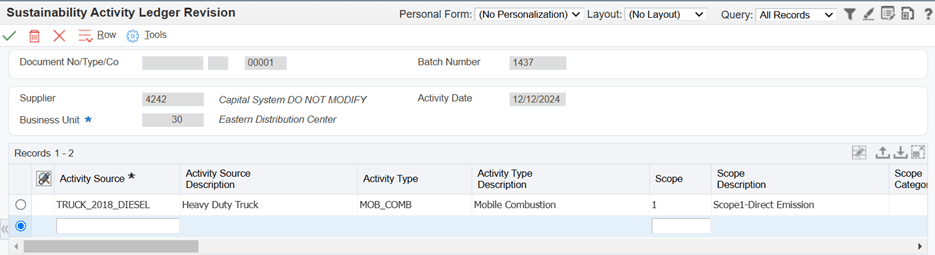
- On the Sustainability Activity Ledger form, click Add to open the Sustainability Activity Ledger Revision form.
- Enter the following values in the header and detail sections:
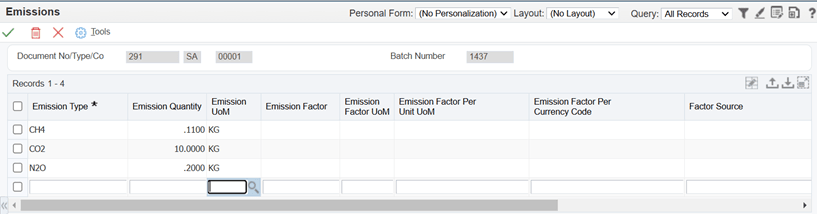
- (Optional) If you have a breakdown of total emissions, select the record and select Emissions from the Row menu to enter the details.
- Click OK to save the record.
- Sustainability Activity Ledger (F20S11)
- (Optional) Emissions (F20S12)
| Supplier | 4242 |
| Business Unit | 30 |
| Activity Source | TRUCK_2018_DIESEL |
| Resource Quantity | 50 |
| Resource UoM | GA |
| Distance | 1200 |
| Distance UOM | KM |
| (Optional) Consumption Start Date | 01/01/2025 |
| (Optional) Consumption End Date | 31/12/2050 |
| (Optional) Co2 Emissions | 1.27 |
| (Optional) Co2 Emissions UoM | KG |
| (Optional) Total Co2e Emissions | 2.36 |
| (Optional) Total Co2e Emissions UoM | KG |
| (Optional) Energy | 0.56 |
| (Optional) Energy UoM | MJ |
NOTE: The system retrieves the Emission Type automatically based on the setup on the Emission Type tab of the Activity Type program (P20S01).
The following tables are updated during the manual Sustainability Activity Ledger process:
NOTE:
- If the company receives monthly or quarterly reports from third-party logistics contractors, they can use these reports for mass upload using spreadsheets in the Sustainability Activity Ledger program (P20S11).
- While processing fuel invoices, if you have sufficient vehicle data, you can enter mobile combustion data using Standard Voucher Entry (P0411) or Voucher Match program (P4314). These programs create sustainability activity records and store them in the Sustainability Activity Ledger table (F20S11).
Conclusion
In this OBE, you learned how to create the setup to track Scope 1 – Mobile Combustions in JD Edwards EnterpriseOne, improving accuracy and compliance in sustainability and emissions reporting.
Want to Learn More?
Capturing Scope 1 – Mobile Combustion in JD Edwards EnterpriseOne
[PDB part number]
April 2026
Copyright © 2026, Oracle and/or its affiliates.